Author: Byron

  • All in One WP Migration vs. Duplicator  Which One Is Better?

    All in One WP Migration vs. Duplicator Which One Is Better?

    We’ve worked with WordPress for many years, so we know how important a reliable backup and migration system is. We’ve been using Duplicator in our own projects and for our partner websites. But we also know that what works for us might not be the best choice for everyone.

    That’s why we decided to take a closer look at Duplicator and All in One WP Migration. We wanted to see how these two popular plugins compare when it comes to making backups, moving websites, and handling different WordPress setups.

    Having the right backup and migration tool can make a big difference. It’s not just about copying files – it’s about finding a plugin that fits well with how you work and gives you peace of mind that your site is safe and easy to move if needed.

    In this All in One WP Migration vs. Duplicator comparison, we will share what we learned from testing both plugins thoroughly. We will look at what each one does well, where they might fall short, and what makes them unique.
    All in One WP Migration vs Duplicator

    All in One WP Migration vs. Duplicator: An Overview

    All in One WP Migration and Duplicator are both popular WordPress backup and migration plugins, each with its own unique features. If you’re short on time, we’ve created a comparison table to give you a quick overview of their key features:

    Plugin Number of Users Key Features Free Version? Starting Price (Paid)
    All in One WP Migration 5 million+ • Simple drag-and-drop import
    • Built-in search and replace
    • Selective content backup
    ✅ $69/year
    Duplicator 1.5 million+ • Smart migration with an installer
    • Scheduled backups
    • Disaster recovery points
    ✅ $49.50/year

    With that said, we highly recommend you keep reading to get our in-depth analysis of each tool. That way, you’ll be better equipped to make the right choice for your WordPress website’s backup and migration needs.

    How We’re Comparing All in One WP Migration vs. Duplicator

    To give you a thorough and fair comparison of these WordPress backup plugins, we set up multiple demo websites to install and test both tools. This allowed us to dive deep into their features, user interfaces, and overall performance in different scenarios.

    We extensively tested each plugin’s backup feature, paying close attention to the available options and ease of use. We then imported these backup files into different demo websites to see the restore process.

    This helped us understand how each plugin performs in real-world migration scenarios. Throughout our testing, we carefully documented our findings, noting what worked well and what didn’t.

    It’s worth mentioning that we’ve used Duplicator for years in our projects and tutorials. This long-term experience has given us deep familiarity with its capabilities and quirks. If you want to learn more about our experience, you can read our Duplicator review.

    We’ve also used All in One WP Migration for our own research, providing us with practical insights into both tools.

    In our evaluation, we considered not just the plugins themselves but also how different users might benefit from them. While all backup plugins fundamentally work the same way, we recognized that some features might be better suited for certain users. 

    For example, beginners may need a WordPress backup all-in-one solution that’s easy to use. On the other hand, advanced users may need more control and customization options for their backups or specific features like multisite support.

    Why Trust WPBeginner?

    Since 2009, WPBeginner has been the go-to resource for WordPress users. We’ve also handled countless site migrations and backups, both for our own projects and through our free WordPress blog setup service.

    This hands-on experience, combined with our extensive testing of backup and migration tools, gives us unique insights into what works best in real-world scenarios. We don’t recommend anything we haven’t thoroughly vetted ourselves.

    For more on our evaluation process, check out our editorial guidelines.

    With all this in mind, let’s compare All in One WP Migration vs. Duplicator. You can use the quick links below to skip to the topic you’re most interested in:

    • Export/Backup Features
    • Import/Restore Features
    • Remote Storage Integrations
    • Feature Richness
    • Plugin Support
    • Value for Money
    • All in One WP Migration vs Duplicator: Who’s the Winner?

    Export/Backup Features

    A good export/backup feature is a key feature in a migration plugin. It’s not just about speed but also about flexibility and reliability. 

    We have grouped export and backup together because, in a migration plugin, they’re often the same process: creating a portable version of your site. Let’s see how All in One WP Migration and Duplicator handle this crucial task.

    All in One WP Migration: Simple Yet Powerful

    All in One WP Migration offers powerful export features, even in its free core version.

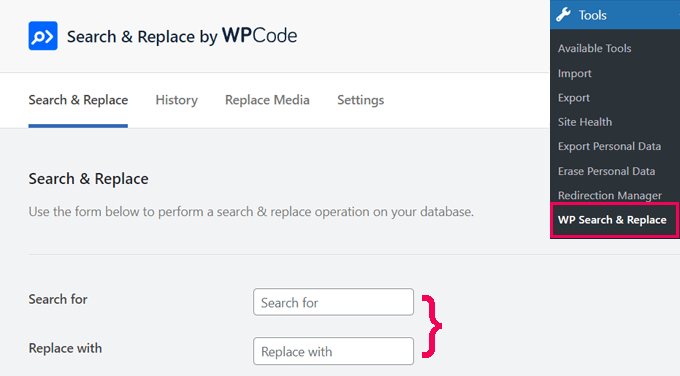
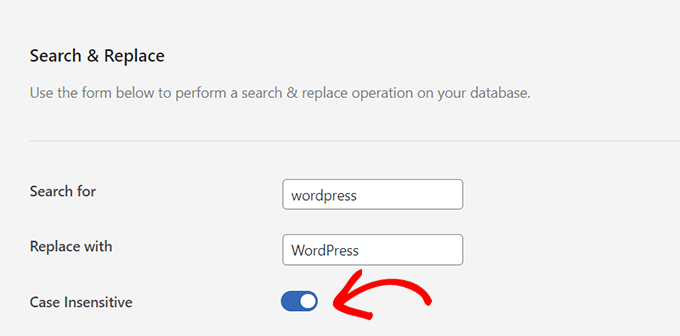
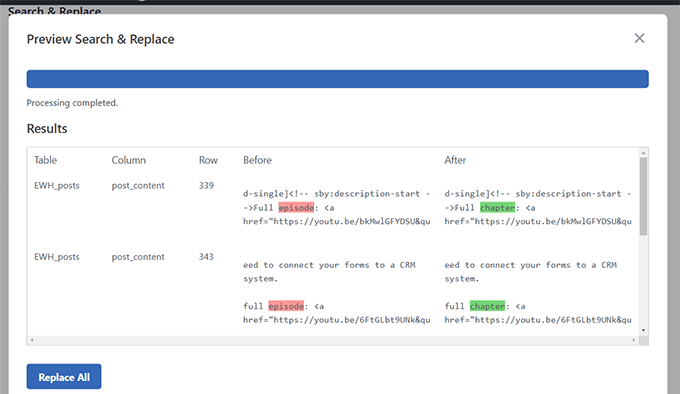
    When you open the export page, you’ll find more than just a backup button. There’s also a handy search and replace function for the database. You can add multiple search and replace operations, which helps when updating URLs or other site-specific info during migration.

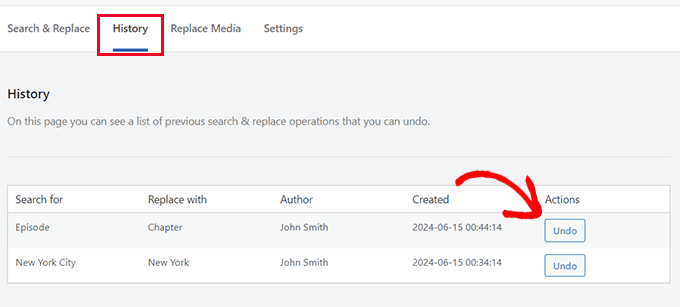
    All in One WP Migration's search and replace feature

    We also like that you can password-protect your complete WordPress backup file. This adds an extra layer of security, which is especially useful when storing backups in shared spaces or sending them over unsecured networks.

    Other than that, the plugin lets you customize your export with several options. You can choose not to export things like spam comments, post revisions, or the media library.

    These settings give you fine control over your backup, which can be helpful in different situations. For example, leaving out the media library can really shrink the file size if your site has lots of images.
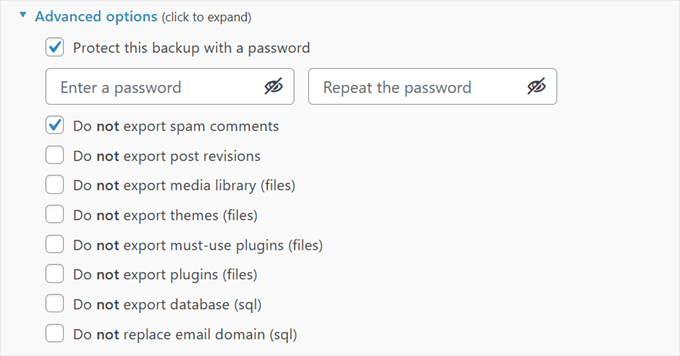
    All in One WP Migration's advanced backup settings

    One thing to note is that for beginners, some features might not be immediately clear. For instance, they may not understand the benefits of the search and replace feature for the database right away.

    It would be great if the plugin provided more context or explanations for these advanced features. This could help newcomers make informed decisions about which options to use and how they might benefit from it when backing up their WordPress website.

    Once you’ve set things up, you can export your site to a .wpress file, which the plugin uses for both export and import.

    If you want to export to FTP or cloud storage or enable automatic backups, you’ll need to pay for an extension.

    Duplicator: Comprehensive Backup Solution

    Duplicator is as powerful as All in One WP Migration when it comes to export and backup features.

    Like its competitor, you can back up your site and store it on your WordPress hosting for free, then download the files to your computer.
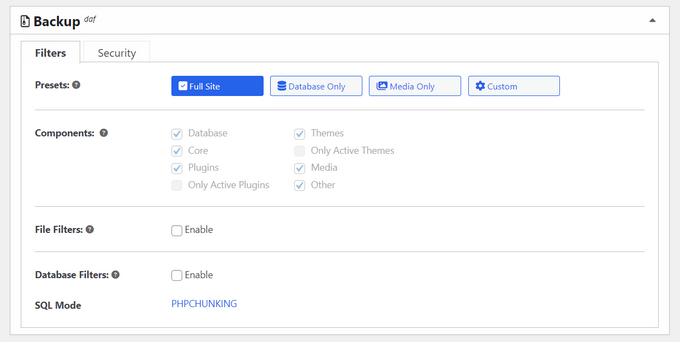
    Quickly and easily creating a full site backup

    With Duplicator, you can choose to back up your whole website—database, plugins, themes, and all—or just the database. The database-only option comes in handy if you’re mainly worried about content changes and don’t need to back up static files often.

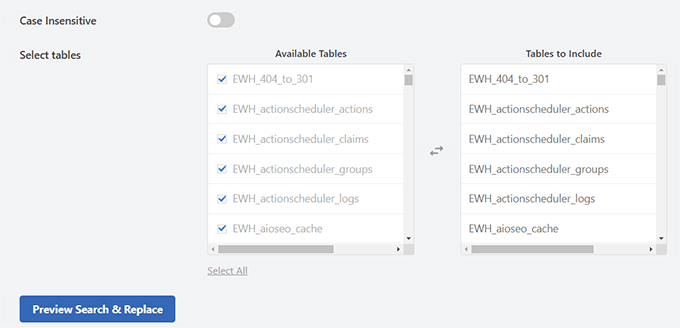
    For database-only backups, you can use filters to leave out certain tables. We find this to be useful for making your backup smaller or excluding data you don’t need.

    We also liked that Duplicator lets you exclude specific WordPress files, folders, or file types from the backup. This is great for leaving out large files you don’t need or sensitive information you’d rather not include in your backup.
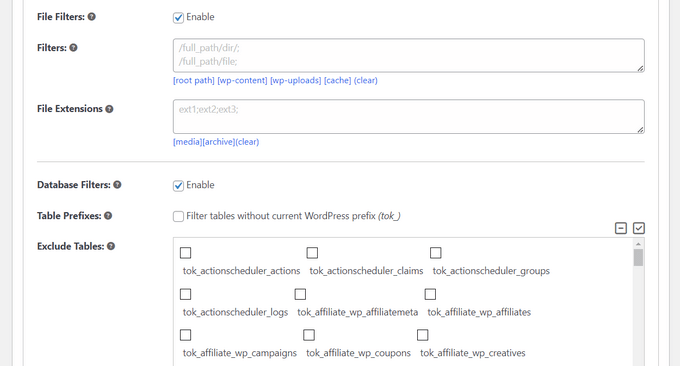
    Exclude files, folders, and tables from the backup

    Like All in One WP Migration, Duplicator offers password protection for your backups, boosting WordPress security.

    All these features may seem intimidating for complete beginners. But thankfully, Duplicator has addressed this potential issue. There are helpful information buttons next to certain features that you can hover over, and they will show you detailed explanations.

    Duplicator's information snippet

    This user-friendly approach makes it easier for newcomers to understand and use the plugin’s more advanced features.

    One feature we really appreciate is Duplicator’s pre-backup scan. It checks your entire WordPress website before backing up to make sure everything’s good to go. This helps prevent incomplete or broken backups, saving you time and potential problems later.
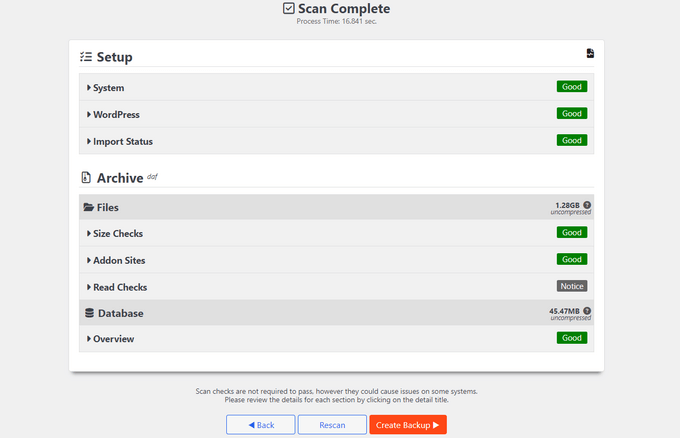
    Creating a WordPress backup

    After the backup, you’ll get a zip file of your archive and an installer file.

    For bigger sites, Duplicator suggests using their special DupArchive format. This format is designed to work around limits often set by cheaper hosting providers, letting you create larger backups without running into server issues.
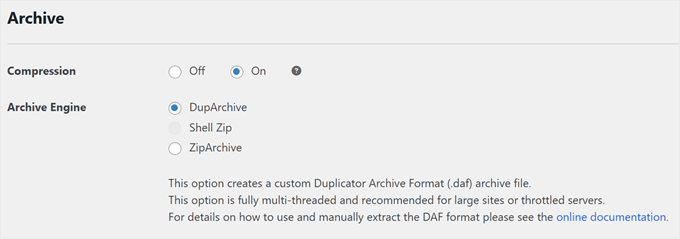
    Duplicator's DupArchive file format

    Just like All in One WP Migration, Duplicator’s paid version lets you export to FTP or cloud storage and includes automatic backups.

    But Duplicator goes a step further by letting you mark a backup as a disaster recovery point. This is great for quickly getting your site back to a known good state if something goes wrong and you’re locked out of your WordPress admin area.

    Duplicator's disaster recovery feature

    Winner: Duplicator

    After closely looking at both plugins, we think Duplicator has a slight edge over All in One WP Migration for exports and backups.

    While both offer strong features, Duplicator’s pre-backup scan, flexible backup options, and special DupArchive format for larger sites give it an advantage. The disaster recovery point feature in the pro version also stands out for site owners who need quick recovery options.

    Import/Restore Features

    Once you’ve backed up or exported your WordPress site, you’ll need to import it. Let’s see how these WordPress migration plugins handle this process.

    All in One WP Migration: Simple Drag and Drop

    If you’re using All in One WP Migration, you’ll need to install the plugin in your WordPress admin dashboard first.

    After that, importing is as easy as dragging and dropping your backup file. It’s a straightforward process that makes it simple to restore WordPress or migrate a WordPress site.
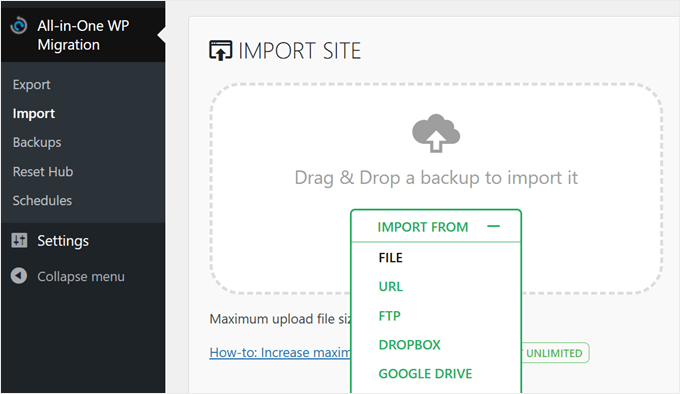
    All in One WP Migration's drag-and-drop import feature

    The plugin also offers import options from FTP, server transfer, URL, or cloud storage and a one-click restore via the plugin’s backup page.

    However, these features require separate paid extensions.

    All in One WP Migration's one-click restore

    One thing we’re not a fan of is that the core plugin has an upload limit of 256 MB. This might be enough for smaller WordPress websites, but if you have a larger site with lots of media, you might hit this limit.

    The unlimited license removes this restriction, which is worth considering if you frequently move your site or manage larger WordPress sites.

    Also, in our testing, we successfully moved our WordPress site to a new host but ran into issues when moving it to a local WordPress environment. This is an important consideration if you’re looking to migrate a live website to a local setup for staging purposes.

    Duplicator: Flexible Restoration Options

    Duplicator takes a slightly different approach to importing and restoring.

    With the free version, you use the installer file you downloaded during the backup process. You add this file to your WordPress files using the file manager or an FTP client, then navigate to https://yourdomain.com/installer.php.

    This opens an easy-to-use restoration wizard that guides you through the process.
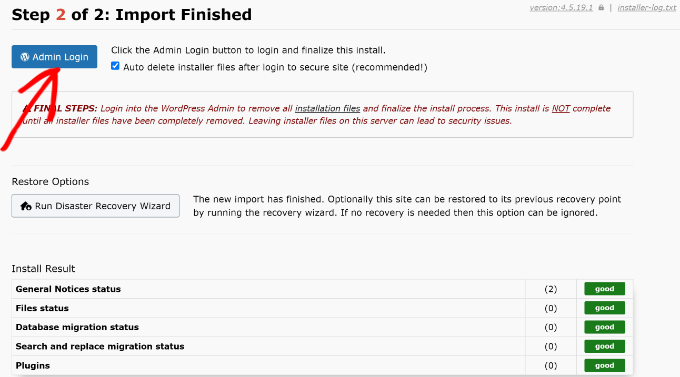
    Click admin login when backup is restored

    This method works whether you’re restoring a backup on the same site or migrating to a different hosting provider with a new domain.

    It’s admittedly a bit more hands-on than All in One WP Migration’s approach. Also, for the process to work, you will need to create your own database first.

    However, it has the advantage of no size limit. Plus, you don’t need to install WordPress or the Duplicator plugin first, which can be helpful for local WordPress development or when setting up a new site.

    If you get one of Duplicator’s pro plans, you get access to more user-friendly options. These include one-click restoration from the database or complete backups, drag-and-drop file import via the plugin interface, and import via URL or cloud storage.
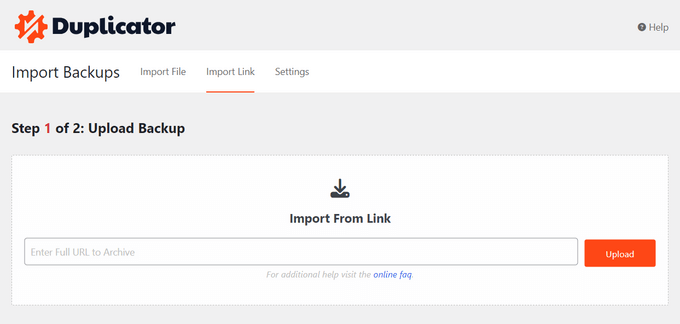
    How to restore a backup to your WordPress blog, website, or online store

    One standout feature of Duplicator Pro is the disaster recovery restoration.

    You can either copy a recovery link and save it separately from your WordPress site or download a launcher file. This launcher is an HTML file that starts the recovery wizard, helping you get your site back online quickly if you can’t access your WordPress admin.
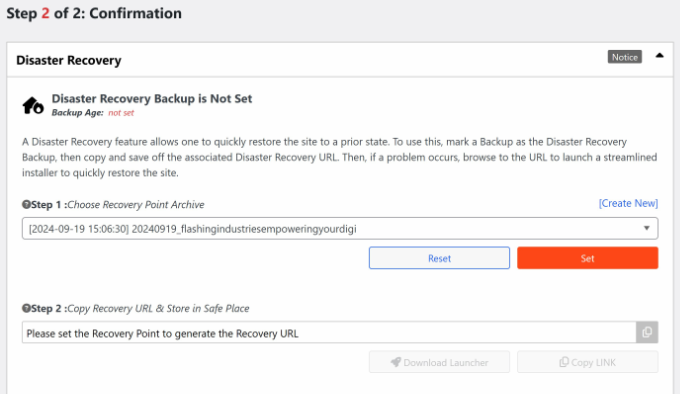
    Set a recovery point for backup

    When it comes to moving a live website to a local environment, Duplicator performed really well. In fact, we were able to create a tutorial on how to migrate a live WordPress site to a local server, thanks to its reliable functionality in this area.

    Winner: Duplicator

    We believe Duplicator takes the lead in the import/restore category.

    All in One WP Migration offers a user-friendly drag-and-drop interface. However, Duplicator’s unlimited file size in the free version and more flexible restoration process give it an edge.

    The pro version’s one-click restore and unique disaster recovery features further strengthen its position. For users managing larger sites or requiring advanced restore options, Duplicator is a more comprehensive solution.

    Remote Storage Integrations

    Both All in One WP Migration and Duplicator offer cloud storage integrations in their paid licenses. This allows you to connect these WordPress backup plugins to various providers for storing your website files.

    This feature is particularly useful when you need to migrate a WordPress site or create off-site backups for your WordPress website. Let’s look at how these WordPress migration plugins compare in terms of remote storage options.

    All in One WP Migration: Extensive Options with Individual Paid Extensions

    All in One WP Migration offers an impressive range of remote storage integrations. It supports 15 different providers, including popular options like FTP, Dropbox, Google Drive, Amazon S3, and OneDrive, as well as less common choices like pCloud and WebDAV.
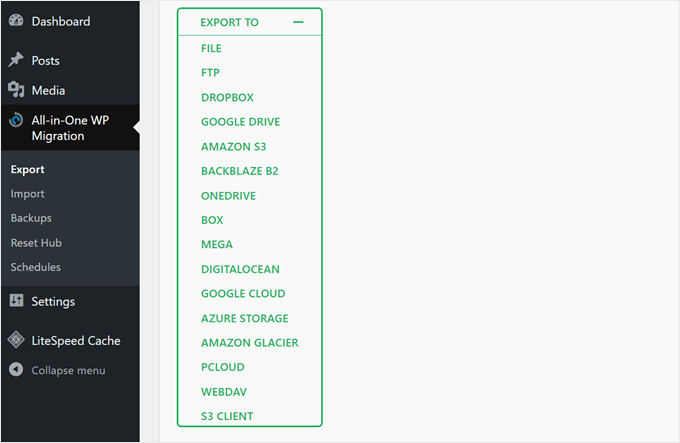
    All in One WP Migration's export options

    The connection process for most of these extensions is straightforward. For example, to back up your WordPress site to Google Drive, you only need to link to your Google Drive account, and the plugin will create a folder for your backups in your Drive automatically.

    However, one downside is that all these integrations come as separate extensions. This approach is fine if you only use one storage provider. But if you need multiple options, you’ll have to purchase more than one extension.

    Duplicator: Fewer Options but All-Inclusive Approach

    Duplicator supports fewer storage providers compared to All in One WP Migration. That said, it still covers major options like Amazon S3, Google Drive, Dropbox, Microsoft OneDrive, and FTP/SFTP.

    It also works with any S3 Compatible Cloud Storage, which expands its compatibility.

    The connection process with Duplicator is slightly more involved. For example, to back up your site to Dropbox, you need to link your plugin to Dropbox and paste a code snippet into your plugin, adding an extra step to the process.
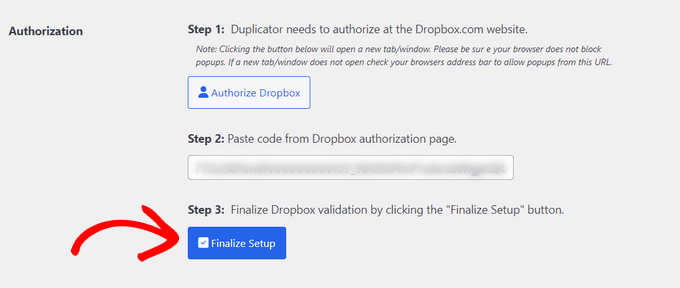
    Enter code and finalize setup

    The key difference is that all Duplicator plans include all these integrations, so you don’t need to purchase different extensions for each storage provider you want to use.

    Winner: Tie

    We find it hard to choose a winner because each has its own strengths. All in One WP Migration offers a wider range of storage options, giving users more flexibility in choosing where to store their WordPress backups.

    On the other hand, Duplicator’s all-inclusive approach means you get access to all supported integrations with any paid plan. This could be more cost-effective than purchasing All in One WP Migration’s cloud storage extensions.

    Ultimately, the best choice between these WordPress backup plugins depends on your specific storage needs and budget. 

    Feature Richness

    Both All in One WP Migration and Duplicator offer a range of features beyond basic backup and migration, which adds to their value as comprehensive WordPress migration services. Let’s explore what each plugin brings to the table.

    All in One WP Migration: Modular Approach with Paid Extensions

    Here’s the full list of features available in All in One WP Migration when you upgrade from the free version and use paid extensions:

    • One-click backup restoration
    • Unlimited usage on websites you own
    • Removal of the 256 MB upload limit
    • Built-in search and replace function
    • Backup scheduler with hourly, daily, and weekly options
    • Cloud storage integration with 15+ providers
    • Reset tools to restart your WordPress website
    • Multisite support
    • WP CLI commands for advanced users
    • Premium support

    Here’s the catch: Some of these features, like cloud storage integration, multisite support, and scheduled backups, are only available as paid extensions. You’ll need to purchase these separately to access the full functionality.

    Duplicator: Comprehensive Feature Set in All Paid Plans

    Here’s a list of the features available in Duplicator’s paid plans:

    • Automatic backup scheduling with hourly, daily, and weekly options
    • 5+ cloud backup storage options
    • Drag and drop import
    • Migration wizard for easy website transfers
    • Email alerts for backup issues
    • Disaster recovery points for quick rollbacks
    • Backup limits to manage storage
    • Server-to-server imports
    • Managed hosting support
    • Shared database support
    • Multisite support
    • Advanced user permissions for backup files
    • Installer branding

    One consideration is that some of these features, like multisite support, advanced user permissions, and installer branding, are only available in higher-tier plans. However, these features are mainly geared towards professionals working with multiple clients and sites.

    Winner: Duplicator

    We believe Duplicator edges out All in One WP Migration in this category. 

    Based on the feature comparison, Duplicator offers a more comprehensive set of tools in its paid tiers. The inclusion of large site support, disaster recovery points, and advanced migration tools across all paid plans makes Duplicator a much more versatile solution.

    Plugin Support

    Reliable support can significantly improve your experience with WordPress migration plugins, especially when you’re trying to move your site safely.

    This section compares the support options offered by All in One WP Migration and Duplicator.

    All in One WP Migration: All-Around Support with Extended Hours

    All in One WP Migration offers a range of support options to help users with their WordPress backup and migration needs. You can contact them through their WordPress.org support page, where users can ask questions and get community assistance.

    For more in-depth information, they maintain a knowledge base filled with helpful articles and guides. We found many of the articles helpful when we needed to test out the plugin’s features.
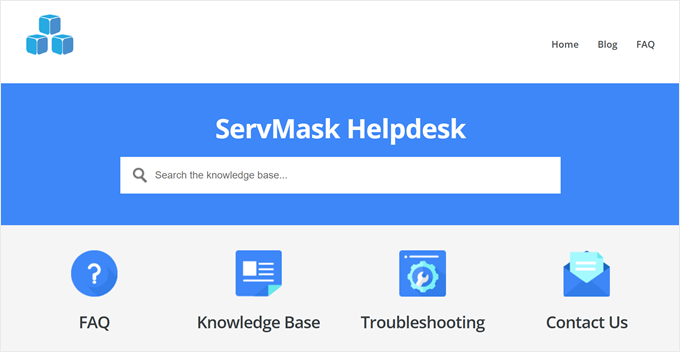
    ServMask's help desk

    For users with a paid license, All in One WP Migration allows you to submit a support ticket. Their support team is available during extended hours, operating on weekdays from 8 am to 10 pm (UTC+7) and on weekends from 9 pm to 6 am (UTC+7).

    Duplicator: Multiple Support Options with Weekday Availability

    Duplicator provides a detailed knowledge base that covers various aspects of using the plugin for WordPress backups and migrations.

    Users can also seek help through the WordPress.org support page, where they can interact with the community and the plugin’s support team.
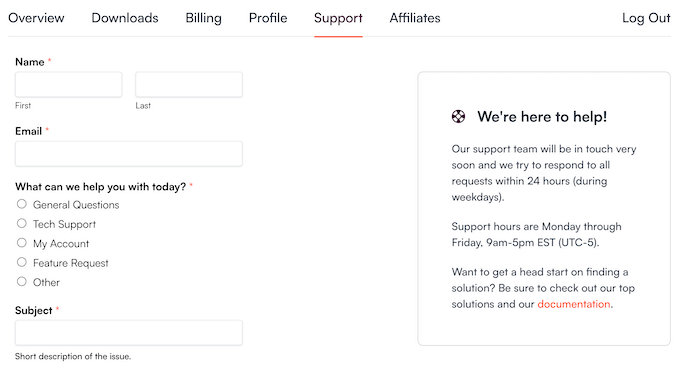
    The Duplicator customer support portal

    For those considering purchasing Duplicator, there’s a pre-sales form available to answer any questions before making a decision.

    Paid users can submit support tickets directly to the Duplicator team. The team aims to respond to all requests within 24 hours during weekdays, with support hours running Monday through Friday, 9 am to 5 pm (UTC-5).

    Winner: All in One WP Migration

    The extended support hours, including weekend availability, make All in One WP Migration more accessible for users across different time zones and work schedules. This can be essential when you’re in the middle of migrating a WordPress site or dealing with urgent backup issues.

    Value for Money

    One of the most important considerations when choosing the best WordPress migration plugin is the price tag. We generally recommend against overpaying for a plugin that doesn’t meet all your needs or using a cheap option that doesn’t have important functionality.

    Let’s see which plugin gives you more bang for your buck.

    All in One WP Migration: Flexible but Potentially Costly

    All in One WP Migration offers a free core plugin with basic export and import functionality.

    However, for more advanced features like one-click restoration, you’ll need the Unlimited extension at $5.75 per month, billed annually or $69 per year.

    Also, each cloud storage provider extension costs $99 per year, while the Multisite extension is priced at $319 per year.

    One advantage is that storage provider and Multisite extensions include the Unlimited extension, potentially saving money.
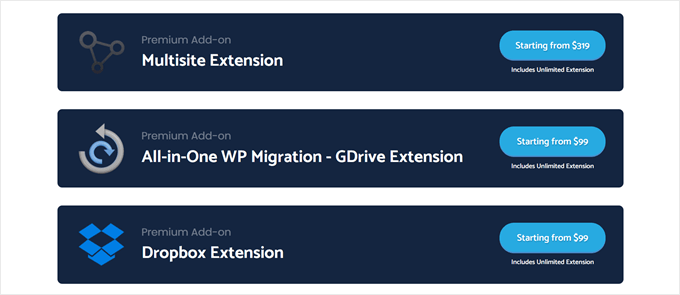
    All in One WP Migration's extensions

    However, costs can add up quickly. For instance, if you need Multisite support and a cloud storage option, you’re looking at $418 per year.

    All extensions allow usage on unlimited websites and include premium support, which can be valuable for managing multiple WordPress sites.

    Duplicator: All-Inclusive Features at Tiered Price Points

    Duplicator’s free version offers basic export and import functionality using an installer file.

    Their paid plans, however, provide a comprehensive set of features at different price points.

    Duplicator Pro has four tiers: Basic ($49.50 per year), Plus ($99.50 per year), Pro ($199.50 per year), and Elite ($299.50 per year). All paid plans include unlimited backups, migrations, multiple website usage, all cloud storage providers, disaster recovery points, and scheduled backups.

    Plus, the Pro and Elite tiers include Multisite support. So, for Multisite functionality and cloud storage, you’d pay $199.50 or $299.50 per year, which is significantly less than All in One WP Migration.

    Winner: Duplicator

    We believe Duplicator offers better value for money, especially for users needing multiple features. Its WordPress backup all-in-one solution is more cost-effective for most scenarios.

    Although All in One WP Migration’s a la carte model allows for customization, it can become expensive quickly when you need multiple features.

  • Whats New in WordPress 6.7 (Features and Screenshots)

    Whats New in WordPress 6.7 (Features and Screenshots)

    WordPress 6.7 was just released today. Like many of you, we get excited about new WordPress releases, and 6.7 is no exception. It’s packed with exciting new features that we can’t wait to share with you.

    This release builds on user feedback, bringing updates to boost your site’s performance, usability, and accessibility. The site editor has received many enhancements, and there’s even a brand-new default theme.

    Join us as we dive into WordPress 6.7 and explore its standout features and improvements designed to enhance your WordPress experience.

    Exploring WordPress 6.7 new features and improvements

    Note: If you’re not using managed WordPress hosting, then you’ll need to update your WordPress version manually. We have a complete guide on updating WordPress safely to help you through it.

    ⚠️Important: As always, remember to create a full WordPress backup before updating to the new release.

    Now, let’s look at what you’ll find in WordPress 6.7 after the update. Here is a quick list of the major features we will explore:

    • Introducing the Twenty Twenty-Five Theme
    • Site Editor Improvements
    • New Zoom Out View for Easier Editing
    • Enhanced Data Views for Better Content Management
    • Improved Font Library and Typography Controls
    • New Additions and Improvements in Block Library and Patterns
    • Expanded Design Tools for More Blocks
    • Managing Block Bindings in WordPress 6.7
    • Preview Options API
    • Interactivity API Enhancements
    • Media File Improvements in WordPress 6.7
    • Under the Hood Changes in WordPress 6.7

    Introducing the Twenty Twenty-Five Theme

    WordPress 6.7 brings a brand-new default theme: Twenty Twenty-Five. WordPress releases a fresh theme each year, focusing on simplicity and ease of use.

    The theme follows a straightforward approach: “Simple things should be easy, and complex things possible.”

    Twenty Twenty-Five comes with multiple pre-designed block patterns and style options, making it easy to customize a website without starting from scratch.

    Styles in Twenty Twenty-Five

    Designed with Bloggers in Mind

    Unlike recent default themes focused on business and multipurpose use, Twenty Twenty-Five’s default layout is tailored for bloggers.

    We liked the simplicity of a simple blog theme as the default experience. This signals the growing trend of building online communities and blogs as hubs for independent publishing and human-generated content.

    Twenty Twenty-Five personal blog view

    Responsive and Customizable

    The theme is lightweight and works smoothly on any device, focusing on accessibility.

    Customizing Twenty Twenty-Five is easy—you can adjust colors, fonts, and layouts with just a few clicks. It’s designed to help you create a personal, polished look without hassle.

    Patterns in Twenty TwentyFive

    We felt that it goes very well with WordPress’s site editing tools. Its plain layout acts as a canvas for users to fill with their designs.

    Site Editor Improvements

    WordPress 6.7 brings a ton of improvements and new features to the full site editor, making it even easier to use.

    These enhancements provide consistency between site editing and content editing areas. They also improve user navigation to help new users quickly find their way around.

    New Zoom Out View for Easier Editing

    As we’ve worked with long pages with many sections and patterns, we’ve often found that all the scrolling makes editing challenging. WordPress 6.7 addresses this with a useful new “Zoom Out” feature.

    Now, with a simple click on the Zoom Out button in the top-right toolbar, you can see a bird’s-eye view of your content.

    Zoom out view in WordPress site editor

    This view lets you manage the overall layout and patterns on a broader scale instead of focusing on each individual block.

    We also noticed that when you open the Patterns tab in the block inserter, the editor automatically switches to Zoom Out mode.

    This change streamlines the process of adding or adjusting pre-designed patterns, making it faster and easier to shape your content layout.

    Enhanced Data Views for Better Content Management

    With WordPress 6.7, the Data Views feature has become even more powerful.

    Originally introduced to help users manage content within the editor, Data Views now offer even more control and flexibility.

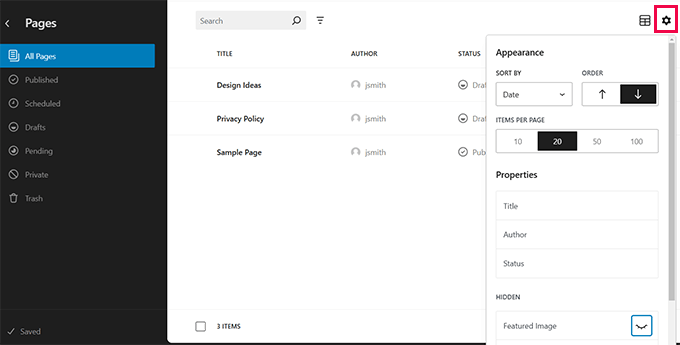
    Data views in WordPress 6.7

    One of the biggest improvements we’ve noticed is the ability to reorder fields directly in the Data View settings.

    This makes it so much easier to customize the display of content, letting you arrange information in a way that suits your needs.

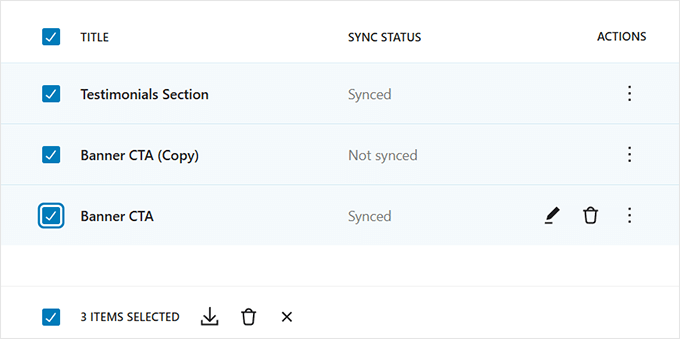
    We also found the updates to bulk actions to be a great addition. The bulk actions menu is now in the footer, combined with the sticky toolbar for a cleaner interface.

    Bulk edit options in data views

    This small change really enhances usability, especially when you’re managing a lot of content at once.

    Overall, these enhancements in Data Views simplify the process of organizing, filtering, and acting on content, giving users more power and productivity within the editor.

    Improved Font Library and Typography Controls

    WordPress 6.7 brings exciting updates to the ‘Styles’ interface, especially for customizing fonts. As we worked with the new tools, we found that font control is now more intuitive and flexible than ever.

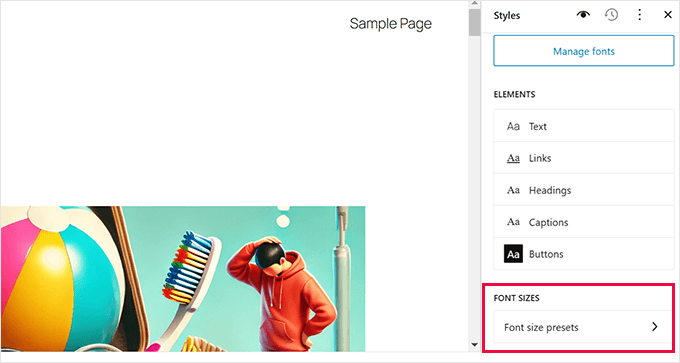
    One standout improvement is the addition of font size presets. These presets let you easily create and apply custom font sizes across your site.

    Font size presets

    It’s a real-time-saver, especially for users who want consistent typography without setting up sizes manually every time.

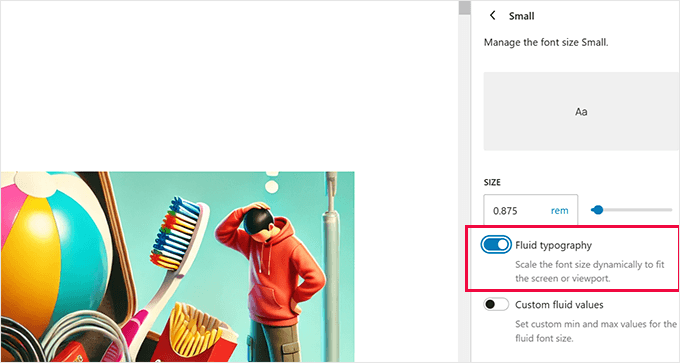
    We’re also excited about the introduction of fluid typography.

    This feature automatically adjusts text sizes based on the screen, keeping your content readable and responsive on any device.

    Fluid typography

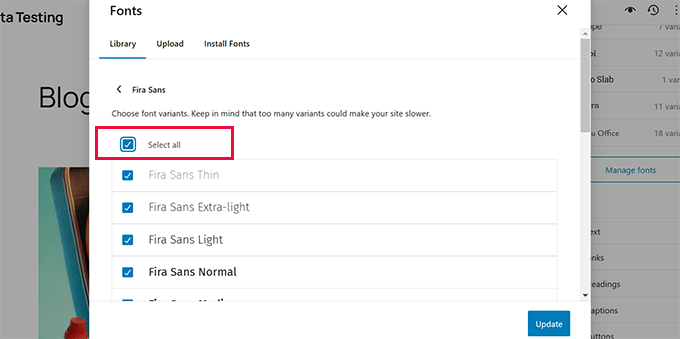
    The management of fonts has also improved with the new Font Library. Now, you can organize fonts by source and easily activate or deactivate multiple fonts at once.

    For anyone managing a variety of custom fonts, this feature makes the process much simpler and more efficient.

    Deactivate fonts

    New Additions and Improvements in Block Library and Patterns

    WordPress 6.7 introduces a range of new features and enhancements to the block library and patterns, making it easier to create and customize layouts.

    These changes, from updated block options to improved pattern designs, give users more flexibility and control over their content.

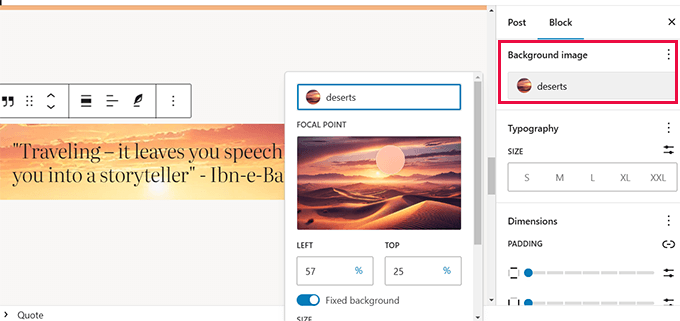
    1. Background Image Support for Quote and Group Blocks

    You can now add background images to the Quote and Group blocks. This feature makes it easy to add visual interest to your blog posts.

    Background image support for Quote block

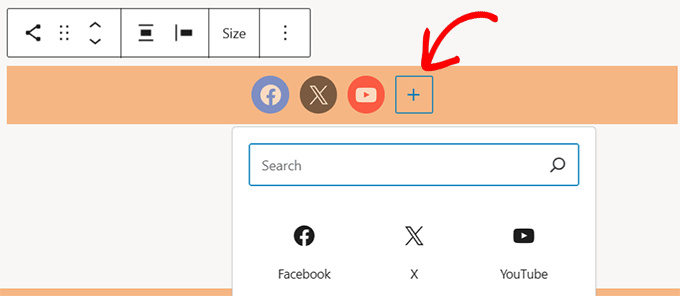
    2. Improved Social Icons

    The “Add New Icon” button is now easier to use, and you can add borders around the Social Icons block for a customized look.

    Easily add social icons

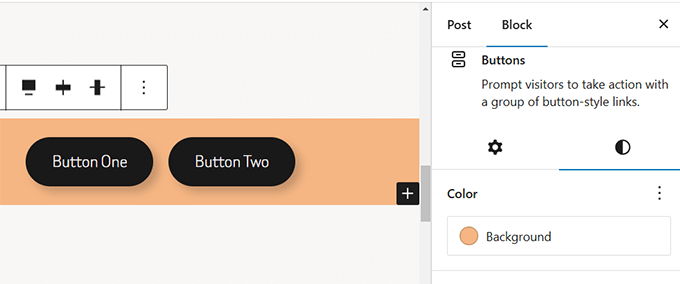
    3. Customizable Buttons Block

    You can set a background color for the Buttons block, giving you more control over its appearance.

    Background color to buttons block

    4. Enhanced Image Block

    Now, when you drag and drop multiple images onto an Image block, it will automatically convert into a Gallery block.

    Multiple images uploaded to convert image block into Gallery

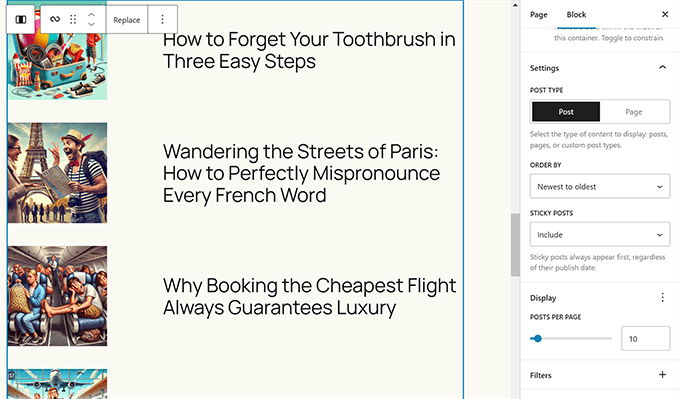
    5. Simplified Query Loop Block

    Setting up a Query Loop block in the past required a lot of manual work. In WordPress 6.7, the Query Loop block inherits queries from the template by default.

    This makes it much easier to display your posts automatically in the editor and on the front end.

    Query loop block

    6. New “Human-Diff” Date Format

    Previously, users had to use a plugin to display relative dates in WordPress. This release adds it to the ‘Date’ block options as a format.

    Human difference date format

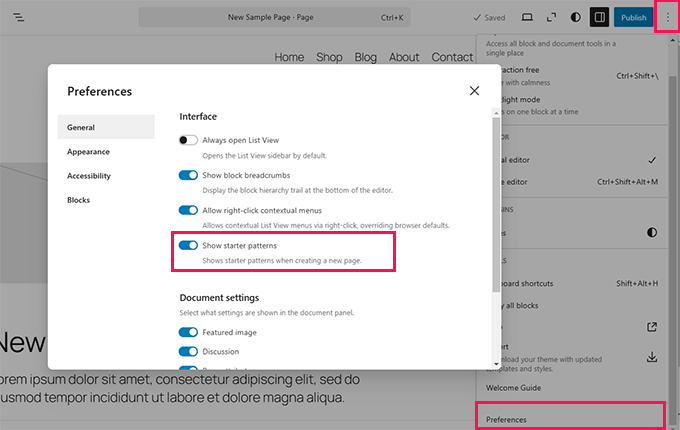
    7. Toggle for “Choose A Pattern” Popup

    When creating new pages, a pattern selector popup usually appears if the page content is empty. In WordPress 6.7, you can turn this popup on or off.

    To do that, simply edit any page in WordPress. Now click on the three-dot menu at the top right corner of the screen and select ‘Preferences’.

    In the block editor preferences, you will find the option under the General tab’s interface section. Simply toggle on/off the ‘Show starter patterns’ option.

    Turn off starter patterns

    Expanded Design Tools for More Blocks

    WordPress 6.7 continues the effort to bring consistency to the design tools available across different blocks. This update introduces more ways to customize blocks, allowing for greater control over your site’s look and feel.

    Some of the major updates include:

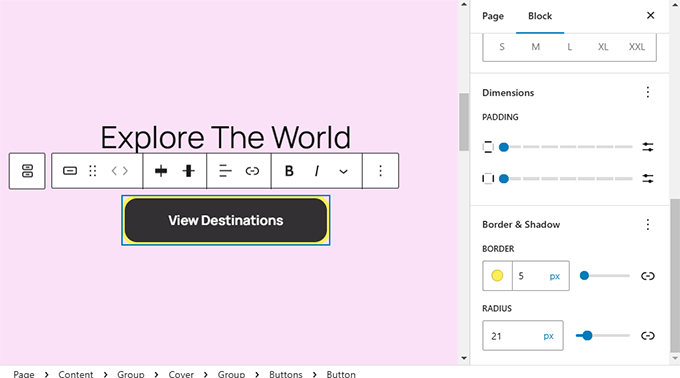
    Border Controls: Many blocks, including Button, Columns, and Cover blocks, now allow you to customize border color, width, and style.

    Border for more blocks

    Background Image Support: The Quote and Group blocks now support background images, adding more visual interest to these blocks.

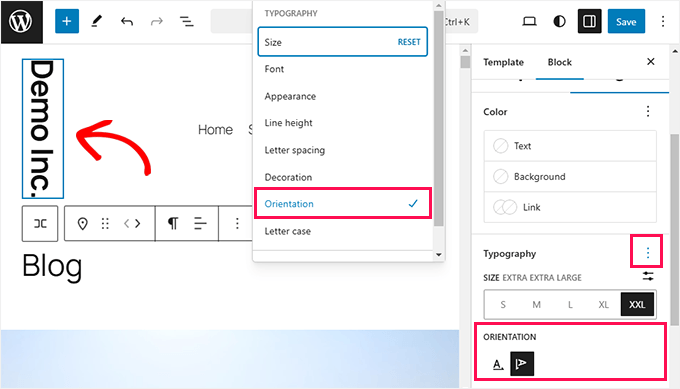
    Writing Mode: The Site Title, Site Tagline, Verse, and Button blocks now offer a writing mode option, which lets you change text orientation for a unique layout.

    Vertical typography

    These additions provide more flexibility when designing within the block editor, helping you create a consistent and visually appealing layout.

    Managing Block Bindings in WordPress 6.7

    The Block Binding API, first introduced in WordPress 6.5, gets a major update in WordPress 6.7. This update improves developers’ ability to manage custom fields and attributes within blocks.

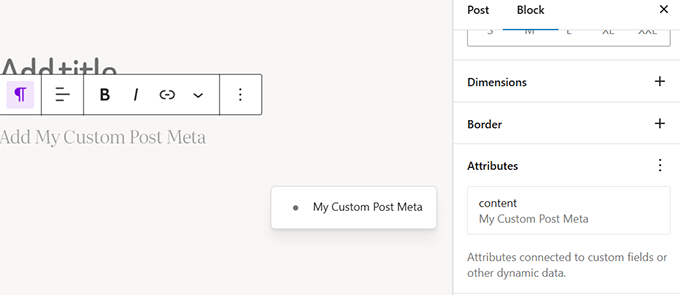
    One of the biggest changes is the new user interface (UI) that lets users create and manage bindings directly within the block editor.

    Block binding API has a UI in WordPress 6.7

    You no longer need to use the Code Editor to link block attributes to custom fields. Instead, you can simply select metadata from the new UI in the block settings.

    Preview Options API

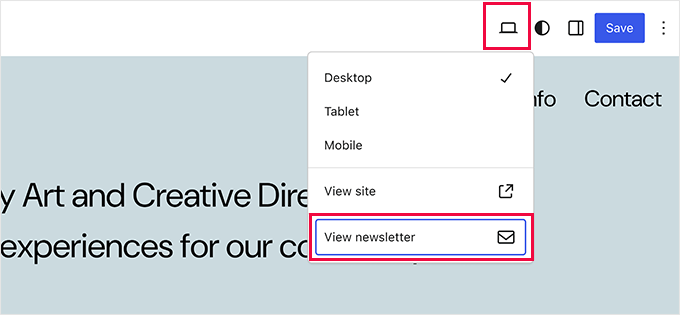
    WordPress 6.7 brings the new Preview Options API, which aims to help developers create better writing experiences for different types of content in the block editor.

    The API will allow developers to add custom preview settings to the block editor. For instance, they can show users contextual options for the type of content they are editing.

    Extended preview options in block editor

    In our testing, we found that this API allows for smoother workflows. It will be interesting to see how developers use the new API in their plugins and themes.

    Interactivity API Enhancements

    WordPress 6.7 includes updates to the Interactivity API, first introduced in WordPress 6.5. These enhancements make it easier for developers to manage asynchronous tasks.

    This release makes the API more stable and efficient, supporting features like lazy loading and code splitting for faster performance.

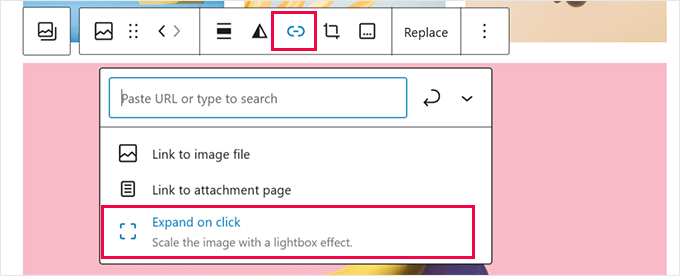
    Users can try it out by adding a Gallery block with a few images linked to ‘Expand on click’.

    Open gallery image in lightbox

    Then, preview your gallery in a browser tab and click on an image.

    Images set to expand will show an ‘enlarge’ icon, and clicking on them opens them in a lightbox popup.

    Lightbox popup using interactivity API

    The updates improve the Interactivity API’s performance, and we expect more plugins and themes to use it for dynamic features in the future.

    Media File Improvements in WordPress 6.7

    If you’ve ever tried uploading photos directly from your iPhone, iPad, or other Apple devices, then you know HEIC files can be tricky to manage.

    One of the big updates in WordPress 6.7 is support for HEIC image uploads. Now, your WordPress website will automatically convert HEIC images to JPEG for better compatibility across devices and browsers.

    This feature does require your server to have Imagick installed with HEIC support, but most WordPress hosting providers already include this.

    Site Health Info

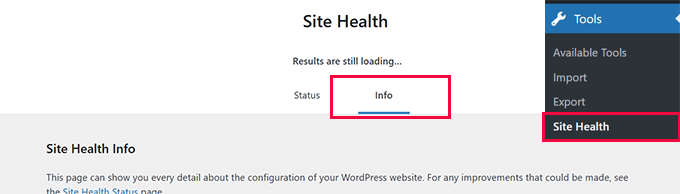
    You can check if your website supports HEIC conversion by going to the Tools » Site Health page and switching to the ‘Info’ tab.

    Scroll down to the Media Handling » ImageMagick supported file formats section and look for HEIC.

    Imagick HEIC format support

    Our testing found that the image quality didn’t degrade during conversion, which is great for users who want to share high-quality photos.

    WordPress will display the JPEG version of your image, but if you link to the attachment file, users can download the original HEIC image.

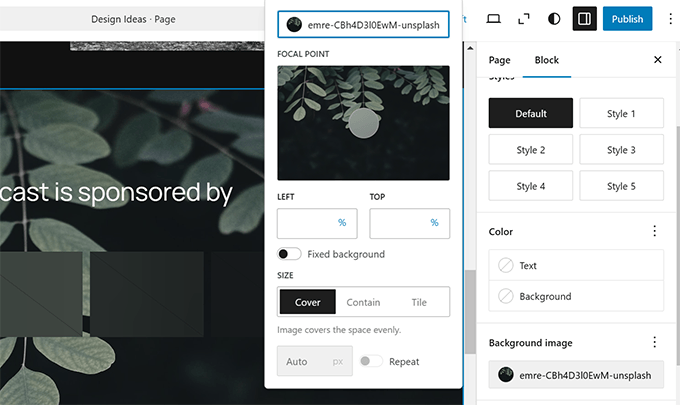
    Another improvement we appreciated is the enhanced control over background images. You can now adjust background images globally and at the individual block level.

    Expanded background image options

    Lastly, WordPress 6.7 further refines lazy loading, helping boost performance by loading images only when needed.

    These media updates improve compatibility and performance, making it easier to manage your content without technical hurdles.

  • WordPress Drama Explained (and How it May Affect Your Website)

    WordPress Drama Explained (and How it May Affect Your Website)

    It’s weird to receive texts like “is this WordPress drama crazy or is it being blown out of proportion”.

    In the 15 years of running WPBeginner, I never thought I would have to write a blog post covering any WordPress industry drama. My focus with the blog has always been to provide high quality free WordPress tutorials for non-techy beginner users and small business owners.

    But unfortunately, we are at a point where a lot of misinformation and fear is being spread about WordPress by media outlets and influencers who’re hungry for clicks.

    This is causing panic among some website owners, agencies, as well as people in enterprise companies. Some folks are asking questions like whether WordPress is still safe and should they search for an alternative CMS option for their websites.

    In this post, I want to explain what this latest WordPress drama is about, who it impacts, and what you can do to protect your websites. 

    TLDR: No, this is NOT the end of WordPress, and your websites are safe.

    WordPress Drama Explained (WP Engine vs. Automattic)

    My Disclaimer:

    I’m not a trademark lawyer or legal expert. I’m writing this post for WPBeginner blog readers who are concerned about what’s going on. I have spent the last 18 years in this community, and I love WordPress. These are my opinions based on my industry experience and what I have been reading online. I have no insider knowledge of the situation. I reserve the right to change my opinions should I learn new information.

    With that out of the way, let’s jump right into what’s happening around this WordPress drama involving WP Engine vs. Automattic.

    • What is This WordPress Drama All About? (Short Summary)
    • Is this the End of WordPress?
    • Is My Website Affected by All of This?
    • What Can You Do to Protect Your WordPress Site?
    • What Should I Do as a WordPress Agency with Concerned clients?
    • My Final Thoughts
    • References

    What is This WordPress Drama All About? (Short Summary)

    Quick Summary: There is a lawsuit between two WordPress companies (WP Engine and Automattic) around a trademark dispute. Due to their influence, there have been escalations that have led to a lot of negative PR for the WordPress ecosystem. The vast majority of WordPress sites are NOT impacted by this at all.

    This whole thing started because two big companies in the WordPress industry are in a legal battle over a trademark dispute.

    Automattic is a company started by WordPress co-founder, Matt Mullenweg. They are the creators of WooCommerce, WordPress.com hosting service, Jetpack plugin, and more.

    WP Engine is a managed WordPress hosting company owned by a large private equity firm Silver Lake.

    Automattic has the exclusive commercial rights to use the “WordPress” trademark. They asked WP Engine to negotiate a licensing agreement which involved either payments to Automattic OR increased contributions to the free open source WordPress project.

    Because the parties failed to come to an agreement, Matt publicized the dispute at the annual WordCamp US conference, where he claimed that WP Engine, despite being a $400M+ revenue company, does not give back enough to the free open source WordPress project.

    As things escalated, both companies sent each other a formal legal Cease and Desist (C&D) letter. Due to the legal threats, Matt, as co-founder of WordPress, banned WP Engine from accessing WordPress.org servers.

    This meant that any customer with websites on WP Engine hosting were no longer able to receive updates from WordPress.org servers.

    The ban was later revertedtemporarily to protect users and allow WP Engine to build their own update servers. Since WordPress is open source, the WP Engine team was able to build their own updater to ensure users on their hosting platform can get software updates.

    The server block officially went back into effect on October 1st. Shortly after, WP Engine filed a federal lawsuit against Automattic and Matt Mullenweg.

    Due to the escalation, WP Engine’s team were banned from accessing their WordPress.org accounts. This means the WP Engine team is no longer able to release updates to their WordPress plugins from the official WordPress.org servers.

    One of the plugins owned by WP Engine is Advanced Custom Fields (ACF) which is popular among developers and used by over 2 million websites. To ensure security updates are available to all users, the WordPress.org team forked the ACF plugin, renamed it to Secure Custom Fields (SCF), and took over the original ACF plugin directory page without the consent of WP Engine. The reasons given for this were to maintain and provide updates to users who were unaware of the drama. 

    This decision was not well received and garnered a lot of negative comments from developers, influencers, and press outlets.

    At the time of writing this post, all other WP Engine plugins are still available for download on the WordPress.org plugin directory, however, the WP Engine team is still banned, so they are not able to use WordPress.org servers to issue updates.

    In summary, at the root of this WordPress drama is a heated legal trademark dispute between WP Engine hosting company, Automattic, and Matt Mullenweg (co-founder of WordPress). 

    Since there is a federal lawsuit filed by WP Engine against Automattic, I believe only the courts can decide the outcome unless the parties come to an amicable resolution outside of the courts. The official WordPress Twitter account tweeted that the situation could be resolved under the following conditions:

    Is this the End of WordPress?

    The answer is NO. Absolutely not.

    WordPress powers over 43% of websites on the internet, and it’s bigger than any one person or company. The vast majority of small business owners and users of WordPress don’t even know about this ongoing drama because it simply doesn’t impact them.

    I talked with a local small business owner who’s my personal trainer, and he wasn’t aware of the negative press around WordPress at all. When I briefly told him about it, here is what he said:

    “I am not going to switch from WordPress because some big companies are having a trademark dispute. What matters to me is that my website is working and my business is growing.” – Sean Nelson, Founder of Hustle Training 360.

    The reality is that the WordPress software you built your website with hasn’t changed.

    If you’re using popular plugins like Elementor, WPForms, WooCommerce, AIOSEO, Duplicator and literally 60,000+ others, they are still the same.

    Something as big as WordPress simply doesn’t end because two companies have a trademark dispute. 

    In the grand scheme of things, there are a small portion of users who are impacted, and I will share how you can find out if your website is impacted, and what you can do about it.  

    Is My Website Affected by All of This?

    The vast majority of users and websites using WordPress are NOT impacted by this legal dispute between Automattic and WP Engine.

    If you are using a free plugin that was developed by WP Engine, and you are NOT on their hosting platform, then your websites are impacted because you will not be able to receive updates for those free plugins from WordPress.org.

    Here are the popular free plugins built by WP Engine that are blocked from sending updates from WordPress.org servers:

    • Advanced Custom Fields
    • Nitropack
    • Better Search Replace
    • WP Migrate Lite
    • WP Offload SES Lite
    • Frost
    • Genesis Blocks
    • Genesis Custom Blocks
    • For the full list, see plugins built by WP Engine.

    What Can You Do to Protect Your WordPress Site?

    As I said earlier, if you’re not using the plugins made by WP Engine, then you don’t need to do anything.

    Your WordPress site is safe and good to go. 

    Although, I always recommend having regular WordPress backups and using a firewall like Cloudflare (see more WordPress security tips).

    Now, if you’re using the plugins built by WP Engine, then you will need to either install the WP Engine updater plugin to continue receiving updates or find an alternative, depending on your personal preference.

    What Should I Do as a WordPress Agency with Concerned clients?

    You can send them a link to this blog post and re-assure them that WordPress is still safe and by far the best open source CMS option in the market.

    A legal trademark dispute between two companies does NOT change the fact that WordPress powers 43% of all websites (and growing). There are 60,000+ free WordPress plugins and thousands of free WordPress themes available in the market that make it easy to build any type of website they want.

    WordPress core development progress continues, and WordPress 6.7 is coming soon.

    Here are some more insights on WordPress market share and trends.

    My Final Thoughts

    Despite everything that’s going on right now, I still love WordPress, and I believe in our amazing WordPress community.

    I have spent more than half of my life in the WordPress community, and I will continue to do everything in my power to support the community and our users. See my recent post on contributing to the WordPress ecosystem.

    Lastly, I truly hope that the two respected companies involved in the lawsuit can come to an agreement soon, so we can all focus on growing WordPress and helping democratize publishing & commerce across the world.

    As always, I want to thank you for your continued support of WPBeginner, and I look forward to continuing serving you for years to come.

    Yours Truly,

    Syed Balkhi
    Founder of WPBeginner

  • Whats Coming in WordPress 6.7 (Features and Screenshots)

    Whats Coming in WordPress 6.7 (Features and Screenshots)

    We have been closely following the development of WordPress 6.7 and testing the beta version of this release, which will bring some exciting updates and several new features.

    For example, we have been excited to discover that this upcoming release will ship with a brand-new default theme and massive improvements to both the block editor and site editing experience.

    In this article, we will walk you through the key features coming in WordPress 6.7. Each feature will help you get more out of your website-building experience.

    Detailed look at the upcoming WordPress 6.7 release

    Note: You can try out the beta version on your computer or a staging environment using the WordPress Beta Tester plugin. Remember that some features in the beta may not make it to the final release.

    Here’s a quick overview of changes coming in WordPress 6.7:

    • New Default Theme – Twenty Twenty-Five
    • Zoom Out View for Site Editing
    • Media File Improvements
    • Preview Options API
    • Refined Query Loop Block
    • Font Library, Font Size Presets, and Fluid Typography
    • Interactivity API Enhancements
    • Block Library & Patterns
    • Refined Data Views
    • Manage Block Bindings Directly
    • Under the Hood Changes in WordPress 6.7

    New Default Theme – Twenty Twenty-Five

    We’ve seen WordPress release a new default theme each year, and the tradition continues with Twenty Twenty-Five in WordPress 6.7.

    In our experience, each default theme offers something unique, and Twenty Twenty-Five is no different. This theme is built around the philosophy that “simple things should be easy and intuitive, and complex things possible.”

    From what we’ve tested, it includes a variety of pre-designed block patterns and beautiful style variations. These ready-to-use templates make it easier for users to adapt the theme to their needs without spending hours customizing everything from scratch.

    Patterns in Twenty TwentyFive

    One of the standout features we’ve noticed is its focus on the blog layout as the default view.

    This sets Twenty Twenty-Five apart from recent default themes, which were more geared towards general business or multipurpose use.

    Twenty Twenty-Five personal blog view

    If you’re a blogger, you’ll love how it puts your content front and center.

    The theme performs exceptionally well on all devices thanks to its lightweight design and focus on accessibility. While testing, we loved how easy it was to customize the new theme. You can adjust colors, fonts, and layouts with just a few clicks, making the entire process hassle-free.

    Zoom Out View for Site Editing

    Like many users, we often felt that editing longer pages with multiple patterns, sections, and blocks requires too much scrolling up and down.

    Wouldn’t it be nice if you could zoom out to see more of your content layout?

    The new zoom-out view feature in WordPress 6.7 will do just that. It allows users to edit patterns on a broader scale. Simply click the Zoom-out button in the top right toolbar.

    Zoom out view in WordPress site editor

    Media File Improvements

    If you’ve ever tried uploading photos directly from your iPhone, iPad, or other Apple devices, you know HEIC files can be a challenge.

    One of the major updates coming with WordPress 6.7 is the support for HEIC image uploads.

    Your WordPress website will automatically convert HEIC images to JPEG for better compatibility across devices and browsers.

    However, this feature requires your server to install Imagick with support for HEIC files (most WordPress hosting companies already have it installed).

    Site Health Info

    You can see if your website supports HEIC conversion by going to the Tools » Site Health page and switching to the ‘Info’ tab.

    Scroll down to the Media Handling » ImageMagick supported file formats section and look for HEIC.

    Imagick HEIC format support

    While testing, we noticed that the quality of images didn’t degrade, which is a big win for users who want to share high-quality photos.

    WordPress will display the JPEG version of your image. However, if you link the image to the attachment file, your users will be able to download the original HEIC image.

    Another improvement we liked is the enhanced handling of background images. You now have more control over background images at the individual block level and globally.

    Expanded background image options

    Finally, WordPress 6.7 continues to refine lazy loading. From our experience, this feature boosts performance by ensuring images only load when needed.

    These improvements enhance media compatibility and performance. They can help you manage your content more effectively without worrying about technical constraints.

    Preview Options API

    The new Preview Options API allows developers to add custom preview settings in the editor. This makes it easier to see how content will look before publishing.

    Extended preview options in block editor

    During our testing, we found that this API allows for smoother workflows. For example, developers can create custom preview formats tailored to specific user needs.

    This is especially useful for websites with multiple layouts or environments where different views are essential for the final look.

    Refined Query Loop Block

    In previous versions, setting up a Query Loop required manual configuration, which could be tricky for some users.

    WordPress 6.7 will allow the Query Loop block to automatically inherit queries from the template by default.

    Query loop block

    We noticed that it dramatically simplifies the process. Your posts will automatically display in both the editor and on the front end without additional setup.

    Font Library, Font Size Presets, and Fluid Typography

    WordPress 6.7 introduces significant improvements to the Styles interface, particularly font customization.

    Users now have more control over font size presets, which makes creating and applying custom sizes throughout their sites easier.

    Font size presets

    One of the most exciting updates is the introduction of fluid typography. This feature allows text to scale dynamically, adjusting to different screen sizes.

    This ensures that your text remains responsive and readable across devices, whether it’s a smartphone or a desktop.

    Fluid typography

    With the new Font Library, managing fonts has also become more efficient. This saves time, especially for users managing a variety of custom fonts on their websites.

    You can now group fonts by their source. The interface even allows you to activate or deactivate multiple fonts simultaneously.

    Deactivate fonts

    Interactivity API Enhancements

    WordPress 6.7 will include updates to the Interactivity API, which was first introduced in WordPress 6.5. Developers will appreciate this feature’s focus on handling asynchronous tasks.

    This release makes the API more stable and efficient, helping with features like lazy loading and directive code splitting.

    Users can see it in action by adding a Gallery block with a few images and linking them to ‘Expand on click’.

    Open gallery image in lightbox

    After that, just preview your gallery in a browser tab and click on an image.

    The images that are supposed to expand will show the enlarge icon. Clicking on them will open them in a lightbox popup.

    Lightbox popup using interactivity API

    The updates improve the performance of the interactivity API. We believe that in the future, we will see more plugins and themes using the API for dynamic features.

    Block Library & Patterns

    WordPress 6.7 will bring several improvements to the Block Library. Here are some of the most useful changes.

    1. Background Image Support for Quote and Group Block

    You will now be able to add background images to both the Quote and Group blocks. This can be handy for adding more visual interest to your blog posts.

    Background image support for Quote block

    2. The Social Icons

    The Add New Icon button is now more usable, and you can add borders around your social icons block.

    Easily add social icons

    3. The Buttons Block

    You can now set a background color for the Buttons block.

    Background color to buttons block

    4. The Image Block

    Users will be able to drag and drop multiple images onto an Image block, and it will automatically convert into a Gallery block.

    Multiple images uploaded to convert image block into Gallery

    There are many other improvements to several blocks. Overall, WordPress 6.7 will bring consistency to block settings panels and significantly improve user experience.

    Refined Data Views

    WordPress 6.7 continues to refine the Data Views feature introduced in earlier releases. Data Views provides users with a powerful way to filter and manage content in the editor.

    Data views now have more useful controls

    One key improvement is reordering fields directly within the Data View configuration user interface. This makes it easier for users to customize how data is displayed and managed.

    We’ve also noticed improvements to bulk actions and the user interface.

    For instance, the bulk actions menu has been moved to the footer, merging it with the floating toolbar and improving its overall usability.

    Bulk options in data views

    The refined Data Views feature simplifies organizing, filtering, and acting on data, making the editor more powerful.

    Manage Block Bindings Directly

    The Block Binding API, introduced in WordPress 6.5, will receive a significant update in WordPress 6.7. This update will improve developers’ ability to manage custom fields and attributes within blocks.

    One of the biggest changes is the new user interface (UI) that allows users to create and manage bindings directly within the block editor.

    Block binding API has a UI in WordPress 6.7

    This means you no longer need to use the Code Editor to link block attributes to custom fields. Instead, users can select metadata from the new UI in block settings.

  • Contributing to the WordPress Ecosystem (My Thoughts)

    Contributing to the WordPress Ecosystem (My Thoughts)

    Last week, I attended WordCamp US in Portland. It was a wonderful event overall, and I had great conversations with so many friends, WPBeginner users, and many new members of the WordPress community.

    Since the event, there has been a lot of conversations happening around the topic of Contributing to WordPress, so I wanted to share my perspective as an observer and participant of this community software movement that is WordPress.

    The Ripple Effect: How Small Contributions Shape the WordPress Ocean

    I accidentally discovered WordPress in 2006 when I was 16 years old. Over the last 18 years, I have seen WordPress evolve and grow to power well over 43% of all websites on the internet.

    That is remarkable growth. But what’s even more incredible is how it all came to be, and what we can all do to keep it growing.

    Many WordPress users and beginners don’t realize that WordPress is a free open source software. It’s built by the amazing WordPress community that consists of thousands of developers, designers, and website builders who volunteer their time to make WordPress the best website operating system on the planet.

    When I explain this to a normal business person or investor, it blows their mind to learn that the WordPress movement is entirely community driven (Open Source + Open Hearts).

    “If you want to go fast, go alone. If you want to go far, go together” ~ African Proverb

    Our WordPress community is truly special, and I’m forever grateful for the impact WordPress has made on my family’s life.

    Today, I want to share my WordPress contribution journey, why we choose to giveback, and how you can support WordPress as well.

    • What Does it Mean to Contribute to WordPress?
    • My WordPress Contribution Journey
    • Our Contributions to WordPress + Open Source
    • Symbiotic Mutualistic WordPress Contributions
    • Why I changed my mind on WordPress Contributions

    What Does it Mean to Contribute to WordPress?

    I personally believe that anything you do to help grow the WordPress community & ecosystem forward is a contribution.

    Here are some ways to contribute to WordPress:

    • Tell others about WordPress – write a blog post about your experience, help someone else start a WordPress site, share your WordPress story.
    • Wear a WordPress shirt or hoodie – we need more WP swags.
    • Attend a local WordPress meetup or WordCamp (see all events). If you’re a parent of a high school or college student, encourage them to attend as well.
    • When purchasing premium plugins, hosting, themes, or services for your WordPress site, support companies that give back to WordPress. I wish there were some sort of badges that WordPress could offer to display which would bring more awareness to the cause.
    • Leave a review for your favorite plugins & themes on WordPress.org
    • Help others in the official WordPress forum, or even in unofficial communities like Facebook groups, Reddit groups like /r/WordPress or the WPBeginner subreddit, etc.
    • Make a Donation to WordPress Foundation – even $10 per year goes a long way.
    • Help translate WordPress in your language – see translation handbook.
    • Help with WordPress documentation – see documentation handbook.
    • Help organize your local WordPress meetup or event.
    • Help with testing new releases, writing code, fixing bugs, and more. See how to become a WordPress contributor.
    • Create a free plugin or tool for WordPress.
    • Create a business around WordPress (i.e agency, products, etc).

    All contributions no matter the size are important because they help shape the ripple effect of WordPress’ growth.

    WordPress grows because of the community!

    Now I do believe that depending on how much you benefit from the WordPress ecosystem, you should try to give back accordingly to pay it forward.

    My WordPress Contribution Journey

    When I started using WordPress in 2006, I was a true beginner and learning my way around WordPress.

    Over the next two years, I evolved my workflow to exclusively use WordPress for all websites that I built (personal & client projects).

    In 2009, I had a realization that most WordPress tutorials were written for developers by developers. This gave birth to WPBeginner, a way to give back by sharing my knowledge and teaching non-techy users about WordPress because I could see the impact WordPress was beginning to have on my own life as a college student.

    I started attending local WordPress meetups as well as WordCamp events across United States. I simply fell in love with how welcoming and helpful everyone in the community was.

    Some of my closest friends and co-founders of my various product businesses, I met at WordPress events. For example, I met Thomas Griffin (my co-founder in OptinMonster) at WordCamp Atlanta. I met Jared Atchison (my co-founder in WPForms) at the first-ever WordPress community summit hosted on Tybee Island, Georgia.

    As our WordPress product business grew, we started giving back in more ways through speaking at WordCamps, evangelizing WordPress at other industry events, sponsoring local WordCamps, organizing local WordPress meetup groups, and even volunteering to help organize WordCamp conferences.

    At each step of the journey, I believe the more we gave back to the WordPress community, the more it helped our business grow.

    Today over 25 million websites use the software and plugins created by my companies.

    This was only possible because the entire WordPress ecosystem grew, thanks to the larger WordPress community. For perspective, the WordPress marketshare grew from 17.4% in 2013 to over 43.5% of all websites today.

    As the saying goes, a rising tide lifts all boats.

    If you benefit in any way from WordPress, then you’re part of the hidden WordPress economy worth well over $597 billion, and I believe it is all of our jobs to nourish the ecosystem that has done so much for us.

    Our Contributions to WordPress + Open Source

    As each year passes, my goal is to continue increasing our contributions to WordPress. Here are some of the ways we’re currently giving back to the WordPress community.

    Global Sponsorship of All WordCamps

    As of last year, WPBeginner is a Gold sponsor for all WordCamps around the world. We do not do this for advertising because as a bootstrapped company, it’s not possible for us to attend WordCamps across the world.

    We provide this financial contribution because I believe community events are central to the growth of the WordPress ecosystem, and we need more events all over the world.

    Five for Future Pledge

    My company, Awesome Motive, now contributes 204 hours per week to the open source WordPress project. We have team members that are part of the Core Team, WordPress plugins team, WordPress security team, and more.

    We are currently the #1 bootstrapped company in the numbers of hours contributed, and we rank #3 overall only behind Automattic (parent company of WordPress.com and WooCommerce) and Newfold Digital (parent company of Bluehost) who continue to do so much for the WordPress ecosystem.

    Creating 100% free WordPress Training

    All tutorials on WPBeginner are completely free. You can take our WordPress 101 video course and numerous other courses at no cost.

    There are hundreds of free video tutorials on YouTube as well and thousands more written ones on WPBeginner.

    WordPress Free Importer projects

    I want as many people to switch to WordPress as possible.

    This is why I asked my teams to create free platform importers for WordPress including: Shopify to WordPress, Weebly to WordPress, and Medium to WordPress.

    These tools are used by thousands of people worldwide including developers and even hosting companies.

    Free WordPress Support & Help

    We offer free WordPress help and support through our website contact form as well as WPBeginner Engage Facebook Group (over 98k members). We have a team of full-time employees and contributors who are there to help users with basic questions.

    Of course, we also offer premium WordPress support at very affordable prices when someone needs help, and you’re guaranteed to get someone knowledgeable about WordPress.

    Numerous Completely Free Utility Plugins

    Our team has created and maintain numerous totally free open source projects & libraries including:

    • One Click Demo Import
    • Transients Manager
    • Missed Schedule Posts Publisher
    • WP Call Button
    • TGM Plugin Activation Class
    • Compact Archives
    • Comment Moderation Role
    • … and many more.

    Let’s Encrypt Sponsorship

    In the past, most website owners would have to pay for SSL which hindered the eCommerce capability of WordPress sites for small business. This is why starting in 2016, I decided to sponsor Lets Encrypt and encouraged numerous hosting partners to start supporting it.

    Fast forward 8 years, Let’s Encrypt now provides SSL certificates to over 450 million websites, and almost every major WordPress hosting company offers free SSL for your WordPress site.

    Symbiotic Mutualistic WordPress Contributions

    Even though my various businesses do benefit from these contributions, I believe they all help bring more people into the WordPress ecosystem.

    Freemium Plugins

    I have either created, acquired, or invested in dozens of freemium WordPress plugins. These plugins add tremendous value to the community in the free version which are great for those just starting out.

    The WordPress Plugin ecosystem is one of the best things about WordPress when it comes to DIY website building.

    Of course, we generate revenue from the small portion of users who do upgrade, and I’m truly grateful for the support of the WP community. Want to help support us? See all my premium WordPress plugins.

    For example:

    • AIOSEO – is the leading SEO plugin for WordPress when it comes to innovation. Now with our keyword rank tracking and other powerful SEO features, we’re helping small businesses get rid of expensive SaaS tools and manage all their SEO needs within WordPress (free version here).
    • WPForms – is the leading drag & drop form builder plugin for WordPress. You no longer need to pay expensive SaaS form or survey tools to build high-converting forms. It comes with over 1900+ pre-built form templates that you can use to create any type of form (free version here).
    • Uncanny Automator – is a no-code workflow automation tool inside WordPress. Think of it as a Zapier but inside WordPress … and without the high costs. (free version here).

    These are just some of the examples. I’m extremely grateful that over 25 million websites trust our various plugins when building their WordPress sites.

    Affordable Pro Services

    When I started building websites nearly 20 years ago, I would charge $500 for the website. Most WordPress agencies and freelancers start with low prices, but as their business & skills grow, they raise the prices.

    This leaves a huge gap for WordPress beginners who end up switching to proprietary website builders that offer affordable custom website design services.

    This is why I invested in Seahawk Media and launched WPBeginner Pro Services to offer affordable websites for small businesses starting at $599.

    In no way am I saying that enterprise WordPress websites cost this low. Our service is intended to fill a gap for small businesses who simply can’t afford the high prices, but still want a trusted provider to build their WordPress site.

    I have great respect for our friends at 10up, Human Made, rtCamp, WebDevStudios, MultiDots, CrowdFavorite, and others who offer enterprise WordPress services. They’re awesome, and if you’re working on a large project, check them out.

    WPBeginner Growth Fund

    In the early days of WordPress, investors simply didn’t understand the WordPress community. I would say many still don’t.

    This means that most WordPress founders have no clear exit path or route to getting friendly investment partners who understood the ecosystem.

    This is why I created the WPBeginner Growth Fund. We provide founder-friendly investments and exits to WordPress founders (many of them are our friends whom I have known for years).

    This is a far better option than exiting to a private equity firm because each company continues to operate independently while having support from someone experienced who values the WordPress ecosystem.

    We’re fully bootstrapped (i.e no investors or debt). My goal is to invest our profits into supporting the WordPress ecosystem growth by providing investments and exits to other WordPress business owners.

    This creates the ultimate win, win, win situation for the customers, for the entrepreneurs, and for the community.

  • 100+ Content Marketing Trends for 2024  Whats Hot and Whats Not

    100+ Content Marketing Trends for 2024 Whats Hot and Whats Not

    Do you find yourself reading and watching content about your next potential purchase before actually buying it? This is just one of the many ways content marketing has shaped our daily lives.

    From social media and podcasts to SEO and video marketing, content marketing is a quickly changing landscape. Even after years of being in the game, there’s always something new for us to learn, and at times, this can feel overwhelming.

    But at the end of the day, our goal is to stay ahead of the curve so that our content is easy to find and useful for our audience.

    If you’re wondering how to do the same, we’ve compiled the latest content marketing trends, stats, and facts to help you navigate this dynamic field. We will not only share the data but also show you how to take these insights and apply them to your own content strategy.

    Content Marketing Trends - What's Hot and What's Not

    Top Content Marketing Trends and Stats to Watch

    We’ve broken down the most important trends and statistics into easy-to-navigate sections. Just use the links below to jump to the topics that matter most to your content marketing strategy:

    • General Content Marketing Trends: What’s Happening in the Industry
      • Content Marketing Tech Trends: From AI and VR to Voice Search
        • Social Media: The Heart of Content Marketing
          • Video Marketing: The Hottest Content Marketing Format
            • Blogging and SEO: The Foundations of Content Marketing
              • Digital PR: Content Marketing Campaigns That Drive Backlinks
                • Podcasts: A Passing Trend or Here to Stay?
                  • The Business Side of Content Marketing
                    • Content Marketing Career Trends: Skills and Salaries in High Demand

                      Content marketing is changing fast. Let’s look at what’s new and important to stay updated about the industry.

                      1. About 47% of buyers look at 3 to 5 pieces of content before talking to a salesperson.

                      About 47% of buyers look at 3 to 5 pieces of content before talking to a salesperson.

                      In other words, your possible customers are looking for information before they buy. By sharing helpful content, you can get their attention and make them trust you. This is why companies are spending more money on content marketing.

                      Content can be many things like WordPress blog posts, videos, social media posts, emails, or even fun quizzes. If you find content creation intimidating and expensive, well, it doesn’t have to be.

                      When our founder, Syed Balkhi, started WPBeginner, he simply focused on what he knew best: sharing knowledge with fellow WordPress users and small business owners. A simple blog was all it took to get started. Over time, this grew into the largest free WordPress resource site.

                      Maybe you’re great at explaining things in writing – then a blog could be perfect for you. Or, if you enjoy talking to people, you might want to try making videos or starting a podcast.

                      The key is to start small and focus on sharing what you know best.

                      2. 47% of marketers say that knowing your audience is the most important part of successful content marketing.

                      You don’t want to be making content that no one wants in the first place. That’s why audience research is a step you cannot skip.

                      There are many ways to do this. Talk to your potential customers, ask them questions, and listen to their struggles. You can also look at comments on your social media posts or blog or even send out surveys.

                      If you already have a website, then a tool like MonsterInsights can help with this.

                      You can connect your WordPress site with Google Analytics and track your customer journey and user engagement to see which pages are most popular, how long people stay on your site, and what content they interact with most.

                      This information helps you make content that your customers will like and find useful at every step of their buying journey.

                      The MonsterInsights realtime reports

                      You can learn more about the platform in our MonsterInsights review.

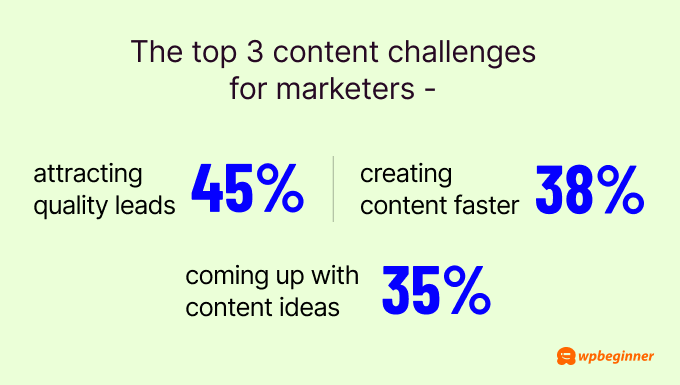
                      3. The top 3 content challenges for marketers are attracting quality leads (45%), creating content faster (38%), and coming up with content ideas (35%).

                      The top 3 content challenges for marketers are attracting quality leads (45%), creating content faster (38%), and coming up with content ideas (35%).

                      Thankfully, there are a lot of tools you can invest in to overcome these issues.

                      To attract quality leads, OptinMonster is your best option. It’s a tool for running marketing campaigns that can help you turn visitors into leads.

                      OptinMonster has smart features that show your popups at the right time, in the right place, and to the right people. This can help you get more leads from your content.

                      Exit intent example

                      For faster content creation and generating ideas, many people are also turning to artificial intelligence (AI).

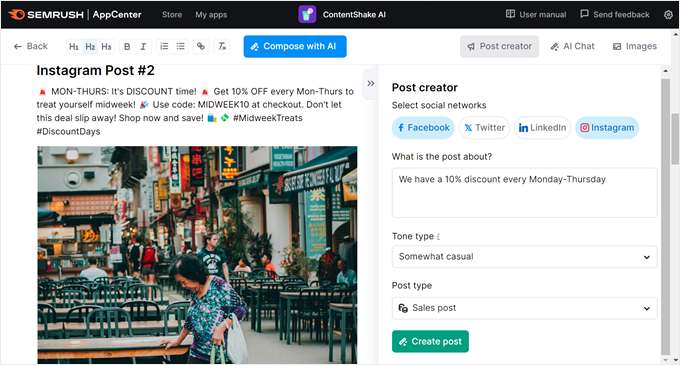
                      You can use platforms like ChatGPT, Gemini, or ContentShake AI to help you write content and come up with new ideas quickly.

                      ContentShake AI's post creator

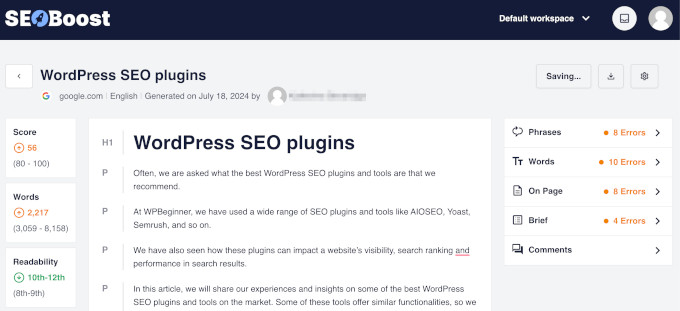
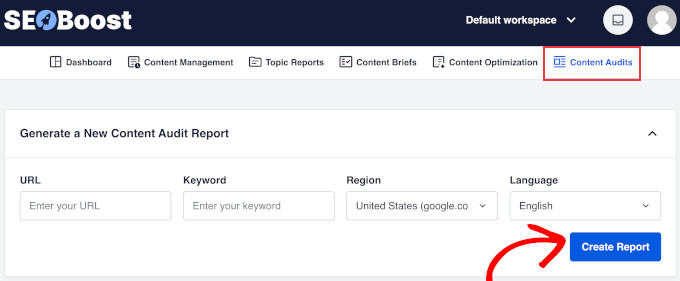
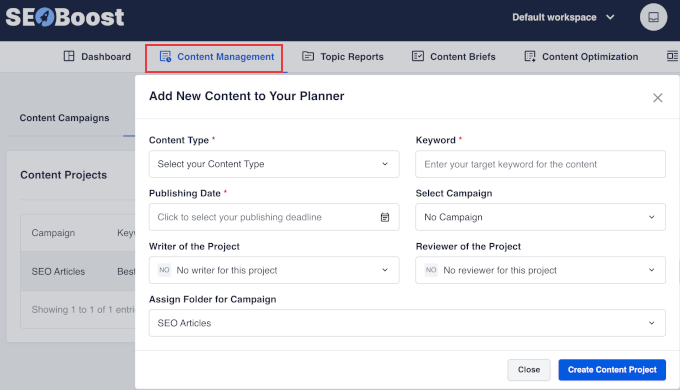
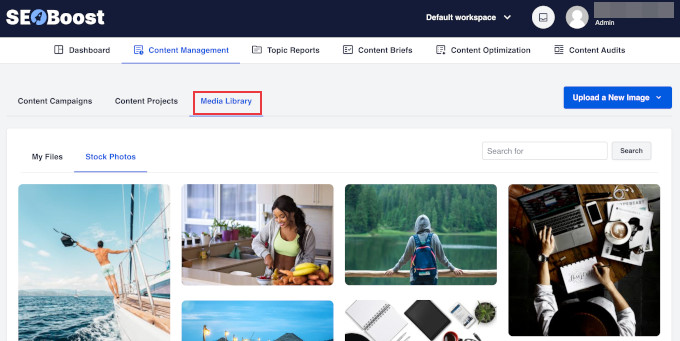
                      To speed up your content creation even more, consider using SEOBoost.

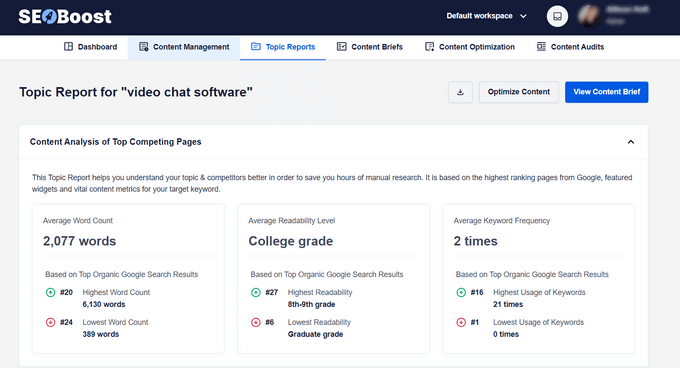
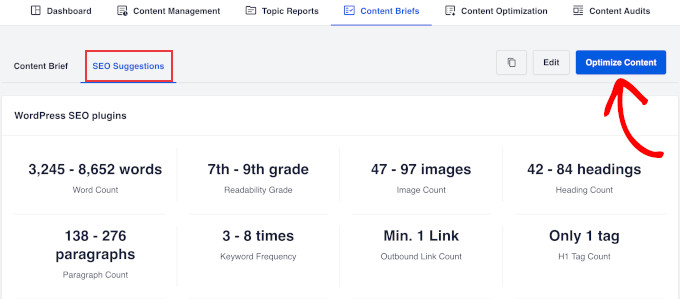
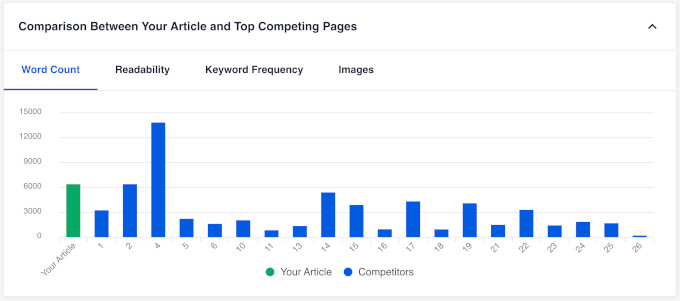
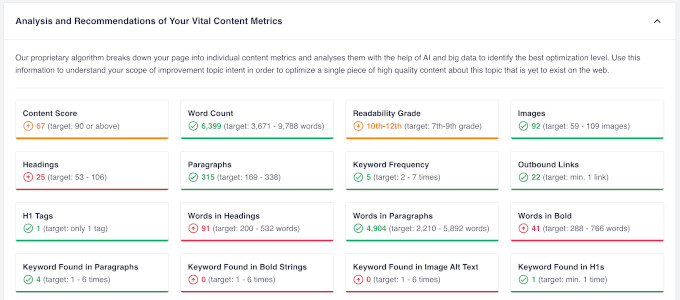
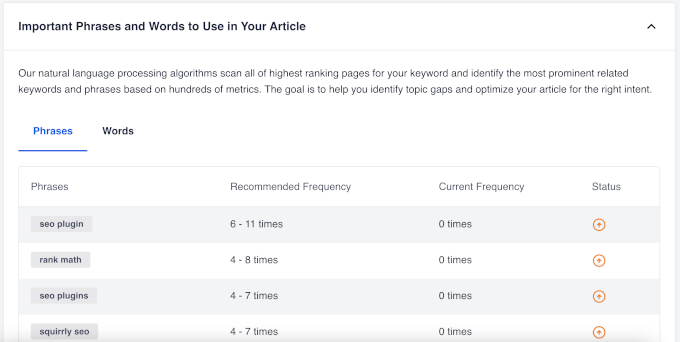
                      It’s a tool that helps you write SEO-friendly content all in one place. You can use it to optimize your existing content based on data-based suggestions and see what your competitors are doing on SERPs. This way, you’re not just guessing what content to create.

                      SEOBoost content optimization

                      4. The top three content performance tracking metrics are website traffic (83%), email engagement (81%), and website engagement (81%).

                      What’s interesting is that metrics focusing on quality and cost are lower on the list. For example, lead quality (44%) and the cost to acquire a lead, subscriber, and/or customer (37%) are near the bottom.

                      This might suggest that not many businesses are tracking their return on investment (ROI) closely. This gap offers a chance to outperform your competitors.

                      Focusing on lead quality and acquisition costs can help you identify which content truly drives value and attracts your ideal customers. 

                      If you want to learn more about how to set this up, check out our beginner’s guide to WordPress conversion tracking.

                      How to set up eCommerce tracking on a WooCommerce store

                      More General Content Marketing Statistics

                      • 90% of organizations have a content marketing strategy.
                      • The number one goal of content marketing is to raise brand awareness.
                      • 54% of companies measure their content marketing ROI.
                      • 51% of content consumption comes from organic search.
                      • 60% of organizations are focusing on owned media for their content marketing like blogs, newsletters, and websites.
                      • 57.2% of businesses report their content marketing strategy as mildly or very successful.
                      • The content marketing industry is expected to be worth $600 billion by the end of 2024.

                      Here are some of the latest marketing statistics that are changing how businesses create and share content.

                      5. 58% of US marketers said generative AI has boosted their content creation performance.

                      If you’re not using AI already, you’re missing out. In fact, the tools you use may already be using AI, but you’re just not taking advantage of it.

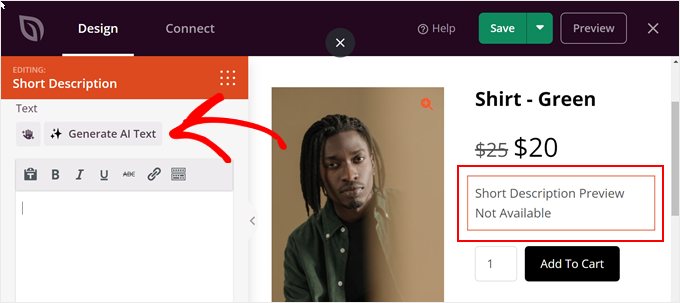
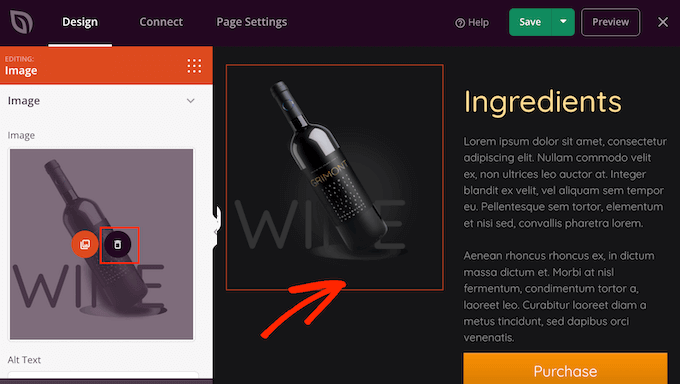
                      For example, SeedProd, a popular drag-and-drop page builder, now includes AI-powered image generation and content creation tools. These features can help you quickly create landing pages without starting from scratch.

                      Editing the product description in SeedProd with AI

                      According to HubSpot, marketers are using AI for various content types: 57% for newsletters and emails, 46% for text-based social media posts, 46% for video-based social media content, and 38% for long-form blog articles. 

                      If you want to learn more, check out our article on how to use AI to boost your marketing.

                      6. 63% of AI users say inaccuracies in AI content are a big challenge.

                      AI is a helper, not a replacement for human creativity and expertise. That’s why fact-checking your content and making it sound more like your personal voice is important, especially when so much online content is AI-generated.

                      Your own voice is also essential for establishing E-E-A-T (Experience, Expertise, Authoritativeness, and Trustworthiness), which Google uses to judge content quality.

                      For more information on how to use AI effectively without hurting your SEO, check out whether AI content is bad for SEO. It answers this question and shares tips on how to make AI-generated content more human-friendly.

                      7. Only 13% of marketers plan to decrease their investment in virtual reality (VR) and augmented reality (AR) in 2024, while 84% plan to invest the same amount or more.

                      A great example of AR in action is the IKEA App.

                      It uses AR to let customers see how furniture would look in their homes before buying. This kind of interactive content creates a unique and engaging content experience for users.

                      The IKEA app

                      Our overall recommendation is to only invest in VR and AR if it truly benefits your business and customers. While it’s an exciting content marketing trend, it’s not necessary for every company. Consider your audience, products, and goals before jumping in.

                      8. The average Google voice search result has 1,199 Facebook shares and 44 Tweets.

                      The average Google voice search result has 1,199 Facebook shares and 44 Tweets.

                      As we mentioned in our Google search statistics article, voice search is becoming more popular. And this trend highlights a key strategy for getting your content to rank well in these voice results.

                      Successful content marketing isn’t just about SEO anymore. You also need to focus on making your content shareable on social media platforms. This social proof seems to play a significant role in how Google ranks content for voice search.

                      To make it easier for your readers to share your content, you might want to add social share buttons to your WordPress site. We have a detailed guide on how to add social share buttons in WordPress that can help you set this up.

                      How to add social sharing buttons to WordPress

                      But don’t just rely on your readers to share your content. You can also promote it yourself and repurpose it across different platforms.

                      Oftentimes, users will skip clicking a link if it doesn’t catch their eye. By repurposing content, you can present your ideas in different formats that appeal to various preferences.

                      More Facts About Tech in Content Marketing

                      • 75.7% of marketers now use AI tools for work.
                      • 85.1% of marketers use AI for writing articles.
                      • 46% use AI for writing copy, and 41% use it for outlining.
                      • The top 3 uses of AI are brainstorming new topics (51%), researching headlines and keywords (45%), and writing drafts (45%).
                      • 40% of content marketers use AI to help create overall strategies, like making personas.
                      • Only 30.1% of marketers think AI will hurt search traffic in 5 years.
                      • 43.8% of businesses using AI report above-average success, compared to 48.6% of those not using AI.
                      • Only 12% of marketers include voice search in their content marketing strategy.

                      Social Media: The Heart of Content Marketing

                      Whether you hate it or love it, social media is a big part of content marketing. Check out these social media trends and stats that can help your business.

                      9. 71% of Gen Z-ers and 51% of Millennials like to find new products on social media.

                      71% of Gen Z-ers and 51% of Millennials like to find new products on social media.

                      These two demographics have a lot of purchasing power, so it’s important to reach them where they’re most active online.

                      However, does that mean you need to be on every social media platform? Not exactly. Just focus on the ones where your customers spend the most time.

                      For example, if you sell clothes, then Instagram might be great for you.

                      On the other hand, TikTok has become an Amazon-style social media marketplace where you can sell almost anything that catches people’s attention. Its shop feature allows users to buy products directly through the app, making it a powerful platform for businesses targeting younger audiences.

                      TikTok Shop landing page

                      10. 52% of people say funny content from brands is the most relatable on social media, followed by actual relatable content (38%).

                      Instead of constantly promoting your products, focus on creating content that resonates with your followers.

                      Take ClickUp and Duolingo as great examples. On TikTok and Instagram Reels, they share entertaining videos that people love watching.

                      Duolingo's Instagram post

                      Don’t worry – sharing funny or relatable content won’t harm your brand image if done thoughtfully. In fact, it can make your brand more likable and memorable.

                      The key is to ensure your content aligns with your brand values and meets your audience’s expectations.

                      11. 50% of Millennials and 38% of Gen X-ers say they have opened TikTok in the last three months.

                      Unlike popular belief, TikTok isn’t just for young folks. It’s now getting popular with older groups, too.

                      Because of this, even companies you wouldn’t expect now have a TikTok presence and are doing pretty well.

                      For example, the Nordic branch of Bain & Company, a consulting firm, has 11.4k followers and 83.6k likes on TikTok. This shows that any business can find success on the platform if they try.

                      The TikTok page of the Nordic branch of Bain and Company

                      They use it to build their brand by showing the people behind the company and sometimes find potential hires. They also don’t try to do every TikTok trend. Instead, they only join in when it makes sense, like main ‘point of view’ videos or year-end summaries.

                      12. 1 in 5 consumers see themselves as content creators.

                      In other words, anyone with a smartphone and social media account can be an influencer and affect others’ opinions about your brand.

                      If you want to encourage customers to promote your products or services, then starting an affiliate or referral program is an excellent option. It’s a win-win situation: you get more exposure, and your customers get rewarded for their loyalty.

                      Girlfriend Collective's referral program

                      That being said, it’s important to remember that this trend works both ways. Just as easily as someone can promote your brand, they can also share negative experiences. So, make sure you focus on developing a good product and providing excellent customer service.

                      More Social Media Content Marketing Facts

                      • Social media is the top channel used for content marketing distribution.
                      • 52% of businesses spend most of their content marketing budget on social media and community-building.
                      • Facebook is the most used social media platform by marketers (57%), followed by Instagram (55%), YouTube (52%), TikTok (42%), and X (39%).
                      • 82% of marketers reuse material across social media platforms.
                      • 27% of social media users have been active in an online community in the past three months.
                      • 24% of marketers say TikTok gives the highest ROI compared to other social media channels.
                      • 52% of US TikTok users find the ads on the platform fun and engaging.
                      • Millennials and Gen X-ers prefer to find new products on social media through ads, while Gen Z prefers short-form videos.
                      • More than 20% of social media users bought a product based on an influencer’s recommendation in the past three months.
                      • For Gen Z, influencer recommendations (9%) are more important than friends and family recommendations (7%) when making purchases.
                      • LinkedIn is used by 96% of B2B content marketers.
                      • 84% of marketers say LinkedIn performs best, followed by Facebook (29%) and YouTube (22%).

                      Video Marketing: The Hottest Content Marketing Format

                      Can you imagine a world without video content?

                      Since the birth of YouTube, videos have helped billions of users learn new skills, find entertainment, and connect with brands in ways they never could before.

                      Here are some trends and statistics that show why video marketing is so powerful.

                      13. 43% of marketers say short-form videos are the best-performing video format.

                      43% of marketers say short-form videos are the best-performing video format.

                      The popularity of short-form videos isn’t surprising, given the rise of platforms like TikTok, Instagram Reels, and YouTube Shorts.

                      The best part? These formats are accessible to everyone with a smartphone, making it easy for businesses of all sizes to create video content.

                      However, creating effective short-form videos does require some skill. A great ‘hook’ – an attention-grabbing opening that makes viewers want to keep watching – is a must. You also need to be able to shorten your message to just 15 to 60 seconds, depending on the platform.

                      14. 87% of marketers say adding a video to their sites has decreased their bounce rate.

                      Videos are great at explaining complex ideas quickly in an entertaining way, which may be why they’re so effective.

                      But before you start making and adding videos to every single page on your website, here’s a tip: don’t upload videos directly to your website. This can slow down your WordPress site, which can then lead to an even higher bounce rate.

                      Instead, use platforms like YouTube and then embed the videos using a tool like Smash Balloon. This approach can help your site load faster and provide a better user experience.

                      15. Articles with at least one video get 70% more organic traffic, but only 8% of blog posts actually include videos.

                      Articles with at least one video get 70% more organic traffic, but only 8% of blog posts actually include videos.

                      The benefits of adding video go beyond just improving website traffic. Many people are visual learners, so including videos in your content can improve your overall user experience. Videos can demonstrate processes step-by-step and engage viewers in ways that text alone can’t.

                      At WPBeginner, we use this approach in our content strategy. We create video tutorials to complement our written content, but we’re selective about which articles get a video.

                      WPBeginner video membership call to action

                      We prioritize tutorials that will actually benefit our subscribers if the content is explained more visually. This way, we don’t exhaust our resources by creating videos for every article. Plus, we ensure that the videos we make are truly valuable to our audience.

                      16. Viewers care 1.6 times more about content that relates to their passions than about high production quality.

                      You could spend a lot of money making a really fancy video, but if it doesn’t connect with what your viewers care about, it might not do well. But a simpler video that really speaks to your viewers’ interests could become much more popular.

                      This doesn’t mean you should ignore quality completely. Your videos still need to look and sound clear. But it does mean that you don’t need a huge budget to make videos that work well.

                      More Stats About Video Content Marketing

                      • Video is the top content type used for marketing worldwide.
                      • 45% of marketers say video is the best-performing content marketing format.
                      • Marketers say video helps customers understand their products better (97%) and that they see an increase in brand awareness through video marketing (95%).
                      • 87% of marketers link sales growth to video content.
                      • 65% of brands create 1-4 marketing videos a month, focusing more on quality than quantity.
                      • Half of millennials and Gen Z say they ‘don’t know how they’d get through life’ without video content.
                      • 56% of US consumers bought something based on a TikTok ad, and 36% said they were willing to.
                      • 53% of marketers are using short-form videos like TikToks, Instagram Reels, and YouTube Shorts.
                      • 63% of consumers say it’s more important for marketing videos to be authentic than polished.
                      • 36% of consumers want to learn about products through short-form videos.
                      • After short-form videos, the best-performing video types are company/product videos (33%), customer success stories (32%), product overviews (29%), and how-to videos (27%).

                      Blogging and SEO: The Foundations of Content Marketing

                      While new trends come and go, blogging and SEO remain two of the go-to tactics for content marketing. Here are some stats you should know to refine your strategy:

                      17. ‘Everything You Need to Know’ posts perform the best for page views and time spent on the page, but they make up only around 0.4% to 0.8% of all content online.

                      These comprehensive posts (also often called ultimate guides) cover a single topic in great detail. They usually include multiple sections, plenty of examples, and actionable tips. The fact that they perform so well shows that users value in-depth, thorough content.

                      However, we don’t recommend starting your blog content strategy with this type of post right away. Instead, begin with shorter, more specific pieces of content. Over time, you can combine these into a larger, comprehensive post.

                      For example, our ultimate guide to boosting WordPress speed and performance is one of our top-performing articles. It combines information from several smaller posts into one comprehensive resource and has been shared 28,000 times and counting.

                      WPBeginner's article on how to boost WordPress speed and performance

                      To find good topics for your blog, try long-tail keyword research using tools like LowFruits.

                      This can help you find keywords where the top-ranking sites have low domain authority, giving you a better chance to rank well.

                      LowFruits keyword finder tool

                      18. Brands that blog can grow their leads by up to 165% compared to only 73% for those that don’t blog.

                      Brands that blog can grow their leads by up to 165% compared to only 73% for those that don't blog.

                      This means your blog needs to do more than just provide information. It should also convert visitors into leads.

                      With OptinMonster, you can add inline, popup, or sidebar campaigns throughout your blog. These can help turn readers into subscribers or customers, no matter what stage they’re at when engaging with your content.

                      An example of a sidebar form, created using OptinMonster

                      Another great option is Beacon.

                      It lets you create lead magnets (like ebooks or checklists) that you can offer in your blog posts in exchange for contact information.

                      19. As AI impacts search results, B2B marketers are focusing on answering user intent (31%), publishing thought leadership content (27%), and creating conversational content (22%).

                      As AI impacts search results, B2B marketers are focusing on answering user intent (31%), publishing thought leadership content (27%), and creating conversational content (22%).

                      These days, it’s hard to tell if something was written by a human or an AI. That’s why Google now looks more for content that shows real knowledge and experience.

                      This means just using the right keywords isn’t enough anymore. You need to show that you really know what you’re talking about and add a personal touch to your writing.

                      For example, to help our readers, we have a guest post column where we invite experts to share their experiences in WordPress, digital marketing, eCommerce, and more. This way, we can give our readers trustworthy information from people who really know their stuff.

                      WPBeginner's expert column

                      20. People typically start losing interest in an article after reading for 7 minutes.

                      Whether you’re creating long or short content, one thing is clear: people’s attention spans have gotten shorter. This just means you need to write content that is easy to read and scan for users.

                      Our recommendation is to use a WordPress SEO plugin like All in One SEO (AIOSEO). This plugin can evaluate your article’s readability based on various criteria, like:

                      • How easy the language is to understand
                      • If you use headings to break up long chunks of text
                      • If there are images or videos to give your readers’ eyes a break
                      • If you use too much passive voice

                      Here’s what it looks like:

                      Page analysis tool

                      What’s more, AIOSEO has other useful features to optimize your site, like a monitor for Google algorithm updates so that you can see how those changes affect your rankings.

                      You can learn more about the plugin in our AIOSEO review.

                      • 92% of marketers say they will keep or spend more on blogging, showing how popular this strategy still is.
                      • 59% of B2C marketers say high-quality content is the most effective SEO strategy.
                      • 83% of marketers say it’s better to make fewer posts so long as they’re high quality.
                      • 70% of people prefer learning from blogs to regular ads.
                      • 85.19% of all blog visitors come from search engines.
                      • On average, blogs have a bounce rate of 82.4%.
                      • ‘Mistakes To Avoid’ articles get shared the most.
                      • ‘How To’ and comparison articles receive the most backlinks.
                      • High-performing blogs publish at least one article a day.
                      • Articles with 7 or more images get 555% more backlinks and 259% more unique page views than those with no images.
                      • Long-form content of between 3000–10,000 words gets shared more than short-form content.
                      • There’s no relationship between Flesch Reading Ease scores and ranking positions on search engines.

                      Digital public relations (PR) is often seen as the underdog of content marketing. When done right, it can bring a lot of visibility to your brand and increase your brand’s industry authority. But it can be a lot of work, too.

                      Let’s look at some stats about this content marketing trend:

                      Organic link generation means creating content that naturally attracts backlinks without directly asking for them. This could be in-depth guides, original research, or unique insights that other websites want to reference.

                      This approach can be more effective because the links are earned based on the content’s value, not through negotiation. It also boosts your perceived expertise, as others in your industry start to see you as a go-to source of information.

                      Semrush is a great example of this. The company often does research and surveys into the marketing industry and shares them for free in exchange for the user’s information.

                      Semrush's landing page for its AI research report

                      Interactive content is typically free online tools that users can use for themselves. These include things like calculators, quizzes, or fun games.

                      These interactive elements are considered ‘link magnets’ because they provide immediate value to users. Other websites often link to them as helpful resources for their own audiences.

                      To take part in this trend, think about what kind of online tool your audience would find useful. Could you create a calculator related to your industry? Or perhaps a quiz that helps users understand their needs better?

                      For example, we created our own free keyword research tool because a lot of similar tools are either expensive or hard to use. Since a lot of our readers are small business owners, we wanted to give them a tool that can help them generate keyword ideas without any cost.

                      Example of using WPBeginner Keyword Generator
                      • 87% of marketers will spend the same amount or more on case studies this year.
                      • 88% of marketers will spend the same amount or more on infographics this year.
                      • 26% of marketers use case studies as part of their content marketing strategy.
                      • The top 3 performing B2B content types are case studies/customer stories, videos, and thought leadership eBooks/white papers.
                      • Articles with data tend to perform better, with 5% of high-performing articles containing data studies compared to 2% of low-performing ones.
                      • 63% of marketers say backlinking and link building are their most effective SEO strategies.

                      Podcasts: A Passing Trend or Here to Stay?

                      Podcasts might be new, but they’re already big in the content world. Let’s see why this audio format has become so popular.

                      23. 42% of Americans ages 12 and older have listened to a podcast in the last month.

                      If you want to start a podcast for your business, ask yourself: Do you have things to talk about regularly? Can you make new episodes often? Does your audience like listening to content? Do you have time to make good-quality audio?

                      If you need some inspiration, you can check out General Electric’s ‘LifeAfter/The Message’ podcast. This science fiction podcast tells a story that incorporates real technology developed by the company.

                      General Electric's podcast series

                      This way, the company can showcase its innovations in an entertaining format, attracting listeners who might not typically engage with branded content.

                      24. 46% of people who listen to podcasts monthly say the ads aren’t annoying, which is 23% higher than for YouTube ads.

                      46% of people who listen to podcasts monthly say the ads aren't annoying, which is 23% higher than for YouTube ads.

                      People might not mind podcast ads because they often sound more personal. Hosts usually read the ads in their own style, making them feel more like friendly suggestions.

                      For businesses, this means podcast ads can be a great way to reach people. And for podcast creators, it means you can make money without bothering your listeners too much.

                      That being said, if you are a business owner, we suggest looking for podcasts that talk to the same people you want to reach. On the flip side, content creators should only promote things they really like to keep their listeners’ trust.

                      More Podcast Content Statistics

                      • 80% of podcast listeners hear all or nearly all of each episode.
                      • Spotify is the top app for podcasts (35.8%), with Apple Podcasts coming in second (33.8%).
                      • The most liked podcast types are comedy, news, and society and culture.
                      • 49% enjoy podcasts while doing housework.
                      • 42% listen to podcasts on their way to work.
                      • 29% of listeners tune in to podcasts while exercising.
                      • People find new podcasts mostly through app directories (40%), asking friends with similar tastes (18.3%), or on social media (15.2%).
                      • For tech-focused audiences, a large majority (73%) of engineers listen to work-related podcasts every week.

                      The Business Side of Content Marketing

                      As with anything in business, there are costs and operational aspects to consider when it comes to content marketing. Here are some key trends that can help you make smart decisions about your content strategy.

                      25. For every dollar spent on content marketing, businesses earn an average of $2.77, which is a 177% profit.

                      For every dollar spent on content marketing, businesses earn an average of

                      While this return on investment (ROI) sounds impressive, it’s important to remember that results can vary.

                      Some campaigns might cost more or take longer to show results. You will need to factor in all costs, including time spent creating content, any tools or platforms you use, and promotional expenses.

                      26. 80% of very successful content marketers have a documented content marketing strategy.

                      Having a written plan helps align your team and set clear goals. It doesn’t need to be long or complicated, but it should include some key elements:

                      • Your target audience
                      • Content goals (like increasing traffic or generating leads)
                      • Types of content you’ll create
                      • How often you’ll publish
                      • How you’ll measure success

                      The document doesn’t need to be long. Even a simple one-page document can make a big difference in keeping your content efforts focused and effective.

                      If you want to come up with a content strategy for your website, then see how to create an effective content plan in WordPress.

                      27. 48% of content marketing is outsourced to agencies or third-party companies, with graphic design (47%), video design or animation (43%), and copywriting (37%) being the top outsourced tasks.

                      48% of content marketing is outsourced to agencies or third-party companies, with graphic design (47%), video design or animation (43%), and copywriting (37%) being the top outsourced tasks.

                      This shows that you don’t have to do everything yourself if you’re not good at it. You can get help from experts. These skills need some know-how because, without good quality, it’s hard to make content that works well.

                      While these are the most common tasks businesses get help with, there are many other parts of content marketing that can be outsourced.

                      For example, at WPBeginner, we offer WordPress SEO services that can help with creating content. With our professional services, you can improve your site’s visibility, build your authority, and, most importantly, save yourself a lot of time.

                      If you want to learn more about how we can help with your content marketing, you can book a free consultation with us today. 

                      28. 49% of Gen Z consumers stop supporting brands that don’t match their values.

                      Some companies have done well by focusing on their values. But others have lost a lot by taking sides on issues.

                      We suggest you find out what’s important to your customers. And if you want to talk about your values, show them through actions, not just words.

                      For example, Patagonia, an outdoor clothing brand, demonstrates its stance on sustainability in several ways. First, they offer to repair or replace any product that doesn’t work well. They also have a store where people can buy and sell used Patagonia gear.

                      These actions show that the brand is committed to reducing waste and extending the life of its products.

                      Patagonia's actions on sustainability
                      • 87% of B2B marketers focus on giving useful information to their audience rather than just promoting their products.
                      • Content marketing costs 62% less to start and keep going compared to other marketing types.
                      • Businesses that spend under $1,000 on content marketing tend to have the least success.
                      • The top concerns for B2C marketers are search engine algorithm changes (64%), social media algorithm changes (53%), and handling data (48%).
                      • To check if content marketing is working, most teams use Google Analytics (64%), social media tools (44%), and SEO tools (34%).
                      • 54% of younger Millennials think brands should talk about social and political issues related to diversity.
                      • 70% of Gen Z trust brands more if they show diversity in their ads.

                      Maybe you’re considering a career in content marketing but don’t know where to start. If so, understanding the latest trends in content marketing careers can help you make better decisions about your professional future.

                      29. Content marketers in the United States earn an average of $112,000 per year.

                      For most states in the country, that’s a healthy sum.

                      This high average salary reflects the growing importance of content marketing in digital strategies. Companies are willing to pay well for professionals who can create engaging content that drives business results.

                      30. The top 3 tech skills for non-senior content marketing positions are writing (61%), video (40%), and analytics (23%).

                      The top 3 tech skills for non-senior content marketing positions are writing (61%), video (40%), and analytics (23%).

                      These are the foundational skills for success in content marketing.

                      Just think about it. For social media alone, you need to be good at writing scripts for your short-form videos, creating engaging videos, and understanding metrics to measure your performance.

                      For writing, we suggest getting used to using AI for writing because it’s becoming a standard tool in the industry. Our guide on how to use AI to generate content can help you get started and make your writing process more efficient.

                      Generate AI content in playground mode

                      As for videos, tools like Camtasia can help you learn video editing basics without breaking the bank. And don’t worry about expensive equipment. Recording with your phone is often enough to create high-quality content for most platforms.

                      Knowing how to use analytics is important, too, because companies want to know if their content is working well. Using tools like Google Analytics to track website performance, Google Search Console for SEO insights, and Buffer for social media metrics can help you stand out when looking for a job.

                      Google search console
                    • WordPress News Aug 2024: AI Features, New Default Theme & More

                      WordPress News Aug 2024: AI Features, New Default Theme & More

                      In August, we witnessed exciting developments in the WordPress world. From powerful new AI tools to the preview of the Twenty Twenty-Five theme, there’s a lot to explore.

                      In this issue, we will cover the latest features from popular WordPress plugins, plus a sneak peek at the new default WordPress theme. We also look at industry changes, including Instagram’s API update and more.

                      Now, let’s take a look at the key highlights from this month’s WordPress news.

                      WPBeginner Spotlight is our monthly series where we share the latest behind-the-scenes updates from the WordPress community.

                      If you have any major WordPress news you’d like us to feature in next month’s edition—whether it’s a brand acquisition, merger, or the launch of a significant new feature—please reach out to us through our contact form.

                      WPBeginner Spotlight 03 - Covering AI features, plugin updates, and other news

                      MonsterInsights Launches Conversations AI: A Game-Changer in Website Analytics and Insights

                      MonsterInsights has introduced Conversations AI, a new feature designed to make website analytics more interactive and user-friendly.

                      This tool aims to simplify the process of understanding website traffic data. Instead of navigating through complex analytics reports, users can just ask specific questions, and the AI chatbot will respond.

                      For instance, you could ask, “Which pages had the most traffic last week?” or “How did my latest blog post perform?” The AI responds with clear, actionable information, making it easier for users to gain insights without needing advanced analytics skills.

                      MonsterInsights conversational AI preview

                      This feature could be particularly useful for site owners who need straightforward answers about their website’s traffic without digging into detailed reports.

                      In a post on X, Syed Balkhi, CEO of MonsterInsights and WPBeginner, also mentioned that it could be helpful for users who are dreading the migration to the new Google Analytics 4 (GA4).

                      This feature is available for all MonsterInsights Pro users. Users of the free MonsterInsights lite plugin will need to upgrade to a paid plan to unlock it.

                      First Look at Twenty Twenty-Five: The Upcoming New Default Theme

                      It’s a long-standing tradition in the WordPress community to release a new default theme each year, typically named after the year. Following this pattern, WordPress is set to introduce Twenty Twenty-Five as the default theme for the upcoming WordPress 6.7 release.

                      The theme’s design philosophy is based on the idea that “Simple things should be easy and intuitive, and complex things possible.”

                      It features a simple, minimalistic design foundation, which is capable of more complex layouts and design choices as needed.

                      Twenty Twenty-Five patterns

                      It will include several style variations, beautiful patterns, and ready-to-use templates, allowing users to customize it for different website needs.

                      One distinctive feature of Twenty Twenty-Five is its focus on the blog layout as the default view, setting it apart from recent default themes.

                      Twenty Twenty-Five personal blog view

                      This design choice highlights the theme’s emphasis on content, making it ideal for bloggers while still offering the flexibility needed for other website types.

                      Twenty Twenty-Five is designed with performance and accessibility in mind. It performs well across various devices and is easy for all users to navigate. Customization is also a key focus, allowing users to adjust colors, fonts, and layouts without needing coding knowledge.

                      As we approach the release of WordPress 6.7, Twenty Twenty-Five may change a bit from its earlier preview. However, the main design scheme will remain the same.

                      WPForms Introduces Conditional Logic for Layout Fields

                      WPForms has introduced conditional logic for layout fields. It enables users to apply smart conditional logic across entire sections of a form rather than just individual fields.

                      Adding conditional logic to a layout field in WPForms

                      This makes form creation faster and more intuitive, especially for complex forms that require dynamic content based on user input.

                      The layout field was already known for its flexibility in arranging form elements in predefined columns. Now, it also supports conditional logic for entire blocks of fields within those layouts.

                      This means you can easily create forms that adapt in real-time, showing or hiding sections based on user selections—all with just a few clicks.

                      Conditional logic demo

                      In addition to this, WPForms has added a single-column layout option. This gives users more control over their form designs while maintaining the ease of use that WPForms is known for.

                      With this update, WPForms has also strengthened its anti-spam measures, ensuring that forms remain secure and free from unwanted submissions.

                      Instagram Shutting Down Basic Display API: What It Means for Your Website

                      Instagram has decided to shut down its Basic Display API in favor of the newer Instagram Graph API. The API was used by several WordPress social media plugins to fetch and display Instagram feeds.

                      Instagram Feed Demo

                      This means that if your website was connected to Instagram using the Basic Display API, it will stop displaying Instagram feeds in the next quarter (around October-November 2024).

                      The folks at Smash Balloon, makers of the popular Instagram feed plugin, announced their plans for the upcoming changes in a recent blog post.

                      Craig Schlegel, Smash Balloon’s general manager, assured users that their feeds will continue working until the shutdown takes effect. He urged users to switch by reconnecting the plugin to the new API before the October-November deadline.

                      After the deadline, if users don’t make the switch, the plugin will continue showing the last cached version of their feed. However, it will be unable to display new content.

                      If your website relies on Instagram content, taking action before the shutdown is crucial to ensure your Instagram feed is working.

                      Formidable Forms Introduces AI Form Builder

                      Formidable Forms has launched a new AI Form Builder that makes it easy to create forms by using artificial intelligence. This tool aims to help users generate complex forms quickly and efficiently, even without extensive technical knowledge.

                      Users can type details about the form they want to make in plain language, and the AI will generate the required form fields.

                      Creating a form using AI

                      The AI add-on streamlines the process by suggesting form fields and layouts based on user goals.

                      Formidable Forms is known for its advanced WordPress form builder. Users making complex forms, such as calculators or directories, may find the AI form builder helpful.

                      The AI Form Builder add-on requires a Formidable Forms Pro ‘Business’ plan. People using the free version or Basic / Plus plans will need to upgrade to access the add-on.

                      New WPCode Release: More Conditional Logic and Auto-Insert Locations

                      WPCode has released a significant update that introduces extended conditional logic and more auto-insert location options for WordPress users.

                      These new features aim to give users more control over their code snippets by providing them with more dynamic ways to insert them.

                      There are two new conditional logic rules in addition to the ones that the plugin already had:

                      • Show/Hide code snippet by author
                      • Show/Hide code snippet by page template
                      Conditional logic rules

                      This is particularly useful for users who need to tailor their site’s behavior based on specific conditions or user actions.

                      In addition to the improved conditional logic, WPCode has expanded the auto-insert location options.

                      Auto insert options in WPCode

                      Users can now insert code snippets in more specific areas of their site, such as in the middle of the content, after a certain number of words, or after a specific % of the content.

                      According to the WPCode team, these new locations will allow users to add code for various use cases, such as Google AdSense code, special offer banners, related posts, and more.

                      Hostinger Celebrated the 3 Million Customers Milestone

                      Hostinger has reached a significant milestone, celebrating 3 million customers worldwide. This achievement marks a major moment in the company’s growth.

                      Reflecting on this achievement, Daugirdas Jankus, CEO of Hostinger, said, “A global trend where more people are interested in starting their own businesses and seeking greater flexibility and independence is becoming more visible.”

                      Hostinger celebrated 3 million customers milestone

                      Since its beginnings, Hostinger has focused on offering high-quality hosting solutions that cater to a diverse range of users. These include everyone from beginners creating their first WordPress website to established businesses looking to scale their online presence.

                      The company credits its success to ongoing innovation, great customer support, and a user-friendly platform for building and managing websites.

                      As part of this milestone celebration, Hostinger has shared stories of its journey and the various improvements it has made over the years. These include the expansion of its global data centers and the enhancement of its customer service offerings.

                      Related: Hostinger review (Pros and cons with performance tests)

                      In Other News:

                      • Charitable, WPForms, and Pressable have all launched redesigned websites, focusing on improved user experience and modern aesthetics.
                      • A minor update to WordPress 6.6, version 6.6.1, has been released to address several bugs and improve overall stability. Users are encouraged to update their sites to take advantage of these fixes.
                      • Sugar Calendar adds support for Elementor widgets, making it easy to use the powerful event calendar plugin with Elementor page builder. Try the free version today.
                      • WordPress.com has partnered with Perplexity AI, which enables WordPress.com sites to appear in the Perplexity answer engine’s ‘discover more’ feature. Users can also opt out if they don’t want to share their content.
                      • WordPress 6.7 will ship with automatic HEIC to JPEG conversion.
                      • MemberPress, the leading WordPress membership and LMS plugin, has added Assignment and Gradebook features for MemberPress Courses. This is going to be a game-changer for the LMS market.
                      • WordCamp US is all set and ready to go! Mark your calendars for September 17-20, 2024. If you haven’t secured your spot yet, tickets are still available. Grab yours before they’re gone!
                      • Uncanny Automator, the popular no-code automation tool for WordPress, added multiple new integrations for FluentBooking, Keap, and Ontraport, along with adding a new feature called Token Loop. This is one of the MUST-HAVE plugins to help you save time and costs. It’s basically Zapier for WordPress without the high costs. Give the free version a try.
                      • WordPress.com launched Write Brief, an AI-powered writing assistant.
                      • WordPress.org added support for Offline Mode and PWA for WordPress Playground.
                    • How to Increase Leads by 50% With Interactive Lead Generation

                      How to Increase Leads by 50% With Interactive Lead Generation

                      Let’s face it: a generic contact form won’t be the most exciting thing your users see today. People crave engaging, personalized experiences.

                      That’s where interactive lead generation comes in. It can transform how you connect with your audience and build valuable relationships.

                      Think about it. Would you rather read a wall of text or take a fun quiz that reveals something about yourself? Interactive content grabs attention, sparks curiosity, and encourages people to stick around. And when people are engaged, they’re far more likely to become leads.

                      Let’s dive into my favorite interactive lead-generation techniques that will help you build a loyal following who can’t wait to see what you do next.

                      Note: This is a guest post by Thomas Griffin, the co-founder of OptinMonster, the #1 conversion rate optimization tool. This is an expert column where we invite a WordPress expert to share their experiences with our readers.

                      How to Increase Leads With Interactive Lead Generation

                      Depending on your niche and the strategies you use, you can expect your conversion rates to increase by 50-300% when using interactive lead generation techniques like these:

                      1. Quizzes Are Lead Generation Goldmines
                      2. The Power of Interactive Calculators
                      3. Engage and Learn Using Polls and Surveys
                      4. Use Gamification to Turn Visitors Into Loyal Fans
                      5. Capture Attention Using Lightbox Popups
                      6. Grow Your Email List by Running Social Media Contests
                      7. Make Forms Simpler Using Progressive Profiling
                      8. Webinars Are High-Impact Lead Generators
                      9. Make Data Irresistible Using Interactive Infographics
                      10. Let Users Download Interactive Lead Magnets
                      11. Generate Leads 24/7 Using Live Chat and Chatbots

                      1. Quizzes Are Lead Generation Goldmines

                      Have you seen those BuzzFeed quizzes that everyone loves to share? There’s a reason they go viral – people can’t resist finding out more about themselves. Quizzes engage users because they tap into their natural curiosity.

                      When given the choice of completing a form or a fun quiz that reveals something about themselves, they’ll pick the quiz every time. And once they are hooked, they will be far more willing to hand over their email address for the big reveal.

                      The numbers don’t lie! Well-crafted quizzes can achieve lead generation rates as high as 50%. That’s because they transform passive visitors into active participants who are eager to learn.

                      I’ve found that the key is to create a quiz that aligns with your industry and audience’s interests. Here are a few ideas to get you started:

                      • Personality quizzes uncover hidden traits or preferences, such as ‘What’s Your Marketing Style?’ or ‘Which Literary Character Are You?’.
                      • Trivia quizzes test knowledge and spark friendly competition, for example, ‘Are You a WordPress Guru?’ or ‘Do You Know Your Blog History Trivia?’
                      • Survey quizzes gather opinions and preferences while providing value, like ‘What’s Your Ideal Workout Routine?’ followed by personalized fitness tips.
                      • Compatibility quizzes help users find the perfect product or service match, such as ‘Which Productivity Strategy Is Right For You?’

                      For example, this website offers a quiz that helps online business owners discover the type of online course that best fits their needs. After completing the quiz, they will receive tips in their inbox about the best way to build a course in that format.

                      Create an Interactive Quiz

                      2. The Power of Interactive Calculators

                      We make decisions every day, but some choices feel bigger than others.

                      Will this investment really pay off? How much could I save with a different approach? These are the questions that keep your potential customers up at night.

                      Interactive online calculators are so effective because they transform uncertainty into concrete numbers, giving your audience the confidence to take the next step.

                      Think about it. Instead of just reading about the potential benefits of your product or service, users can input their own information and get personalized results. Suddenly, those benefits become tangible, placing 40% subscription or conversion rates within reach.

                      But you should understand I’m not talking about generic calculators. You will need to create custom interactive calculators that directly address a key concern for your target audience.

                      Let’s say you sell eco-friendly cleaning products. A ‘Cost Savings Calculator’ that compares the long-term costs of traditional vs. eco-friendly options would really resonate with budget-conscious consumers.

                      Here are some more calculator ideas to inspire you:

                      • Financial services businesses can offer retirement planning calculators, mortgage payment estimators, and investment return calculators.
                      • Healthcare websites could use symptom checkers, healthy habit trackers, and cost-of-care estimators.
                      • Marketing and business sites might create website traffic calculators, social media ROI calculators, or freelance rate estimators.
                      car payments lead generation popup

                      By providing valuable tools that simplify decision-making, you’re not just generating leads – you’re building trust and positioning your brand as a helpful resource. And that’s a recipe for long-term success!

                      3. Engage and Learn Using Polls and Surveys

                      Many of my clients complain that it always feels like they’re talking at their audience instead of with them. Polls and surveys are my favorite weapons for turning a one-sided speech into a genuine conversation.

                      People love to share their opinions, especially when they know their feedback is valued. By adding polls and surveys to your website, you are not just collecting data. You are also showing your audience that you care about what they think.

                      Here’s where it gets really powerful. The insights you get from polls and surveys can give a huge boost to your marketing strategy. You can:

                      • Understand content preferences by asking what topics your audience wants more of, which questions they need to be answered, or what formats they prefer.
                      • Improve the user experience by asking for feedback on your website’s design, navigation, or checkout process to identify areas for improvement.
                      • Refine your products and services by discovering what your audience loves, what they wish was different, and which new products or services they’d be excited about.
                      Customer feedback poll example

                      The best thing is that you don’t need to be a tech genius to create engaging polls and surveys on your WordPress site. There are plenty of user-friendly WordPress poll plugins like UserFeedback that can have you up and running in minutes without slowing down your website.

                      4. Use Gamification to Turn Visitors Into Loyal Fans

                      Unless you inject a little fun into your lead generation process, filling out forms can feel like a chore. Gamification makes the way people interact with your brand more exciting and engaging.

                      You may be familiar with the addiction to getting the highest score on arcade games. Gamifying your website taps into that same psychology, making people want to engage with you.

                      Game-like elements on your website will encourage visitors to take action and provide their email addresses. They will also create a positive association with your brand, so people will spend more time on your site and are more likely to return.

                      Here are some of my favorite ways of gamifying landing pages:

                      • Offer instant discounts, freebies, or exclusive content rewards on a spin-to-win wheel that requires an email address to enter.
                      • Hold a virtual scavenger hunt where you hide clues or challenges throughout your website that lead to a special offer or reward, encouraging deeper engagement.
                      • Add a customer loyalty program that awards points for actions like signing up for your email list, making a purchase, or referring a friend.
                      Use Gamification Elements Like Spin-to-Win

                      Don’t forget that for gamification to be successful, you need to make it relevant to your audience and your brand. The goal isn’t just to give things away. It’s to create a memorable, enjoyable experience that deepens the connection with your audience.

                      5. Capture Attention Using Lightbox Popups

                      As I said in an earlier guest post, popups are still relevant and can be an incredibly effective way to interact with your website visitors. Lightbox popups are even better.

                      Think of lightbox popups like a well-timed spotlight on a stage. They gracefully dim the background content to focus your visitor’s attention on a specific message or offer. Plus, they can be animated and eye-catching, making them impossible to ignore.

                      While the average popup might have a conversion rate between 2-5%, some of my best clients have seen incredible results with lightbox popups, boosting conversions by a staggering 600%.

                      Here are some of the best ways to use them:

                      • Build your email list by offering a tempting lead magnet, exclusive content, or a special discount in exchange for an email address.
                      • Grow your social media following by encouraging visitors to connect with you on Facebook, Instagram, or other platforms with a well-placed lightbox.
                      • Boost sales with urgency using a countdown timer to create a sense of scarcity and encourage quick action.
                      Use Interactive Lightbox Popups

                      The golden rule of lightbox popups is clarity. Make sure your popup looks great and has one clear call to action. Remember, the goal is to enhance the user experience, not distract from it.

                      To learn how to get even more mileage out of your popups, you may want to see my guest post on how to use the psychology of popups to boost signups by 250%.

                      6. Grow Your Email List by Running Social Media Contests

                      Everyone loves a good giveaway! Social media contests are a fun, effective way to generate excitement, attract new followers, and grow your email list.

                      The beauty of a well-run contest is that it’s a win-win. Your audience gets a chance to win something awesome, and you get valuable leads and increased visibility for your brand.

                      Creating a giveaway is easy because the best WordPress giveaway and contest plugins, like RafflePress, offer all the features you need to run a social media contest that grows your email list.

                      Besides just asking for an email address, I prefer to give contestants multiple ways to enter. For example, you could let them like your Facebook page, follow you on X (Twitter), or visit your YouTube channel.

                      RafflePress Actions to Get More Subscribers

                      You can assign points to each method, and the more points they earn, the greater the chance that they’ll win a prize.

                      7. Make Forms Simpler Using Progressive Profiling

                      Let’s be honest: no one wakes up in the morning hoping they get to fill out an online form. And the longer or more complicated the form, the more likely people will abandon it altogether.

                      So, how do you collect those leads without scaring people away with a never-ending list of questions? The answer is to create interactive forms using progressive profiling.

                      Progressive profiling is a smarter, more user-friendly approach to form design because it takes things one step at a time. Instead of asking all your questions right away, you gather information gradually, asking just a few relevant questions at each interaction.

                      Use Progressive Profiling in Lead Capture Forms

                      Think of it like a friendly conversation, not a job interview.

                      Some other small ways I like to improve my own lead capture forms are to display a progress bar to keep users motivated and use dynamic form fields that change based on user input.

                      This adds a personal touch and lets the user skip irrelevant questions. By keeping the process simple, your submission rates will skyrocket.

                      For an expert guide on creating the perfect form, you can take a close look at Jared Atchison’s guest post on creating more interactive forms.

                      8. Webinars Are High-Impact Lead Generators

                      If you want to connect with your audience on a deeper level and generate a flood of high-quality leads, then I recommend holding webinars. In fact, I get my team to run a webinar every week, and studies show that 95% of marketers hold webinars.

                      A webinar is an online event where you can share your knowledge, answer questions in real time, and build a stronger connection with your audience. This lets you become the go-to expert in your field from the comfort of your own computer.

                      Why are webinars so effective?

                      • They attract an engaged audience because people who sign up for your webinar are already interested in what you have to offer, making them prime candidates for becoming loyal customers.
                      • They showcase your expertise by allowing you to share your knowledge, demonstrate your skills, and establish yourself as a thought leader.
                      • They build trust and credibility through live interaction and allowing participants to ask questions.

                      Make sure you choose a compelling topic that answers your audience’s burning questions and leaves them wanting more.

                      Hold Webinars

                      There are excellent webinar software platforms available that offer the functionality you need, such as registration, lead capture, and engagement features like live Q&As.

                      To get started, take a look at this guide on how to host a virtual event in WordPress.

                      9. Make Data Irresistible Using Interactive Infographics

                      We all know that visuals are powerful, but smart marketers are taking things a step further with interactive infographics.

                      Would you rather passively look at a static image or actively explore data, uncover hidden insights, and control your own learning experience? Interactive infographics transform data from something you simply see to something you experience.

                      For example, on the OptinMonster website, users can interact with a graphic by moving a slider. This lets them explore the difference our product can make to their conversion rates.

                      Interactive Infographic With Slider

                      Here are some more ways you can use interactive elements to improve your infographics:

                      • Capture attention using animations, hover effects, and clickable elements that draw the eye and invite exploration.
                      • Simplify complex information by breaking down data into manageable chunks that users can explore at their own pace, improving comprehension and recall.
                      • Tell a story using interactive timelines, maps, or diagrams to create a narrative flow that keeps your audience engaged.

                      Just like Apple uses interactive infographics to showcase its products, you can use them to captivate your audience, enhance your brand message, and drive conversions.

                      Interactive Infographic on Apple's Website

                      You can learn how by following this guide on how to create interactive images in WordPress.

                      10. Let Users Download Interactive Lead Magnets

                      Lead magnets are valuable freebies that you offer in exchange for an email address. They are one of the most popular ways to grow your list.

                      But with every website out there offering downloadable PDFs, how do you make your lead magnets stand out from the crowd?

                      The answer is to make them interactive. Interactive lead magnets transform the way people learn and engage with your brand. Instead of passively reading eBooks, your users can actively participate in an experience that delivers personalized insights.

                      We’ve already explored the power of quizzes, calculators, and polls as lead magnets. But here are a few more ideas to spark your creativity:

                      • Interactive buyer’s guides help your audience make informed decisions with clickable elements that reveal product comparisons, feature highlights, and customer reviews.
                      • Product demos and virtual tours give potential customers a hands-on experience with your product through interactive simulations, 360-degree views, and clickable hotspots.
                      • Mini online courses deliver valuable knowledge in bite-sized, interactive lessons, complete with quizzes, progress tracking, and gamified elements.
                      • Behind-the-scenes experiences offer exclusive access to your creative process, company culture, or product development journey through interactive videos, timelines, or tours.
                      Offer Interactive Lead Magnets

                      This is easier than you might think. Specialized lead magnet tools like Beacon or Thrive Leads can integrate with your email marketing service for easy delivery.

                    • 12 High-Converting Landing Page Examples That Actually Work

                      12 High-Converting Landing Page Examples That Actually Work

                      You know your product is great, but for some reason, your landing page just isn’t converting visitors into customers. It’s frustrating, isn’t it?

                      I’ve designed and analyzed tons of landing pages across my career. And I’ve seen first-hand how many website owners and marketers struggle to actually convert their users.

                      But what if I told you that with a few strategic tweaks, you could transform that underperforming landing page into a conversion powerhouse? That’s exactly what we’re going to explore today.

                      Note: This is a guest post by John Turner, the co-founder of SeedProd, a popular drag-and-drop page builder plugin for WordPress. This is an expert column where we invite a WordPress expert to share their experiences with our readers.

                      High-Converting Landing Page Examples That Actually Work

                      There’s no better way to learn than from real-world examples, and I’ve found some true gems for you. Here’s a list of landing page examples we are going to look at today:

                      1. WPForms
                      2. Hostinger
                      3. Surfshark
                      4. Trainwell
                      5. PushEngage
                      6. Scentbird
                      7. OptinMonster
                      8. Bellana
                      9. All in One SEO (AIOSEO)
                      10. HelloFresh
                      11. Lead Guru
                      12. Visser Labs

                      1. WPForms

                      If you are looking to create a Google ad landing page, then I’ve found a great example to take inspiration from.

                      WPForms ran a PPC ad campaign for the search keyword ‘Square payments plugin’, and they saw a massive 36% increase in conversions.

                      Here’s why their landing page works so well. First, the design is crisp and sharp, and the copy is straight to the point.

                      WPForms' call-to-action button

                      It’s exactly what you want for a PPC landing page. They understand that visitors from ads are often ready to take action, so they’ve removed any unnecessary information that might slow down the decision-making process.

                      What stands out to me is how well they’ve aligned their keywords and landing page content. When a visitor clicks on an ad for a ‘Square Payments plugin,’ that’s exactly what they see on the landing page. No confusion, no wasted clicks.

                      They’ve also placed the ‘Get WPForms Now’ call-to-action button throughout different parts of the page. This is a smart move to make sure that no matter where a visitor is on the page, they’re never far from the next step.

                      What you can learn from WPForms: With PPC, you’re spending money for every click. Make sure to match your content to your ad keywords and keep your call to action within easy reach to maximize your return on investment.

                      Other than that, I recommend tracking your ad performance using a tool like Google Analytics. You don’t want to make improvements on your landing pages blindly. Instead, use data to focus on efforts that are most likely to boost conversions.

                      2. Hostinger

                      Hostinger's WordPress hosting landing page

                      Converting visitors is important, but you also want people to feel comfortable and confident when buying from you. I’ve found that overselling is a surefire way to make potential customers skeptical.

                      Hostinger‘s landing page strikes a great balance between selling and building trust.

                      First, let’s talk about the ‘Ask AI’ chatbot button. This is a smart way to give quick answers to visitors’ questions, making it easier for them to decide. The 30-day money-back guarantee also helps people feel safer about trying the service.

                      Hostinger's AI feature in WordPress hosting landing page

                      The FAQ section also addresses common questions upfront, which is important for eliminating hesitation.

                      From WordPress usage to pricing details, they’ve covered all the bases.

                      Hostinger's FAQ section

                      What you can learn from Hostinger: Businesses selling technical services should focus on building trust alongside their sales pitch. You will want to anticipate questions and address them on your landing page to remove any doubt about buying your product.

                      3. Surfshark

                      Surfshark's affiliate landing page

                      Keeping things simple on your landing page can be incredibly effective. In fact, one study shows that when a page goes from 400 to 6,000 elements (like text, titles, and images), the chances of people converting can drop by 95%.

                      Surfshark’s affiliate landing page is a great example of simplicity.

                      The top part of the page is clean and uncluttered, with no distracting navigation menu to pull visitors away from the main message. The bright call-to-action button is impossible to miss because it contrasts well enough with the rest of the design.

                      What really catches my eye is how they’ve personalized the page. By mentioning Mrwhosetheboss, the channel where this affiliate link appears, they instantly create a connection with visitors who have come from that source.

                      As you scroll down, you’ll find a slider showcasing rotating testimonials from popular YouTubers. This clever use of social proof quickly builds trust and credibility.

                      Surfshark's rotating testimonials

                      Social proof is a powerful tool to persuade potential customers, which is why page builders like SeedProd have a similar rotating testimonials feature. It’s an effective way to show off positive feedback while saving valuable space on your landing page.

                      What you can learn from Surfshark: Tailoring content to your visitors can make them feel seen and create an instant connection with them. When that happens, they’re more likely to engage with your page and trust your brand.

                      Personalization isn’t as complicated as you might think. If you want to implement this strategy, WPBeginner has a guide on how to add dynamic content in WordPress (including personalized campaigns).

                      4. Trainwell

                      Trainwell's landing page

                      While looking at landing page examples, I’ve seen countless long, scrolling pages packed with information. In reality, that’s not always a good practice, and Trainwell proves that less can be truly more.

                      They’ve fit everything important onto a single screen so that no scrolling is needed. It’s a bold move that pays off because users can just focus on the essential information without distractions.

                      Even in this limited space, they’ve managed to include powerful social proof. They’ve prominently displayed ‘LOVED BY 39,000+ CLIENTS!’ along with a 4.9-star rating.

                      When the ‘Find my trainer’ button is clicked, it leads to a simple survey that will match users with the right personal trainer. The 14-day free trial banner at the top of the survey is a smart way to address potential hesitation.

                      Trainwell's survey

                      What you can learn from Trainwell: Make the most of a limited space with a clear call to action and social proof elements. Also, perks like a free trial can ease customers into signing up, making them feel like there’s less risk in purchasing from you.

                      5. PushEngage

                      In digital marketing, timing is key. If you strike at the right moment, then you could turn a simple campaign into a big success. PushEngage‘s landing page for Notix users shows how to do this well.

                      They made this page knowing Notix was closing down, targeting users who needed a new service fast.

                      What’s great about this landing page is they used ‘Notix alternative’ in their main headings. This best practice can help your landing page show up in relevant searches and improve your ad quality scores.

                      Another aspect I want you to take note of is how they use social proof. They display live notifications with TrustPulse, showing recent purchases from various locations. This clever tactic creates a sense of ‘If others are buying, maybe I should too!’

                      PushEngage's social proof notification

                      To top it off, they also share customer case studies with real metrics.

                      Case studies provide concrete, measurable results that potential customers can relate to. They are more credible than using testimonials alone because they show real-world applications and outcomes for your product or service.

                      PushEngage's case study section in the landing page

                      What you can learn from PushEngage: When making a competitor landing page, use their name in your headings where relevant, but don’t just stuff keywords. Also, I recommend thinking outside the box and finding ways to present measurable social proof rather than just users’ opinions.

                      6. Scentbird

                      Scentbird's landing page

                      Did you know that one brand boosted its conversion rates by over 300% just by adding a countdown timer? This feature taps into a powerful psychological principle called scarcity.

                      When we see time ticking away, our brain tells us the opportunity is limited. This creates a sense of urgency that can push us to make decisions faster, and Scentbird uses this tactic brilliantly.

                      It’s not just about the time running out, though. They’ve paired it with a significant discount: 55% off. This combination of time pressure and perceived value is a powerful mix for driving conversions.

                      We’re naturally wired to avoid missing out on good deals, and this setup tells our brain, ‘Act now, or you’ll regret it later!’

                      What’s clever is how they balance this urgency with clear information about how their service works. This addresses potential hesitations without distracting from the main call to action.

                      How Scentbird works

                      What you can learn from Scentbird: Urgency tactics like countdown timers are powerful for limited-time offers. By creating a sense of FOMO (fear of missing out), you can motivate visitors to act quickly and increase conversions.

                      7. OptinMonster

                      OptinMonster is a powerful lead-generation software that helps businesses turn website visitors into subscribers and customers. But even as a lead generation tool, they still needed help with their landing page.

                      My team worked on improving their landing page with SeedProd. With our page builder, the OptinMonster team was able to create a new landing page for their PPC campaign in less than 30 minutes, and the results were impressive.

                      The new page is pretty simple but includes several key features designed to engage and convert visitors. An animated headline grabs attention quickly, while an embedded video explains the product more in detail.

                      OptinMonster's animated headline

                      They also use multiple forms of social proof, including statistics, brand logos, and a testimonial carousel, to build trust with potential customers. These changes make the page more compelling and credible.

                      The results? OptinMonster reduced their cost per acquisition by 47.20%, increased conversions by a whopping 340%, and improved their click-through rate by 13.30%.

                      OptinMonster's landing page made with SeedProd

                      What you can learn from OptinMonster: Sometimes, you can ditch the fancy features and just stick to the basics. So long as you include an attention-grabbing element, explain your product clearly, and build trust with social proof, you’re on the right track.

                      I actually broke down the formula for a successful landing page in another WPBeginner article. If you want to read my take on it, check out the anatomy of a high-converting landing page.

                      8. Bellana

                      Bellana's landing page

                      Bellana’s landing page is the perfect example of how to create a strong first impression. Their full-screen video background instantly showcases the beauty of Bali, which is a great way to sell high-end real estate investments.

                      Instead of pushing for a quick sale, they let visitors imagine themselves in this luxurious setting with the immersive visual. The clean design has a subtle logo and a noticeable but not pushy ‘Schedule a Call’ button.

                      I’ve found that this emotional connection is crucial for big-ticket purchases. When customers can picture the lifestyle or benefits of a high-value service, they’ll feel more emotionally invested and motivated to take the next step in the buying process.

                      At the bottom, you’ll find a form to contact the business owner. This smart placement lets visitors build desire before they’re asked to take action.

                      Bellana's contact form

                      What you can learn from Bellana: Remember, your landing page doesn’t always need to convert immediately. Sometimes, it’s about making a lasting impression that leads to big sales later.

                      A visually stunning, immersive experience can be more persuasive than a page cluttered with text and calls to action. Don’t be afraid to let your product speak for itself before asking for the sale.

                      9. All in One SEO (AIOSEO)

                      Let’s say you run a SaaS company that sells a project management tool. To promote it, you might run a search ad campaign to target keywords like ‘project management software’ or ‘project management tool.’

                      Here’s an idea I want you to try: create separate landing pages for each of your core product features.
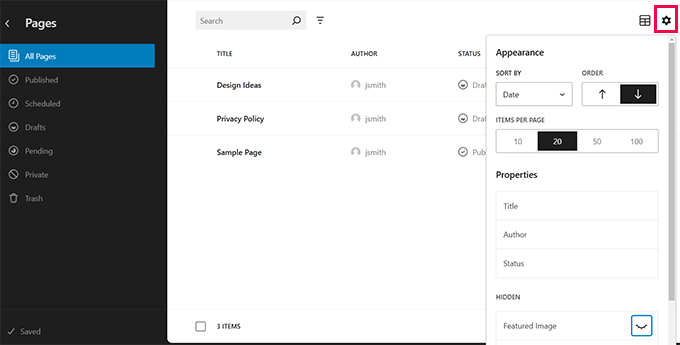
                      This approach broadens your reach because many people search for specific solutions such as ‘easy task assignment’ or ‘time tracking for teams’ rather than a complete software suite.

                      All in One SEO (AIOSEO) is a WordPress SEO plugin that nails this strategy. Their headline and above-the-fold call-to-action focus on internal linking, which is one of the many features this plugin offers.

                      This works because it meets users where they are in their journey. Someone looking for an internal linking tool might not be ready for a full SEO suite, but you can capture their interest with a targeted solution.

                      AIOSEO's internal linking feature explanation

                      What’s more, it opens the door for upselling. Once users see how well your feature works, they might be interested in exploring your full software package.

                      That’s exactly what AIOSEO does. After explaining their internal linking tool in detail, they go on to show the other SEO features the plugin comes with. Since this part is slightly text-heavy, the team uses feature boxes with icons to make it more readable.

                      AIOSEO's plugin features

                      What you can learn from AIOSEO: Creating targeted landing pages for each of your product’s features helps you capture a broader audience. Then, you can meet their specific needs and potentially convert users who might not have initially considered your full package.

                      10. HelloFresh

                      HelloFresh's landing page

                      I love how HelloFresh’s landing page immediately starts the signup process when someone opens it. This smart approach keeps people interested and immediately shows what the users can get from their service.

                      The page breaks down the signup into multiple steps, which is a great practice to increase form completion.

                      Also, notice how they show the discount offer in the floating banner. It’s an excellent way to remind people that they’re getting a good deal and encourage them to sign up.

                      What you can learn from HelloFresh: Sometimes, you can show users what they will get by buying from you instead of telling them in your own words. HelloFresh does this well by immediately involving visitors in the signup process.

                      11. Lead Guru

                      Lead Guru's landing page

                      Lead Guru optimized their squeeze landing page with just one small change.

                      Using OptinMonster, they swapped out a regular form for a special button called a MonsterLink. This button, when clicked, opens a lightbox popup with the opt-in form.

                      It’s a clever use of the Zeigarnik Effect, which is a psychological principle that suggests people are more likely to complete tasks they’ve already started.

                      The results paid off big time. Before, 55% of visitors would sign up, but with the popup opt-in form, 81.8% of people who clicked it signed up. That’s a 26% increase overall!

                      They also added an exit-intent popup to capture organic traffic that might otherwise leave without converting. In my experience, this is a smart move to maximize the value of every visitor. It gives you one last chance to turn a lost opportunity into a lead.

                      What you can learn from Lead Guru: Try breaking your signup process into two steps. Instead of showing a full form right away, you could use a button that opens a lightbox popup form when clicked. This can make your page less scary and get more people to sign up.

                    • 90+ Google Search Statistics and Data for 2024

                      90+ Google Search Statistics and Data for 2024

                      Did you know Google updates its search results around 13 times daily, from changing its rankings to the search interface? Or that keeping visitors on your website just 3 seconds longer can boost your Google rankings?

                      These are just some of the most surprising Google search engine stats, and there’s a lot more.

                      Like every other website, Google’s constant algorithm changes have affected WPBeginner’s search rankings. That’s why we study Google’s updates so closely. This helps us improve our SEO strategy and show you how to do the same so that your site stays visible in search results.

                      In this guide, we will dive into the most crucial Google search statistics that you should know to improve your website’s search engine optimization (SEO).

                      Google Search Statistics and Data

                      The Ultimate List of Google Search Statistics

                      We have a lot of ground to cover, so feel free to use the quick links below to skip to the topic that interests you the most:

                      • General Google Search Stats: Market Share and Search Volume
                        • SERP Stats: Google’s Changing Landscape and Algorithm
                          • Google Search Features: AI Overviews, Rich Results, and More
                            • Google Search Ads: PPC and Ad Revenue Statistics
                              • Consumer Behavior: How People Use Google Search to Shop
                                • Mobile Google Search Trends: The Shift to On-the-Go Queries
                                  • Local Google Search Stats: How Businesses Are Found Online
                                    • Google Voice Search Statistics: The Rise of Hands-Free Search

                                      General Google Search Stats: Market Share and Search Volume

                                      Let’s dive into some eye-opening Google search stats that show just how big this search engine really is.

                                      1. Google dominates the search engine market on both mobile (95.18%) and desktop (80.41%).

                                      Google dominates the search engine market on both mobile (95.18%) and desktop (80.41%).

                                      Interestingly, over the past 5 years, Google’s share of desktop searches has gone down from 83.94% to 80.41%. Its mobile share has also slightly decreased from 95.9% to 95.18%. That being said, Google is still the clear leader.

                                      Simply put, if you want people to find your WordPress website, you need to focus on Google. It’s where most of your potential visitors are searching.

                                      2. Google’s search index contains hundreds of billions of web pages and over 100 million gigabytes of data.

                                      This enormous index shows just how much content is out there competing for attention. To stand out, you need to make sure your website is properly optimized and easily discoverable by Google.

                                      This is where All in One SEO (AIOSEO) comes in handy.

                                      AIOSEO is a powerful WordPress SEO plugin that helps your site shine in this vast sea of content.

                                      One of its key features is the ability to easily add your site to Google Search Console. This is crucial for getting your pages indexed quickly and accurately.

                                      But AIOSEO doesn’t stop there. It offers a wide range of on-page SEO optimization tools to help your content rank higher in search results, from optimizing your SEO titles to implementing schema markup.

                                      We’ll be discussing more of AIOSEO’s features throughout this article. But if you want a comprehensive overview, check out our detailed AIOSEO review.

                                      3. Google processes over 6.3 million searches every minute.

                                      This staggering number of searches represents a huge opportunity for website owners. But with so many searches happening, how do you know which keywords are bringing visitors to your site?

                                      MonsterInsights can help you out. This tool helps you understand exactly how users are finding your WordPress site by connecting it with Google Analytics.

                                      You can also connect your site with Google Search Console to see the exact keywords people use to find your pages.

                                      From here, you can identify your top-performing keywords and create more content around these topics to attract even more visitors.

                                      Viewing Google Search Console Report in MonsterInsights

                                      4. Every day, 15% of Google searches are brand new.

                                      In other words, users constantly come up with new search terms that Google has never seen before.

                                      For website owners, this means you need to stay on top of what people are searching for.

                                      To keep up, you can regularly check Google Trends to find new topics in your niche and spot rising trends early before your competitors do.

                                      Compare the graph for different keywords

                                      Additionally, you can use keyword research tools weekly to find new search terms.

                                      At WPBeginner, we like to use LowFruits to find new keyword ideas. The tool shows you search results where the top websites don’t have a strong domain authority.

                                      This means you have a better chance of getting your content to rank well for these keywords, even if your WordPress blog is relatively new or small.

                                      Use LowFruits to outrank your competitors for local keywords

                                      More General Google Search Statistics

                                      • Google.com attracts approximately 2.77 billion daily visits worldwide.
                                      • The top 5 Google search queries globally include ‘Google,’ ‘you,’ ‘YouTube,’ ‘weather,’ and ‘Facebook.’
                                      • Google generated a global revenue of $305.63 billion USD in 2023.
                                      • In Russia, Yandex leads the search market with a 63% share, while Google holds nearly 36%.
                                      • Alphabet, Google’s parent company, has a market value of $1.6 trillion USD.
                                      • Google’s first storage system had ten 4GB hard drives in a Lego casing, which is now displayed at Stanford University.
                                      • A 5-minute Google outage in 2013 resulted in a 40% decrease in global Internet usage.

                                      SERP Stats: Google’s Changing Landscape and Algorithm

                                      What makes a website rank on Google? And how do you get to the top position in search engine results pages (SERPs)?

                                      Let’s look at some surprising stats about Google’s search results and what they mean for your website’s chances of showing up in organic search.

                                      5. 96.55% of web pages get no traffic from Google.

                                      This shows how tough it is to stand out in Google search results. But don’t be discouraged! There are many tools out there that can help you get into that top 3.45%.

                                      For example, AIOSEO’s SEO audit checklist feature can uncover various issues that might be holding your site back.

                                      For instance, it can detect if there’s an accidental noindex tag preventing Google from indexing your pages. Or it might reveal that your website’s loading speed isn’t up to Google’s standards.

                                      The SEO Audit Checklist dashboard in AIOSEO

                                      6. Google is predicted to tweak its search algorithm about 13 times every day.

                                      This prediction by Search Engine Land came after Google revealed they did over 4,700 launches, 13,000 live traffic experiments, and many more tests in their algorithm in just one year. That’s a lot of changes.

                                      While following SEO best practices generally keeps you on track, some major updates can affect even well-optimized websites.

                                      To help you stay on top of these changes, AIOSEO offers a handy way to monitor Google algorithm updates.

                                      With the SEO Statistics feature, you will find a graph with markers for all Google search result updates, allowing you to see exactly when changes were rolled out.

                                      Clicking the Read More button on AIOSEO's Search Statistics timeline

                                      The graph also compares two key website performance metrics: impressions and clicks.

                                      By comparing this data with the update markers, you can easily see how each algorithm change might have affected your site’s performance.

                                      AIOSEO's SEO Statistics timeline showing the total of search impressions and clicks within a given timeframe

                                      7. Websites that increase their time on-site by 3 seconds can rank one spot higher in Google search results.

                                      Websites that increase their time on site by 3 seconds can rank one spot higher in Google search results.

                                      The same Backlinko study also found that the average time on site for a Google first-page result is 2.5 minutes. This shows that engaging content that holds visitors’ attention and a good user experience both matter a lot for SEO.

                                      If you’re not sure where to start with improving your site’s user experience, then you need to look at your data first.

                                      If you use Google Analytics, you can set up user engagement tracking. This shows you which parts of your site visitors interact with most and how they explore your site.

                                      Tracking scroll-depth using MonsterInsights

                                      If you have a WooCommerce online store, then you will want to set up customer tracking with Google Analytics.

                                      This helps you understand your customers’ journey from the moment they land on your online store to when they make a purchase. You can see which products are viewed most often, which pages lead to more sales, and where customers might be dropping off in the checkout process.

                                      User journey in MonsterInsights

                                      8. The average Google first page result has 1,447 words.

                                      Does this mean you should always aim for long content? Not necessarily.

                                      While longer content can cover topics more thoroughly, what really matters is quality and value.

                                      Focus on answering your readers’ questions completely and providing useful information. Sometimes, that might take 500 words, other times 2,000. The key is to make every word count.

                                      One tool we love to use is SEOBoost. With this, you can plan your content based on data-driven suggestions.

                                      Use Topic Reports tool in SEOBoost to do keyword research

                                      For instance, it shows you how many headings your competitors use, how long their content is, and what questions you should consider covering in your articles.

                                      While these are just guidelines, they can be incredibly helpful in creating content that competes well in search results.

                                      Pro Tip: Need help with SEO? Our expert team at WPBeginner Pro Services can check your website performance and come up with an SEO strategy tailored to your business. Book a free consultation today.

                                      More Facts About Google’s Organic Search Results Pages

                                      • 65% of SEO experts say that Google’s search engine algorithm updates have helped their websites gain more traffic and achieve higher rankings.
                                      • The 1st result in Google has about 3.8 times more backlinks than positions 2-10.
                                      • Google’s top 10 results include 65% to 85% of their ranking keywords in their title tags.
                                      • The average Google first page result loads in 1.65 seconds.
                                      • The average URL length on Google’s first page is 66 characters long.
                                      • Nearly 95% of newly published pages fail to reach the Top 10 results within a year, while most successful pages achieve this ranking in about 3-6 months.

                                      Google Search Features: AI Overviews, Rich Results, and More

                                      Here are some of Google’s exciting search features that are helping people find information online.

                                      9. 91.4% of searches now show an AI-generated response from Google.

                                      Many website owners fear their sites might lose traffic if users find what they need in AI-generated answers.

                                      However, it’s not all bad news.

                                      After all, Google’s other features, like featured snippets, are also known to sometimes reduce click-through rates. But they can also increase visibility and brand awareness for the featured sites.

                                      Google AI Overviews Example

                                      Plus, if your content is featured in these AI overviews, you could see a boost in traffic.

                                      If you need help, you can check out our tips and tricks to optimize your site for Google’s AI overviews.

                                      10. Rich results in search get 58 clicks for every 100 searches, outperforming regular search results.

                                      Rich results are enhanced search listings that provide extra information directly in the search results.

                                      Think of recipe cards with cooking time and ratings, product listings with prices and availability, or event details with dates and locations.

                                      An example of a featured recipe snippet, in Google

                                      These rich results are popular because they give users more information at a glance, making them stand out and attract more attention. This explains why they get more clicks than regular search results.

                                      To get rich results, you need to use schema markup, a type of code that helps search engines understand your content better.

                                      While this might sound technical, AIOSEO makes it easy with its dedicated Schema feature. In the block editor, you can simply input the information you want to show in rich results, and AIOSEO handles the technical part for you.

                                      11. 44% of people trust regular search listings more than fancy SERP features.
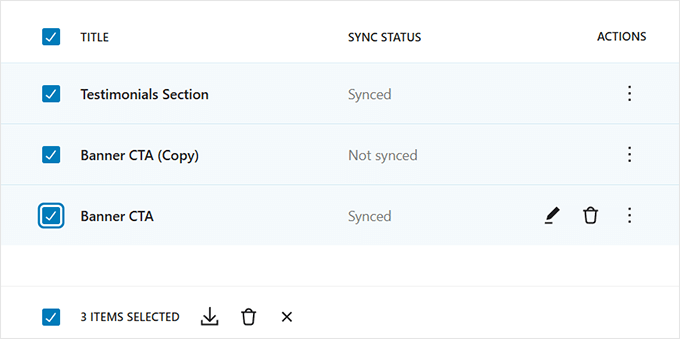
                                      44% of people trust regular search listings more than fancy SERP features.

                                      While rich results can attract clicks, many users still prefer simple, trustworthy listings. So, it’s important to optimize for both types.

                                      You will want to write clear, informative meta descriptions and use relevant title tags to make your regular listings more credible.

                                      An SEO plugin like AIOSEO makes the whole process super easy. In the block editor, you can quickly enter your meta description. Then, the plugin tells you if it’s the right length and includes your focus keyword.

                                      Adding focus keyphrase in meta description

                                      AIOSEO also offers a headline analyzer tool. It evaluates your post’s title and suggests improvements to attract clicks.
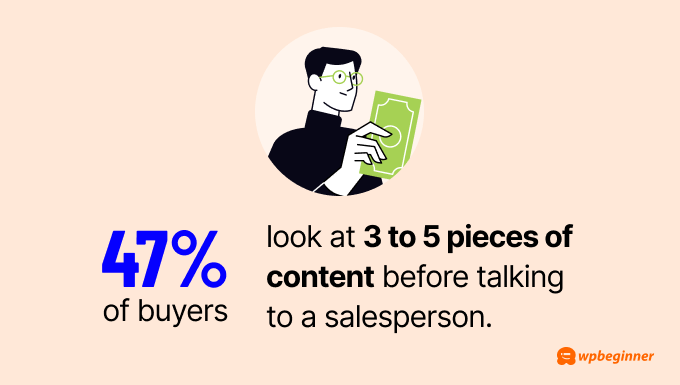
                                      Plus, with the OpenAI integration, you can automatically generate headline ideas to save time.
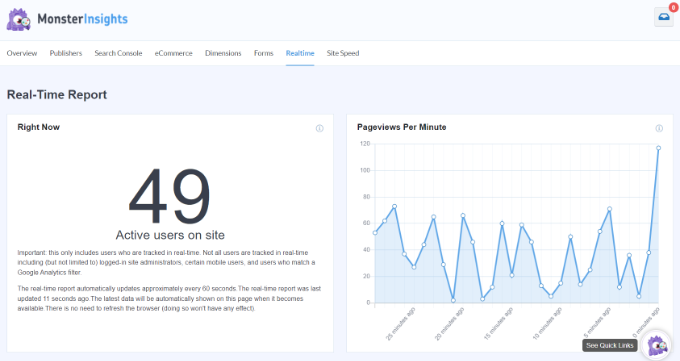
                                      AIOSEO SEO Headline Analyzer

                                      12. Google Lens processes over 12 billion visual searches every month.

                                      Google Lens is a tool that lets users search the internet using images instead of words.

                                      It’s been a game-changer for many, helping people with everything from identifying plants to finding where to buy products they see in real life.

                                      Google Lens

                                      To optimize images for Google Lens, you will need to focus on clear branding and high-quality images on your website and products. Make sure your logo is visible and your product images are clear.

                                      For your website, make sure to follow best image SEO practices. These include using descriptive alt tags and file names for images.

                                      These steps help Google Lens understand and identify your images better, potentially increasing traffic from visual searches.

                                      More Stats for Google Search Features

                                      • FAQ rich results get the most clicks out of all rich results (87%).
                                      • Google Autocomplete helps people type 25% less when searching.
                                      • 62% of links in Google’s AI-powered answers come from websites that are not in the top 10 search results.
                                      • Google’s AI answers show up less often for finance (71%) and insurance (52%) topics.
                                      • 72.6% of pages on Google’s first page use Schema markup.
                                      • Getting a featured snippet can help your website show up 1,000 more times a day in search results.
                                      • Featured snippets and knowledge panels can get 42% of all clicks in SERPs.
                                      • Web pages with Schema markup can get 40% more clicks than those without.
                                      • ‘People Also Ask’ boxes get 6 out of every 100 clicks in search results.
                                      • Google had about 136 billion images in its image search in 2023.
                                      • Pages with schema markup have a 40% higher click-through rate than pages without.
                                      • The ‘Discussions and forums’ feature shows up in 77 out of 100 search results.
                                      • 3D images in Google Shopping receive almost 50% more clicks than static ones.

                                      Google Search Ads: PPC and Ad Revenue Statistics

                                      Google isn’t just a search engine giant. In fact, it makes money mainly from its advertising platform, Google Ads.

                                      If you run Google search ads, here are some key statistics you should know:

                                      13. Google dominates online advertising with a 39% market share, followed by Facebook (18%) and Amazon (7%).

                                      Google dominates online advertising with a 39% market share, followed by Facebook (18%) and Amazon (7%).

                                      If you want to get into online advertising for your business, Google Ads may be your best bet. That being said, it’s also highly competitive.

                                      To stand out, consider diversifying your approach. For example, if you run a WooCommerce site, you might want to explore Google Shopping. This platform allows you to showcase your products directly in search results, potentially increasing visibility and sales.

                                      We have a detailed tutorial on how to add products from your WordPress website to Google Shopping.

                                      14. The click-through rate for a paid search ad in the 1st position (2.1%) and the organic search result in the 10th position (2.2%) is very similar.

                                      The click-through rate for a paid search ad in the 1st position (2.1%) and the organic search result in the 10th position (2.2%) is very similar.

                                      This suggests users may trust organic results more than ads. Even being at the bottom of the first page in organic search can be valuable.

                                      However, paid ads can be helpful for short-term campaigns or events needing quick visibility. They’re also useful for highly competitive keywords.

                                      Often, combining paid and organic strategies works best. This approach lets you get immediate traffic while building long-term visibility and perhaps test some keywords before investing in SEO.

                                      Of course, to see how much money you’re making in return for your ads, you need to set up a tracking system. For this, you can read our guide on how to set up Google ads conversion tracking in WordPress.

                                      15. 8 out of 10 people can tell the difference between paid ads and regular search results on Google.

                                      In other words, your ads need to work harder to earn clicks.

                                      To make the most out of ads, don’t just throw money at every keyword. Instead, focus on areas where you can offer something special. Think about what makes your business unique and highlight that in your ads.

                                      Also, getting clicks is only half the battle. Your landing page needs to deliver on your ad’s promise to get conversions and get your money’s worth.

                                      Our article on how to make a Google ad landing page in WordPress can walk you through the steps using SeedProd, the best drag-and-drop page builder on the market.

                                      Creating a Google Ad landing page with SeedProd

                                      16. 33% of people click search ads because they directly answer their query, more than those who click for brand familiarity or ad position.

                                      Relevance is more effective than brand recognition and ad placement when it comes to getting people to click on your ads.

                                      Just like with SEO, you need to focus on solving the searcher’s problem on your ad copy. Show how your product or service addresses their specific need.

                                      This approach can help your ads perform well even if you’re up against big brands or don’t have the budget for the top ad spots.

                                      Not sure how to do that? Check out our guide on how to use AI to boost your marketing, where we show you a prompt for generating smart ad copy.

                                      More Google Search Ad Statistics

                                      • Google’s revenue reached $79.9 billion in the first quarter of 2024, up from $69.4 billion in the same quarter last year.
                                      • The average cost-per-click for Google Ads in the U.S. is $6.56.
                                      • Shoppers who click a Google search ad before visiting a store that runs the ad are 27% more likely to buy something.
                                      • People who click on a Google search ad before visiting a store by that ad spend 10% more on average.
                                      • Google Ads have an average conversion rate of 4.8%.
                                      • 38% of baby boomers (ages 55+) click paid search ads because they mention familiar brands.
                                      • If limited to one ad type, 70% of advertisers would choose Google search ads over display ads.
                                      • Over 20% of advertisers focus on ‘Target CPA (Cost per Action)’ or ‘Maximize for conversions’ when setting Google Ads bids.
                                      • 40% of companies use Google Ads mainly to generate leads, while 30% use them to drive direct sales.

                                      Google isn’t just a place to find information. Many users use it to look up the next thing they need to buy online or in-store.

                                      Let’s look at how consumers interact with Google.

                                      17. 71% of people say Google Search is their top choice to find information on topics like electronics, cars, health, and finance.

                                      These topics usually require extensive research because they involve big decisions or investments. Before making these choices, people turn to Google for trusted, comprehensive information.

                                      Because of that, it’s important to focus on E-E-A-T when creating web content. This stands for Experience, Expertise, Authoritativeness, and Trustworthiness. It’s what Google looks for when ranking content, especially for important topics.

                                      One way to do this is to showcase your business’s experience and expertise to build trust with Google and your audience.

                                      AIOSEO has an Author SEO add-on for this exact purpose. With it, you’re essentially telling Google, “Hey, this author is a real expert in this field.”

                                      Author Bio Displayed on a WordPress Post

                                      This can boost your content’s credibility in Google’s eyes, potentially leading to better rankings. Plus, when readers see that your content is written by qualified experts, they’re more likely to trust and engage with it.

                                      18. 4 in 10 shoppers start their purchase research on Google for both online and in-store buys.

                                      This stat tells us how important it is to have a strong online presence that goes beyond your website.

                                      While great content on your site is important, don’t forget to build relationships with your customers, influencers, and brands in your niche. Doing this can create online recommendations for your business, which can influence what people decide to buy.

                                      You can start by teaming up with content creators for product reviews, engaging with customers on review sites like Trustpilot, or even creating a referral program to get more word-of-mouth recommendations.

                                      19. 80% of 13 to 21-year-olds search at least 3 times a day, while only 60% of those over 60 do the same.

                                      80% of 13 to 21-year-olds search at least 3 times a day, while only 60% of those over 60 do the same.

                                      A lot of businesses targeting a younger crowd often focus more on social media than search. That being said, this stat highlights how important it still is to have a website and optimize it for SEO.

                                      By doing SEO, you’re building credibility for all age groups. A well-optimized website that ranks high in search results signals trustworthiness to both younger and older audiences.

                                      Also, focus on clear, easy-to-read content that doesn’t assume too much tech knowledge, especially if you target an older audience. Consider using larger fonts and high-contrast designs for better readability.

                                      More Google Consumer Behavior Findings

                                      • 49% of consumers use Google to discover new products.
                                      • The most frequently asked question on Google worldwide is ‘Where is my refund,’ with an average of 15.5 million search queries per month.
                                      • 73% of people who research online use a search engine to access at least one source of information.
                                      • For routine purchases like baby care, 58% of consumers use search as their main source of information.
                                      • For less frequent purchases like personal finance, 49% of consumers rely on search for information.
                                      • Searches for ‘my activity,’ where users manage their Google Account information, have increased by more than 1000% worldwide.

                                      Smartphones have changed our internet usage and search habits. Let’s see how people look for information on mobile devices:

                                      20. Mobile Google searches are less likely to end without clicks to websites (17.3%) compared to desktop searches (25.6%).

                                      Mobile Google searches are less likely to end without clicks to websites (17.3%) compared to desktop searches (25.6%).

                                      This difference might be because mobile users tend to scroll more and look at more results, making them less likely to find their answers in the features at the top of the search results page.

                                      This is good news for website owners. It means mobile users are more likely to click through to your site, even if you’re not in the very top position.

                                      21. Bounce rates for mobile organic search are 3% higher than for desktop.

                                      Mobile users are on the go more often and, therefore, less likely to wait for a slow website to load, which can contribute to higher bounce rates.

                                      If you want to get on Google’s good side and reduce your mobile bounce rate, then you should focus on Core Web Vitals. These are Google’s metrics for measuring user experience and site performance.

                                      Start by using PageSpeed Insights to check your current performance. This tool will give you your Core Web Vitals scores and highlight areas that need improvement.

                                      Google's core web vitals

                                      Then, there are many ways to go about improving speed, from optimizing your images and minifying your code to using a content delivery network.

                                      For a comprehensive guide on how to implement these strategies and more, check out our ultimate guide on how to boost WordPress speed and performance.

                                      22. 33% of mobile users make decisions within 5 seconds of searching on Google, compared to 45% of desktop users.

                                      33% of mobile users make decisions within 5 seconds of searching on Google, compared to 45% of desktop users.

                                      This difference likely stems from the smaller screens, which make it harder to look at visuals or read information clearly. Plus, mobile browsing just feels more casual and generally more distracting.

                                      To accommodate mobile users’ decision-making process, you should adapt your website design.

                                      You can use a responsive theme, make buttons and links easy to tap, add a font resizer for better readability, and keep your most important information at the top of the page so users can find it without scrolling.

                                      Here’s our guide on how to make your WordPress website more mobile-friendly if you want more details.

                                      mobile-friendly illustration

                                      23. 56% of in-store shoppers use their smartphones to research items while shopping.

                                      That’s why it’s crucial to have detailed, up-to-date product information on your website. Shoppers compare prices, read reviews, and check specs right in the store.

                                      To take advantage of this, make sure your product pages are optimized and include all the information a shopper might need. Consider adding features like stock availability or easy-to-use size guides to help these on-the-go researchers make a decision.

                                      More Mobile Google Search Facts

                                      • 51% of smartphone users have found a new company or product while searching on their phones.
                                      • 90% of smartphone users aren’t sure which brand they want when they start researching online.
                                      • 79% of people are more likely to revisit or share a mobile site if it’s easy to use.
                                      • Featured snippets cover 50% of a mobile phone screen, making them important for search visibility.
                                      • Organic click-through rates are higher on desktop searches and 50% lower on mobile searches.
                                      • Mobile users are more likely to perform multiple searches, with 29.3% of mobile queries using new keywords compared to 17.9% on desktop.

                                      Local Google Search Stats: How Businesses Are Found Online

                                      Google features like Google Business Profile and Google Maps are making it easier than ever for users to discover local brands. We have found some interesting stats to demonstrate that:

                                      24. Google is the most widely used online review site (81%), followed by Facebook (45%) and Yelp (44%).

                                      Google is the most widely used online review site (81%), followed by Facebook (45%) and Yelp (44%).

                                      If you have a local business and you’re not on Google, you’re missing out on a huge opportunity. Having a Google Business Profile is the first step you can take to show up in these local searches.

                                      For a comprehensive guide on optimizing your WordPress site for local search, check out our detailed tutorial on local SEO for WordPress websites.

                                      Our article will walk you through how to set up a Google Business Profile and optimize it for local search.

                                      Example of Google Business Profile

                                      25. ‘Shopping near me’ searches on Google Maps have increased by 100% globally year over year.

                                      To optimize for these local searches, you should keep your business information consistent across your Google Business Profile, website, and other platforms.

                                      Be as detailed as possible with your information. Include accurate opening hours, pin the exact location, and provide a complete description of your business.

                                      This consistency helps Google understand and trust your business information, making it more likely to show your listing in relevant local searches.

                                      If you have multiple online listings, then we suggest using Semrush Local to make sure all of your information is consistent. This tool can crawl all over the web to see on which platforms your business is present and what details you need to fix.

                                      Semrush Local's listing management

                                      26. 47% of consumers find the ‘Sort by newest’ review function most useful when looking at business reviews.

                                      Fresh reviews let potential customers know that your business is active and maintaining high quality.

                                      One effective way to encourage reviews is by offering customers a small incentive, like a coupon code, in exchange for their feedback.

                                      If you’re running a WooCommerce store, we have a handy guide on how to automatically send a coupon after a product review.

                                      Other than that, consider displaying customer reviews throughout your website, such as on your product pages, homepage, or even a dedicated customer reviews page.

                                      Besides boosting your site’s E-E-A-T score. these reviews may even appear in Google search results. As a result, potential customers can look at some real social proof before they even click on your site.

                                      More Statistics for Local Google Searches

                                      • 54% of smartphone users search for business hours.
                                      • 53% of mobile device users look up directions to local stores in search.
                                      • 18% of local smartphone searches lead to a purchase within a day, compared to 7% of non-local searches.
                                      • 60% of smartphone users have directly contacted a business using search results, like the ‘Click to call’ option.
                                      • Businesses with complete Google Business Profiles are 2.7 times more likely to be seen as reputable.
                                      • Customers are 70% more likely to visit and 50% more likely to consider buying from businesses with complete Google Business Profiles.
                                      • 89% of consumers say local branch reviews influence their decision to use a store.
                                      • 91% of consumers believe local reviews of chains and franchises affect their overall brand perception.

                                      Google Voice Search Statistics: The Rise of Hands-Free Search

                                      Voice search is transforming the way people interact with Google, opening up new opportunities for website owners to connect with their audience.

                                      Let’s take a look at the latest trends for Google voice search:

                                      27. Over 500 million people use Google Assistant every month, mainly in English.

                                      Over 500 million people use Google Assistant every month, mainly in English.

                                      As this number keeps rising, needing to optimize your content for voice search is unavoidable.

                                      One effective way to do this is by creating FAQ sections that address common questions in your industry. This approach works well for voice search because it directly answers questions people might ask their Google Assistant.

                                      To make your FAQ section even more effective, you can add FAQ schema. This structured data helps search engines understand and potentially feature your content in voice search results.

                                      AIOSEO can help you with this, as you can easily insert your FAQ section in the Schema feature in the block editor.

                                      Add FAQs to All in One SEO

                                      For instance, instead of searching for ‘best pizza in New York,’ users might ask, ‘Hey Google, what is the best pizza in New York City?’ This trend shows that your SEO strategy should focus on long-tail keywords and natural language phrases.

                                      Instead of merely inserting keywords, you will want to optimize your content to answer specific questions and handle more complex, conversational queries.

                                      Also, natural language queries often provide deeper insights into user intent. Therefore, your SEO efforts should aim to understand and address this intent rather than just matching exact keywords.

                                      To assist with this, you can use LowFruits, which offers keyword clustering. This feature groups similar long-tail keywords based on shared intent using real-time search data.

                                      Discover related keywords with the Keyword Clustering feature

                                      By targeting these clusters, you can address a broad range of relevant search queries and improve your chances of ranking for multiple related keywords.

                                      29. Having accurate business info on Google, Yelp, and Bing can make your business 90% more voice search-friendly.

                                      People often use voice search when they’re on the go. They might ask, ‘Where’s the nearest coffee shop?’ or ‘What time does the hardware store close?’

                                      If your info is correct and consistent, you’re more likely to be the answer to these voice queries.

                                      This isn’t just about showing up in search results. It’s about getting more people through your door.

                                      Every voice search that leads to your business is a potential customer walking in.

                                    • Introducing SEOBoost by AIOSEO: Content Optimization Made Easy

                                      Introducing SEOBoost by AIOSEO: Content Optimization Made Easy

                                      Have you ever wished that you could do all your topic research, content optimization, and SEO auditing in one place?

                                      Most content optimization tools are simply too expensive for small businesses or offer very limited features to their users.

                                      This means that website owners either have to invest hundreds of dollars per month in premium SEO platforms or don’t have the information they need to actually improve their content.

                                      That’s why I asked my team at All in One SEO (AIOSEO) to build an affordable, all-in-one SEO platform for bloggers, marketers, agencies, and small business owners.

                                      Today, I am excited to announce SEOBoost, a powerful and beginner-friendly all-in-one tool for improving your search rankings and getting more organic traffic.

                                      Our goal is to make it easy for you to research, write, and optimize content from a single hub.

                                      SEOBoost announcement

                                      Create Detailed Topic Reports and Content Briefs in Just a Few Clicks

                                      Before you can start out-ranking the competition, you will first need to understand what makes their articles work.

                                      This is where SEOBoost’s topic reports come into play.

                                      Just go to Topic Reports and enter a target keyword, region, and language. Once you click the ‘Create Report’ button, SEOBoost will put together a comprehensive topic report in just a few moments.

                                      SEOBoost topic report

                                      This report will show you a bunch of different data for the highest-ranking competitor articles, including:

                                      • Average word count
                                      • Readability level
                                      • Keyword frequency
                                      • Images
                                      • Title length
                                      • Outbound links

                                      Plus, this data is grouped in a table so you can easily see the stats of the highest-ranking posts and add their headings directly to your topic brief.

                                      Top-competing pages SEOBoost

                                      Another handy feature is that SEOBoost grabs the most relevant user questions from social platforms like Reddit and Quora.

                                      This can help you see what regular users are actually looking for and answer those questions in your content.

                                      SEOBoost relevant questions report

                                      As you go through the different reports, clicking on the suggested keywords and headings will instantly insert them into your content brief on the right side of the screen.

                                      This makes it super easy to build a content brief without manually adding any content yourself.

                                      SEOBoost content brief editor

                                      Then, jumping to the Content Brief tab in SEOBoost lets you see a complete overview of all the information you’ve added.

                                      Under the ‘SEO Suggestions’ tab, there is also a handy table with SEO recommendations that gives you a quick overview of what your article needs to rank.

                                      SEOBoost SEO suggestions

                                      Clicking on the ‘Optimize Content’ button will then take you to the content optimization screen.

                                      Optimize Your Content for Better SEO Rankings

                                      SEOBoost makes it extremely easy to optimize your content for your chosen keyword because it automatically pulls all the data from the topic report you created.

                                      Then, you can start writing straight into the editor or paste your content.

                                      SEOBoost content optimization

                                      On the left, you can see an overview of different scores for your content, while the panel on the right shows you specific errors that you should fix within your content.

                                      For example, SEOBoost might recommend adding missing keywords, increasing the number of words in your title and/or article, or adding headings from your topic brief.

                                      SEOBoost also lets you leave comments within the user interface, which is great for the editors on your content team.

                                      Run Easy-to-Understand Content Audits

                                      Not sure why your content isn’t ranking well on Google? SEOBoost makes this easy with detailed content audits.

                                      All you have to do is go to Content Audits and enter your article’s URL, target keyword, region, and language.

                                      Content Audit Report SEOBoost

                                      Once you hit ‘Create Report’, SEOBoost will start instantly analyzing your content with the help of AI.

                                      It will then show you a bunch of different reports for how your content compares to top-ranking competitors for word count, readability, title length, and more.

                                      SEOBoost audit chart

                                      These visual graphs make it very easy to see where you compare to other websites.

                                      All of this data is also highlighted in green, orange, and red so you can easily see where you need to improve.

                                      Content audit comparison SEOBoost

                                      Wondering which keywords are missing from your content? You can easily see them at the very bottom of the content audit report.

                                      This allows you to find content gaps and better optimize your content for the right search intent.

                                      SEOBoost keyword gap

                                      Easily Collaborate Across Your Content Team

                                      SEOBoost’s content management feature is a huge time-saver for content marketing agencies and bigger teams.

                                      It lets you set up content campaigns that are made up of smaller projects to work on.

                                      Then, you simply need to pick the target keyword for each project, choose a publishing date, and assign it to a writer and reviewer.

                                      Making a project in SEOBoost

                                      This automatically creates a chain of tasks for both the writer and reviewer, from creating a topic report all the way through to approving and publishing the content.

                                      Team members can then quickly see the next task they need to do in their SEOBoost dashboard.

                                      For example, clicking on the task below will take you straight to the interface where you can create a topic report.

                                      SEOBoost tasks list

                                      Our tool also allows you to upload your own images to a shared media library or pick stock images.

                                      This can make it even faster and easier for your team members to create their content.

                                      All you have to do is go to Content Management » Media Library. From here, you can upload new images or browse the library of stock photos.

                                      SEOBoost Media Library
                                    • Why You Should Avoid Webflow (+ Use This Alternative Instead)

                                      Why You Should Avoid Webflow (+ Use This Alternative Instead)

                                      Recently, Webflow has faced criticism for forcing large websites on its platform to switch to expensive enterprise plans. This has left many users frustrated and searching for better alternatives.

                                      At WPBeginner, we understand the importance of selecting a flexible and affordable website-building platform. That’s why we are here to help you pick the right option for building your website.

                                      In this article, we will dive into the issues surrounding Webflow, highlight its pros and cons, and offer a superior alternative.

                                      Why you need to avoid Webflow and move to a better alternative

                                      The Problem With Webflow and Similar Hosted Platforms

                                      In recent weeks, Webflow has faced significant backlash for forcing large websites on their platform to switch to expensive enterprise plans.

                                      This controversy gained widespread attention after Nico Cerdeira of Failory.com highlighted the issue on social media. Other users then expressed frustration over these unexpected cost increases and the lack of flexibility in hosting options.

                                      The problem with Webflow and similar hosted platforms goes beyond just pricing.

                                      These platforms often lock users into proprietary systems, making it difficult to migrate their websites elsewhere.

                                      For established websites, the migration process can be particularly challenging, time-consuming, and costly, further trapping them into an unsatisfactory situation.

                                      Additionally, as websites grow, users frequently run into scalability issues and limitations in customization options.

                                      This situation has left many website owners questioning their choice of platform and seeking more flexible and cost-effective alternatives.

                                      Pros and Cons of Webflow

                                      Users often weigh the pros and cons when choosing Webflow and similar hosted website builders. Let’s take a look at these considerations before discussing a superior alternative.

                                      Pros of Webflow

                                      • User-Friendly Visual Editor: Webflow offers an intuitive visual editor that makes it easy for users to design and customize their websites without writing code.
                                      • Built-in Hosting and Security: With Webflow, hosting and security are integrated into the platform. This makes things simple for users who are not familiar with managing these aspects.
                                      • Good for Small Websites: Webflow is well-suited for smaller projects where the built-in tools and templates can be utilized effectively.

                                      Cons of Webflow

                                      • High Costs: The cost of using Webflow can escalate quickly, especially for larger websites that are forced into expensive enterprise plans.
                                      • Limited Flexibility and Customization: Webflow’s proprietary system often restricts users, limiting their ability to customize their websites fully.
                                      • Vendor Lock-In: Migrating away from Webflow can be difficult, particularly for established websites with significant content and customization.

                                      Considering these factors, let’s look at the best alternative to Webflow for building any kind of website.

                                      Why WordPress Is The Best Alternative to Webflow?

                                      WordPress is the world’s most popular website builder, powering over 43% of all websites on the internet.

                                      Note: When we say WordPress, we are referring to the self-hosted WordPress.org, not WordPress.com. For details, see our article on the differences between WordPress.org and WordPress.com.

                                      Here is why you should choose WordPress as an alternative to Webflow:

                                      1. Cost Effectiveness

                                      With self-hosted WordPress, you control the costs.

                                      While WordPress itself is free, you will need to pay for hosting, a domain name, and, optionally, other third-party tools and services.

                                      The major expense will typically be hosting. The good news is that you can get high-quality hosting at very low prices due to fierce competition in the hosting industry.

                                      We recommend Bluehost for small—to medium-sized websites. You can get started for as low as $1.99/mo, with a free domain name included.

                                      Bluehost website

                                      For larger websites, we recommend SiteGround or WP Engine. These managed WordPress hosting providers offer more server resources and a premium hosting experience for growing sites.

                                      Other WordPress expenses include third-party tools, services, WordPress plugins, or themes you may use.

                                      Unlike Webflow, where you pay a set price for a fixed set of features, WordPress allows you to use free tools and plugins and only spend money on features you actually need.

                                      For a more detailed breakdown, see our guide on the costs of building a WordPress website and how to save money for sustainable long-term growth.

                                      2. No Forced Upgrades

                                      Unlike Webflow, WordPress does not force you into expensive enterprise plans as your site grows. Instead, you can scale your hosting plan according to your needs and budget.

                                      For instance, if your website exceeds your shared hosting resources, then you could upgrade to a VPS hosting plan or managed WordPress hosting plan instead of moving to an enterprise plan.

                                      In many cases, you can also boost WordPress performance by caching and managing your site’s resource usage.

                                      For more details, look at our guide on how much traffic WordPress can handle.

                                      Once your website reaches performance limitations (like overused bandwidth or memory), then you can easily upgrade resources to the next plan.

                                      3. Flexibility and Customization

                                      WordPress gives you access to thousands of third-party plugins, website designs (themes and templates), marketing tools, and more.

                                      Unlike Webflow, which offers a fixed set of features with each plan, WordPress allows you to add any feature to your website regardless of your hosting plan.

                                      WordPress Plugins & Themes

                                      WordPress plugins allow you to expand your website and add new functionality.

                                      For instance, let’s say you started with a simple blog and now want to sell a course on your website. To do so, you will simply need to install MemberPress and add the course subscription to your site.

                                      Need an online store? Just install and activate WooCommerce (the most popular eCommerce platform in the world) and start selling products.

                                      If you are just starting and can’t afford to buy premium plugins, then you can easily find free alternatives. There are currently over 59,000+ free plugins and 12,000 free WordPress themes that you can use.

                                      For more ideas, see our expert pick of the best WordPress plugins.

                                      4. Easy No-Code Design Tools

                                      Many people start with Webflow due to its easy drag-and-drop design capabilities.

                                      While the user interface may look great, your design choices and website-building capabilities are actually quite limited. You can only use a small set of templates and the features available inside the Webflow’s editor.

                                      On the other hand, WordPress offers easier drag-and-drop tools with more design choices.

                                      Thrive Architect Builder

                                      Here are some of the best WordPress page builders:

                                      All these tools offer no-code solutions where you can visually design your website with simple point-and-click editing.

                                      Customize your SeedProd theme

                                      Each one also offers ready-made templates you can use as a starting point for your website design. They have a wide range of templates suitable for all kinds of sites.

                                      In addition, they work with top WordPress plugins, so you are not limited to the features available in the design tool.

                                      For more details on how to do this, you can see our tutorial on how to make a WordPress website.

                                      Bonus Tip: Need help with your website design? Take a look at our WordPress Website Design service. For a small fee, our expert team will help you set up a professional WordPress website with your own custom branding.

                                      5. Marketing & Growth Tools

                                      Due to WordPress’s immense popularity, all top marketing and growth tools work really well with it.

                                      For instance, you can use any of the top email marketing service providers (just pick one that suits your budget and business needs).

                                      Additionally, use growth tools like OptinMonster to capture leads, build email lists, boost sales, and convert visitors into customers.

                                      WordPress is also more SEO-friendly out of the box than Webflow, but you can take things even further.

                                      With plugins like All in One SEO for WordPress, you can set up a professional SEO framework for your website within minutes. It even has a free version called All in One SEO Lite that you can use.

                                      For more practical examples, see our guide on growing your business online on a smaller budget.

                                      You can find more details in our in-depth Webflow vs. WordPress comparison, where we have also analyzed localization, support, and advanced integrations for both platforms.

                                      Moving From Webflow To WordPress

                                      Want to move away from Webflow to WordPress? Luckily, setting up a WordPress website is incredibly easy.

                                      First, you will need to sign up for a WordPress hosting provider. For small to medium websites, we recommend Bluehost.

                                      They are offering WPBeginner readers a discount on hosting and a free domain name. You can get started for just $1.99 per month.

                                      Bluehost is one of the biggest hosting companies in the world and an officially recommended WordPress hosting provider.

                                      Why We Recommend Bluehost

                                      At WPBeginner, we have worked with dozens of top hosting companies over the years. Among them, Bluehost has consistently performed well in our rigorous testing and detailed analysis. (See our complete Bluehost review)

                                      Alternative: Hostinger ($2.69 per month + Free domain name)

                                      If you have a larger website with significant traffic and lots of content, then we recommend starting with SiteGround or WP Engine.

                                      They are both managed WordPress hosting providers, offering premium hosting services for medium to large websites.

                                      For more hosting options, see our expert pick of the top WordPress hosting providers, which includes a thorough comparison of their performance, features, and pricing.

                                      Getting Started With WordPress

                                      Most hosting companies automatically install WordPress upon sign-up or offer a one-click installer when you log in to your hosting account.

                                      If you need help, then just follow our step-by-step WordPress installation tutorial, and you’ll be all set in minutes.

                                      Moving Your Data from Webflow to WordPress

                                      Unfortunately, moving your data from Webflow to WordPress is not as straightforward.

                                      If you have a smaller website, then you can download your data to your computer and manually upload it to your new WordPress website. You can follow our tutorial on how to migrate from Webflow to WordPress for detailed instructions.

                                      For larger websites, you can contact our WordPress Emergency Support service. Our on-demand WordPress support service lets you hire professional WordPress developers to help you with your specific needs.

                                    • Introducing Sugar Calendar 3.0: Events & Ticketing Made Easy in WordPress

                                      Introducing Sugar Calendar 3.0: Events & Ticketing Made Easy in WordPress

                                      Ever wished there was an easy way to display calendars, manage events, and sell event tickets from your WordPress site?

                                      Most event calendar plugins are either way too simple or overly complex. That’s why I acquired Sugar Calendar a few years ago.

                                      Today, I am excited to announce that we’ve completely revamped Sugar Calendar from the ground up (free version here).

                                      With Sugar Calendar 3.0, we’ve completely reimagined how the plugin works. Now, managing events & ticketing in WordPress is easier and faster.

                                      sugar-calendar-announcement

                                      About Sugar Calendar

                                      Sugar Calendar has been one of the most beginner-friendly event calendar plugins for WordPress. My friend, Pippin Williamson, created the plugin 12 years ago with a goal of making a simple event management & ticketing plugin for WordPress.

                                      In 2021, I acquired the plugin as part of a larger deal that brought Easy Digital Downloads, AffiliateWP, WP Simple Pay, as well as Sugar Calendar to the WPBeginner family of brands.

                                      With the latest Sugar Calendar update 3.0, we’ve completely redesigned the plugin from the ground up, prioritizing your productivity. You’ll find a fresh, modern look and an easy-to-use layout that will make you wonder how you ever managed events without it.

                                      Let’s explore these new features:

                                      New Admin Area: Creating Events Made Easy

                                      sugar-calendar-admin-dashboard

                                      Sugar Calendar’s brand-new event plugin management dashboard makes it easy to add new events to your calendar. If you need a refresher, you can quickly find links to the documentation.

                                      All the options you need to set up events in WordPress are organized in a streamlined way.

                                      event builder sugar calendar

                                      Here are a few options you’ll find in our WordPress event builder:

                                      • Duration: Easily assign a start and end time for your event.
                                      • Recurrence: Make the events recurring on the calendar if you want.
                                      • Location: Display an interactive map with Google Maps pointing to the event’s location.
                                      • Tickets: Manage ticket sales for both virtual and in-person events right from your WordPress site.
                                      • Details: You can add relevant event details either with the classic editor or block editor. Your preferred editor can be selected from the plugin settings.

                                      After setting up events in the event builder, you can publish and embed it on any page of your site.

                                      This allows your users to add events to their calendar of choice, such as Google Calendar / Microsoft Outlook / Apple Calendar, or even download the event as an ICS file.

                                      add to calendar

                                      Organize Events Into Calendars Like Never Before

                                      If you host multiple different type of events, then you need an easy way for users to find the event type they’re looking for.

                                      For example, churches often host different event types, like small groups, fundraising events, bible study, virtual sermons, etc. Businesses, on the other hand, also host different types of events, such as conferences, webinars, consultations, and more.

                                      Since attendees for each event type are often different, it makes sense to organize a separate calendar for each event type that you offer.

                                      The event filters in the Sugar Calendar event admin page

                                      With Sugar Calendar, you can easily switch between calendars, choose your preferred view (monthly, weekly, daily, or list), and even filter events by date. Alternatively, you can search for a specific event using the search bar on the right.

                                      Drag-and-Drop Calendar Blocks to Show Events

                                      Sugar Calendar makes it easy to add events to any posts or pages in WordPress.

                                      It comes with 2 Sugar Calendar blocks.

                                      1. Events Calendar

                                      Display your events in a clean and attractive calendar view.

                                      sugar calendar block 1

                                      Within the block options, you can configure which calendar to display, customize accent colors, and select the preferred view – whether it’s weekly, monthly, or daily.

                                      When published, this block enables users to toggle between different calendar views on the front end, ensuring a personalized experience for every visitor.

                                      event block front end

                                      2. Events List

                                      With the Events List block, you can display your events in a summarized list.

                                      list event block

                                      This block is the best choice if you only want to highlight events from the upcoming week.

                                      Unlike displaying the entire calendar, the list block doesn’t take up a lot of space on the page to display the events.

                                      event list block front end

                                      Sell Event Tickets without a Hassle

                                      The Event Ticketing addon allows you to manage ticket sales for both virtual and in-person events right from your WordPress site. The plugin lets you process the payments with Stripe.

                                      We also have a seamless WooCommerce integration that you can use as well. It allows you to enable a standard WooCommerce checkout experience for selling tickets.

                                      Using the event ticketing add-on in Sugar Calendar

                                      More Features That Make Sugar Calendar Standout

                                      Below are a few features that you’ll love about Sugar Calendar:

                                      • Automate Workflow with Zapier: Connect to over 7,000+ apps to streamline your event management processes.
                                      • Frontend Event Submission: Integrate Sugar Calendar with a form builder plugin and allow users to submit events directly from the frontend of your site.
                                      • Calendar Feed Subscription: Enable visitors to get event updates directly to their personal calendars on Google Calendar, Apple Calendar, Microsoft Outlook, and more.
                                    • Introducing Search & Replace Everything by WPCode: Bulk Editing in WordPress Made Easy

                                      Introducing Search & Replace Everything by WPCode: Bulk Editing in WordPress Made Easy

                                      Have you ever wanted to make bulk updates to your WordPress site?

                                      Wouldn’t it be nice if you could update hundreds of posts with a single click… without having to update them manually?

                                      If you’re like me and most other smart website owners, then you have at least wished for this solution a couple of times in your WordPress journey.

                                      Today, I am excited to announce the new Search & Replace Everything by WPCode, a free tool to easily perform bulk search and replace operations in WordPress.

                                      Introducing Search & Replace Everything by WPCode

                                      Why Did We Build This Tool?

                                      By default, WordPress does not come with a Find and Replace tool. This makes it hard to do bulk updates on your site.

                                      Especially if you want to quickly update a link on every page, change an image that’s used in multiple areas, or making bulk changes when you’re moving your site.

                                      Website owners either have to update every page manually which is extremely inefficient and time-consuming, or hire a developer to write a SQL query which can be expensive.

                                      And that’s why I decided to create Search & Replace Everything by WPCode.

                                      Search & Replace Everything revolutionizes how you update your content on your site once and for all.

                                      This tool is designed for anyone who manages a WordPress site and wants to save time and avoid errors.

                                      Here are some of the top use cases:

                                      • Bulk Update Content in WordPress Posts: As the plugin’s name suggests, you can search and replace any content on your website with a single click.
                                      • Replace an Image Used Across Multiple Locations: Quickly replace outdated images anywhere on your site with the new ones with just a click.
                                      • Updating URLs After WordPress Migration: When you migrate a WordPress website to a new address, you can replace URLs pointing to the old address. The plugin helps you fix all broken links while also saving you time.

                                      Making Bulk Changes in WordPress Effortlessly

                                      With Search & Replace Everything, our goal is to make it easy to make bulk changes to your website.

                                      Instead of writing complex SQL queries on your own or hiring a developer, you can enter what you want to search for and what you need to replace it with.

                                      Let me show you what makes Search & Replace Everything incredibly powerful yet so simple.

                                      1. Update Everything Quick and Easy

                                      Search & Replace Everything comes with a clean user interface. Just go to the Tools » WP Search & Replace page, enter the content you want to find, and then add the content you want to replace it with.

                                      This simple layout ensures that even non-technical users can perform complex operations without hassle.

                                      Easy to use interface

                                      2. Control Where to Search

                                      Target your changes precisely by selecting specific database tables or searching across all tables for comprehensive updates.

                                      This feature ensures you’re making changes exactly where needed, preventing any unintended modifications.

                                      Select tables

                                      3. Precision Search with Case Sensitivity

                                      By default, the plugin performs case-sensitive searches, ensuring accurate and specific matches.

                                      For example, a search for “WordPress” will not match “wordpress” or “WORDPRESS”.

                                      However, if you need to make your searches case-insensitive, you can easily toggle the option. This allows you to find and replace text regardless of its case.

                                      For instance, enabling case-insensitive search would allow “WordPress,” “wordpress,” and “WORDPRESS” to be treated as the same.

                                      Case Insensitive searches

                                      4. Preview Before Making Changes

                                      Worried about making mistakes? Preview all the changes before you save them. This feature ensures you get everything right the first time.

                                      Preview changes

                                      5. Replace Any Image in Your Media Library

                                      Replacing images used in multiple places? No problem.

                                      Switch to the ‘Replace Image’ tab, find your image, and click ‘Replace’. It’s that simple.

                                      Replace image in media library

                                      6. Track & Undo Changes

                                      You can keep track of Search & Replace activity in the ‘History’ tab. This allows you to quickly review the changes you made and undo them with the click of a button.

                                      Track history and undo changes

                                      Note: This feature is available with the paid plan with an introductory $30 discount.

                                      6. Fast, Even on Large Websites

                                      Performing site-wide search and replace operations consumes server resources, which could slow down or crash a website. Search & Replace Everything is designed to be fast and efficient, even if you have a larger website with tons of data.

                                      With Search and Replace Everything, making bulk changes has never been easier.

                                    • How to Build Trust and Make Money With Ethical Affiliate Marketing

                                      How to Build Trust and Make Money With Ethical Affiliate Marketing

                                      Are you looking to make money with affiliate marketing?

                                      Adding compelling product recommendations to your blog content can boost your revenue by 30%. But you need to earn the trust of potential shoppers before they will click on those affiliate links.

                                      They need to know that your website is legitimate, the products you recommend will do what you claim, your affiliate partners are above board, and they won’t lose their money through fraud.

                                      This all comes down to brand credibility. The most successful affiliate marketers do this by establishing themselves as experts who can be trusted in a specific niche or area.

                                      In this article, I’ll show you some of my favorite ways to build trust and make money using ethical affiliate marketing practices.

                                      Note: This is a guest post by Blair Williams, the founder of Pretty Links, a popular all-in-one affiliate link management plugin. This is an expert column that we publish every Thursday, where we invite a WordPress expert to share their experiences with our readers.

                                      How to Build Trust and Make Money With Ethical Affiliate Marketing

                                      I will cover quite a few topics in this post. Here’s a handy list so you can jump to the section you are most interested in:

                                      1. Create a Professional-Looking Affiliate Marketing Site
                                      2. Choose Reputable Affiliate Partners With Quality Products
                                      3. Clearly Disclose Your Affiliate Relationships
                                      4. Create Helpful Content Showing How Your Products Solve Problems
                                      5. Integrate Friendly Affiliate Links Naturally Within Your Content
                                      6. Introduce Yourself to Your Audience on Your About Page
                                      7. Make It Easy for Visitors to Contact You
                                      8. Demonstrate That Others Trust You and Your Recommendations
                                      9. Show Your Users That You Respect Their Privacy

                                      Create a Professional-Looking Affiliate Marketing Site

                                      First impressions matter. When someone first visits your website, it should give a clear signal that you are a credible source of information and recommendations. A sloppy or spammy-looking website is a huge red flag.

                                      The best way to achieve that is to create a self-hosted WordPress blog.

                                      That’s because WordPress is easy to use and supports a wide range of affiliate marketing tools and plugins that add the features you need.

                                      For example, plugins like Pretty Links and ThirstyAffiliates give you a centralized affiliate link management system right in your WordPress dashboard. This saves time that you can better spend creating content and marketing your products.

                                      You can also easily customize the look and feel of your blog using one of the best themes for affiliate marketing. These give you full control over your website’s layout and color scheme so you can match your brand and business niche.

                                      However, if you’d like some expert help creating your site, then affordable professional website design services are also a good option.

                                      Choose Reputable Affiliate Partners With Quality Products

                                      In my experience, it is better to recommend a few quality products that you believe in than a huge list of products that you know nothing about.

                                      This is one reason the average affiliate marketer only promotes 1-10 products at a time. (Source)

                                      So, you should choose products you use yourself that come from reputable affiliate partners. Because you trust and are familiar with each product, your audience will sense your passion as they read your detailed content and personal observations.

                                      This targeted approach lets you tailor your recommendations to the needs and interests of your audience, giving you a better chance of successful conversions.

                                      On the other hand, promoting products you haven’t used or don’t believe in can be seen as unethical and can also damage your reputation in the long term.

                                      Clearly Disclose Your Affiliate Relationships

                                      One of the quickest ways to earn your visitors’ trust is to be transparent about any links you could make money from. Affiliate link disclosures are also legally required by the Federal Trade Commission (FTC) and other regulatory bodies around the world.

                                      Disclosing where you can make money builds a bridge of trust between you and your audience.

                                      Link disclosures should be clear and visible. You can place them near the beginning of your content or close to your affiliate links. Plus, they should be short and easy to understand.

                                      For example, many small businesses and affiliate blogs will place an affiliate link disclosure right beneath the featured image at the beginning of each blog post.

                                      Example of an Affiliate Disclaimer

                                      I find that the best disclosure messages speak directly to the target audience using informal language. Personal messages will earn more trust than using a boilerplate disclaimer with legal jargon.

                                      I also recommend creating a dedicated disclosure page on your site to show your readers that transparency is your priority. Individual link disclosures can link to this page, allowing your users to see all of your affiliate connections in one place.

                                      WordPress affiliate plugins like Pretty Links make it easy to add an affiliate disclosure to each blog post automatically by filling in a few settings. This notice will include a link to your affiliate disclosure page.

                                      Create Helpful Content Showing How Your Products Solve Problems

                                      The best way to encourage your visitors to click your affiliate links is to create useful content that educates them about the value your products offer and the problems they can solve.

                                      That content can include case studies, comparisons and reviews, tutorials, and blog posts. It can be in written or video form or a combination of the two.

                                      I always recommend writing from your own experience and highlighting your positive and negative experiences with each product. Your content will be more credible if you talk about the methods you used to test the products along with your personal insights.

                                      Plus, using first-person language can show your readers that you’ve actually tested out the items you recommend. Here’s an example from an affiliate review article on WordPress payment plugins:

                                      WPForms affiliate review

                                      You can also include other information that inspires trust in the product, such as usage statistics, satisfaction ratings, awards, and other data.

                                      When you genuinely endorse products you personally use, your recommendations come across as more authentic and trustworthy. Your audience can sense your passion and genuine belief in the product’s benefits.

                                      Creating useful content like this will help you build relationships with potential customers at each stage of their user journey, and establish you as an authority and expert in your niche.

                                      Helpful content and reviews will attract new users to your website on a long-term basis. As the reader becomes convinced that the product can help them, they will be incentivized to click the affiliate links you placed within the content.

                                      That being said, you will need to make it easy for readers to find your affiliate links.

                                      The Wirecutter blog does this well. Their content includes helpful reviews and comparisons of products they have tested. Additionally, throughout the content, they include product boxes and affiliate links in just the right places to maximize clicks.

                                      Wirecutter Affiliate Content Example

                                      You can improve your click-through rate (CTR) by using links that are short, clear, and readable.

                                      Most internet users are concerned about fraud and will immediately notice links that look suspicious. So, it’s important to use link URLs that inspire trust.

                                      Long links can look confusing and make users hesitate or feel overwhelmed. The same goes for unreadable links that make the destination unclear.

                                      With an affiliate link plugin like Pretty Links, you can choose to leave your links uncloaked so your visitors can see where they are going. Or you can create short links like this:

                                       yourwebsite.com/refer/macbook-air-13 

                                      Not only is this link short and readable, but it also uses the website’s branding. This is another way to reassure users and improve the credibility of your affiliate links.

                                      Introduce Yourself to Your Audience on Your About Page

                                      It’s hard to trust a stranger. An About page is a great way to introduce your business to potential customers.

                                      This page can give some details about your business, brand, and team. You can use it to outline your commitment to promoting the products you believe in and acknowledge that you participate in affiliate marketing.

                                      Your About page is an excellent opportunity to build trust with customers by explaining how your background relates to your blog niche. The more transparent you are, the bigger the chance your visitors will do business with you.

                                      The ‘About Brevo‘ page is a great example. They include a brief description of their history, a video of how they can help you, and a quote from the founder. They go on to include some usage statistics, introduce the team, show off their awards, and more.

                                      Example of an Effective About Page

                                      By creating a similar page, you can educate potential customers about your business and position yourself as a reliable and trustworthy brand.

                                      For more details, you can see this tutorial on how to create a custom page in WordPress.

                                      Make It Easy for Visitors to Contact You

                                      A well-designed Contact page is another valuable way to build trust with potential customers.

                                      The easier it is for customers to get in touch with you, the more trustworthy you will appear. So make sure your Contact page includes a business email address, a handy contact form, and links to your social media profiles.

                                      Customers will feel more confident about buying your recommended products if they can reach out to you with their questions and concerns.

                                      Be sure to respond to their inquiries quickly and professionally. Take time to compose answers that are detailed and helpful, and provide additional resources where possible.

                                      This demonstrates that you value your audience and are committed to supporting them.

                                      Demonstrate That Others Trust You and Your Recommendations

                                      If your website visitors are still a little uncertain, then demonstrating that other people trust your blog and your recommended products will go a long way toward reinforcing your brand’s credibility. This is called social proof.

                                      Potential customers will feel more at ease with buying products if they know that someone else has already tried them and are happy with the result. That’s why 87% of buying decisions start with careful research.

                                      And one of the best ways to do this is to display positive testimonials from genuine customers who have bought and used the products you recommend.

                                      For example, you can use a tool like Smash Balloon Reviews Feed Pro to find product reviews from sites like Trustpilot, Google, and Facebook. Then, you can show the positive testimonials within your affiliate product reviews.

                                      You can see how the Smash Balloon website uses its own plugin to display testimonials from Twitter, WordPress, and elsewhere automatically.

                                      I also suggest asking your own readers to send you their testimonials and positive experiences with your affiliate blog. This feedback can show other visitors that your word can be trusted.