On October 10th, WooCommerce introduced an upgrade that will speed up your WooCommerce store. Among other improvements, High-Performance Order Storage (HPOS) will enable a better, faster checkout experience for your customers and faster order processing for you.
If your store was launched before October 10, 2023, you’ll be able to enable HPOS within your WooCommerce settings. If you’ve launched your store on or after October 10, 2023, great news — HPOS is automatically enabled for your store! This post explains what High-Performance Order Storage is, why we’ve built it for WooCommerce, and how you can enable it for your existing store.
Here’s a quick overview of what you need to know:
HPOS means your customers’ experience and your store management experience will be faster and better.
HPOS is fully compatible with Woo Express and its included extensions.
If you have an existing store, it’s available to test — and turn on/off — now, but some extensions aren’t compatible yet. If an extension is incompatible with HPOS, you will receive an alert inside your wp-admin dashboard.
For stores created on or after October 10, 2023, HPOS is enabled by default. When you download and activate a new extension, you will receive an alert inside your WP Admin dashboard notifying you of any HPOS compatibility issues.
Third-party developers are responsible for updating their extensions. Woo will continue to communicate with them until the extension is compatible.
What is High-Performance Order Storage?
High-Performance Order Storage, or HPOS, is a major database improvement that WooCommerce has been working on since January 2022. It has been rigorously tested by our developers and the external developer community.
HPOS will unlock major upgrades for your online store, including up to 5x improvement in order creation speed and up to 1.5x faster checkout. On the operational side, performance will also be greatly improved — finding an order will now be up to 40x faster.
It was the most requested feature from our developer community. This is not only a change that will help your store grow and our own technology scale, it’s something that will benefit all developers who work with Woo, from extension creators to the developers who help manage stores on an ongoing basis.
How is order storage changing with this upgrade?
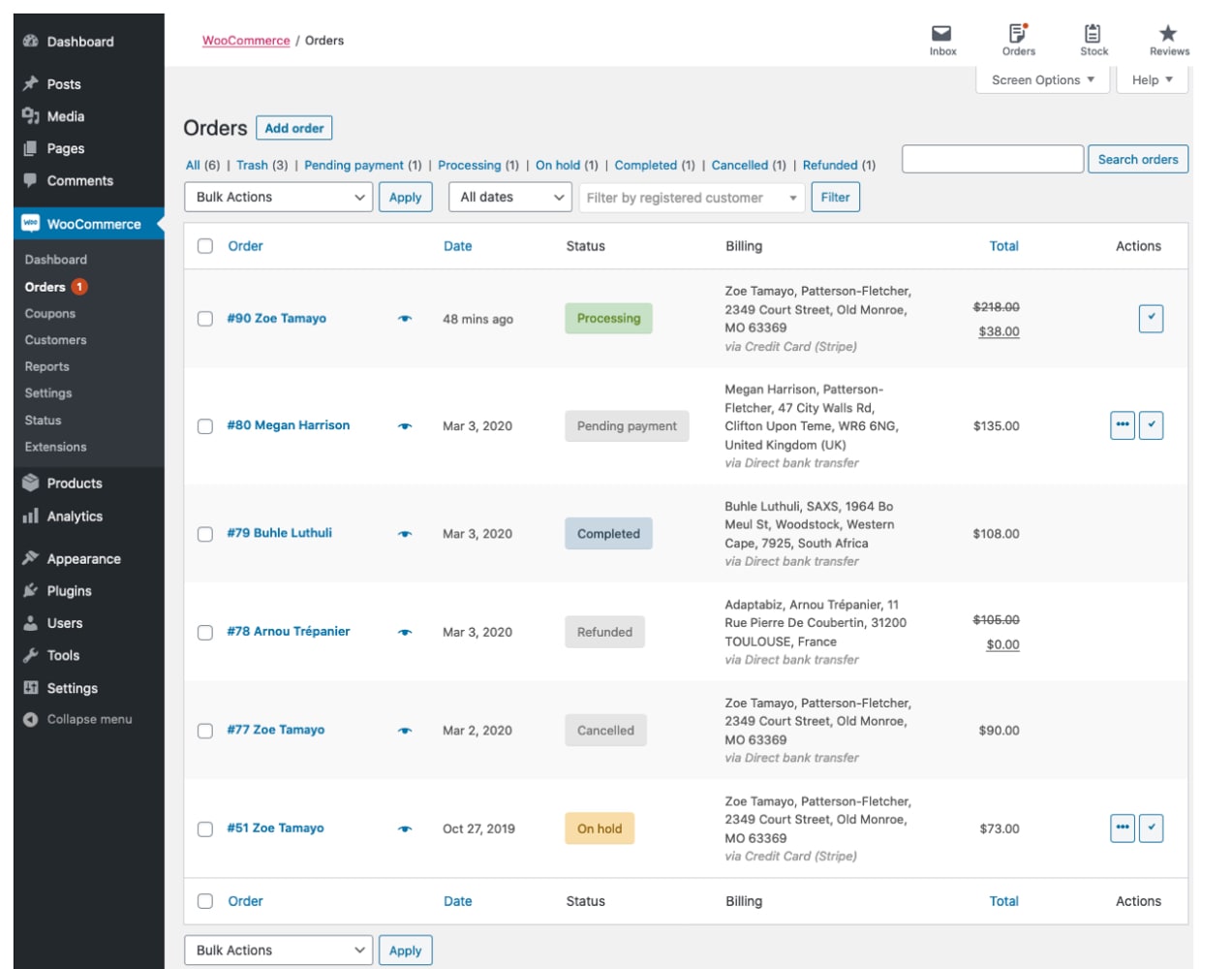
With the current technology, your store’s orders were stored using the same database technology that stores WordPress posts. High-Performance Order Storage will move order information into a new database storage system that is commerce-first and will scale better with your store.
Your website will process orders faster and you’ll be able to access order information more quickly on the backend. This new feature will upgrade your online shop with the most modern database technology that scales easily with your business — no matter how big it grows.
What happens next with HPOS?
We realise that some of the developers we work with may need more time to make their extensions compatible. This means that some plugins will continue to be incompatible for a little while after the general availability date.
HPOS is built into WooCommerce for all new stores, which means you can test it out as soon as you’d like. For existing stores, you’ll still need to enable HPOS.
How will I know if an extension will be compatible with HPOS?
Once you have an extension downloaded and activated, you will receive an alert in your WP Admin dashboard if an extension is incompatible. If an extension you have activated is incompatible, you can try the following steps to fix the issue:
Deactivate any incompatible extensions to quickly resolve an issue.
If deactivating the extension is not an option, you can disable HPOS by following these instructions.
How will this impact your WooCommerce store?
High-performance order storage is a default feature for all stores created on or after October 10, 2023.
However, we want to make sure that our existing stores are functioning perfectly and, at this time, HPOS will not be the default experience for existing stores. Your store will continue working but we encourage you to try it out and enjoy the benefits of a faster checkout — or ask the developer you work with to enable it for your store.
This experience will eventually become the default for all stores in the future, but we are giving ourselves and our extension developers plenty of time to make that transition as smooth as possible.
We’ll reach out to all existing stores before enabling HPOS for everyone.
Who can enable High-Performance Order Storage now?
If your store was launched prior to October 10, 2023, and uses WooCommerce 7.1 or later, you are welcome to try HPOS at any time. It’s currently an opt-in experience available under your advanced settings. To find it, follow this navigation path: WooCommerce > Settings > Advanced > Features.
There is documentation on the WooCommerce website and also in GitHub guides for developers. At the moment, it is still an experimental feature until it’s released, so work will be required to sync your store to the new table structure.
We recommend reading through the complete documentation before deciding to enable HPOS for your store.
Please note that some extensions will not be compatible with the new database architecture yet. We’re working with our third-party developers to make sure the extensions they make and support will be compatible with HPOS.
In the meantime, if you choose to try HPOS, we recommend testing the feature in a staging environment before adding it to your live site. Learn how to set up a staging environment for your store in this blog post. Once your staging environment is set up, you can see which extensions will be compatible via your extension screen after HPOS has been enabled.
Since many of our Marketplace extensions are built by third-party developers, we are relying on them to update their extension code for compatibility. If you try HPOS and find your favorite extension is incompatible, we encourage merchants to reach out to that developer and ask them to update soon. WooCommerce has provided instructions and resources to all developers to help them update their products.
If you try HPOS and have any feedback for us, please reach out to our support team and they can make sure your feedback is sent to the right team.
How does this impact stores created after HPOS is released?
First, congratulations on taking a major step in your business journey! If you are creating a new store after High-Performance Order Storage is generally available, this will be the default database structure for your store. There is nothing you will need to do to enable HPOS. However, some extensions will remain incompatible. Despite our best efforts to encourage extension developers to make the updates, some will not have done so in time for general release.
All new stores will receive the full benefits of a faster checkout experience and better operational performance with HPOS.
Frequently asked questions
The Woo engineering team is working hard to ensure that all HPOS changes are impactful in positive ways, and so that merchants and developers alike have what they need to make an informed decision about when to enable High-Performance Order Storage.
Below is a list of common questions and their answers. For more technical insight, take a look at our developer blog FAQ. If you have further questions, please leave a note in the comments section or reach out to our support team, and we will respond as quickly as we can.
1. How does High-Performance Order Storage work?
High-Performance Order Storage (HPOS) works by adding database storage tables, specific to orders, to the existing WordPress database. This means your orders are going to be now stored in a new table structure designed specifically to work for WooCommerce. For more technical information, our documentation on HPOS is a great resource.
2. I have an existing store but don’t want to try HPOS.
No problem! While we do encourage everyone to switch to HPOS to enjoy the full benefits of a faster checkout experience for your customers, we understand that not everyone will want to try it right away. You will be able to switch at any time.
3. My favorite extension is incompatible with HPOS, what should I do?
We have been actively communicating about the upcoming HPOS change with our developer community. We have several blog posts, guides for how to update extensions in GitHub, and full documentation. Despite our best efforts to encourage extension developers to make the switch, some developers may not accommodate HPOS.
If one of your extensions is incompatible, we strongly recommend that you reach out to the developer’s support team and ask them to make the update. Any extensions that do not update by the time the feature is released will be removed from our Marketplace. You will continue to be able to use the extension without HPOS if you already have it installed.
4. I tried to enable HPOS, but I’m stuck!
If you work with a developer who helps manage your online store, we recommend that you ask them to help migrate your store over to HPOS. If you are not working with a developer and you try HPOS before it’s released, there is additional work needed to sync your store. Be sure to follow our documentation closely.
If you are still running into issues, you can disable HPOS, or you can reach out to our support team for assistance. Additionally, our knowledgeable WooExperts are available if you need more in-depth help with your online store.
5. Can small businesses use HPOS or is it only meant for larger businesses?
Businesses of all sizes will benefit from High-Performance Order Storage.
6. I have a high-volume store on WooCommerce. How does this impact my store?
Existing stores will not be migrated over to HPOS at this time. You are still welcome to try it, especially if you work with a developer who maintains your store.
Eventually, all Woo stores will migrate to HPOS. When we’re ready to migrate existing stores over, we will reach out again to notify our existing stores not currently on HPOS.
If you need additional support for your high-volume business, you may be eligible for Woo Enterprise, which includes unique benefits like dedicated support and discounted extensions. Learn more about how our team can help your business grow.
7. Will this work with extension [X]?
Prior to HPOS general availability, the best way to check if a specific extension’s compatibility is to enable HPOS under advanced settings and then check your plugins tab in WP Admin. Any extensions not compatible with HPOS will show a message on this screen. You may still be able to use an incompatible extension with HPOS, but please proceed with caution and always test it in a staging environment first.
8. Are there any specific hosting requirements or limitations for using HPOS in WooCommerce?
There are no hosting restrictions. Any host that is able to run WordPress should have no trouble running HPOS, and it should even increase performance in a number of ways after it is enabled.
Shipping products successfully is one of the most important parts of the customer experience — so choosing the right shipping method is crucial to the success of your eCommerce business. Shoppers expect to pay as little as possible for shipping, get fast delivery, and find all their products in perfect condition.
Balancing these expectations with reasonable costs to your online store requires careful attention to logistics and quality control. Complications with supply chain management just add to the process. While there are a lot of moving pieces (literally!) involved, perfecting your eCommerce shipping strategy doesn’t have to be complicated.
Shipping process basics
If you are new to eCommerce shipping, you’ll want to do some research on different eCommerce shipping options to determine the best solution for your business. You should set out to create a comprehensive strategy focused on keeping your shipping process efficient and cost effective. When developing your shipping process, ask yourself the following questions:
What kind of packaging should I use?
Which shipping carriers best fit my needs?
What shipping methods should I offer my customers?
What fulfillment solution works best for my business?
Not sure what your answers are just yet? Don’t worry — we’ll go over each of these areas in detail to help you better understand what to look for in a shipping carrier, types of shipping methods you might offer your customers, and distributor or fulfilment center options.
Choosing the right packaging
Before you start shipping your products, you’ll need to decide on the right packaging. Is it important to you that your packaging matches your brand or will a plain shipping box do? Are you concerned about environmental impact?
Since shipping costs vary depending not only on shipping rates but also on your packaging costs, you might choose packaging that helps keep your shipping prices low if minimising cost is your priority.
Though standard boxes won’t help you stand out, you may be able to reduce costs by taking advantage of free packaging provided by carriers for select postal services only. For example, this is offered for USPS Priority Mail and USPS Priority Mail Express.
Some packaging options to consider when developing your eCommerce shipping strategy include:
Custom-printed packaging
First impressions matter, right? Brand your shipping boxes and envelopes with custom-printed designs that represent your unique style. Not only does this elevate your brand’s identity, but it also adds a touch of professionalism. Custom packaging is like a mini billboard that showcases your personality and sets you apart in a sea of brown boxes.
Recycled packaging
If you’re all about being environmentally friendly (high-five!), post-consumer recycled (PCR) or biodegradable packaging should be your go-to choice. Not only does this reduce your environmental footprint, but it also resonates with eco-conscious customers who love supporting green businesses.
Padded mailers
For those smaller, delicate items, padded mailers are a gem. They’re lightweight, protective, and offer a layer of cushioning that keeps your products safe and sound. Plus, they’re easy to store and super cost-effective, which means more dollars in your pocket.
Boxes and tubes
Cardboard boxes and tubes come in various sizes, making them versatile for a wide range of products. Boxes are ideal for bulkier items, while tubes are perfect for posters, artwork, or anything that needs to stay crease-free.
Cushioning types
When it comes to cushioning, you’ve got tons of choices. Think bubble wrap, packing peanuts, air pillows, and foam inserts. For eco-friendly options there’s also green cell foam and mushroom packaging (a styrofoam alternative).
Assess your product’s fragility and choose the cushioning that provides the right level of protection. You want your customers to unbox with excitement, not trepidation.
Bulk packaging purchases
Buying packaging materials in bulk will get you the lowest price per unit and reduce your overall cost of goods. Not only will you save money, you’ll ensure that you never run out of essential packaging supplies during peak seasons. Plus, you can avoid those last-minute trips to the local office supply store.
Tape and labels
While we’re at it, don’t forget the essentials: packaging tape and labels. If you or your in-house team are taking care of packaging, you’ll want to reinforce your boxes with sturdy tape that keeps everything secure during transit. A heavy duty hand-held tape dispenser is indispensable.
Stretch wrap or poly wrap can also help secure your packages and prevent water damage if a package is left out in the rain on a doorstep.
And labels? They’re your package’s passport to its final destination. Make sure they’re clear, accurate, and easy to scan.
You can find affordable thermal label printers online that work with a variety of postage and label creation software like WooCommerce Shipping, Shippo, Shipstation, Stamps.com, and more.
Customer experience
Packaging isn’t just about protection; it’s about creating an unforgettable unboxing experience. Consider adding a personal thank-you note, a small gift, or even a QR code that leads customers to exclusive content. This personal touch adds a warm and fuzzy feeling that turns buyers into loyal fans.
In a world where eCommerce is booming, your packaging choices can make a big impact on your bottom-line. Whether you’re going for a sleek, branded look, an eco-friendly vibe, or simply practical protection, there’s a packaging solution to suit your needs.
So pick the packaging that resonates with your brand and watch as your customers become unboxing enthusiasts!
Choosing shipping carriers
A shipping carrier is the person or company that physically delivers your products to your customers. They charge a certain rate for each delivery, which is typically based on a combination of weight, speed, and distance for local delivery or international shipments.
If your business is located in the United States, popular shipping carriers are the United States Postal Service (USPS), FedEx, UPS, and DHL. View a full list of shipping carriers that integrate with WooCommerce.
When you choose a shipping carrier, it’s important to find the right fit for your business and products. Depending on where you are shipping to and what you are shipping, you may need to use multiple carriers to achieve reliable deliveries at an affordable shipping cost.
Here are some important aspects to consider when deciding on the best carriers to use for your needs.
Shipping fees
You’ll end up passing shipping costs on to your customers, or adding them to your business expenses, so it’s important to compare providers based on what they charge for packages. Consider ways to save, like shipping in bulk or using extensions, like WooCommerce Shipping, to get pre-negotiated discounts on shipping labels.
Weight limits
How much do your products weigh? Some carriers have weight limits and others specialize in large freight shipping, so make sure that your items qualify for the shipping solutions you’re considering.
International shipping
Shipping internationally can be quite expensive and can often be very slow, depending on each country’s customs practices. If you’re not willing to pass the additional cost and delivery delay onto your customers, you might want your shipping destinations to remain domestic only.
Depending on where your customer base is, however, international shipping may be vital to your business. So if you want international delivery for your products, you’ll need to choose a shipping service that operates in the countries you’re shipping to.
Delivery experience
Some shipping services have unique offerings that make them more successful at delivering packages to customers, such as same-day delivery, expedited shipping services, in-store pickup, special door access, etc.
When you choose a shipping partner that offers a variety of shipping methods and ways for customers to collect their packages, you can provide a better overall shopping experience.
Weekend delivery
Do you want to offer weekend delivery to customers? Some providers only ship on weekdays. Other companies may only offer delivery during business days, but they might offer weekend in-person pickup options at a physical location.
Insurance
If you want to provide extra protection for packages, choose a carrier that offers insurance coverage. This is especially important for one-of-a-kind items like original artwork, high-value products, or in areas where mail delivery can be unreliable.
Sometimes the cost of insuring very high-value items is prohibitively expensive. There are some package protection services like Route and AfterShip that act as third-party insurers.
If a package is lost or stolen, some of these package protection services will even purchase a new product from your website and have it shipped to the customer whose order wasn’t received, so that the business owner incurs no extra cost for shipping a replacement.
Tracking
There’s rarely going to be a case where you don’t want to include tracking on a package. Most customers like to be able to check on the delivery status of their orders. And if a package is delayed or lost, you want to be able to track it down to determine what happened.
When your packages are easily trackable, you can provide improved customer service. Quickly reassure the customer regarding arrival time or ship out a replacement package and make a claim with the shipping carrier if necessary (because, of course, your package was insured, right?).
Just about every shipping service offers tracking, but keep in mind some carriers offer lower-cost shipping methods that don’t include tracking. It can be an easy mistake to simply choose the cheapest option when selecting your preferred shipping method, and not realize that a tracking number is not included.
USPS First-Class Mail and USPS Marketing Mail, for instance, do not include tracking, but you can add that service on during the purchasing process. Other shipping methods like USPS Priority Mail, UPS Ground, FedEx Ground, and FedEx Priority automatically include tracking.
Special considerations
Do you sell alcohol, fragile items, or products that must be kept cold? Ensure that your shipping carrier can work with those requirements.
One WooCommerce customer who does this extremely well is Brown Brothers. Brown Brothers is a wine company that only ships to regions that aren’t “dry†and doesn’t allow people under 18 years of age to accept their packages.
Some companies specialize in freight management and shipping solutions for specific industries — like art handling and produce transport.
Perhaps you have a large crate that requires rail shipping or you need to ship mass quantities of product via an ocean freight shipping service. There are qualified shipping services that can transport just about anything to your desired shipping destination.
Be flexible and work with as many shipping partners as you need to get the best result for your business and customers. You might use one specifically for heavy items and another for everything else.
You could use FedEx Ground to ship to one region and UPS Priority to ship to another. Perhaps you get pre-negotiated discounts through a fulfillment partner for expedited shipping through Priority Mail Express.
There are a variety of choices, so the eCommerce shipping carriers you choose will be highly dependent on your circumstances and needs as well as the providers and shipping rates available to you.
eCommerce shipping methods
A shipping method is both the rates and shipping service types that customers can choose from at checkout. They’re often based on the carriers you work with, and determine shipping speed and what shoppers pay for delivery.
Below are a few different types of shipping methods that you may want to offer to your customers.
Standard shipping
This basic shipping option offers a balanced approach between cost and delivery time. Standard shipping is reliable and usually takes five to seven business days to deliver (when shipped domestically), making it a popular choice for budget-conscious customers. It’s best suited for non-urgent items and serves as a baseline shipping method for most online retailers.
Expedited shipping
When speed is of the essence, expedited, or express shipping steps in. This method guarantees quicker delivery, typically within two to three business days. Customers willing to pay a bit extra for faster service often choose this option for time-sensitive purchases, gifts, or urgent needs. However, the higher cost may deter some budget-minded shoppers.
Overnight shipping
The crown jewel of rapid delivery, overnight shipping is even faster than expedited shipping, promising delivery within one business day. This is ideal for emergency situations, last-minute gifts, or perishable goods. Due to the extremely short delivery time, the costs associated with air freight and overnight shipping can be significantly higher compared to other methods.
Flat rate shipping
Simplicity is the hallmark of flat rate shipping. Regardless of the weight or destination of the package, a fixed rate is charged. Flat rate shipping is advantageous for heavy items or shipments traveling long distances. Businesses can offer a predictable cost to customers, fostering transparency and reducing shopping cart abandonment due to unforeseen shipping fees.
Variable rate shipping
Also referred to as table rate shipping, this method takes into account factors like package weight, dimensions, distance, and delivery speed to determine the shipping cost. Variable rate shipping offers flexibility and accuracy in pricing, ensuring that customers are charged based on specific shipping zones and other details of their order. Businesses benefit from covering their actual shipping costs while offering choices tailored to individual needs.
If using a variable weight shipping method is right for your store, the best way to get accurate rates is to connect your store to your carrier using an extension. The extension will automatically calculate shipping charges in real time, based on weight, box size, destination, and other factors so that customers never overpay and you’re never stuck with higher costs than anticipated.
See all shipping method extensions.
Free shipping
A powerful magnet for customer engagement, free shipping has become a staple shipping option for eCommerce companies. While it can boost sales and enhance customer satisfaction, businesses often offset the cost by adjusting product prices or setting minimum order thresholds. Free shipping can be a game-changer during promotional periods or for gaining a competitive edge.
Same-day delivery
Riding the wave of instant gratification, same-day delivery strives to deliver orders on the day they’re placed. This service provides unparalleled speed and requires tight coordination between retailers and local logistics partners. The downside is that it typically limits delivery based on a customer’s location, restricting eligible orders to certain geographic areas.
Same-day delivery options may come with steep costs, but in some cases it might be worth it. Speedy local delivery can actually be a core component of certain types of small businesses. Expedited shipping services like same-day local delivery can be the ideal solution for eCommerce businesses like flower shops, meal delivery services, local restaurants, and grocers.
Click and collect (in-store pickup)
Click and collect allows customers to place orders online and pick them up from a physical store. This method saves on shipping costs and offers customers added convenience. It also encourages foot traffic to physical stores.
Ultimately, the right shipping method for you all depends on your shipping strategy and eCommerce business. You may choose to reserve expedited and overnight shipping for holiday rush periods or exclusively offer free shipping on all orders just to avoid the hassle of having to deal with table rates. In-store pickup and same-day delivery are often only practical for brick-and-mortar stores (stores that have physical locations) that have a strong local customer base.
Take a deep look at your business model, products, and customer demographics and then select the right eCommerce shipping methods for you.
Fulfilment solutions
Fulfilment solutions involve the entire process of delivering your products. From determining shipping costs to printing labels, and everything in between. Let’s take a look at a few of the steps involved in the fulfillment process.
Printing shipping labels
Shipping labels tell your carrier where the package is supposed to go, when it’s supposed to arrive, and how much you paid to get it there. While you can get shipping labels from your carrier’s location, like the post office, it’s often easier to print them from your place of business.
With WooCommerce Shipping, you can pay for the label and print it at the same time, straight from your WordPress dashboard, which allows you to just drop your package in a box or arrange for pickup at your front door.
Putting packages in the mail
Of course, you have to actually get your products to your customers. How does that work for your company? Who’s responsible for pulling inventory off the shelves? Packing each box? Setting up a pickup or dropping packages off at your carrier’s location?
It’s important that every aspect of the fulfilment process works seamlessly, which minimizes returns and speeds up overall shipping time. Depending on your business, you might want to invest in a tool or extension that connects your store to your inventory management system and synchronises data.
Updating your customers
Customers should know where their package is and when it will arrive on their doorstep. Tracking information is one way to help with this — a buyer can check on their order at any time of day without having to reach out to your support team.
You can also email customers each time their order status changes. Is their order boxed up and ready to go? Has it been shipped? Is it sitting on their front porch? Let them know where they are in the process from start to finish.
Consider a fulfilment center or third-party logistics provider (3PL)
If you want to completely offload the fulfilment process, you should consider a fulfilment center. It houses your products in bulk and packs, labels, and ships each order. One common example of this is Amazon Fulfilment, which automatically integrates with your WooCommerce store and syncs order information.
While this does mean a lot less work and hassle for your team, it can also be expensive and turns over a certain amount of quality control to a third party.
Connect all the pieces
As you can see, shipping carriers, the types of shipping methods used, and fulfilment processes all work together to deliver a seamless experience for your customers and your staff. WooCommerce provides the tools you need to connect all the pieces.
Running an eCommerce business takes more than just great ideas, products, marketing, and inventory. You also need an eCommerce accounting system to follow the money. How much are you spending? What are your profits? Are you within your anticipated business budget? Is the government happy with your business? What are your sales tax obligations?
eCommerce accounting uses well-known processes for keeping track of your financial data and business transactions, and staying up to date on taxes, payroll, and profits.
Whether you’re just starting your eCommerce store or have been at it for a little while and are realizing that you need help tracking your business finances, this eCommerce accounting guide will get you going in the right direction.
eCommerce accounting empowers you to judge the financial health of your business, manage cash flow, and make more accurate financial projections as your business grows.
What does eCommerce accounting involve?
eCommerce businesses are built on transactions and inventory. You make sales. You ship goods. You purchase and refill inventory.
The basics of eCommerce accounting begin with a system for recording and reporting your transactions, which includes purchase orders, invoices, expenses, and taxes.
But it goes much further than that. Accounting firms will then take that data and use it to prepare financial statements so they can analyze and report on the financial health of your business.eCommerce companies also require some specialized attention due to the fundamentals of the business model.
Think about what happens when you make a sale in your eCommerce store. That means the customer uses their credit card and submits payment to your payment processor. What are all the ways that sale affects your finances?
Your payment processor has received money, but it’s not in your bank account yet
Sales taxes are incurred, possibly from a different state or country
Inventory declines
Credit card and/or payment processor fees are charged
Actual income from the sale differs from the sales price
The order must be shipped, and might be returned — who’s paying for shipping in both scenarios?
No matter the sales channel, making even a single sale touches on many aspects of your financial records — and the aftereffects of that one sale will show up in your financial records over the next couple months. And if the order does get returned, many of these transactions must now be reversed or modified.
And, that’s just one sale.
Tracking some of this is the job of a bookkeeper, and we’ll talk about the differences between eCommerce bookkeeping and accounting a bit later.
First, let’s begin with some basic accounting terminology.
Basic accounting terms
Here are the most important terms to know for eCommerce accounting:
Transactions
In accounting terminology, a transaction happens any time money is spent, received, or asked for by a business or vendor.
A transaction could be any of the following:
Money the business owner invests in the business
Revenue from sales
Invoices
Expenses like wages, marketing, travel, and building costs
Assets purchased, such as vehicles, office equipment, property, or materials
A single transaction can have multiple components. When you pay an hourly employee, for example, you have to know the amount of time they worked, their gross wages, tax deductions, and net pay. The best cloud accounting software can perform all of these tasks.
Transactions for eCommerce companies can get complicated due to certain factors, particularly sales taxes and timing delays caused by the separation between business and consumer.
For example, do you charge sales tax right at the time of purchase? If so, what happens to that money if the product gets returned a month later?
eCommerce accounting attempts to manage your transactions and processes so these sorts of complications don’t cloud the financial picture of your business.Â
Debits and credits
All transactions are tracked by a system of debits and credits. First, let’s define some key terms:
Debit: A record of the money taken from your bank account. You’ll see debits show up on your statement when you make a purchase.
Credit: A record of the money added to your account.
Assets: Property (real or intellectual) owned by an organization.
Liabilities: Business obligations that have yet to be fulfilled. A liability is a claim against the assets shown on a balance sheet.
Equity: The sum of assets after debits have been subtracted from them.
Now, we can look at how these terms play into what’s known as the main accounting equation:
Assets = Liabilities + Equity (Owner’s or Corporation’s)
A debit is added to the left side of the equation, as an asset. A credit is added to the right.As a simple example, if you make a sale for $500, that $500 gets debited and added to your business assets. And it also gets credited as Owner’s Equity in the form of income. Whenever something gets debited, something else must be credited, because this keeps the equation balanced.
That’s a vastly simplified explanation, but it gives you a basic idea of what your accounting software is doing when you enter transactions.
Cost of goods sold (COGS)
eCommerce accounting must pay particular attention to the cost of goods sold. This refers to all the costs required to sell a product, not counting things like payroll or marketing.
COGS covers all inventory costs, including purchasing, storing, managing, and shipping. Inventory is your largest expense as an eCommerce seller, so if you don’t have an accurate accounting picture of the costs of goods sold, your profit margin and taxable income will also be inaccurate.
An inaccurate COGS also makes it harder to know what to spend on marketing, what prices to set, how much inventory to order, if you should hire employees, and how much warehouse space to acquire.
Profit margins
Margins represent the actual income your business acquires after a sale has been made. You calculate margins with this equation:
Margin = (Revenue – Cost of Goods) / Revenue
Essentially, it’s your net profits expressed as a percentage. If you sell $10,000 worth of products in a week and your COGS for those products is $3000, your margins would be 70%.
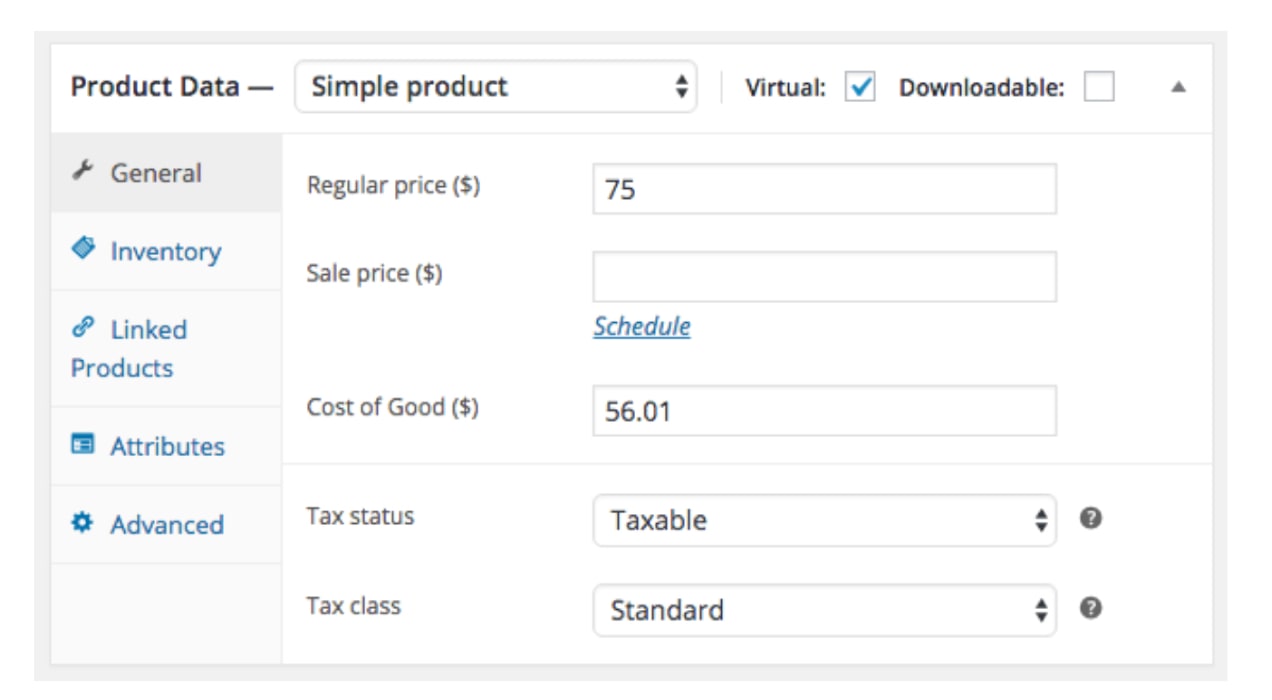
To simplify this process, WooCommerce has an extension that calculates your cost of goods so you can compute the cost of each specific product you sell, a category of products, or all of your products for any time period you select.
Accounts receivable and accounts payable
These terms refer to money that has not yet changed hands, but is slated to.
Accounts receivable includes any money that is due to arrive in your bank account. For example, if you send out an invoice, that goes in accounts receivable until the customer actually pays you.
Accounts payable works the same way in reverse. If your business makes a purchase from a vendor, and that vendor sends you a purchase order, it goes in accounts payable until you actually make the payment.
eCommerce accounting vs bookkeeping — what’s the difference?
There’s some overlap between eCommerce bookkeeping and accounting. But in general, the difference is that bookkeepers process events, and accountants compile and analyze those events to create an accurate and useful picture of your business budget.
If a sports analogy helps, bookkeepers are like the play-by-play announcer, and accountants are like the analyst or color commentator. The bookkeeper tracks what happened. The accountant tells you what it means.
What does an eCommerce bookkeeper do?
Bookkeeping tasks focus primarily on transactions, records, and financial institutions. If you have employees, the bookkeeper handles the payroll. They also do things like:
Process invoices
Send receipts
Record what comes in and goes out from your business bank account
Record inventory purchases
Reconcile your bank accounts every month
Generate monthly financial statements
Create year-end statements and tax documents
Accurate eCommerce bookkeeping will help you build a financially stable and reliable business model.
What does an eCommerce accountant do?
In addition to what the bookkeeper does, the accountant seeks to give a full and accurate picture of the true financial status of your eCommerce business. No matter the eCommerce platform you use, they incorporate your inventory, cost of goods sold, and other complicating factors such as sales taxes, returns, chargebacks, pre-orders, subscription revenue, and alternate payment methods like Buy Now Pay Later (BNPL).
An eCommerce accountant will do things like:
Analyze and track operational costs and business performance
Conduct financial forecasting
Study financial statements — including those from your bookkeeper
Perform tax planning, including filing returns
Report on your cash flow management
The accountant’s goal is to help eCommerce business owners make informed financial decisions.
Can you afford to hire a new employee? Should you expand into a new state or country? What’s the minimum you should charge for a new product?
eCommerce accounting at its best will be able to answer these questions.
Accounting methods for eCommerce sellers
There are two basic methods of eCommerce accounting — the cash method and the accrual method. The accrual method is the more common one, and depending on the size and nature of your business, may be required by law.
The basic difference between the methods is when a transaction is recognized.
Cash basis accounting
In cash basis accounting, a transaction is recognized when actual money has changed hands. When you pay an invoice, cash basis accounting marks that as an expense. If you receive an invoice in January but you pay it in March, cash accounting marks that as an expense in March.
Income operates the same way. Suppose you make a sale, and the customer signs up for a payment plan that will spread out their payments over four months. With cash accounting, you count this as income each month the money comes in.
Accrual method accounting
In accrual accounting, the transaction is recognized when the work has been completed and the invoice sent. Suppose you place an order for a fresh supply of office paper in January and put it on your business credit card. You receive the office paper immediately, but you don’t actually pay for it until February, when the statements for your credit card accounts arrive.
In accrual accounting, the transaction happens the moment you receive the paper. You take the receipt, store it in your file system, and record the expense. It’s an expense for January, even though you don’t pay for it until February.
Using the same example, accrual accounting would record the entire purchase price as income the day the sale is made, even though you won’t actually receive all the money until four months have passed.
Which accounting method is better for eCommerce businesses?
Accrual accounting gives you a clearer picture of your cost of goods sold each month. If you buy paper in August, that paper was part of the cost of running your business — in August, not when you actually get around to paying the bill. If you make a sale in May, then you made the sale in May, not in July when the customer finally sends the money.
It also works better with inventory management.
Suppose you make $30,000 in new inventory purchases in September, and you sell it over the next four months leading up to the holiday season. In cash accounting, you would mark the entire inventory purchase as an expense in September. In accrual accounting, you would mark it as an expense as you sell the product.
With the cash approach, you’d have a big expense in September, and then artificially high profit margins in October, November, and December, because it will appear as if you have no costs of goods sold.
Accrual accounting enables you to reconcile the costs of doing business each month, so you can see which months produced the highest margins.
Three primary financial statements
Even if you plan to outsource your eCommerce accounting and bookkeeping, you need to be able to read and understand your financial reports.  If you’re doing it yourself, using your eCommerce bookkeeping software to enter transaction data will enable you to prepare the three basic financial statements: income statements (also known as the “profit and loss statement†or P&L), balance sheets, and cash flow statements.
Income statement
The income statement reports profit earned over a specified period of time, such as a month. This profit is what people refer to when they use the term “bottom line.†Your profit is your net income. Or, if you lost money during that time period, your net loss.
Balance sheet
Balance sheets report your assets, liabilities, and equity at a specific point in time, typically at the end of a month, quarter, or year. It’s a snapshot of your financial health.
Assets are things owned that have value. Liabilities, including accounts payable, are things you owe.
If you look back at the basic accounting equation listed earlier, you’ll see that equity is simply the difference between assets and liabilities. Subtract liabilities from assets, and you have what’s called the “book value,†or equity, of your business.
Cash flow statement
The cash flow statement reports on how your cash on hand has changed during a given time period.
All three of these statements can be quickly produced by your accounting software, as long as you’ve been diligent about entering your financial data. If you don’t have time for that, this is one reason to hire an eCommerce bookkeeper.
Essential financial metrics for eCommerce accounting
TaxJar put out a great article about eCommerce accounting metrics. Remember, accounting isn’t just about keeping financial records. Accounting also tells the story about the financial status and growth (or decline) of your eCommerce business.
Here are their most essential accounting metrics:
Revenue
Revenue refers to your gross receipts before any expenses have been deducted. Revenue is fairly easy to track. But by itself, it gives you an incomplete picture.
Contribution margin
This is the selling price minus the cost to sell that product. It is sort of like the COGS figure from before, but for each individual product you sell. It does not include operating expenses.
Profit
Profit is what results after you take away all your expenses from your revenue, including marketing and operating expenses. If your revenue is high but your profits are low, you either need to increase revenue, or reduce costs.
eCommerce conversion rate
This is the percentage of visitors to your eCommerce store who buy something.
Customer acquisition cost
Typically, it costs a lot less to make additional sales to your existing customers than to acquire a new customer.
So, if your CAC is high, and you don’t want to stop any of your marketing, you have two options:
Try to improve or optimize your marketing
Start marketing more to your existing customers
Customer lifetime value
If you’re a relatively new eCommerce seller, you’ll have a tough time determining this one for your first few years. But with good accounting software, you’ll be able to start estimating this as time goes on.
This number helps you justify your marketing expenses. In other words, if your CAC is high, but your customer lifetime value is much higher, then it’s worth the cost to acquire those customers.Â
Average order value
Especially for newer eCommerce businesses, this is a more useful metric than lifetime value. If you spend $10 to get a customer, but they spend an average of $25 per order, that’s a good deal as long as your other expenses aren’t too high. If you can scale that up as you reach more customers, you’ll do great.
Cart abandonment rate
This number is shockingly high for eCommerce stores. According to TaxJar, about 70% of eCommerce shoppers put products in carts but don’t buy them.
Your single best strategy for reducing cart abandonment is to send abandoned cart emails, If you can lower that cart abandonment rate down to 60% or 50%, that will produce a sizable increase in revenue. And if all it takes is a few automated emails, that’s a no-brainer.
Customer refund and return rate
Do a lot of customers return products for a refund? That’s an indicator that something is wrong. Keep track of this and do everything you can to keep it low.
Five important eCommerce accounting tasks to tackle
If you’re in the early stages as an eCommerce business owner, you need to get a handle on your basic accounting tasks soon so you don’t end up in hot water later. And just so we’re clear, ‘hot water’ can mean a lot of things, such as:
Unpaid taxes — income tax, sales tax, or state and local taxes
Incorrect tax filings
Overspending on inventory
Hiring employees you can’t afford
Withdrawing too much equity
Here are some steps you can take to get your eCommerce accounting system off to a good start:
1. Create a separate business bank account
eCommerce small business owners often don’t think about this as they’re busy with all the other business startup tasks.
But business accounting becomes very difficult if you’re mixing personal with business transactions or funding your venture directly from a savings account. Your business account is what you’ll use for all your business expenses, and it’s where you’ll deposit income from sales.
There are various business account types you can discuss with your local financial institution. To open a business bank account, you’ll need a business tax ID number.
2. Prepare for employees and contractors
If you plan to have employees, you’ll need to set up procedures for withholding taxes. Even if you plan to run the business on your own for now, you’ll probably still hire contractors for particular projects. Contractors who are paid above a certain amount per year in the U.S. must be sent a 1099, so be sure to:
Track who you’ve paid and how much you’ve paid them
Get a W-9 form from each contractor
Keep current addresses on file for everyone you hire
3. Get accounting software
If you expect to have hundreds or thousands of transactions per month, you’re going to want cloud accounting software like QuickBooks Online, Xero, or FreshBooks. Businesses with fewer transactions can get away with using an Excel spreadsheet, but a high-transaction business won’t be able to keep up with manual entries.
eCommerce accounting software automates most of the essential accounting tasks and simplifies your life. It records, stores, and retrieves financial data and uses it to produce financial reports and statements.
You can sync your store data with QuickBooks Sync for WooCommerce, Xero for WooCommerce, or WooCommerce FreshBooks.
4. Keep all receipts, invoices, and payment records
The Reliability Principle of Accounting says that only transactions with supporting documentation should be recorded. If you don’t have records of a transaction, you can’t count it as income or an expense. If you tried to claim a tax deduction for an expense you have no proof you ever paid for, that could be called tax fraud.
Keep physical receipts. Or take photos of them and store them digitally. Keep all emailed invoices and receipts in a separate email folder too, not just your general inbox.
5. Start paying attention to tax requirements
Tax requirements vary dramatically depending on the type of business and where it operates. You need to know about sales tax compliance, import tax if you have any international transactions, tax withholding, quarterly taxes, and any other taxes specific to your nation, state, province, city, or region.
Those taxes will figure into your financial reporting. It is always recommended to consult with a tax professional to ensure you’re following the right procedures.There’s a lot more to say about eCommerce tax management. Here are two big tax issues you’ll have to deal with:
Tracking and paying sales taxes
eCommerce sales taxes have become very complicated. Nearly every US state now charges an online sales tax, and the EU also has a sales tax system.
In the U.S., each state charges different rates, and has different requirements for when sales tax applies.
Paying estimated quarterly business taxes
Business income is pre-tax. Just like a 1099 employee, your eCommerce business makes money before any taxes are paid on that income.
And like a 1099 employee, you need to pay quarterly income taxes. If you don’t, the government will penalize you for being late on your tax bill.
How do you manage this? The idea is to avoid falling way behind on your taxes. The best way to manage quarterly taxes is to set aside a percentage of your income each month and then use that to pay estimated taxes each quarter.
Should you hire bookkeepers and accountants or DIY?
If you don’t get accounting software, or if you do get it but don’t want to be responsible for using it, you’ll need a bookkeeper. But as your business grows, you’ll eventually also need to look at some of the many accounting firms that understand the nuances of eCommerce businesses.
Many eCommerce business owners like the idea of running their own show, including acting as the Chief Financial Officer, and as long as your business remains small, you might be able to get away with it. But let’s define “small.â€
With an eCommerce company making even something like $100,000 per year in net profits, that’s already going to start getting out of hand in terms of your accounting system if you’re selling products in multiple states or countries. The sales taxes alone just get too complex.
You also have to deal with shipping, returns, chargebacks, and all the rest. Most eCommerce platforms sell lower-priced products, and deal in volume. Unless yours is an exception to that, that means you will have a lot of transactions.
The more transactions, the more time it takes to track and record it all. And even a “small†eCommerce business making just $100,000 in net profits per year selling products that range from $5 to $20 will have a lot of transactions.
Now, if your business only sells in one region, state, province, or country, your level of tax complexity goes way down. In that scenario, you might be able to get away with doing it yourself — if you want the extra work.
Try out your preference and see how it goes. You can always change your mind later — especially after filing your first year of tax returns.
WooCommerce has accounting covered
WooCommerce understands the responsibility business owners have each day. Manually inputting transactions and creating financial reports can be time consuming and tax planning can give you a headache, but accounting is an essential part of running a successful business.
To take the burden off of store owners, WooCommerce platform has a variety of extensions that automate key accounting processes. If you’re another looking for a reason to use WooCommerce, this is it.
Decades ago, eCommerce forever changed the way people shop. Who hasn’t researched products online before making a purchase? Ordered online for in-store pickup or delivery? Or pulled out a smartphone in a store where the product you needed wasn’t in stock?Â
But eCommerce looks different than it did in its early days. It continues to change with evolving customer behaviors and to take advantage of the latest technology.Â
Here are ten eCommerce trends to watch in 2024 and consider building into your business strategy. Keeping up with these trends can help you improve customer experiences, operate more efficiently, and stay competitive — all keys to your success.Â
eCommerce trends with momentum going into 2024
1. Artificial intelligence (AI)
Using AI to improve operations and business outcomes isn’t just for large enterprises anymore. Advances in AI have made it more user-friendly and affordable for retailers of all sizes. Generative AI platforms like ChatGPT allow you to ask questions in natural language to get answers that will help you personalize customer experiences and make upsell and cross-sell offers that work. Additionally, generative AI can analyze customer, sales, and other data to create marketing content and social media posts that lead to greater engagement — without you having to do any of the writing. Â
AI can also automate processes, like screening calls to customer service. It can even give customers answers to simple questions so human agents can focus on tougher issues. AI also makes visual image search possible, so customers can snap a photo and find a link to your store to purchase it.Â
Fortune Business Insights predicts the market for artificial intelligence in retail will skyrocket at a phenomenal 34.1% compound annual growth rate (CAGR) from $5.5 billion in 2022 to $55.53 billion by 2030.
2. Augmented reality (AR)
Brick-and-mortar stores have had an advantage over eCommerce when it comes to allowing the customer to see firsthand how an item would look in their homes or how apparel looks when they try it on. AR is closing that gap.Â
For example, a furniture retailer can allow consumers to show a three-dimensional image of a chair or table over a real-time view of a room to see how it would fit and look. Similarly, AR can enable a shopper to “try on†a shirt or dress on their image.Â
Consumers are anxious for this technology to be widely available; 61% say they prefer retailers with AR experiences, and 71% say they’d shop more often if they could use AR.Â
3. Subscriptions
The subscription model is a set-it-and-forget-it way to enjoy streaming services and magazines is convenient for consumers. Moreover, subscriptions build a reliable recurring revenue stream for businesses. You don’t have to rely on customers remembering to reorder each month. Sales just keep coming in.Â
But the model doesn’t only work for companies that are typically associated with subscriptions. Retailers are also finding ways to make purchases monthly and bake in customer loyalty. Consumables, like daily vitamins, coffee or tea, and beauty products, are perfect candidates for subscriptions. When a customer places an order, make an offer to automatically restock them with these essentials each month and set up recurring payments.Â
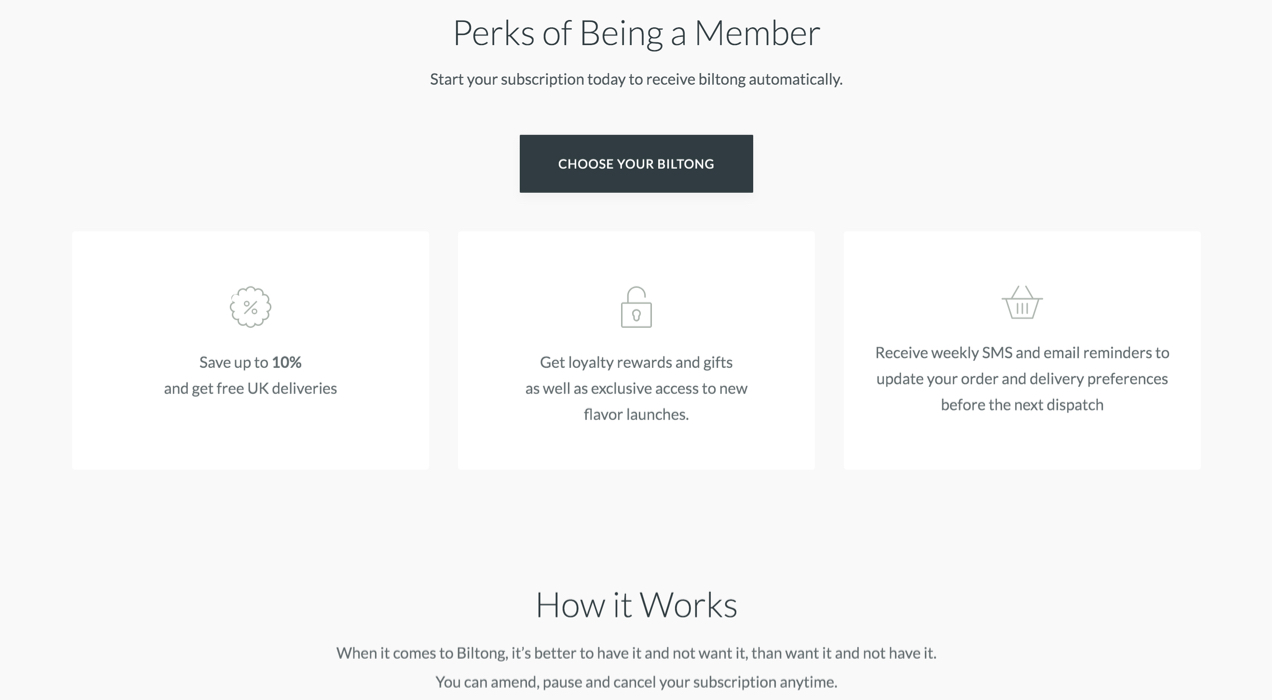
Subscription perks from https://thebiltongfactory.co.uk/
However, you have other options to be a part of the subscription economy. Fashion and accessories, pet supplies, and other specialty retailers can send curated boxes, personalized for the customer, for an annual membership or monthly fee. It’s a way to keep customers engaged month to month — even adding an element of surprise — while keeping revenues coming in.Â
Research and Markets sees the eCommerce subscription economy growing, predicting the market will grow by $2.323 trillion from 2022 to 2028.
4. Omnichannel
Instead of selling only from their eCommerce website or a single marketplace, retailers will take more of an omnichannel approach in 2024. More eCommerce retailers are finding out where their target audience likes to browse and shop, and are doing business there.
It could mean joining the Amazon ecosystem or selling handcrafted or specialty products on Etsy. Another option is to dive into social commerce, selling directly from Pinterest or Instagram. The key to omnichannel eCommerce success, however, is creating a unified experience and clearly communicating your brand message wherever you sell.Â
Statista reports that multichannel eCommerce sales are growing. They totaled $350 billion in 2020 and are on pace to reach $575 billion this year. That growth is likely to continue into 2024 and beyond.Â
5. A tougher fight against fraud
Fraud costs the retail industry about $100 billion annually, a number that’s growing as eCommerce grows. When people aren’t face-to-face with a sales associate when they make a purchase, they have more opportunity to commit fraud. But retailers are fighting back with technology and processes that make it harder. The industry is also putting policies in place that keep a lid on chargeback or “friendly fraud.†That’s when consumers use their own credit cards but then contact the bank for a refund even though they received the products. They bet on the merchant not fighting back.Â
The good news is that AI and other advanced technologies can spot unusual behavior that may signal fraud. For instance, it may flag an order coming from a country that doesn’t match the customer’s ZIP code, several orders from the same IP address, or multiple high-value purchases in an hour or two. AI can also quickly analyze data and let the merchant know a customer has a suspicious chargeback history.Â
When technology raises red flags, the eCommerce system can stop transactions until customers prove their identity or decline the purchases completely.Â
6. Short form video and live streaming
Consumers like the autonomy of online shopping. eCommerce lets them do product research and comparison shopping and control how to pick up their orders or have them delivered.Â
But sometimes, they like input from the experts. Product videos can answer questions shoppers may have about items they’re considering — and may even clue them in on some features they didn’t know the product has. Seeing a product in action can give the shopper more confidence and create more excitement over the purchase.Â
Video of a product in action from https://dvosuspension.com
Additionally, you can build a social media following by live streaming about featured products or promotions your business is running.Â
eMarketer research found that 75% of U.S. consumers look for visual content on a regular basis before purchasing. If you provide it, more people in your target market may find your business.Â
7. Mobile-first design
Statista reports that 60% of all eCommerce sales worldwide originate on mobile devices. To improve shopping experiences on a small screen, eCommerce retailers are taking a different approach to website development: They’re designing for a smartphone first, then scaling the design for larger tablet, laptop, and PC screens. In the past, website design was primarily the other way around.Â
The logic is simple: It’s easier to create something appealing for a small screen rather than to design it for a big screen and attempt to scale it down. With a mobile-first approach, user experiences are good for all your customers, which could lead to less abandonment, more revenue, and increased loyalty.Â
Also, keep in mind that Google has transitioned to mobile-first indexing, so mobile-first design can help you improve SEO.Â
8. Voice searches
The number of voice assistant users has grown from 79.9 million in 2017 to 125.2 million in 2023. Furthermore, PwC research reveals that 68% of consumers use voice assistants to add items to a shopping list, and 50% use them to buy something. Ease of use, convenience, and hand-free shopping are driving this consumer behavior.Â
To make the most of this opportunity, remember that people don’t speak the same way they type. Learn all you can about the phrases your customers use in voice search, and add them to your website content. Also, remember to optimize searches for “near me†if you focus on selling to a local market.Â
9. Sustainability
Consumers are using their buying power to help protect the environment. For example, a study by McKinsey & Company found that 60% of consumers would pay more for a product with sustainable packaging. Additionally, research by NielsenIQ found that 78% say a sustainable lifestyle is important to them.Â
But the proof is in how these products perform. Products marketed as “sustainable†are growing almost three times faster than ones that aren’t.Â
In 2024, eCommerce retailers will see greater success if they adopt sustainable practices, work with suppliers who do, and clearly communicate that to their customers.Â
10. Payment choices
Your business strategy might be to provide the best quality or unique products. You might have a great loyalty program. Or you may focus on an omnichannel strategy. But one of the best things you can do to capture sales is to offer customers payment options.
PYMNTS surveyed consumers who shop digitally and found nearly half say the ability to use their preferred payment method is very or extremely important. Moreover, about another 12% say it’s the most important factor in deciding where to shop.Â
If you currently only accept credit or debit card payments, research your market to learn which other payment methods could help you capture sales.
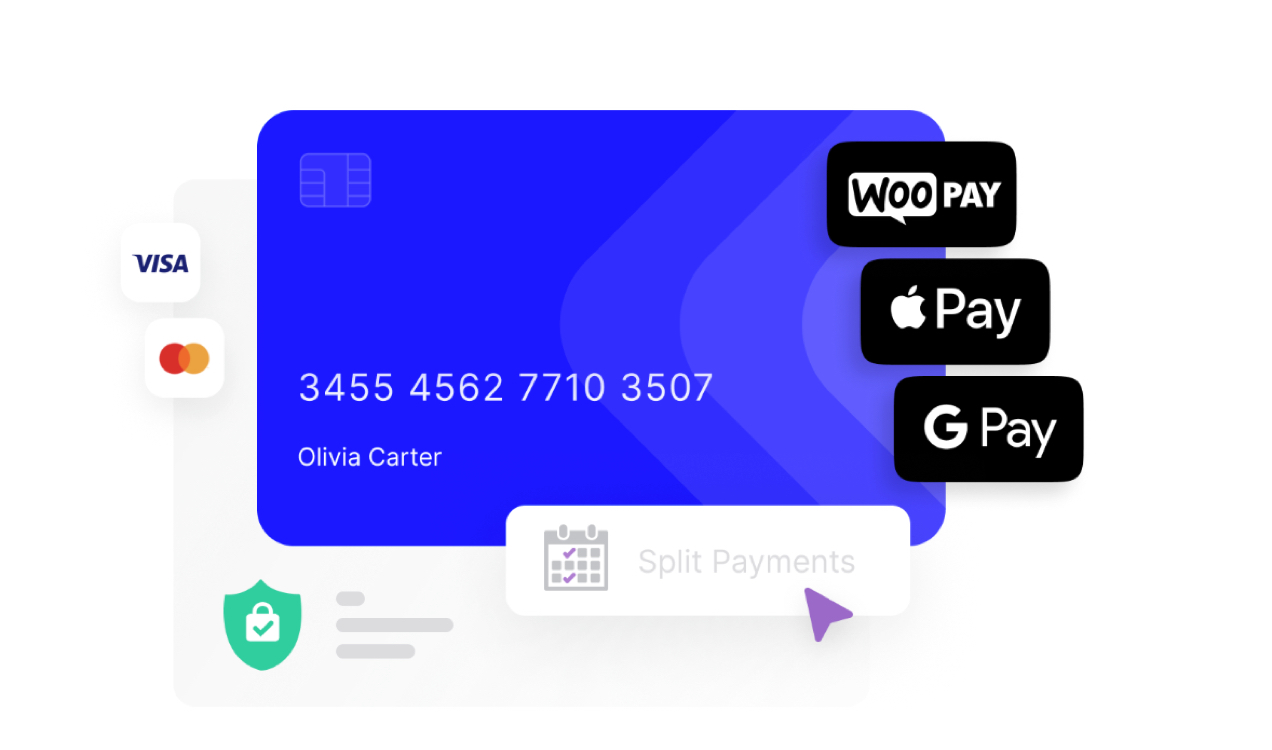
Some of the payment options available with WooPayments
Depending on your market and the makeup of your customer base, you could benefit from:Â
ACH payments: This method lets customers pay directly from their bank accounts, and it’s growing in popularity; Nacha reports that the total volume of ACH payments has increased by at least $1 trillion each year from 2012 to 2022.Â
Buy now, pay later (BNPL): With this option, customers can divide payments for high-value purchases into three or four payments over several weeks, making them more affordable (and maybe decreasing shopping cart abandonment). Fortune Business Insights sees the BNPL market growing at a high CAGR, 22%, from 2023 to 2030 to reach $122.19 billion.Â
Mobile wallets: In the U.S., 53% of consumers use digital wallets more than traditional payment methods. Some more information you may also be interested in is that 47% say they spend more money when using a digital wallet — and 51% say they’d stop shopping with a merchant that doesn’t accept these payments.Â
Peer-to-peer: The adoption of P2P payments, e.g., Venmo, Zelle, Cash App, and PayPal, is another growing payment trend. This method, which many people used, for example, to reimburse friends or family for their part of a restaurant check or to give a gift, is becoming a more common way to pay merchants.Â
Be on trend in 2024
Operating a successful eCommerce business takes continually adapting to changes. It’s smart to see what’s trending in your market and to adapt. Keeping these eCommerce trends in mind as you plan your 2024 business strategy can help your eCommerce technology work better, make your customers happier, and build your business. If you’re ready to take your eCommerce game to the next level, contact us today, and let’s explore how Heavyweight Digital can help you stay ahead of the curve and drive success in 2024.
Effective February 1, 2024, Google and Yahoo will roll out new email sender requirements. This change may prevent your emails from reaching customers, so compliance with the new requirements should be considered mandatory — and all types of emails, whether transactional, marketing, or something else, must comply.
These changes are meant to protect recipients from spam by making it easier for Google and Yahoo to identify fraudulent emails.
Who needs to comply?
Even if you send only transactional emails, it’s important to authenticate your domain to ensure that your email campaigns still reach your audience. As the email industry trends toward requiring authentication for all senders, it’s likely that providers other than Google and Yahoo will follow in their wake.Â
Those who send 5,000 or more messages a day to Gmail accounts will have additional requirements, which are detailed in the next section.
What are the new email sender requirements?
From Google’s support pages, all senders who send email to Gmail accounts and all domains and consumer email brands hosted by Yahoo Mail must meet the following requirements:
Remove Gmail from your store’s “From:†address.
Set up SPF or DKIM email authentication for your domain.
Maintain spam rates below 0.10% and avoid reaching a spam rate of 0.30% or higher.
Make sure that sending domains or IP addresses have valid forward and reverse DNS records (also known as PTR records).
Use a Transport Layer Security (TLS) connection for transmitting email.
Format messages according to the Internet Message Format standard.
Senders of 5,000 or more messages per day to Gmail accounts will also have the following requirements:
While smaller senders should have SPF or DKIM set up, both are required for larger senders. DMARC email authentication confirms both protocols for your sending domain.
Marketing messages and subscribed messages must support one-click unsubscribe and include a clearly visible unsubscribe link in the message body.
Email authentication
Senders will need to implement stronger email authentication by using industry standards such as SPF, DKIM, and DMARC. What does that mean?
Sender Policy Framework (SPF)
SPF records allow a sender to specify the IP addresses (or authorized mail servers) that are allowed to send mail for a specific domain. Service providers can then reject emails sent from an IP address that doesn’t match the SPF records for the email’s domain — like scamming and phishing emails.
DomainKeys Identified Mail (DKIM)
A DKIM record adds a digital signature to emails that your organization sends. Recipient email servers then perform a check to see if the signature from the email matches the DKIM record in your domain name system (DNS) settings. A matching signature indicates that the email content hasn’t been modified and is from a legitimate sender.
Domain-based Message Authentication, Reporting, and Conformance (DMARC)
DMARC is a policy that allows a sender to indicate that their messages are protected by DKIM and/or SPF, and tells a receiver what to do if neither of those authentication methods pass.
Email domains should match your website domain
Emails from public domain providers, like @gmail.com or @yahoo.com will (very) likely be marked as spam. This includes both marketing and order notification emails.
One-click unsubscribe links
Senders of 5,000 or more messages a day to Gmail accounts must implement one-click unsubscribe for marketing emails. If you have been or are planning to send email to residents of the European Union, this builds on the GDPR’s unsubscribe requirement, which states that unsubscribe options must be provided in every marketing communication.Â
The one-click mechanism is intended for machines, rather than humans, to trigger. For instance, Gmail allows users to unsubscribe from marketing emails directly from their inboxes. This functionality is what will become a requirement on February 1st.Â
What should you do to ensure compliance?
Merchants should transition to using email addresses associated with their own domain rather than public domain addresses like @gmail.com or @yahoo.com. Additionally, you must ensure your email setups are configured with proper authentication protocols (the SPF, DKIM, DMARC protocols described above) to improve email deliverability and comply with the new requirements. This move will help prevent your store emails from being marked as spam and ensure vital communication with customers remains uninterrupted.
Every email marketing platform will have a slightly different process. We recommend starting with the following actions:
Review WooCommerce email settings (WooCommerce > Settings > Email) and settings of any plugins that you use to ensure that they send as your branded domain (e.g. me@mybrand.com), and not as your @gmail.com or @yahoo.com address.
If your host delivers your store’s emails (most common), review your host’s documentation about authentication or confirm with customer support that your store’s emails are authenticated with SPF, DKIM, and DMARC. Each host will have a specific process, and they will help you ensure compliance.
If you use plugins like WP Mail SMTP or MailPoet to deliver your store’s emails, you will need to follow their recommendations on how to authenticate your branded domain.
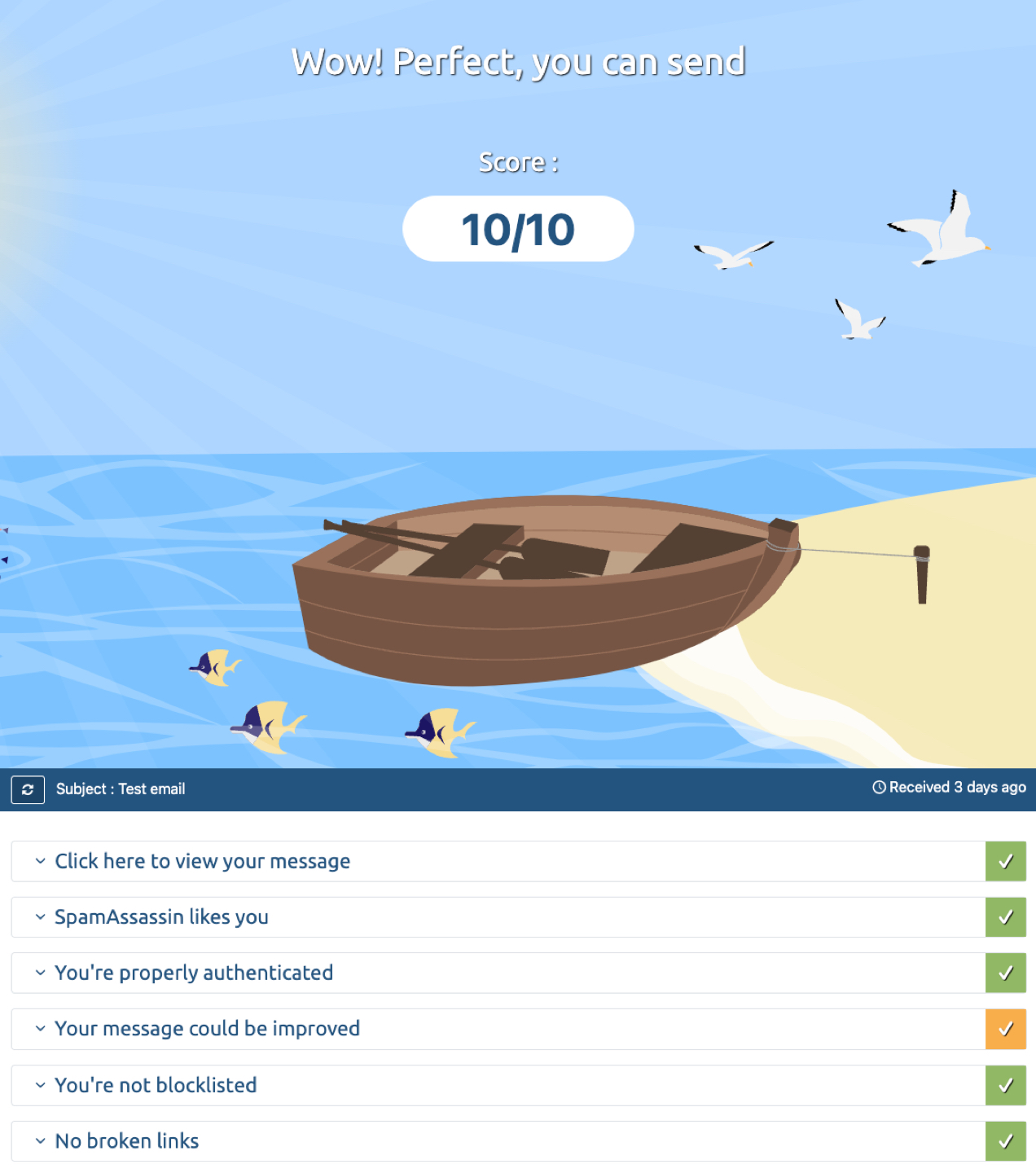
You can check authentication yourself by sending a test email from your store to a service like mail-tester.com and ensuring that the authentication is valid. Placing a test order on your store is a good way to do this. Your test results should look like the image below.
How to change your sender email domain in your WooCommerce settings
Installations of self-hosted WooCommerce use WordPress’ default email sending capabilities for transactional messages, which are likely not configured in compliance with these new requirements. It is possible that your store’s sender email is set to your user email.
To check your settings and update your sender email address, navigate from your WordPress dashboard to WooCommerce > Settings > Emails.Â
Using your @gmail.com, @yahoo.com or similar public domain email address will likely cause emails to land in spam folders due to mismatch between the declared sender (servers of Gmail or Yahoo) and the actual sender (your website server).
If your personal email is used, update this field with a registered email address that uses your website’s domain name.
We recommend testing your different email campaigns to make sure that all are compliant and able to be delivered. You can also install plugins (like WP Mail Logging) that will check to see whether your transactional emails are sending. Check out the Woo email FAQ documentation for further guidance.
To change your sender email for your marketing communications, check in with your email marketing platform to find out where these settings are.
What’s next?
While the new requirements will be rolled out on February 1, 2024, enforcement will increase to full capacity by mid-2024. Non-compliant emails will land in users’ spam boxes or be rejected altogether. Lack of order confirmation emails could cause confusion for your customers, and a lack of marketing emails could negatively impact your revenue, so it’s important to achieve compliance as soon as possible.
For further guidance, check for documentation and updates from your email marketing provider and your hosting provider. Settings may vary from service to service, so it’s important to review all settings to help ensure your emails are securely delivered to your customers.
In the five years since the momentous Ecl decision by the U.S. Supreme Court, the sales tax landscape has shifted dramatically. Until that point, nexus — the connection between a seller and state that requires the seller to collect and remit sales tax there — was based on having a physical presence in a given state. eCommerce taxes weren’t a thing: Many online purchases weren’t taxed, and life was a lot easier for internet sellers (and less expensive for their customers).
But in the wake of South Dakota v. Wayfair, Inc. in 2018, everything changed. This Supreme Court decision allowed states to create nexus requirements based on the amount of sales or the number of transactions a seller has in a state, regardless of whether the seller or its products are actually located in that state.
Different laws in different states add compliance challenges
This created significant compliance challenges, and as more states continued to introduce laws around eCommerce taxes, the complexity only grew. Even more challenging is the fact that not only is sales tax different from state to state, it can be different within a state, too: Cities and counties often have their own taxes on top of the state’s base sales tax, which can make figuring it all out a nightmare.
And, merchants don’t just need to charge the right amount — they are responsible for filing returns and remitting the funds to each individual state. (Thankfully, merchants don’t have to file separate returns and send separate payments for the cities and counties within those states.)
To add yet another hurdle, rules and regulations change frequently, so companies that thought they were meeting their obligations can be in for an unpleasant surprise.
eCommerce continues to grow
Still, consumers didn’t turn away from online shopping, even though they had to adjust to the idea of paying sales tax on their purchases. In fact, they shopped more: According to the International Trade Administration, global retail B2C eCommerce sales have gone from approximately $3.3 trillion (USD) in 2019 to a projected $5.9 trillion in 2023.
While some of that increase could be attributed to the pandemic, it’s clear that the Wayfair decision hasn’t pushed merchants — or consumers — away from eCommerce. Today, WooCommerce has nearly 4 million live installations helping businesses of all sizes sell their products and services online.
Tax revenue is booming, too
As online sales have grown, so has tax revenue — and the economic nexus laws enacted after Wayfair have proven to be a boon for states. The U.S. Government Accountability office reports that states collected at least $23 billion from online sellers in 2022. That’s triple the amount collected in 2019, and nearly eight times what they brought in from remote sales before Wayfair.
There’s a lot of money at stake when it comes to sales tax, and this growth comes during a period when overall tax revenue in many states has lagged. That means states are likely to aggressively protect this new revenue source through increased enforcement and audits.
The cost of audits, financial and otherwise
While increased sales are good news, increased audits are not: the average sales tax audit costs more than $300,000 USD. But even for companies that don’t have that kind of revenue, an audit can still be costly, because it’s not all about the money. It’s also about time. The process of a typical sales and use tax audit can take 30 to 45 days or longer.
Dealing with an audit almost always means businesses have to take time and resources away from other things in order to respond — which can put a strain on the business, especially for smaller companies. Combine that with potential financial penalties, and it’s easy to see why it is so important to stay on top of sales tax.
Global sales add the responsibility of global compliance
Economic nexus isn’t a concern limited to U.S. companies, either: Merchants located outside the U.S. are subject to state sales tax laws, even if they aren’t required to pay federal income tax. Companies that sell in the U.S. must comply with the laws of the states where they sell. And merchants with inventory in a warehouse in the U.S. might have to consider physical nexus, too.
Similarly, U.S. companies that sell abroad need to think about their global tax obligations. Many countries require taxes to be collected once a certain threshold is reached — but a few don’t have any threshold at all, meaning taxes on every sale need to be collected and remitted.
What does it all mean for you?
eCommerce tax compliance can be a lot to process. Even if you’re already familiar with the concepts of economic nexus and eCommerce taxes (like many Woo merchants), you’ve probably got questions. That’s understandable — after all, you have better things to do than monitor current sales tax developments.
But let’s take a look at three key takeaways for your business as you move ahead in this rapidly changing landscape.
1. eCommerce taxes are likely going to remain as complex and confusing as everÂ
The world of eCommerce taxes can be incredibly fluid — which means even if you’re keeping your head above water now, there might be a big wave just over the horizon. A state could lower its threshold to the point where you have economic nexus when the law changes. Another state could start taxing the items you sell differently than before. Rates could change in any number of jurisdictions. And international regulations ramp up the complexity even further.
Sales tax cases continue to arise in the courts, too: Earlier this year, the U.S. Supreme Court declined to hear a case arguing that a company located in North Carolina should not have to pay the state $3.24 million in sales taxes and penalties for items that it sold outside of the state. (We can’t get into all the details here, but the short story is that the company initially received materials outside of the state, transferred them to a carrier — also outside the state — and then the materials were ultimately delivered to customers in the state. The state decided to tax those sales, and won when the company sued.)
What’s the next big wave going to be? Nobody knows. The only thing that is certain with sales tax is that the waves are going to keep coming — and big or small, any of them can impact your business.
2. Many businesses will continue to struggle with compliance
Trying to manually keep up with regulations in different states and markets — and then figure out the right amount of tax to charge on every transaction, and then file and remit taxes in each jurisdiction — can be almost impossible for businesses of any size. Small businesses often don’t have the resources to do it, while many medium and large companies sell in too many markets to manage it all on their own.
A survey of 1,000 businesses in the U.S. and U.K. illustrated the challenges: Almost 40% of respondents don’t believe they are fully compliant with economic nexus laws, with small businesses the most uncertain. And only a little more than half said they could even explain all of their online sales tax obligations (which might mean they aren’t meeting them). If you find tax laws complex and confusing, you’re not alone: 72% of respondents agreed.
3. Technology is going to be even more important
WooCommerce doesn’t collect sales tax for you, but the power of our platform includes integrations that can help you stay on top of your tax compliance — right in the system you already use.
With the right tools, you won’t need to stay on top of changing rules and regulations, because the system will update automatically. You won’t need to wonder if you’re charging the right amount of tax. And you won’t need to worry if you happen to be audited, because automation also significantly reduces the risk of tax errors in your transactions.
Another reason to lean on technology is the impact it can have on the rest of your business. In a recent survey, 33% of respondents said they used manual tools — such as spreadsheets and rate tables — to help manage their tax compliance. Manual tools like this may feel familiar, but they pose the risk of manual errors and take a lot of time to use and maintain. With automation, you don’t just reduce the risk of errors; you can increase the time you or your staff put toward more profitable initiatives.
Compliance doesn’t have to be an obstacle
While the tools in WooCommerce can help you make sales tax less stressful, it’s never going to be easy — especially if your business is looking to grow, enter new markets, or introduce new products. But with the right approach, the right solutions, and the right partners, you can ensure that your compliance obligations don’t get in the way of opportunity.
Today’s post is all about the numbers. There are many ways to enhance your marketing efforts, but one important step is to use eCommerce analytics tools to gain insights into the performance of both your products and your website. What’s nice is that this is fairly straightforward if you’re using WordPress and WooCommerce.
If you own an online store (or are planning to start one), you’re probably always thinking about how you can grow your business. To thrive over the long haul, you’ll need to keep converting more prospects and refining operations for financial efficiency.
In this post, we’ll start by discussing the benefits of tapping into eCommerce analytics. Then we’ll provide you with an in-depth guide to the key metrics that WooCommerce Analytics — Woo’s built-in data tool — offers.Â
And no matter how you feel about numbers, you’re going to love the way you can use what you learn to achieve more with your store.Â
A brief overview of eCommerce analytics
If you’re thinking about opening an eCommerce store, or you’ve just completed a successful launch, you might not have much experience with eCommerce analytics. Don’t worry, though — this is going to be a beginner-friendly guide.
So, what is eCommerce analytics? This term refers to the process of tracking and analyzing data about eCommerce businesses. This data includes key numbers such as the amount of online sales, number of customers, percentage of returns or refunds, and so on.
That’s a lot of information to process. Fortunately, you can use sophisticated eCommerce software to collect this data for you. Then, you can use that same software to access and analyze your key eCommerce metrics.
Why it’s important to track your eCommerce analytics
Why should you care about analytics for eCommerce? The answer is simple — the metrics along with strong data analysis can help you optimize and grow your eCommerce business.
You can use it to gain valuable operational, marketing, and sales insights, and then adjust your strategies accordingly. The most important eCommerce metrics are straightforward, so you don’t need to be a customer data scientist to interpret and learn from them.
As an example, let’s say you’re unsure about whether your product lineup is appealing to your customers. You can start by tracking your top-performing products, as well as any returns. This will make it clear which products customers like and which ones they end up sending back.
Once you’ve analyzed all the data, you can use your findings to tweak your inventory, and even adjust your overall product catalog. This will allow you to sell the best products for your audience, leading to happier customers and more conversions.
You can also track the sales data that results from promotional deals, like free shipping coupons or percentage discounts. When you know which type of deal performs better, you can offer more of the same (rather than having to guess).
Additionally, when you pay attention to data points like average order value (AOV), you may discover that you need to start upselling and cross-selling products. With the right software, you can also learn about more advanced customer behaviors. This can guide your marketing campaigns to boost customer retention, satisfaction, and loyalty at a lower customer acquisition cost.
There are endless ways you can leverage eCommerce analytics tools to gain actionable insights, improve your eCommerce store, and grow your business.
An introduction to WordPress and WooCommerce
Now that you know the benefits of eCommerce analytics, it’s time to get practical. For the purposes of this article, we’re going to be working with WooCommerce Analytics. WooCommerce is the most commonly-used platform to create an online store in the world — and for good reason.Â
If you’re not using WooCommerce, much of what you’ll learn can still be applied to the platform of your choice. But if you’re curious why Woo and the merchants that rely on it are so successful, here’s a quick overview:Â
Let’s start with WordPress — a powerful content management system (CMS). You can use this software to create any type of website you want — from personal blogs to corporate websites, membership programs and, yes, online stores.Â
WordPress is highly-customisable and ideal for beginners, thanks to its intuitive design tools (like the block editor and the Site Editor). When you use these features, you can build and manage a custom site without ever having to touch a line of code. Additionally, you can choose a WordPress eCommerce theme to fast track the design process.Â
Plus, you can extend your site’s functionality using plugins, which add any features you need to your site. Some of these plugins are free, while others may require a premium membership or license.
You can transform any WordPress site into an eCommerce store for free, by using the WooCommerce plugin.Â
If you’re hosting your website yourself, all you have to do is log into your WordPress dashboard, and install and activate WooCommerce. You can then follow the setup wizard to customize key elements of your online store. This wizard will help you with everything from adding your first products to choosing payment gateways.
Once your store is set up, you’ll see some new tabs in the left-hand menu of the WordPress dashboard. You’ll notice that one option is the Analytics tab. This is one of the great things about using WooCommerce — it includes all of the features you need to make your store a success, including built-in eCommerce analytics tools.
Getting around: Key elements of WooCommerce Analytics
If you’re a beginner and want to leverage the power of eCommerce analytics, WooCommerce may be the perfect eCommerce platform for your business. That’s because it comes with some highly useful web analytics features built directly into the platform. You don’t need to install or configure any additional plugins to get access to them.
Let’s start by exploring the Analytics dashboard, which is the hub for your online store’s data. To find it, go to Analytics → Overview.
This screen is divided into three main sections — Performance, Charts, and Leaderboards.
As you can see, you can customize the view for all the data by selecting a Date range. In our example, we’ve chosen a week’s worth of data. But you can easily expand the Date range drop-down menu to select a different option.
In the Performance section, you’ll see valuable insights like Total sales, Net sales, Orders, etc. When you move along to Charts, you’ll see a visual representation of that data.
By default, the Charts section is set to use a line graph, but you can change it to a bar graph by selecting the bar chart symbol.
These simple visuals are a great way to make the data more accessible and user-friendly.Â
What’s more, once you have enough customer data, you’ll be able to compare these graphs on a greater scale. As you can see, you’re able to check boxes to display or hide comparisons of different date ranges.
Now, let’s continue on to the Leaderboards section.
Here, you’ll be able to view your top performing products, categories, and more.Â
Understanding the benefits of WooCommerce Analytics
As we discussed earlier, there are plenty of benefits to leveraging eCommerce analytics in general. But you might want to know more about the specific advantages of using WooCommerce Analytics.
First of all, the WooCommerce Analytics dashboard is built directly into WordPress, making it highly convenient to access. You don’t have to leave your website and access your eCommerce analytics through a third-party tool.
Furthermore, WooCommerce offers a highly-visual interface. The separation of Performance, Charts, and Leaderboards is straightforward, making it quick to navigate through plenty of advanced eCommerce data. And you can use the toggle buttons to modify your stats, so they’re displayed in the way that’s most convenient for you.
In other words, the way you use WooCommerce Analytics can be extremely personalized. You’re able to show as many or as few data points as you like.
Along with its convenience, WooCommerce Analytics enables you to reveal useful metrics about your store and its products. Here’s how each section of the dashboard can help you:
Performance. With insights on overall sales, orders, and returns, you’ll be able to optimize your inventory and product catalog.
Charts. If you’re dealing with large amounts of data, the line and bar graphs can make that information easier to understand.
Leaderboards. This section enables you to identify best sellers and loyal customers at a glance.
In the upcoming sections, we’ll dive a little deeper into how you can use WooCommerce Analytics to improve your store and grow your business.
Using chart and performance data to improve your store
Now that you have a basic understanding of the WooCommerce Analytics dashboard, let’s take a closer look at the chart and performance sections. This way, you’ll know exactly how you can use them to improve your business.
As mentioned previously, you can customize what performance metrics you see. To do so, just click on the three dots on the far right of the Performance section.
The same applies to the Charts section.Â
You can choose to show:Â
Total salesÂ
Net sales
Orders
Average order valueÂ
Items sold
Returns
Discounted ordersÂ
Gross discounted amount
Total tax
Order taxÂ
Shipping taxÂ
Shipping
Downloads
Gross sales
It’s also important to note that you can export WooCommerce data as a CSV file. Then you can use it with other tools or software. But you’ll only be able to export certain metrics from the above list.
To do this, just go to Tools → Export in your WordPress dashboard.
Make your selections, and click on Download Export File.Â
Alternatively, you can use a premium WooCommerce extension, like WooCommerce Customer / Order / Coupon Export. This tool will give you the power to export more advanced data in multiple formats.
Now we’re going to check out some of the most important data points and what they mean.
Total sales
Sales are the heartbeat of your store, and while they might not always equate to profitability, they are a quick way to assess your performance.
First, you can check your total sales in a given month as compared to the same month last year. In the Performance section next to each metric, you’ll see either a red or green box with a percentage. You’ll want to aim to always keep these boxes green.Â
If you’ve never looked at your analytics before, you might be deceived by a red box this month, and think your store is in trouble. But if you select a range starting with the beginning of the year, you might see that you’ve actually grown overall, and this was just a slow month. This is why toggling and analyzing different date ranges is an important exercise.
The longer the date range is, the more applicable the data becomes. And it’s not about the data quality. Let’s say you’ve been in business for at least five years, and on January 1st of this year, you hired a new marketing manager. By selecting a period that goes back five years, you can see if the new manager has made an impact on sales.Â
Why is the date range so important? If you just look at one slow month, you might decide that the marketing manager isn’t helping. But if you see an overview of the last five years, you might see that your sales have been down year over year, and the new employee is actually reversing that trend. Now, you can make better data-driven decisions.Â
Average order value (AOV)
Even if you’re new to managing an online business, you probably already know that it’s more profitable to keep existing customers than to find new ones. But if you want to increase revenue without new customers, you’ll need to increase average order size or purchase frequency.Â
Average order value is important for any eCommerce strategy. For instance, maybe you’re running a new Google Ads campaign. Although this is an expensive customer acquisition method, you may find that your AOV is high enough to make the campaign profitable. This metric also helps you evaluate other marketing strategies, like upsells and cross-sells.
Again, it’s best to look at a wider date range to see if your average order value has increased or decreased over the years. Then consider what changes could account for the differences you see, and adjust your strategies accordingly.
Returns
Returns are a good indicator of customer satisfaction. Unhappy customers return products, don’t make repeat purchases, and don’t leave reviews (or worse, leave negative ones).Â
Perhaps you’ve recently changed suppliers. The margins on your products may have improved as a result, and everything seems great on the surface. But upon examining your metrics, you find that returns have doubled since your new partnership. In this scenario, you may need to reconsider and determine whether the improved margins are worth the cost of returns (and the loss of loyal, repeat buyers).Â
The same applies to a change in return policy. Offering no-hassle returns can increase customer confidence and boost sales. But if the cost of processing returns swells too much, it can hurt your bottom line.Â
Paying attention to your metrics can also help you predict future returns. Do you have a massive ‘cyber week’ sale on the horizon? An unexpected rash of returns could negatively impact cash flow. By looking back to last year’s sale, you might know to expect returns to be 15 percent above average, and you can prepare accordingly.
Discounted orders and net discounted amount
Coupons and discounts are powerful ways to motivate customers to buy, but they can also be a liability if shoppers expect or abuse them. The discounted orders and net discounted amount reports can help you spot both types of problems.
Are people redeeming substantially more coupons this month than they did during the corresponding month last year? This might be a cause for alarm, or it may be completely acceptable.
You can use the chart view to see if there are any days where coupon use peaked significantly. If one or two days account for the majority of discounts, what could be the cause? An email with a promo code or a flash sale might be innocent explanations.Â
Then, you can look at a longer time period to see if you’re issuing discounts too frequently. Along with the effects on revenue, you might consider whether this will cause coupon fatigue, which occurs when customers are no longer motivated by sales because they’ve seen so many.Â
Have discounted orders increased by ten percent every month for the last two years? You might worry at first, but make sure you compare that result to the Orders report. If the number of orders increased at approximately the same rate, there’s really been no change.Â
Keep in mind that these aren’t all of the available reports. Make sure you explore the full list at the top to see what might be most relevant for your store!
Leveraging leaderboard data
The last section of the Analytics dashboard is equally as valuable. There are four leaderboards for you to explore.
1. Top Customers, Total Spend
Knowing who your best customers are could change your eCommerce business entirely. Here are three ways you can make the most of that information.
The first option is to reward them! Loyal customers can be hard to come by, and marketing campaigns get expensive, but they provide a high customer lifetime value. So when you find someone who’s truly passionate about your store, you want to keep them forever. You can offer them a special gift, give them access to exclusive products, or treat them to discounts.Â
Secondly, you can also learn a lot from your loyal customers. For instance, you might reach out to them with a survey or simple email, and ask why they love your store and how you might improve it.Â
Finally, this metric can be another indicator of your store’s overall health. In most cases, your best customer’s total spend shouldn’t be much higher than a customer in the middle of the pack (median total spend).
Why? If a few customers make up the majority of your revenue, losing one could have a major impact. A greater number of customers that spend about the same amount results in more financial security.Â
There’s one caveat: if you expand the date range to a year or more, and almost all of your customers spent a similar amount during that time frame, this could mean that you don’t have any repeat customers. In that scenario, you’ll want to explore ways to get shoppers to come back again and again.Â
2. Top Coupons, Number of Orders
These next relevant data points can help you answer some crucial questions, like:
Which promotions worked best this quarter?
Are any coupon codes floating around on the internet and being abused?
If you’re struggling to determine what kind of promotion to run next, you can expand your date range to identify your all-time greatest performers. Then consider: What do the top coupons all have in common? You can use this information to become a top-notch promoter.Â
3. Top Categories, Items SoldÂ
On this leaderboard, you’ll get a quick view of the kinds of items that are your best performers. As with the other sections of WooCommerce Analytics, you can modify the date range in order to evaluate trends, and see if certain categories perform better during different times of the year.
If you run a fashion shop, you may find that, last year, your best category was earrings, but this year, those items are near the bottom of the list. You’ll want to determine what’s causing that trend (perhaps via customer surveys), and consider what strategies you can use to bring back your earring sales.
4. Top Products, Items Sold
Similar to the previous leaderboard, on this one you can quickly determine your biggest winners, and identify trends to continue growing your store.
As an example, if you sell seasonal items, you might use last year’s data to predict what will perform well this year. Alternately, you might spot an over-performing product in a category that, as a whole, is near the bottom. If you can figure out why that specific product has been so successful, you may be able to boost its entire category.Powerful data, simplified for growth
When you have powerful eCommerce data and actionable insights at your fingertips, you’ll be able to understand customer behavior, maximize sales, and grow your store. And if you’re using WooCommerce, this is straightforward thanks to the built-in analytics dashboard.
You can start by keeping track of basic eCommerce data like net sales, average order value, and products returned. After that, it’s useful to check out your top-performing products, categories, coupons, and even customers. When taking into consideration all of these key metrics, you’ll be better equipped to modify your marketing strategies, product inventory, and even your coupon strategies.Â
Once you have a grip on eCommerce analytics essentials, you can move on to even more advanced analytics extensions — like Google Analytics — to continue your growth!
There are a variety of ways to help customers find your online store — but many of them require a financial outlay on your part with no guarantee of a return on investment (ROI). Luckily, eCommerce content marketing offers a lower-cost alternative to paid ads. It democratizes the playing field: if you’re willing and able to put in the work, you can find success even without major financial resources.Â
Let’s define what eCommerce content marketing is, why you should invest in it, and how to develop effective content marketing strategies. Then we’ll review a few eCommerce content marketing examples.
What is eCommerce content marketing?
At its core, eCommerce content marketing is about using media to grow your customer base and increase revenue.
Your target customers have a question or a problem, and they’re looking for answers. You offer a product or service on your eCommerce site that solves their problem. If you give them valuable — and timely — information, they’ll be more likely to choose your offering or solution.
Why? Because you’ve given them reason to view you as a trusted authority andtrust is the most important factor people consider when making a purchase.
Content marketing takes many forms, including:
Audiobooks
Blog posts
ChecklistsÂ
Courses
eBooks and guides
Influencer media
Infographics
Podcasts
Reports
Tutorials
User generated content (e.g. customer stories and reviews)
Videos
Webinars
White papers
Depending on the kind of business you’re in, your eCommerce content marketing efforts may be geared towards providing useful information about your products and industry, helping people solve technical problems, or educating your audience on certain niche topics.
But keep in mind that your content marketing strategy doesn’t always have to be how-to guides and educational material. You may also simply offer a solution to the age-old problem of boredom — entertainment.
While providing high-quality content that your target market values is key to gaining their trust, let’s not forget the most important part of eCommerce content marketing — driving sales.Â
Content marketing can be done on your own website, throughsocial media, or on other third-party platforms. You can also leverage interviews, affiliate marketing, and social media influencers to further extend your reach.
How content marketing applies throughout the customer journey
Beyond the many forms content marketing takes, it can also apply throughout various points of the marketing funnel.
At the top of the funnel, you may attract first-time visitors with blog posts and content that answers specific questions or simply connects with them around a shared passion.Â
To serve your goals further down the marketing funnel, you should build content that helps people understand what your offerings do and why they’re applicable to your audience.Â
Later, content might be more sales-focused and seek to convince your audience to take action.Â
Further still, some content should be focused on endearing your brand to customers so they become loyal, long-term supporters.Â
A full-scale content marketing strategy will address every point in the buyer’s journey and pull together many different kinds of content, distribution channels, and content goals into a cohesive program.
Why invest in eCommerce content marketing?
Any eCommerce store can benefit from content marketing. It provides novel ways for people to discover your brand and products, reduce the amount of money you might otherwise be spending on paid advertising, and build brand trust. Here are a few other reasons to invest in content marketing for you online store:
It can circumvent ad restrictions
There are certain types of online retailers that should rely almost exclusively on eCommerce content.
If your eCommerce store sells restricted products, you may have trouble advertising on some platforms due to their policies. Your ad campaigns may frequently get rejected, making it difficult to capitalize on the digital marketing opportunities that so many other eCommerce stores have.
Generating organic traffic from search engines or attention from a social media audience can drive traffic regardless of many restrictions.
It’s free to get startedÂ
While you can certainly invest plenty of money in content marketing efforts, and should as your brand grows, a organised can start gaining attention for their idea without anything but a device and internet connection.Â
If you’re strapped for cash, but high on ambition and time, you can create content for your own site and for third-party sites that attracts new followers, demonstrates the value your offer provides, and endears them to your brand for years to come.Â
It’s not an instant approach to gaining sales, but it’s a great option for those with limited financial resources.
It’s owned media
Though you may publish content on a variety of platforms, the content you create and publish to your own site is completely within your control — particularly if you’re using WordPress and WooCommerce — because you’re not subject to the rules and regulations of a third party.Â
So you can say exactly what you want, how you want to say it, and in an environment that’s free from the clutter of ads by competitors or other publishers.Â
This content has long-term value and its development adds equity to your business in ways that temporary paid ads don’t.
It provides long-term ROI
Though it takes longer to achieve results, content marketing provides a strong ROI and the opportunity to not be beholden to paid media.Â
Paid ads have their place, but every click or impression immediately costs you money. If you stop writing the check, the traffic stops, too.
With content marketing, as you grow an audience and move up in search engine rankings, the attention generated doesn’t simply stop overnight and isn’t limited by budget. Whether you get ten visitors or ten thousand, it costs the same.
It’s more genuine
Content marketing that adds true value — educational, entertainment, or otherwise — to your audience is better received than a paid ad that interrupts someone’s video or social media feed. It makes a more human connection and feels more genuine than a banner promo on a third-party site.Â
It’s multi-faceted
Content marketing isn’t just a siloed channel. You can use it to improve all areas of your marketing strategy.
For example, you could write one blog post, then:
Publish it on your website, which can help with SEO and brand reputation
Integrate it into your social media marketing
Include it in your email newsletter
Link to it in your paid advertising efforts
Send it in response to customer support queries
Add a link to it in guest posts or interviews
This is the perfect demonstration of the phrase, “A rising tide lifts all boats.â€
It’s a great exercise for your team
Creating unique content produced and owned by your brand is a valuable exercise in itself, regardless of the marketing impact it makes. It gives your team the opportunity to participate in shared creativity and define a brand that’s representative of their unique and diverse ideals.
It can spur greater cohesion as an organization and a shared sense of purpose that improves the quality of work throughout the company.
Five steps to create a winning eCommerce content marketing strategy
In the eCommerce world, if you want to consistently generate more revenue and increase customer loyalty, you’ll have to do more than write a few blog posts on your website or put a couple of videos on your YouTube channel. You’ll need to have a solid content marketing strategy.
One of the biggest and most common content marketing mistakes is content creation without a defined strategy. If you don’t know what will resonate with potential buyers, aren’t sure whether to focus on blogging or videos or podcasting, and don’t have a publishing schedule worked out, you’ll find yourself feeling frustrated and scattered.
Worst of all, you won’t achieve the results you’re looking for.
With careful planning and curated content, however, you can develop an eCommerce content strategy that bolsters your brand authority, attracts more potential buyers to your product pages, takes people on a compelling customer journey, and improves customer retention.
Follow the five steps below to get started on planning your eCommerce content marketing strategy:
1. Choose the right channels and media
With the multitude of options available for distributing content to potential customers, it’s crucial to choose the right types of media and channels. Not only should they align with your goals, fit your brand, and reach potential buyers effectively, they also need to be something you can realistically manage.
Define your content goals and capacity
Different types of content serve various purposes. Ask yourself these questions when you’re establishing your content goals and determining what you can commit to:
Are you aiming to increase brand awareness, generate leads, or drive sales?
What kinds of products are you selling and do they lend themselves to being discussed in specific types of media?
What type of media do you have expertise in?
Do you have access to any specialized equipment you would need to create your content?
Are you able to pay professionals to create your content for you? What’s your budget?
What platforms are you interested in publishing on? How many can you comfortably manage?
How often can you commit to publishing?
Clearly defining your content goals will help determine the media and channels you should focus on.
For instance, if your goal is to raise brand awareness, video content distributed through social channels and blogging might be ideal. In contrast, if lead generation is your primary objective, email marketing and webinars may be more appropriate.
Keep in mind that not every media type works for every eCommerce company and there’s plenty of room to be creative and play to your strengths. Don’t make your first attempt at content creation something that isn’t a good fit for your goals, requires a huge time or financial investment, or is way out of your comfort zone.
Start with something that you relate to, have the budget for, and that will take the least amount of time to go live with. You can always build and expand from there.
For instance, if you’re on a shoestring budget and know nothing about video production, scripting, motion graphics, and also really dislike being filmed, then perhaps video marketing is not for you.
If you enjoy writing or have great writers on staff, then blogging, writing ebooks, or creating how-to articles might be the best fit.
Understand your target audience
Before finalising your media and channel selection, it’s imperative to understand your target audience. You should create detailedbuyer personas that outline their demographics, preferences, online behavior, and customer pain points.
Knowing your audience helps you tailor your content and select the most suitable channels to reach them effectively.
Select social media wisely
Social media is a powerful channel for eCommerce content marketing. But you don’t have to be active on all platform — you just need tochoose the right social media channels.
Your content marketing campaigns will be more successful on platforms that resonate with your target demographic. Focus on creating content for the channels that are most popular with your existing customers or used by bigger eCommerce brands similar to yours.Â
For instance, eCommerce websites that sell fashion or lifestyle products might find Instagram and Pinterest more effective. If you sell gardening tools or DIY kits, YouTube videos that provide instructions or demonstrations of your products may be where you want to focus your energy.
If your eCommerce site sells games, crafts, or niche fandom products, try building an online community on a social media channel. Platforms like Facebook and Discord allow you to create groups so that loyal customers and fans can exchange ideas, ask questions, and socialize.
For B2B eCommerce businesses, social media marketing is still important. In fact,social media is the most effective channel for driving revenue for B2B companies, with content marketing coming in second. However, the channels you’ll want to focus on will be different from B2C eCommerce companies.
B2B businesses may want to focus primarily on LinkedIn, Facebook, and Instagram.
Find out where your audience spends their time online and meet them there.
Embrace email marketing
Regardless of the media you choose or where you’re publishing it, you canleverage email marketing with software likeMailPoet to reach your audience.
Whether it’s newsletters, product updates, tips and tricks, or personalised recommendations, email marketing allows you to engage with your customers on a more personal level. Segment your email list to send tailored content to different customer groups based on their preferences and behaviors.
Consider influencer marketing and user generated content
Influencer marketing can be a powerful tool for eCommerce websites. Identify influencers in your niche or industry whose followers align with your target market. Collaborate with these influencers to create content and promote your products. This can help you tap into their loyal follower base and gain credibility in your niche.
User generated content is also helpful and doesn’t necessarily have to be created by influencers with huge followings. Many eCommerce brands can boost online sales when they share customer stories on their content distribution channels.
People want to hear directly from other customers about whether a product works and how it works so they can envision how it might fit into their own life. Reviews and testimonials from actual users can go a long way towards building consumer confidence and increasing sales.
Engage in brand collaborations
Brand collaborations are another great way to diversify content marketing for eCommerce. When two brands with complementary values or demographics come together, they can produce content that enhances their combined market presence and builds trust and credibility.
These partnerships can introduce products or services to a fresh customer base, foster creative and innovative content, and generate buzz. Moreover, brand collaborations can leverage each other’s strengths, whether that’s expertise, resources, or a shared ethos, ultimately increasing the likelihood of a successful and memorable marketing campaign.
Write guest posts and do guest appearances
Guest blogging, interviews, and Q&As are another great example of strategic content marketing. They provide content value for the businesses whose websites and media channels you are posting on and you, in turn, get broader exposure and an organic traffic boost for your eCommerce brand.
Depending on the types of media you’re focusing on you may want to:
Submit guest blog posts to complementary brands’ websites
Write articles for publishing platforms likeMedium or industry-specific magazines and journals
Answer industry-related questions on platforms like HARO orQuora
Do guest interviews on another brand’s YouTube channel
Do podcast interviews
Do guest lectures at conferences and events
Participate in aReddit AMA (Ask Me Anything)
Analyze and adapt
Your choice of media and channels should not remain static. Regularly analyse the performance of your content across different platforms and adapt your strategy accordingly.
Pay attention to metrics like engagement rates, click-through rates, conversion rates, and ROI. Use this data to refine your content strategy and make informed decisions about where to allocate your resources.
Don’t forget to stay on top of what your competitors are doing. Regularly search out eCommerce content marketing examples from other companies in your industry or niche. Take note of what they are doing well and use that as inspiration for your own eCommerce business.
2. Create high-quality, relevant content
Content marketing for eCommerce sites doesn’t always have to be high-budget and high-polish, but it should still be thoughtfully created, engaging, and of interest to potential customers.
You don’t have to have studio quality lighting and expensive microphones, but people do need to be able to see and hear you. And anywhere where your production values might be lacking, you should make up for in the quality of your messaging.
Even though your content doesn’t have to be perfect to be effective, you should still work towards the best quality that you can manage with your available resources, time, and skills.
Six tips for better production quality
Usehigh-quality imagery. You can take your own photos or video using the latest smartphone or a high-end camera or hire the work out to someone else. Either way, make sure that the resulting imagery is well-lit and composed.
Purchase the right kind of equipment. Can you use the built-in mic on your laptop to record your podcast? Yes. Should you? Probably not. If you’re not sure what equipment you should buy, you cansearch online for recommendations, ask in atopic-specific subreddit, or reach out to other industry professionals you know.
Invest in good gear. Get the best quality and highest durability equipment that your budget allows. You’ll spend less in the long run if you buy equipment that stands the test of time and performs well. If you start off with something unreliable it may end up costing you more by producing unusable content, wasting time, or just causing endless frustration with unpredictable performance.
Research and fact check. If you’re creating informational content, ensure your facts are correct by doing thorough research. If possible, include references to your sources.If your content is mostly for entertainment value, you’ll still want to research the topics your customers are interested in, any jokes or memes that they might identify with, and any timely events or trends in your niche that you could react to or critique in your media.
Create scripts and outlines. If you’re creating video or audio content, a script will help you stay on track and sound professional. If you’re writing an article or blog post, creating an outline provides a framework to keep you on topic.
Use professional editing software. Some content marketing platforms come with their own editing tools. TikTok and Instagram have photo filters and video editing tools built-in. But those tools may be too limited, or you may not be distributing your content on those channels, so make sure that you are investing in audio/visual (AV) editing tools that can help you craft the level of content you want to produce. Some examples of photo, video, and audio editing software include:
Canva
PhotoPea
Adobe Creative Cloud (Photoshop, Premiere Pro, Lightroom, After Effects)
GarageBand (Apple)
Audacity
Openshot
Clipchamp
For writers, there’s editing software that you can use likeGrammarly and style guide tools likeWriter to help keep your articles and blog posts professional and on-brand. You can also take advantage of AI tools likeChatGPT orJetpack AI Assist to speed up content development.
3. Use search engine optimisation techniques
Without content like posts or tutorials, your website relies onproduct pages. But not everyone knows they need your product, or that it even exists. People don’t head to search engines for a product; they search for an answer. That’s one reason content marketing goes hand-in-hand withsearch engine optimisation (SEO).
Whether you’re creating blog posts, product descriptions, or video content, ensuring the web pages they display on are optimised for search engines is crucial for visibility. Conduct keyword research and incorporate your findings naturally into your content. Leveraging SEO helps your content rank higher in search engine results, increasing organic traffic.
Keyword research and use isn’t just something you need to think about for content appearing on your own website, it’s important for every channel your media is distributed on. And those channels should all link back to your website so visitors can sign up for your email list and purchase your products.
4. Implement a sales funnel
Not everyone who reads your blog or watches your videos will become a customer immediately. It may take days, weeks, months, or even years for a lead to turn into a customer. But by creating a systematic approach that guides people through the customer journey, you can take leads through from initial awareness to making a purchase.
After you’ve got the attention of potential customers through your content marketing strategies, you’ll want to capture, nurture, and then convert your leads.
Capture leads
In this stage, you want to capture leads’ information. Implement lead generation tactics such as email opt-ins, free ebooks, webinars, exclusive offers, and even rewards for social follows. The goal is to turn your content consumers into leads you can nurture.
Nurture leads
Send targeted emails, provide case studies, offer product demos, send direct messages on social media, or incentivise folks to interact with yourwebsite’s chat system. Your content should guide them towards making a purchasing decision. Don’t forget — personalisation is key to making your leads feel valued and understood.
Offer solutions and incentives
Now it’s time to convert leads into customers. Present your products or services as solutions to their problems. Highlight the benefits, provide clear calls to action, and make thebuying process as simple as possible.
Build trust and long-term relationships
A successful funnel doesn’t end with a sale. It’s about building long-term relationships. Keep in touch with your customers through post-purchase emails, provide excellent customer support, and encourage referrals or repeat business.
5. Publish regularly
You don’t need to write an award-winning article or produce Oscar-worthy videos every week to accomplish your goals. You do, however, need to publish content consistently.
For many, this is the hardest part. A few sporadic blog posts are unlikely to make a significant impact on your site traffic. Create a plan to publish a certain number of blog posts in a given period of time — maybe one post every two weeks.Â
Here are some tips to help you develop a publication schedule and some tools to help you manage it:
Decide on frequency. If this is your first time creating a content marketing strategy, you might want to start with publishing once a month, then ramp up to once a week or multiple times a week.Â
Use a content calendar. A content calendar will help you stay organised. You can use a physical planner, a calendar app, or an online planning tool.
Create backup content. Try to create some backup and bonus content. Especially if you are running a one-person show, you may have sick days or need to take off work for a family emergency. Having extra content that you can release will help keep your content machine moving along effortlessly in your absence.
Automate publishing. In WordPress you can schedule posts to publish at a future date. Some social platforms have this feature as well, but it’s a lot easier to manage your social media posts all in one spot. Tools like Jetpack Social can help streamline your process. Most email marketing platforms as well as tools likeAutomateWoo also have the ability to schedule email campaigns in advance as well as create automated customer journeys based on user behavior.
Ecommerce content marketing examples
We’ve discussed how to create your own eCommerce content marketing strategy, but before you begin crafting your plan you may want to research what other eCommerce companies are doing for inspiration.
Let’s take a look at a few examples of how each eCommerce brand below approaches attracting, nurturing, and converting leads through their content marketing.
1. Attracting leads: 2 Hounds Design
Blog posts that answer commonly-asked questions can be an excellent way to attract leads.
Let’s say you’re a dog owner and it’s the middle of winter. It’s no fun to take your dog out for a walk when it’s snowing sideways, so you just stay inside and keep warm. The problem is, your dog needs exercise. So you might search, “How do I keep my dog active in the winter?â€
2 Hounds Design, which sells dog leashes, collars, and related products,wrote a blog post with five ways to help your dog stay active during colder months.Â
When you find the answer to your question on 2 Hounds Design’s site, you might also poke around their product pages to see what’s available. If your furry friend needs a new leash or collar, you’ll make a purchase.
If not, you may still end up following their social profiles or signing up for their newsletter because you find the content so interesting. Eventually, when the timing is right, you’ll probably make a purchase.
Would you have found this site without that article? Highly unlikely.
2. Nurturing leads: Godin Guitars
You can do one of two things with your new leads:
Sell them something immediately
Collect their contact information and start nurturing them
The second choice is for leads who may not be ready to buy, but want to stay informed about your products and services. If you offer them valuable content — an eBook or a free guide — they’ll gladly hand over their email address or follow you on other social media platforms.
A great example of this is Godin Guitars.
Godin offers a free three-month subscription to an online guitar lessons service when you sign up for their mailing list. These additional content and service offerings keep subscribers engaged and if they aren’t ready to make a purchase now, they may be convinced somewhere down the line.
With this approach, your leads are now contacts, and you can follow up with them as long as they remain on your mailing list. As you continue to produce new content — blog posts, videos, PDFs, infographics, webinars — send it to your email list and post it to your social media accounts.
By continually providing valuable content that solves problems and answers questions, people begin to trust you as a source of valuable information. When they’re ready to buy, they’ll choose you.
3. Converting leads into buyers: Gorilla Printing
Depending on the problem you’re solving, some content can directly sell the solution and link to appropriate product pages at the same time. It solves a problem through sales, suggesting specific items readers can use to meet a need.Â
Gorilla Printing, a large format printing business based out of New York, uses WooCommerce as their B2B eCommerce platform.
On their site, they wrote a blog post that explains the benefits of using LED light boxes as part of your marketing strategy. They show several examples and give useful details about how to design for a light box.
If you go to the page, you’ll notice a chatbot in the corner. Readers might have additional questions, which they can ask directly in the chatbot on that page without having to navigate elsewhere.Â
Gorilla Printing uses content marketing to attract leads and then offers additional ways to engage with them. Within the blog post, and most certainly near the end, you should always give the reader a next step to take — like “buy now†buttons that link to product pages. At the very minimum, you should offer them a way to contact you — like a chatbot or link to your contact page — or a free offer in exchange for their email.
Though it may not result in an immediate sale, continuing to engage prospects increases the chance that they will become paying customers.Â
Is eCommerce content marketing easy?
Yes and no. If you’re someone that doesn’t even enjoy creating content, it can be difficult to stay consistent and the results will likely show. In that case, delegate the work to a professional (and don’t micromanage it — you know your business and content creators and marketers know theirs). But if you love writing or making TikTok videos or sharing customer success stories on Instagram — it may come easy to you.
However you decide to approach developing your eCommerce content, make sure to come up with a plan. Research eCommerce content marketing examples from other online stores, publish in a format you’re comfortable with, come up with a schedule and stick to it.
Focus on topics you’re passionate about and that you can relate to your eCommerce website. Listen to customers and take note of the most common questions they ask. Then, answer them using the appropriate media and channels.Â