Category: News

  • Whats Coming in WordPress 4.1 (Features and Screenshots)

    Whats Coming in WordPress 4.1 (Features and Screenshots)

    Nearly two months ago WordPress 4.0 was released. It came with tons of new improvements like an enhanced post editor, improved internationalization support, embed previews, etc. WordPress 4.1 is expected to be released in the second week of December, 2014. It is coming with lots of changes and a new default theme. In this article, we will show you what’s coming in WordPress 4.1 with features and screenshots.

    You can test the beta version on your computer or in a staging environment by using the WordPress Beta Tester plugin.

    Focus – The New Distraction Free Writing Mode

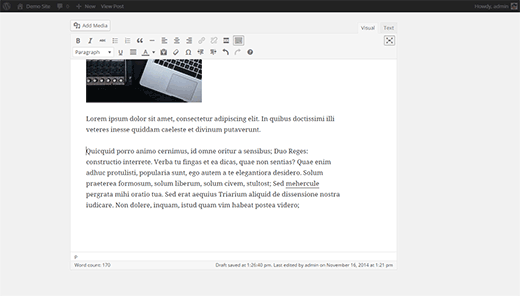
    WordPress 4.1 will arrive with a new and improved distraction free writing mode. Many beginners usually don’t know about the distraction free editor, and those who know about it don’t find it very helpful. The new distraction free writing mode makes it much simpler to switch back and forth between normal writing mode and distraction free editor.
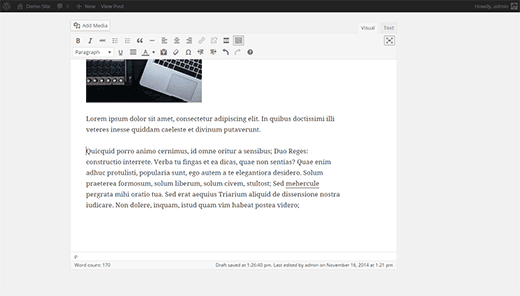
    Distraction free editor in WordPress 4.1

    You will notice that the metaboxes and WordPress admin bar will slide out of view and will remain hidden as long as you are writing. As soon as you move the cursor away, the admin bar and meta boxes will slide back in.

    This feature is enabled by default in the beta version. However, it will not be enabled by default in the final release and users will have to click on the distraction free button on the screen to enable it.

    Inline Image Editing

    WordPress beginners often find it difficult to align images in WordPress post editor. With 4.1 users will be able to click on an image and instantly see alignment options along with a button to remove alignment. The pencil button is still there which will open the image into a popup where users can further edit an image.

    Inline image editing toolbar in WordPress 4.1

    Twenty Fifteen – The New Default Theme

    Keeping up with the tradition of at least one new default theme every year, WordPress 4.1 will ship with Twenty Fifteen the new default theme for WordPress.
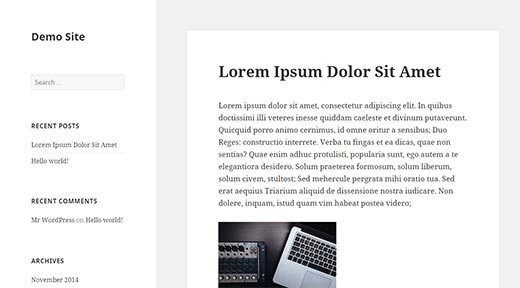
    Twenty Fifteen default WordPress theme
    Twenty Fifteen is a simple blog theme with emphasis on typography. It uses Google’s Noto Serif and Sans fonts which support many languages. This makes Twenty Fifteen ready to be used with any language without changing fonts.

    Using theme customizer, users will be able to select from different color schemes, add background image, change header, etc. Allowing users to quickly and easily modify the default theme and make it their own.

    Customizing Twenty Fifteen

    Install Language Packs From Admin Area

    WordPress 4.0 introduced language selection during the installation process. Which provided an out of box localized experience for users. WordPress 4.1 will make it even more easier, as users will now be able to change the language from Settings » General screen.
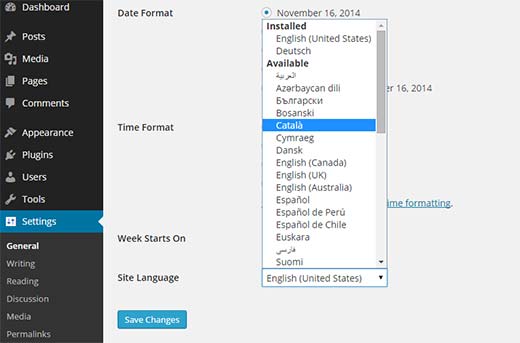
    Choosing a language for WordPress admin area from Settings screen

    Simply select the language you want to install from the dropdown menu and save settings. WordPress will automatically download and install the language packs for you.

    Improvements for Developers

    WordPress 4.1 has many new features for developers to play with.

    Customizer API – WordPress customizer API is aiming to build a complete JavaScript API for customizer. There are lots of improvements for contextual panels, controls and sections.

    Title Tags – New title tag for WordPress themes will allow theme developers to explicitly define a site’s title and avoid conflict with the WordPress title tags.

    Query Improvements – Rewritten and improved meta, date, comment, and taxonomy queries in WordPress 4.1.

  • Whats Coming in WordPress 4.0 (Features and Screenshots)

    Whats Coming in WordPress 4.0 (Features and Screenshots)

    WordPress 4.0 Beta 1 was released yesterday. This is a major release with some really cool features and improvements. In this article, we will show you what new features are coming in WordPress 4.0 along with their screenshots.

    Please note that WordPress 4.0 is still in beta. Some of the features mentioned here may not make into the final release.

    You can test WordPress 4.0 beta on your PC, Mac, or in a staging environment by using the WordPress Beta Tester plugin.

    Having that said let’s take a dive into what’s coming in WordPress 4.0.

    Better Internationalization From The Start

    If you wanted to install WordPress in other languages, then you would have to install a localized version of WordPress or manually upload the translation files.

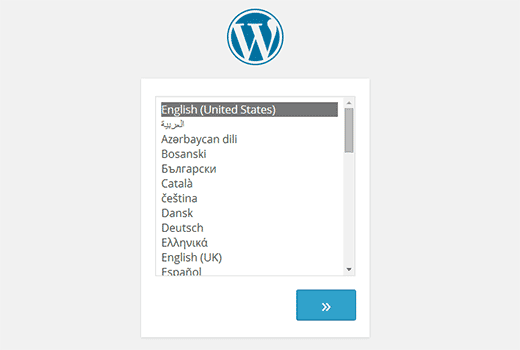
    In WordPress 4.0, installing WordPress in other languages will be a lot easier. Users can choose the language for their site as the first step of the install process, and the rest of their installation will continue in user’s chosen language.

    Language selection during the install process in WordPress 4.0

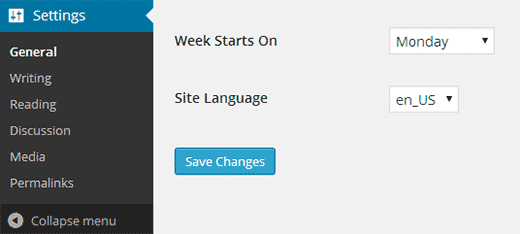
    WordPress 4.0 will also allow users to switch/change the site language from WordPress admin area by going to Settings » General and choosing a language from Site Language drop down menu.

    Chosing language in WordPress settings

    Users will also be able to to search for plugins and themes available in their selected language.

    Hopefully this will encourage more users to contribute translations for their favorite themes and plugins. Here is how to find translation ready themes and plugins for WordPress.

    Media Grid View

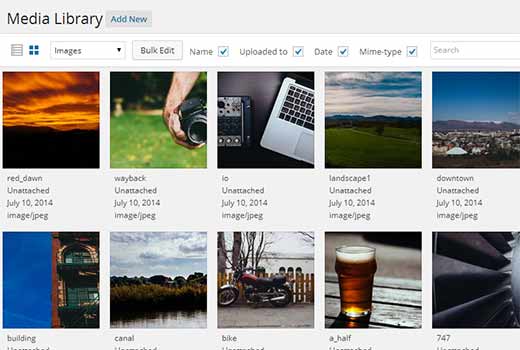
    Media Grid started as an standalone project, and is going to enter the core with WordPress 4.0. As the name suggests, it allows you to view your media library in a grid view.

    Grid view for media library in WordPress 4.0

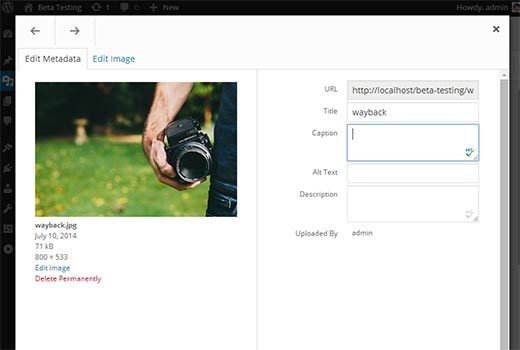
    This modern interface will provide a faster way to view and manage your media files in WordPress. Clicking on a media file will open it in a modal popup where you can edit file information. You can also browse media files in the modal popup using the arrow keys.

    Edit media files directly from library with one click

    Post Editor Improvements

    WordPress 4.0 will bring some very useful improvements to the post editor.

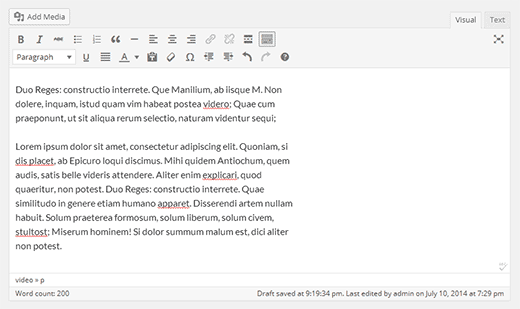
    First of the menu bar in the editor will now stick to the top as a user writes a post. It was really annoying for new users who had to scroll up to click buttons. The editor will now resize itself as you write. The scroll bar in post editor is also gone providing a much better writing experience.

    Easy scrolling when writing posts

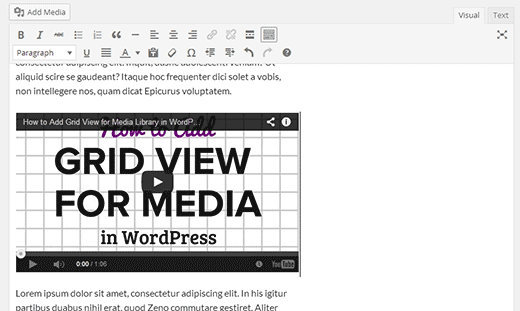
    Another improvement in post editor is displaying embeds. Users will be able to see the actual embed in the post editor when they paste a URL from a supported site like YouTube, Twitter, WordPress.tv, etc.

    Embeds will be displayed inside post editor

    In this release, several other oEmbed providers were added like: TED Talks, Mixcloud, CollegeHumor, YouTube Playlist URLs, etc.

    Improvements in Theme Customizer

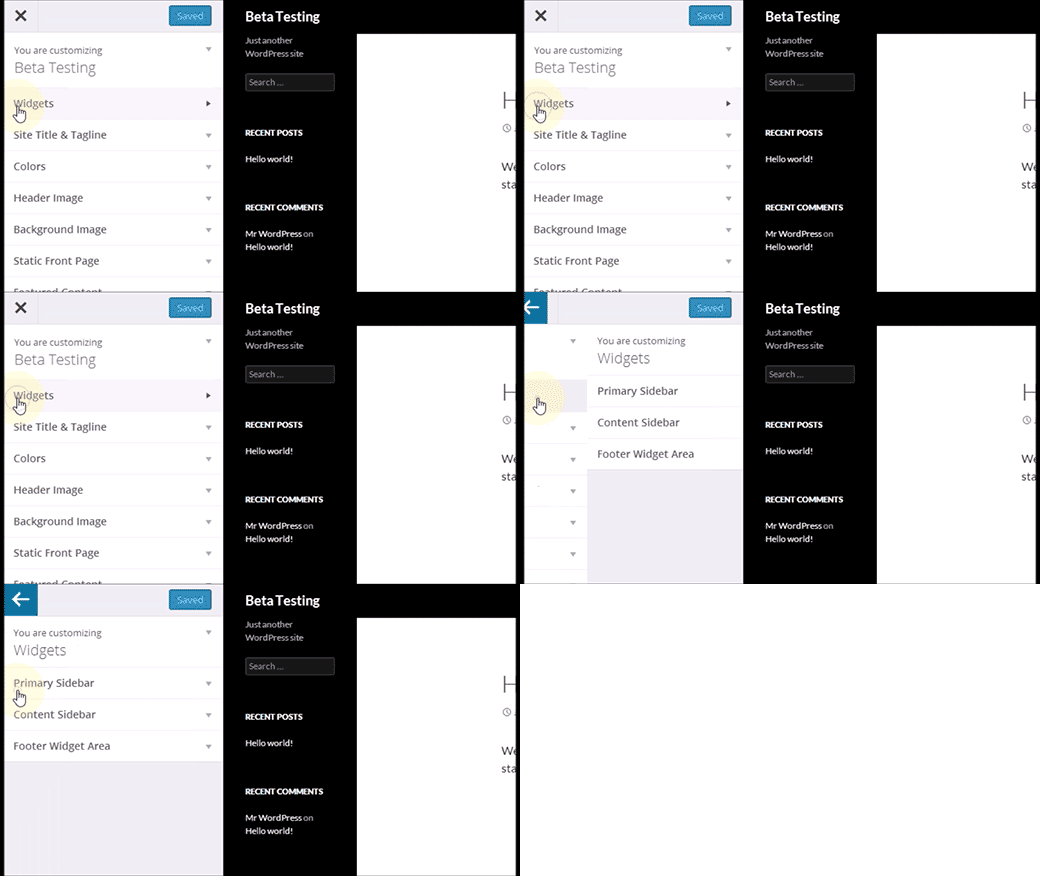
    In WordPress 3.9, widgets were added to Theme Customizer. In WordPress 4.0, Widgets are moved to their own panel in Theme Customizer.

    Widgets now have their own panel in theme customizer

    Plugin Install Experience

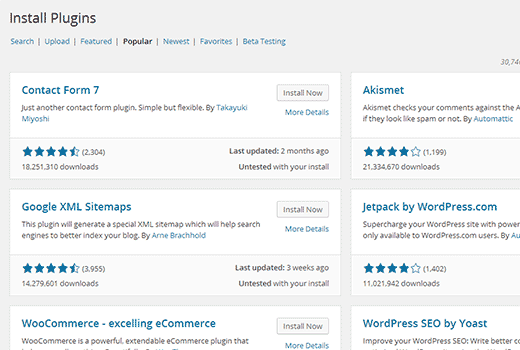
    An improved user experience for plugin install screens is another important change in WordPress 4.0. Plugin search results as well as popular and featured plugin details are changed to show plugins in a nice grid.

    Plugin install experience in WordPress 4.0

    The plugin install experience is still work in progress, so hopefully there will be more improvements in the final release such as plugin headers and more.

    For Developers

    Customizer and Panel API has several changes which will allow theme and plugin developers to create custom panels and user interface elements in the customizer.

    WordPress 4.0 is going to be an exciting new release. Let us know what are your favorite features in WordPress 4.0 and what features you would like to see in upcoming releases.

    If you liked this article, then please subscribe to our YouTube Channel for WordPress video tutorials. You can also find us on Twitter and Google+.

  • Whats New in WordPress 3.9

    Whats New in WordPress 3.9

    WordPress 3.9 arrived yesterday with lots of improvements and new features. At WPBeginner, we followed the development closely, and published an article about what’s coming in WordPress 3.9 with screenshots. We are glad to report that all the features we were excited about made their way into the final release. In this article, we will show you what’s new in WordPress 3.9, and what cool new things you should try out after updating your sites.

    Please note that WordPress 3.9 is a major release, so it will not get automatically updated. You will have to initiate the update.

    TinyMCE aka Visual Editor is Overhauled

    WordPress ships with its own version of TinyMCE Editor. Just like WordPress, TinyMCE is also an open source software which recently got some cool new improvements. In WordPress 3.9, those improvements are imported into WordPress. Some of our favorite improvements in the post editor are:

    Drag and Drop Image Uploads

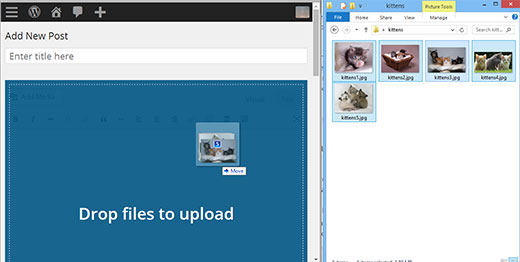
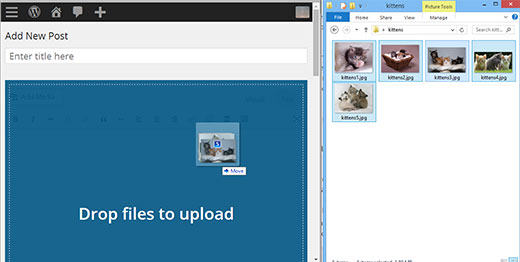
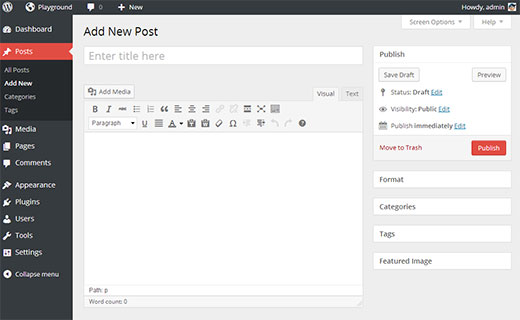
    You can now simply drag and drop images into the post editor, and they will get uploaded to your site. You can also drag and drop multiple image files for quicker upload.

    Drag and drop images into post editor for quicker uploads

    Live Gallery Previews

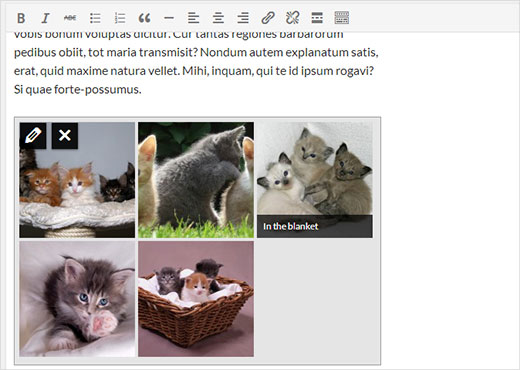
    Before WordPress 3.9, when you added a gallery in WordPress, it showed a placeholder to indicate the gallery’s position. Now when you add a gallery, you can see actual gallery preview right inside the visual editor.

    Live gallery previews in post editor

    Resizing and Editing Images in Post Editor

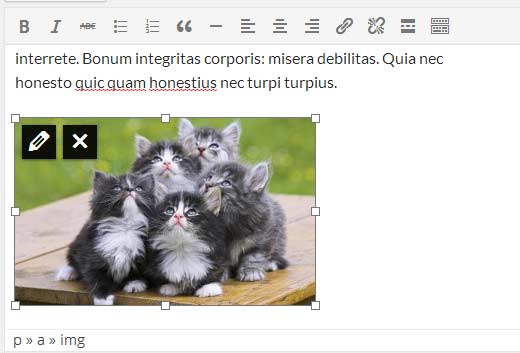
    Another image related feature that you are going to love is live image resizing. Just click on an image and drag the handles on the corner to resize your image.

    Resize images inside post editor

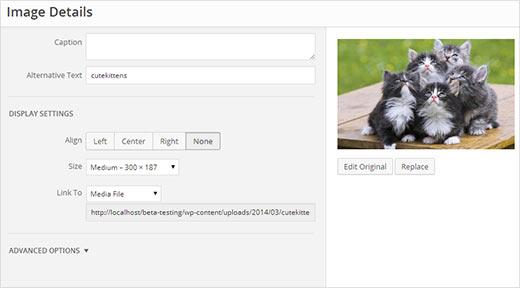
    Click on an image inside the post editor and then click on the pencil icon to edit image attributes. A brand new Image Details popup will appear. It is much better looking and has some cool new features.

    Editing an image while working in the visual post editor

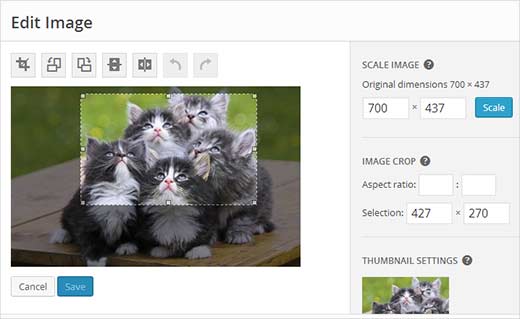
    You can click on Replace button to replace the image or click on the Edit original button to launch the new improved image editor without leaving the post you were editing. On the edit image view, you can crop, scale, rotate image and save your changes.

    Rotate, crop, scale your image in the image editor

    Copy Paste Directly From MicroSoft Word

    Don’t be alarmed if you can’t see the Paste from MS Word button in your post editor. It has been removed in WordPress 3.9, as it is no longer needed. Previously users had to click on paste from Word button when they needed to paste their posts from MS Word to WordPress post editor. Now there is no need to do that. The post editor will now clean up any mess created by MS Word. We know that many of our beginner users write their posts in MS Word. This feature will help them avoid dreadful code that came along.

    Flat Plain Text Editor Buttons

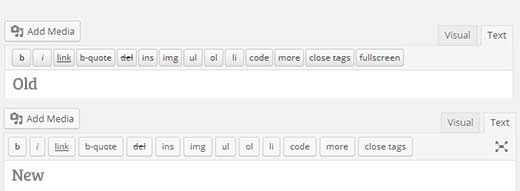
    If you are like us and use plain Text editor to write your posts, then there are some tiny changes for us in the text editor’s toolbar. First change is the buttons are now flat and match rest of the WordPress buttons. Another change is that fullscreen button is replaced with an icon button.

    Plain text editor with a modern new look

    Live Widget Previews in Theme Customizer

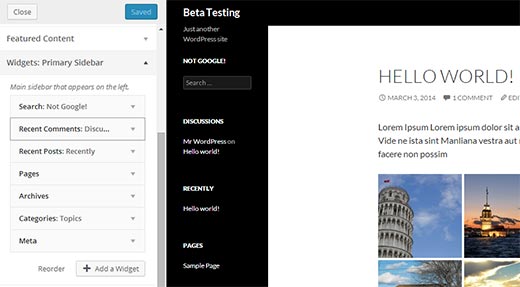
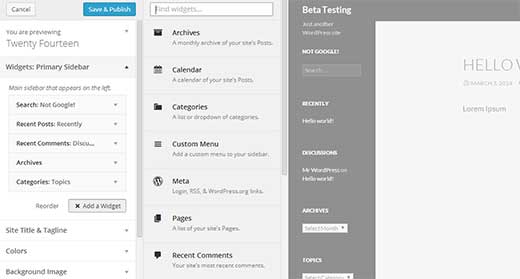
    Another much anticipated feature of WordPress 3.9 is Live Widget Previews. This feature will allow users to add, remove, edit and customize their Widgets from Theme Customizer. It is a lot easier to use, and you can see your changes live in action in the preview pane.

    Live widget previews in Theme Customizer

    The old widgets screen will still be there under Appearance, for users who would rather use the old familiar interface to manage their widgets.

    Improved New Theme Screen

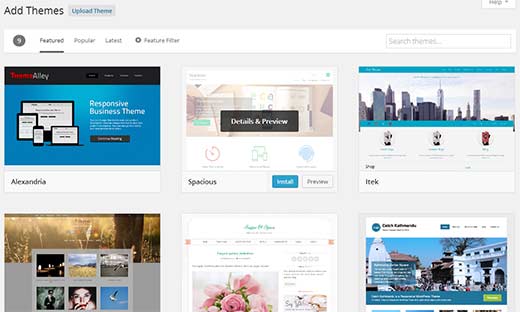
    In WordPress 3.8, we got a new user interface for the admin area. However, some parts of the admin area felt out of place. Add new theme screen was one of those areas. The new interface for Themes was developed separately as part of THX38. In WordPress 3.9, Add New Theme area got a new prettier and more user friendly interface. Searching for Themes hosted on WordPress themes directory is a lot easier now.

    Improved add new theme screen in WordPress 3.9

    Audio/Video Playlists

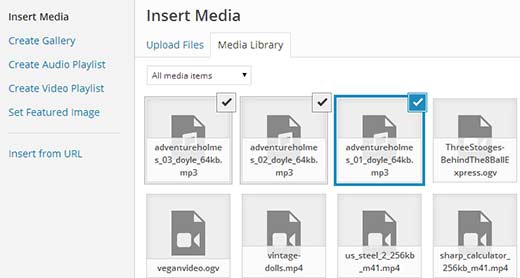
    With WordPress 3.9, you can create audio and video playlists the same way you create galleries. We do not recommend our users to upload their videos to WordPress, but here is how to try this feature out. Simply click on Add Media button and upload your Audio/Video files. On your left hand, you will see a link to create video playlist.

    Please note: in some cases you may not see a link to create an audio or video playlist unless you have an audio/video file in your media library, or you upload an audio/video file.

    Creating audio/video playlists in WordPress 3.9

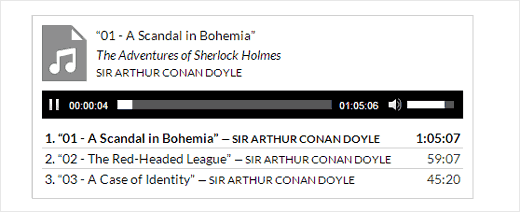
    Clicking on it will show your uploaded audio/video files already selected. All you need to do now is click on Create New Audio/Video Playlist button. On the next screen, you can add titles and captions to your playlist just like image galleries. Once you are satisfied click on Insert Playlist button.

    An audio playlist in WordPress

    There are many other under the hood improvements, such as new versions of libraries, improved autosave, and bug fixes.

    We hope that this article helped give an overview of WordPress 3.9.

    For more updates about WordPress, you can follow us on Twitter, or join us on Google+.

  • Whats Coming in WordPress 3.9 (Features and Screenshots)

    Whats Coming in WordPress 3.9 (Features and Screenshots)

    WordPress 3.9 Beta 1 was released yesterday. This is a major release, developed under the plugins-as-features development model. In this article, we will show you what new features are coming in WordPress 3.9 along with their screenshots. WordPress 3.9 is still in beta, so some of these features may not make into the final release.

    You can test the beta version on your computer or in a staging environment by using the WordPress Beta Tester plugin.

    Live Widget Previews in Theme Customizer

    With WordPress 3.9, you will be able to see live previews of widgets in the theme customizer. Widget Customizer will allow you to edit widgets, rearrange them, and even add new widgets.

    Widget customizer in WordPress 3.9

    The exciting part is that you can see all this happening in the live preview pane on the same screen. In the earlier versions of WordPress, users were able to edit most theme features from Customize screen except widgets. Now with this feature, theme customizer looks complete and much more powerful. In case you are wondering the old Widgets screen will still be there, so you can manage widgets the old fashioned way as well.

    To try out this feature, you can install and activate the Widget Customizer plugin. Upon activation simply go to Appearance » Customize, where you will notice a Widgets section for each widget ready area and sidebar supported by your theme.

    Audio / Video Playlists

    With WordPress 3.9, users will be able to create audio/video playlists. The audio/video playlists will work as a shortcode just like image galleries. You will be able to upload multiple audio/video files and add them as a playlist right from WordPress media uploader.

    Arranging a playlist in WordPress media uploader

    WordPress will also try to get the attached media’s cover and album information using the ID3 tags, but this will fall under a theme feature. It will be a very useful feature for WordPress Themes for bands and musicians.

    TinyMCE aka Visual Editor Updated

    Visual Editor in WordPress is based on TinyMCE editor which is another open source software. TinyMCE recently released a major update to the software, so in this release WordPress TinyMCE will be updated. This update resulted into many improvements in the Visual Editor. In fact, you can say that WordPRess 3.9 is focused on improving the writing/editing experience in WordPress. Some of these improvements are:

    You will be able to see live gallery previews in the visual editor. When you add a gallery to your posts, images will be displayed in a beautiful grid right inside the post editor.

    Live gallery previews inside post editor

    You can also drag and drop images to the editor directly, and they will be automatically uploaded (this is pretty awesome).

    Simply drag images to the editor for upload

    Many more improvements are made into adding and editing images while writing a post. Like if you want to crop and edit an image while writing a post, you don’t need to open another window for that. You can do that directly by clicking on an image and resizing it by dragging the handles on the corner.

    Resize and edit an image right inside the post editor

    Pasting text directly from Microsoft Word will not result into weird characters. You don’t need to press ‘paste from Word’ button anymore. We’re sure many beginners will be excited to hear that.

    Improved Add New Theme Screen

    You will also notice further improvements in Themes screen. There will be a new, sleek and stylish UI to add new themes in WordPress. It fetches screenshot of the featured themes. You can also click on tabs to switch between popular tags, filters and search for new themes from the official theme directory.

    Add new theme screen in WordPress 3.9

    For Developers

    Aside from the notable features above, there were several under-the-hood updates that our developer users might find useful. Below are the two that we were interested in:

    • WordPress Image Crop position – Up until now additional image sizes were cropped to center horizontally and vertically. In this recent release, there will be an image crop position that will allow developers to decide the crop position. (#19393)
    • Autosave Refactored – Autosave had lots of “moving parts” and over the years many additional functions were “pinned” to it. In WordPress 3.6 most of the additional functionality was moved to heartbeat, like logged out warning, nonces update, etc. In this release, saving of post data is moved over to heartbeat as originally planned. (#25272)

    It is going to be a exciting a new release. We are particularly excited about the visual editor updates. It will greatly improve post writing experience for many WordPress users. Let us know, what features you like in WordPress 3.9, and what you would like to see in the upcoming releases by leaving a comment below.

  • Whats Coming in WordPress 3.8 (Features and Screenshots)

    Whats Coming in WordPress 3.8 (Features and Screenshots)

    Less than a month ago, WordPress 3.7 made its debut. A lot of under the hood features were added like automatic updates, but nothing that the user could see. WordPress 3.8 which is expected to be released in December will be different. This release is focused on improving the user interface for WordPress admin area meaning a lot of visual improvements. In this article, we will show you what’s coming in WordPress 3.8 and how you can try some of these features right away.

    Many of the proposed features for WordPress 3.8 are already available for testing and development purposes as plugins. This features-as-plugin approach allowed contributors and developers to work on their projects simultaneously. You can try these plugins in a development environment. However, since most of them are highly experimental, it is not recommended to use them on a production site.

    New User Interface For WordPress Admin

    We wrote about how MP6 could become the future of WordPress. It is official now. The MP6 plugin will become part of WordPress core in 3.8. It is already in use on WordPress.com sites, and you can give it a try by installing the plugin. It gives WordPress admin interface a modern, optimized, and polished new look that it deserves.

    A new user interface for the admin area is announced for WordPress 3.8

    MP6 features a streamlined and improved admin user interface with flattened icons and beautiful color schemes. You can choose a color scheme from Users » Profile.

    The current default admin interface comes with only two default color schemes which makes it feel ancient, so these new refreshing colors will be a nice change. MP6 uses Open Sans font which will be shipped with WordPress 3.8. MP6 also brings great improvements to buttons, forms, and the overall appearance of the admin interface making it prettier and user friendly.

    A New Less Bloated Dashboard

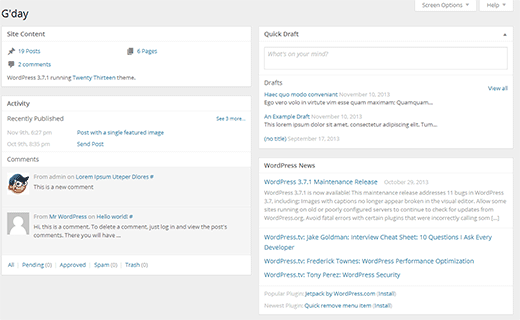
    The dashboard screen will also get a face lift in WordPress 3.8. Based on the Dashboard plugin by @lessbloat and the team, the new WordPress dashboard will have fewer and more relevant widgets.

    For example, the incoming links widget will be removed. ‘Right now’ widget will be replaced by ‘Activity’ widget. QuickPress on the dashboard screen will be renamed to Quick Draft and will be much simpler.

    A new less bloated dashboard is expected in WordPress 3.8

    Better Live Previews of Themes

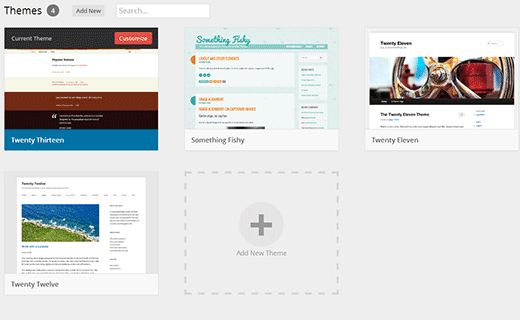
    Themes screen in current WordPress has too much text. WordPress 3.8 will bring theme experience plugin (codename Thx38) into core. This will transform the theme screens in WordPress admin area. It has larger theme screenshots and a clutter free user interface. Theme search is moved to the top right corner of the screen. To try this as a plugin on WordPress 3.7 or earlier, you would need to install MP6 plugin first.

    Themes screen in development versions of WordPress 3.8

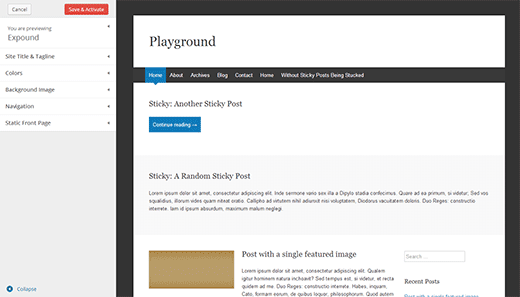
    The new theme experience will greatly improve the theme preview experience. You can still see theme previews in WordPress 3.7 without activating a theme. However the new theme experience will provide a better user interface to do that. You can completely collapse the sidebar and see the full screen theme previews. It is also much faster and prettier than previous theme screen.

    Theme preview screen in development versions of WordPress 3.8

    A Friendlier and Easier Widget Area Chooser

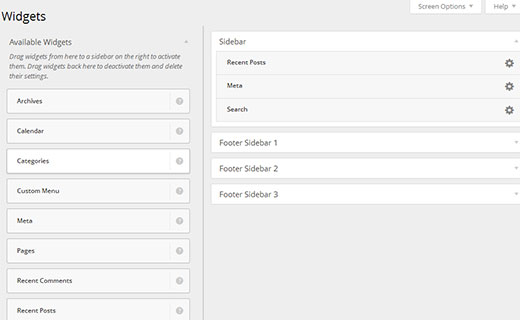
    Widgets are an easier way for users to drag-drop elements into their sidebars and other widget ready areas. This allows theme developers to build themes with multiple widget ready areas, so the users can create their own website layouts. With multiple widget ready areas and tons of widgets to choose from, sometimes it becomes difficult to drag and drop a widget into the right sidebar.

    Widget area chooser in action

    With WordPress 3.8, this problem will be solved with a new User Interface for the widgets screen. The new Widgets screen will allow users to easily choose the sidebar they want to add a widget to without dragging it across different sidebars. The new widget interface will be cleaner, clutter free, and visually appealing.

    A New Default Theme – Twenty Fourteen

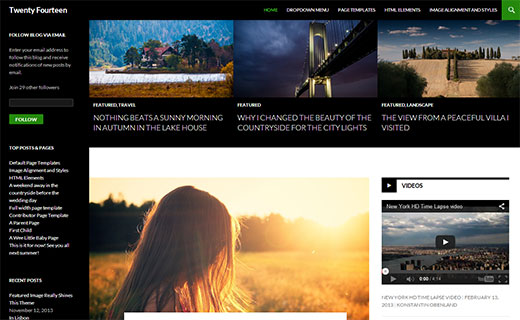
    Twenty Fourteen will be the new default theme for next year which is expected to be released in WordPress 3.8. It is a magazine style theme with support for featured content to be prominently displayed across the site. If your site does not use featured images, Twenty Fourteen makes sure that it looks pretty out of the box without featured images as well.

    Twenty Fourteen - The new default WordPress theme for next year

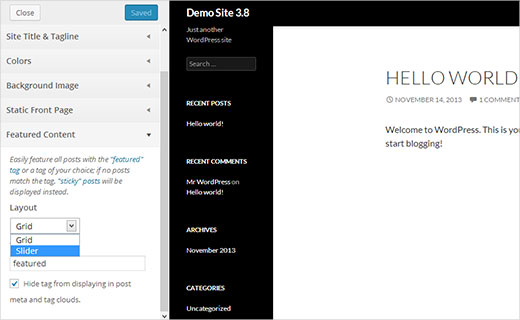
    Twenty Fourteen will allow users to customize the featured content area. They can choose to have a grid style layout or a slider. Users can choose which content to be featured by adding a tag in the theme customizer. Twenty Fourteen will then look for posts with the tag and display them in the featured content area.

    Setting up featured content area in Twenty Fourteen WordPress theme

    You can see a demo of currently under development version of the theme here.

    We’re not huge fans of this left aligned layouts, but we’ll see if it starts to grow on us. From the current looks, this theme looks extremely crowded.

  • What Features are Coming in WordPress 3.6

    What Features are Coming in WordPress 3.6

    It was just a few months ago when WordPress 3.5 was released (December 11, 2012 to be exact). Well, the next major release, WordPress 3.6, is already underway. WordPress 3.6 is expected to be released in late April 2013. We have been following the developments of WordPress 3.6 and decided to share with you what features to look forward to. In this article, we will discuss what features are coming in WordPress 3.6.

    Better Editorial Controls

    WordPress 3.6 will be a great update particularly for bloggers and content publishers. It is focused on post edit area, providing better tools and support to improve the editorial process of creating content with WordPress.

    Post Lock

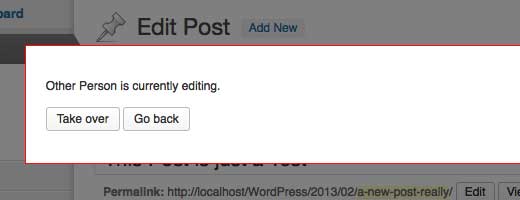
    WordPress 3.6 will have an editorial control feature, called post lock. This will allow website administrators and authors to lock a post so that other users can not work on the same post until it is unlocked. If the other user has the rights to edit a post, then they will be prompted to either go back or take over. This is a very neat feature for blogs with multiple authors.

    Post Lock in WordPress 3.6

    Improved Autosave

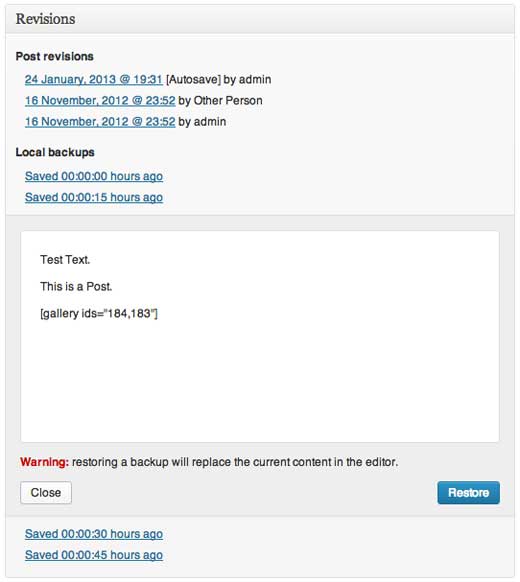
    WordPress 3.6 will be focused on content editing, so the auto-save feature will see some great improvements. There are talks about saving unsaved changes in browser’s local storage. This will be very helpful because it will prevent you from losing posts due to expired cookies, loss of internet connection, inadvertent navigation, plugin or core errors on save, browser crashes, OS crashes, cats walking on keyboard, etc. If any of those happen, you would be able to resume editing exactly where you left it.

    Local Backups for Revisions

    The goal is to get people to trust WordPress with their posts. The autosave feature was introduced for this vary reason because people were afraid of losing their work. This is the reason why many use third-party applications like Windows Live Writer to write their WordPress posts. The hope is that by enhancing the auto-save feature, many users will begin to trust the WordPress autosave capabilities.

    Better Handling of Post Revisions

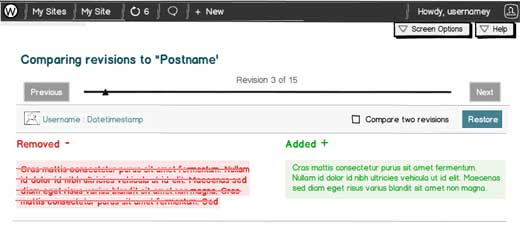
    Post Revisions will now reflect the changes between different versions. Changes will be highlighted with colors and visual elements, so you will be able to quickly notice the difference between them.

    Compare Post Revisions UI

    Editorial Workflow

    There were talks of integrating one of the best editorial workflow plugin into core. However due to time constraints, this feature will not be added in WordPress 3.6. The efforts weren’t wasted because it brought to surface many challenges involved in the process. This will allow the core team to prepare in advance for next release. (See Mark Jaquith’s Explanation). Well nothing to worry about. You can still use Edit Flow plugin (we’re using it).

    New and Improved UI for Post Formats

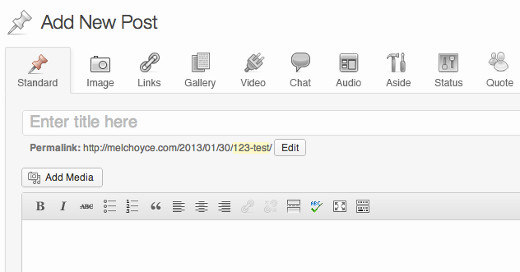
    As you know that WordPress has support for Post Formats and custom post formats. However, the old interface was not very noticeable. In WordPress 3.6, there will be a new user interface for post formats. Users will be able to choose and switch between post formats, and the edit area will change based on the post format. Inspiration for these changes comes from Alex King’s post format UI plugin, we showed you earlier how to install Post Format UI Plugin in WordPress 3.5. Folks are submitting ideas and wireframes as to what Post Formats UI should look like. Below is a mockup submitted by Mel Choyce:

    Post Formats UI Mockup

    Twenty Thirteen

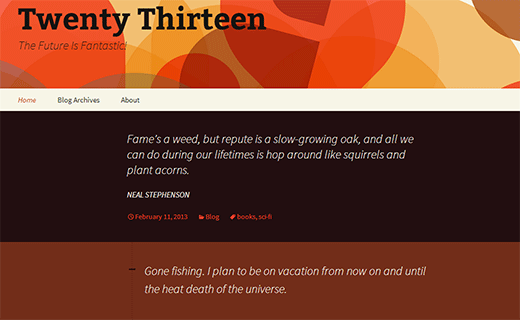
    WordPress 3.6 will also come with Twenty Thirteen, the new default WordPress theme. Twenty Thirteen will have great support for post formats. Unlike previous WordPress default themes, Twenty Thirteen will be using lots of bold colors. It will use different background color for each post which looks great when a user scroll downs the page. Twenty Thirteen will be fully responsive and will look equally great on different screen sizes, resolutions, and devices. See the live demo.

    Twenty Thirteen Demo Screenshot

    A New GUI for WordPress Menus

    The WordPress Menu editor will also get a new and more intuitive user interface. At WPBeginner, we noticed that a lot of WordPress beginners don’t understand the menu system. The tabs, menu drop down, choosing multiple menus and switching between them is trivial to most new users. Hopefully this will change in WordPress 3.6, and it will become easier to create and manage Menus in WordPress.

    Improved Login Notifications

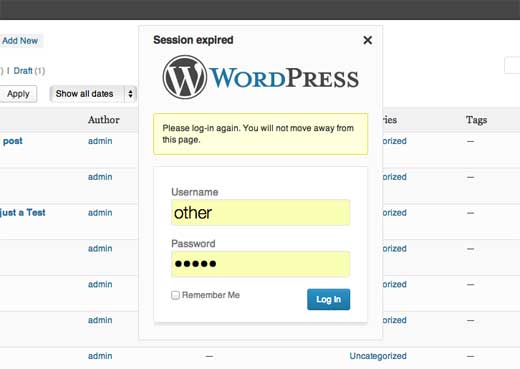
    Sometimes a user session expires right in the middle of something important. The new login notification system will ask a user to login without leaving the page they were working on.

    Improved Login Notifications - WordPress 3.6

    There is still some time left in the release of WordPress 3.6. This is a major release so apart from these new features, there will be several improvements to the core code, bug fixes, security updates, etc. Remember you can always submit your ideas for WordPress, the highest voted ideas will be included in upcoming versions of WordPress. What new features you would like to see in WordPress? What’s your favorite feature of this WordPress 3.6 release? Let us know in the comments below.

  • Whats Coming in WordPress 3.5 (Features & Screenshots)

    Whats Coming in WordPress 3.5 (Features & Screenshots)

    WordPress 3.5 is less than a month away. This will be the second major release for 2012 (last one being WordPress 3.4 on June 13, 2012). Expected to be released on December 5th, 2012, WordPress 3.5 is already in the third beta release. This means a release candidate is very close. This is why we thought we should give you a heads up on some of the exciting new features that are coming in WordPress 3.5.

    Links/Blogroll is Hidden

    Link Manager Removed in WordPress 3.5

    We wrote about this in September that Link manager aka Blogrolls will be hidden in WordPress 3.5. In the past, we used the wording “sort of removed” which confused the heck out of people. If you are using the link manager currently, then it will stay as is. However, for those users who do not use it or have a fresh install of WordPress 3.5, the link manager will be hidden by default.

    You can enable the link manager feature by using the plugin Link Manager.

    This decision was made to make the core of WordPress lighter and leave specific functionality to plugins.

    New Welcome Screen

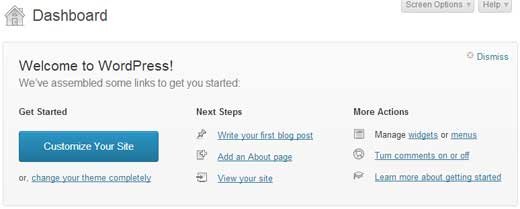
    WordPress 3.5 New Welcome Screen

    WordPress admin panel can be pretty complicated for beginners. This is why we have the free WordPress videos course that guides you through the entire dashboard. In the continuous efforts of improving the user experience, WordPress team has decided to improve the welcome screen. The idea is to highlight all the basic tasks that the user may need.

    Easy Plugin Install with Favorites

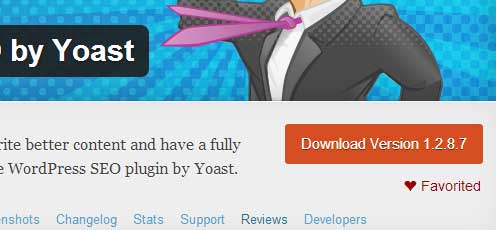
    Often regular users and developers complained that installing the same list of plugins on multiple sites was difficult. Folks used to say, it would be really nice if we can just pull all of our plugins at one place in the dashboard. Then install them to our heart’s content. Well that wish has come true thanks to Otto. WordPress.org repository has a feature called Favorites. When you go to a specific plugins page, you see a favorite button below the download button.

    Favorites Feature on WordPress.org

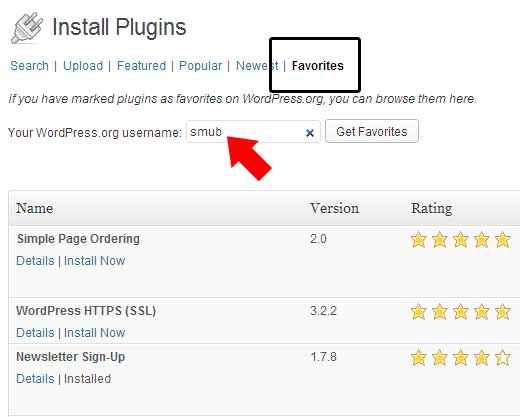
    You can favorite all the plugins you like and have them displayed on your profile. In WordPress 3.5, you can now see the list of favorite plugins of any WordPress.org user in your backend. All you have to do is go to the plugins tag and click Add New. Click on the favorites tab. Type your WordPress.org username or anyone else’s username. For example, if you type “smub”, you will get our favorite plugins.

    Favorites Plugin in WP Admin

    Media Enhancements

    WordPress Media uploader got a major overhaul. The user interface was improved to make it easy for WordPress beginners and average users. For example, there was no button to click Upload/Insert media. It just showed text with an icon. When training a client, we would say click on the add media button, and they will say where is that? Little things like these go a long way.

    Add Media Button

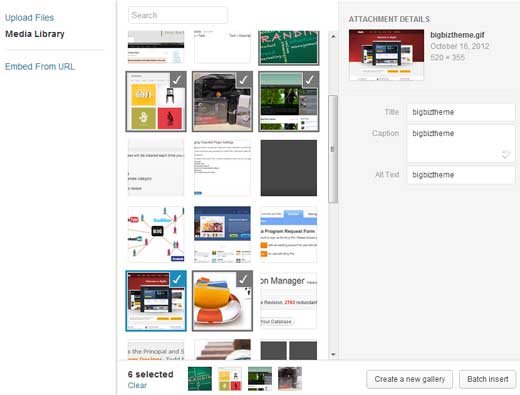
    The big overhaul happened with the actual uploader. If you click on the Add Media button, you are taken to a new lightbox.

    WordPress 3.5 Media Lightbox

    If you look at the screenshot above, you will see quite a few things that are different. The entire layout is different to make it all work. When you click on an image, instead of opening a tab with all the image settings, this keeps everything visible by showing image specific settings on the right. In the past, it was really hard for users to use built-in galleries. You could only use the images that you upload in the specific post, you would have to use all the images you uploaded unless you utilized the gallery shortcode and exclude each image manually. With this new interface, this problem is solved. You can select images using a visual interface (even fro the media library), and then create a new gallery. This gives you the option to exclude or include images at your will. You can also batch insert images in your post if you want.

    The entire media experience is improved. It’s totally awesome.

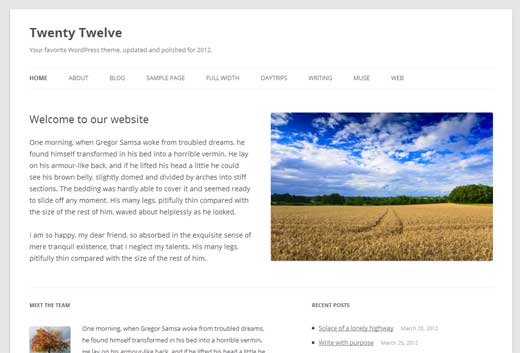
    Twenty Twelve Theme

    Twenty Twelve Theme

    A brand new default theme will be shipped with WordPress 3.5. Twenty Twelve is already available for download in the WordPress theme repository for those who want to use it. It features a clean responsive design using all the basic WordPress features.

    Other Enhancements

    Ofcourse there were tons of other enhancements and bug fixes. We will try to highlight some of them:

    • Improved Static Front Page UI under Settings » Reading.
    • Rename the “HTML” editor tab to “Text”
    • Bug fix: Prevent child categories from being visually promoted to the top level after quick edit.
    • HiDPI (retina display ready) dashboard.
    • New Color Picker for Live Theme Demos
    • Improved keyboard navigation and screen reader support.
    • XML-RPC enabled by default
    • Native oEmbed support for SoundCloud, Slideshare, and Instagram. It also supports SSL links now. But again, if you followed WPBeginner, and used our tutorials for Slideshare, Instagram, and SoundCloud, then you should probably remove them in WordPress 3.5. Because the core supports it already.
    • Updated External Libraries – TinyMCE 3.5.6. SimplePie 1.3. jQuery 1.8.2. jQuery UI 1.9 (and it’s not even released yet). They have also added Backbone 0.9.2 and Underscore 1.3.3, and you can use protocol-relative links when enqueueing scripts and styles.
    • WP Query can now ask to receive posts in the order specified by post__in.
    • Improvement to Posts API – Major performance improvements when working with hierarchies of pages and post ancestors. Also, you can now “turn on” native custom columns for taxonomies on edit post screens.
    • Comments API – Search for comments of a particular status, or with a meta query (same as with WP_Query).

    So how do we know all of this? Nope, we are not any special than any other WordPress user. If you want to try the beta version of WordPress 3.5, then all you have to do is use the WordPress Beta Tester plugin. We DO NOT recommend that you use this plugin on a live site. Create a demo site, and use it there.

    Which feature do you think is the best in WordPress 3.5? What are you looking forward to? Which feature you wish would’ve made it, but didn’t? Let us know in the comments.

  • WordPress.org Now Have Reviews for Plugins and Themes

    WordPress.org Now Have Reviews for Plugins and Themes

    Earlier this month, we wrote an article on our vision for a better and more engaging WordPress plugin directory. This weekend, we are at Tybee Island, GA for the first ever annual WordPress Community Summit organized by the WordPress foundation. Otto (@otto42) finally unveiled the reviews for the WordPress.org themes and plugins directory.

    Plugin Review and Ratings

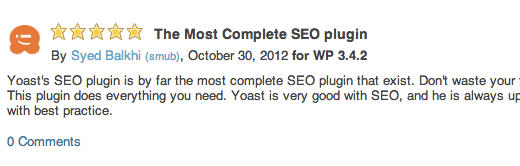
    As mentioned in our last article, one of the problems we identified was that people were not held accountable for their actions. They would rate something 1 star and leave. This could be done by a competitor plugin author and since there was no accountability, it was really easy to do it. With the addition of reviews, we will get rid of that problem because it adds accountability to each rating.

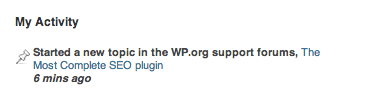
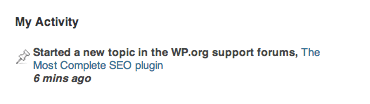
    A user MUST write a review in order to make their rating count. The profile design is still not updated entirely to integrate this. Currently it just adds your rating in the activity tab where it says: “Started a new topic in WP.org forums”.

    Plugin Profile Activity

    It would be neat if it says: Rated a plugin “Name of Plugin” – title of rating. Another nice addition would be if it shows rating + reviews under user favorite plugins list.

    The reviews feature is really nice because you can always edit your review in the future if need be. Reviews are also threaded, so users can leave a comment on your review if they want. It would be nice to see a functionality like Amazon’s “Did you find this review helpful” to feature top reviews.

    We understand that this is the first step in the right direction. Additional feature enhancements will be added in the future. Now the WP.org team has done their job. WordPress is nothing without its community. Please help others by rating and reviewing plugins that you use.

  • Customize Your WordPress with 600 No-Coding Design Options in Catalyst

    Customize Your WordPress with 600 No-Coding Design Options in Catalyst

    Often when you purchase a WordPress theme, it comes with usually one theme that has some configurable items through the WordPress backend. Some theme providers like Themify are now putting a creative touch by selling numerous color variations with one theme purchase, so you can use the same theme (different colors) for different sites. But that still does not give you a lot of control because you are getting one theme with pre-defined color variations. The folks over at Catalyst theme are providing a rather unique touch for their users. When you purchase Catalyst, you get 22 different skins in addition to the main theme for the price of just one theme. Now these skins are more than just color variations. In this article, we will give you an overview of the Catalyst Theme which comes pre-equipped with 600 No-Coding Design option that lets you create your own skins in a matter of minutes.

    You have the option to customize everything from your header, wrap, body, navigation, content, sidebar, widgets, breadcrumb, author, and everything until the footer. Below is an example of the admin panel:

    View all Admin Screenshots

    Just by having this feature, Catalyst theme is a perfect theme for any affiliate marketer or blogger who is thinking about launching products. You can pretty much create custom landing pages, and entire sites without knowing how to code. Aside from this, you also get other cool features such as:

    The Most Comprehensive Font Control Offered In A WordPress Theme!

    Catalyst Theme is fully integrated with the Google Font Directory API, giving you loads more choices for web-safe typography on your sites. There is universal font control option along with custom override option to have custom fonts just for specific things.

    Full SEO Optimization

    Catalyst provides all the SEO options that any theme needs. However we recommend that you use WordPress SEO Plugin by Yoast.

    A Custom CSS Building Tool That Writes Custom Code For You!

    You don’t have to worry about writing CSS, you just need to know what you want and how to copy/paste the automatically-generated code out of the CSS Builder and into the appropriate slot in your site.

    There are bunch of other features that you can find on the Catalyst Theme Website.

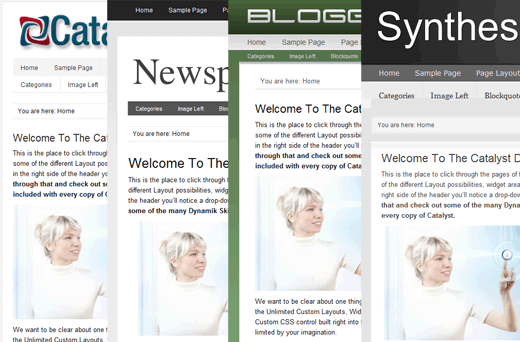
    Below are the demos of some of the Catalyst Theme Skins

    You can create a skin of yours within a matter of few minutes.

    Catalyst theme has two packages Personal license that goes for $97 and the Developer edition for $174. If you are one of those users who want to have an ability to easily modify the look and feel of your site without writing a single line of code, then Catalyst Theme is for you.

    Buy Catalyst Theme Now

  • Whats New in WordPress 3.4 (Features & Screenshots)

    Whats New in WordPress 3.4 (Features & Screenshots)

    Yesterday, WordPress 3.4 was released. While we knew which features were coming, unlike other releases we did not keep a close tab of alpha and beta versions due to a very packed schedule. We would like to apologize to our audience for that. For those of you who did not click the one-click upgrade button just yet, please make sure that you upgrade. In this article, we will highlight what’s new in WordPress 3.4 in terms of features for users and developers.

    Live Preview and Theme Customizer

    The theme customizer is one of the most outstanding features in WordPress 3.4. Handy for both users and developers alike, the theme customizer will start a new era of WordPress theme development. In the past, users would never know whether a specific theme would work for their website without activating it. They would not know how the theme would look with their content. Well that problem is out the window now with the Live Preview and Theme Customizer. When you go to Appearence » Themes, you will see “Live Preview” below each theme.

    Live Theme Preview - WordPress 3.4

    When you click that link, a live preview will open with the Theme Customizer. For active themes, there will be a link named Customize that you can click which will open the live preview.

    Theme Customizer

    We hope that more developers start using this instead of complex theme options. Otto has a great article that will show you how to leverage the theme customizer in your themes. Check out the video walk through of the Theme Customizer.

    Subscribe to WPBeginner

    Easy Tweets Embed with oEmbed

    In the past, you would have to use a plugin to embed a tweet in WordPress posts. Well not anymore. Just like youtube videos, now all you have to do is add the link to your tweet in a separate line. WordPress will embed the tweet with reply, retweet, favorite, and follow features. Love it. Check the example below:

    Custom Header Improvements

    In WordPress 3.0, WordPress added the ability add custom header images. Well, all the header images had to be a specific width and height. If you decided to change things around, it would cause things to look weird. In WordPress 3.4, you can now have flexible headers. You can see the new code in the Codex.

    Aside from that, you can now add custom header and background images from the Media Library as well.

    HTML in Image Captions

    In the past when adding images, you couldn’t link to the photo author in the caption. Well, in WordPress 3.4 you can. This will make things easy. Check out the example below:

    Largest Swimming Pool in the World
    This the worlds largest swimming pool 3324 feet long and 1977 acre The water is pumped from the Pacific Ocean after it has been filtered and treated Photo by <a href=httpwwwflickrcomphotosthiagocouto3683203242inset 72157620737585091 rel=nofollow target= blank>Thiago Graça Couto<a> found from the article <a href=httplist25com25 most fascinating swimming pools from around the world>25 Most Fascinating Swimming Pools<a>

    Better Organization for Page Templates

    If you ever worked on a complex site, you will find yourself creating a lot of custom page templates. Up until now, all page template files had to stay inside the theme folder along with all other files. This can get really clunky. For the sake of organization, you can now have a /pages/ sub-directory in your theme’s folder where you can place all page templates. Starting in WordPress 3.4, WordPress will identify all page templates in the theme folder or in any sub-directory of a theme folder.

    We know this will be extremely handy for our theme.

    Other Improvements

    There were a lot of bug fixes and improvements. Below is a list of items that we found to be very useful.

    • WP_Query Performance Improvements – Developers saw 2-3x speed performance improvements.
    • Post Formats will now be added under Navigation Menus
    • WordPress will now redirect attempts to visit /login, /dashboard, or /admin to the appropriate WordPress pages. Now you don’t need a plugin anymore :)
    • A lot of XML-RPC improvements
    • Internal functions and classes now add “rtl”, “ie7”, “ie8”, “ie9” for browser targetting

    We would love to hear what are your favorite features in WordPress 3.4

    Additional Resources

    WordPress 3.4 “Green” Official Release Article
    Full List of Features in WordPress 3.4
    10 Things you Need to KNow about WordPress 3.4
    How to Leverage the Theme Customizer in your own Themes

  • Mojo Themes WordPress Cyberbundle  Huge Savings

    Mojo Themes WordPress Cyberbundle Huge Savings

    If you really want to take your WordPress designs to the next level you have until December 4th to save almost 500 dollars on the Mojo themes WordPress Cyberbundle! It includes 15 WordPress themes with 10 of them being the most popular items on the market right now. It also includes 5 niche WordPress themes for restaurants and landing pages. In the end you can get your hands on $515 dollars worth of WordPress themes for only $29! This is a LIMITED time deal only, so act fast. The offer will expire on December 4th, 2011. Here is a sample of what you will have:
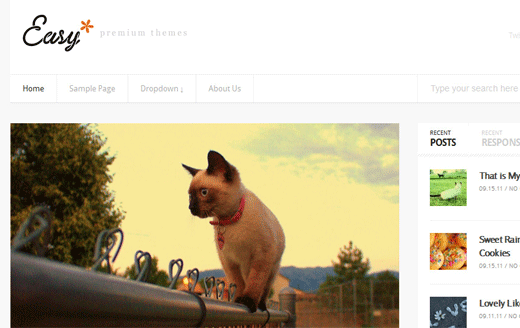
    Easy Theme $37 (Magazine)

    Easy Theme

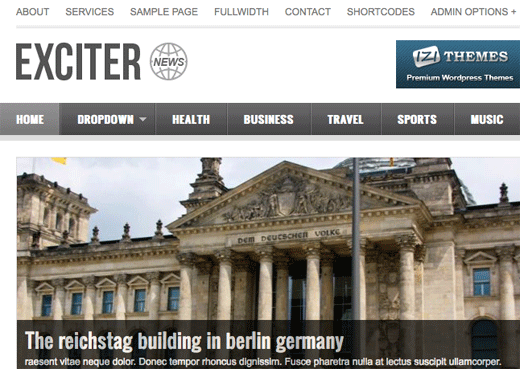
    Exciter $35 (Magazine)

    Exciter Theme

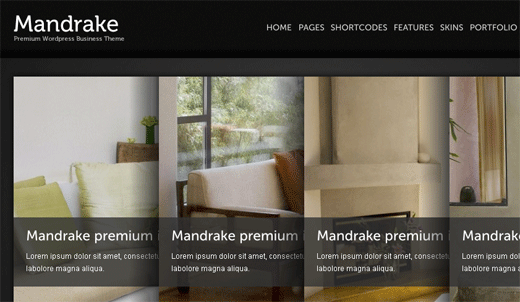
    Mandrake $37 (Business)

    Mandrake Theme

    Complex $37 (Business)

    Complex Theme

    MediaFlux $35 (Magazine)

    Mediaflux Theme

    LittleSmile $37 (Business)

    Littlesmile Theme

    Oddly $35 (Business)

    Oddly Theme

    Banter $37 (Business)

    Banter Theme

    Box One $32 (One-Page)

    Boxone Theme

    Ampersand $35 (Magazine)

    Ampersand Theme

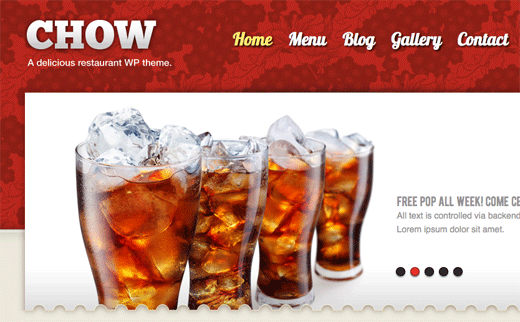
    Chow $35 (Restaurant)

    Chow Theme

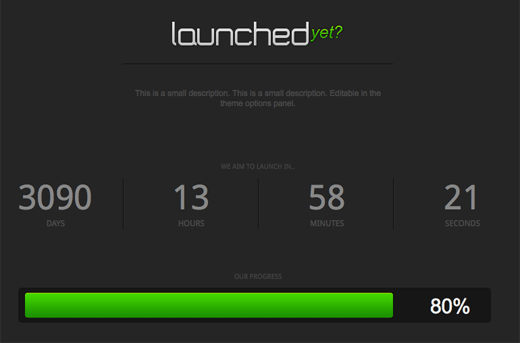
    Launched Yet? $18 (Landing Page)

    LaunchedYet Theme

    Fuse Music $35 (Music)

    Fusemusic Theme

    EStyle $35 (Fasion)

    Estyle Theme

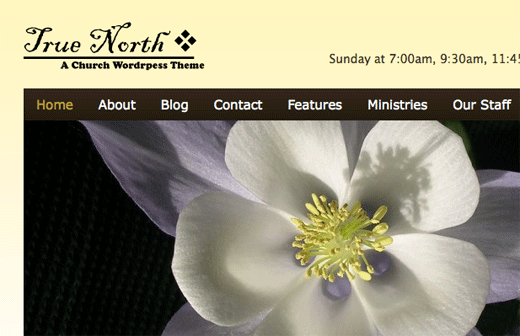
    True North $35 (Church)

    True North Theme

    Get Mojo Themes Cyber Bundle Now