Category: News

  • Whats Coming in WordPress 4.9 (Features and Screenshots)

    Whats Coming in WordPress 4.9 (Features and Screenshots)

    WordPress 4.9 is expected to be released on November 14th, 2017. We got our hands on the first beta version to checkout the new features and changes that are coming. In this article, we will show you what’s coming WordPress 4.9 with features and screenshots.

    What's coming in WordPress 4.9

    Note: You can try out the beta version on your computer or on a staging environment by using the WordPress Beta Tester plugin.

    It is still under development, so some features may not make it to the final release.

    Save and Schedule Theme Changes in Customizer

    WordPress 4.9 will introduce saving theme customizations as draft. Now when you make changes to a theme using the customizer, you will have an option to save your changes as a draft instead of making them live.

    Save theme changes as draft

    This new feature will also allow you to share the preview of changes with a url. You can send this URL to any user, and they will be able to see your website with the changes made in that particular draft.

    Share customize changes with URL

    Want to publish your theme changes at a specific time? WordPress 4.9 will also allow you to schedule changes.

    Schedule theme changes

    The New Gallery Widget

    WordPress 4.8 brought media widgets including rich text, audio, image, and video. WordPress 4.9 will introduce the new gallery widget.

    It will allow you to create a native WordPress gallery and add it to any widget ready areas.

    The new Gallery widget in WordPress 4.9

    However if you want a more powerful gallery with albums, then you need to look at a third-party plugin like Envira Gallery.

    Add Media Button in Text Widget

    The newly introduced text widget came with visual and plain text editors. However, if you wanted to add an image, you still had to write HTML code.

    WordPress 4.9 will fix this by adding the ‘Add media’ button on top of the text editor. This will allow users to easily add images inside the rich text widget.
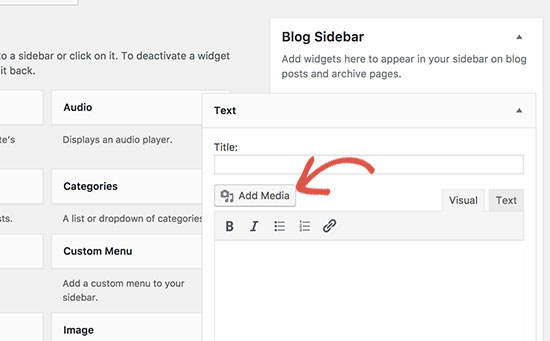
    Add media button in the text widget

    Improved Code Editing Experience

    WordPress 4.9 will bring a much better code editing experience. You will see an enhanced code editor while editing code in custom CSS, theme editor, or plugin editor.

    This code editor comes with syntax highlighting, code suggestions, and auto-completion.
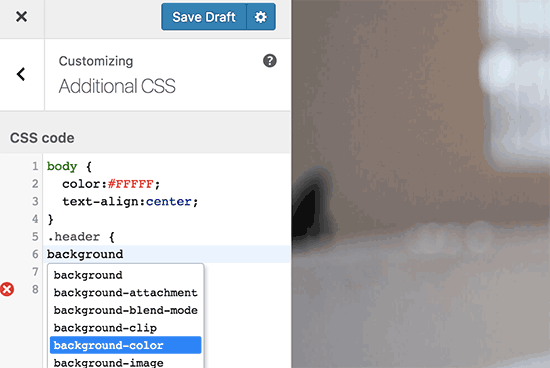
    Code editing in WordPress 4.9

    If you have ever faced syntax error when editing your theme, then this enhancement will automatically fix many common mistakes that cause such errors.
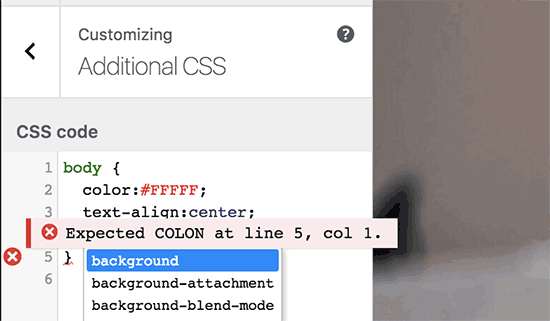
    Error highlighting in new code edior

    Don’t like syntax highlighting? It can be easily disabled from your user profile page.

    Disable syntax highlighting

    Miscellaneous Changes

    These under the hood changes are likely to make into the final WordPress 4.9 release.

    Better mapping for theme widgets and navigation menus after switching themes. #39693, #39692

    Removal of SWFUpload library from the core. #41752

    Recursively search for files in plugin and theme editors. #6531
  • Whats Coming in WordPress 4.8 (Features and Screenshots)

    Whats Coming in WordPress 4.8 (Features and Screenshots)

    The schedule for WordPress 4.8 is released. It will be the first major WordPress release of 2017. We have been following the development closely, and we are excited to report that the final version is expected to be released around June 8, 2017. In this article, we will show you what’s coming in WordPress 4.8 with features and screenshots.

    What's coming in WordPress 4.8

    Note: You can try out the beta version on your computer or on a staging environment by using the WordPress Beta Tester plugin.

    The official beta release will happen on May 12th, which means no more new features will be added until the final release of WordPress 4.8. However, some of the features in beta may not make it into the final release.

    Visual Editor in The Text Widget

    By default WordPress comes with a plain text widget. This widget contains a simple text box where you can add text and HTML code.

    Beginners who are not familiar with HTML were unable to add links or use basic formatting in the text widget. This will change in WordPress 4.8.

    The new text widget comes with a simple visual and text editor. Similar to the one you see on the post edit screen.

    New text widget in upcoming WordPress 4.8 with visual and text editor

    This will allow beginner users to easily add links, create lists, or make text bold / italic without writing any HTML code.

    The New Image Widget

    Right now, if you want to display an image in WordPress sidebar, you will have to write HTML or use a plugin.

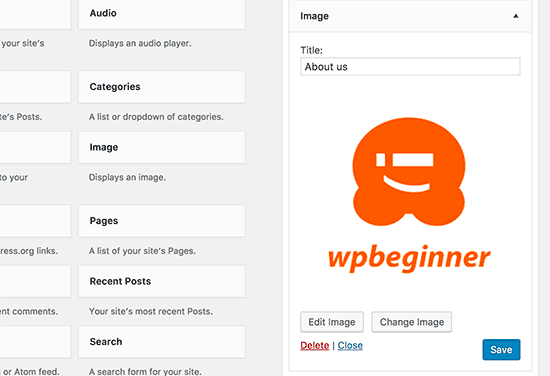
    WordPress 4.8 will introduce an image widget which will allow users to easily add images into the sidebar. You will be able to upload an image right from the widget or select any image from the WordPress media library.

    Image widget in upcoming WordPress 4.8

    Clicking on the select image will open the WordPress media uploader popup where users can upload or select an image. After inserting the image, users will be able to see a preview of the image in the widget area.

    Image widget preview

    The New Video Widget

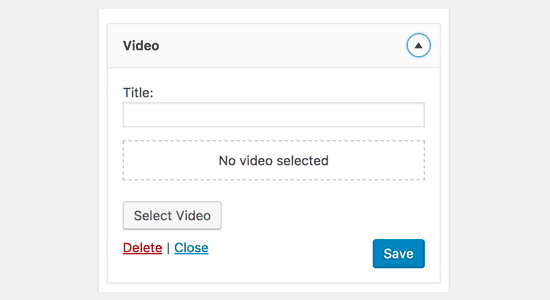
    Similar to the image widget, WordPress 4.8 will also introduce the Video widget. It will allow users to easily upload videos to their sidebar or display any video from YouTube, Vimeo, or any other oEmbed provider.

    New video widget in upcoming WordPress 4.8

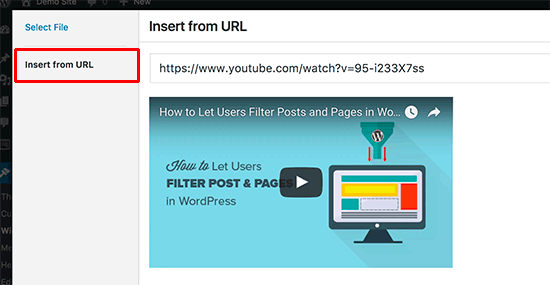
    Note: we recommend that you should never upload videos to your WordPress site. Instead, you should use a video hosting provider like YouTube or Vimeo. Simply click on the ‘Select Video’ button in the widget, and then click on ‘Insert from URL’ link.

    Insert video URL inside Video widget

    Add the URL of the video you want to embed and then click on the ‘Add to widget’ button. The media uploader popup will disappear, and you will see a thumbnail preview of your video inside the widget.

    WordPress News and Events Dashboard Widget

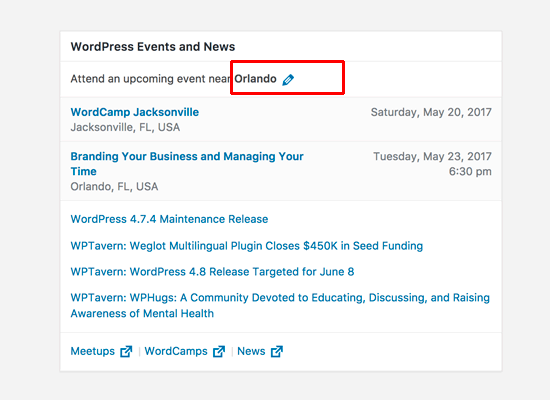
    WordPress 4.8 will also introduce the WordPress Events and News dashboard widget. It will appear on your WordPress dashboard page and will contain information about WordPress news as well as WordPress events near your location. It will replace the older WordPress news widget which only showed WordPress news.

    WordPress news and events widget

    If you have multiple users on your website, then the widget will show them events based on their location. It will automatically try to detect a user’s location by sending their timezone, locale, and IP address to api.wordpress.org.

    Users can also edit the location to manually enter their location or view events from any other location.

    Under The Hood Improvements

    These updates improve significant parts of the WordPress core but are mainly intended for developers.

    The customizer pane will now be proportionally sized on larger screens. #32296

    User’s name prominently displayed on edit user screen. #28182

    New function get_term_parents_list() will be introduced as taxonomy agnostic version of get_category_parents(). #17069

  • Whats New in WordPress 4.7

    Whats New in WordPress 4.7

    WordPress 4.7 was released just a few hours ago. It is the last major release of the year 2016, which brings some exciting new improvements and several bug fixes. In this article, we will show you what’s new in WordPress 4.7 and which features you should try after updating your websites.

    What's new in WordPress 4.7

    4.7 is a major WordPress release, and unless you are on a managed WordPress hosting service, you will have to manually initiate the update.

    Important: Don’t forget to create a complete WordPress backup before starting the update.

    Twenty Seventeen – A New Default Theme

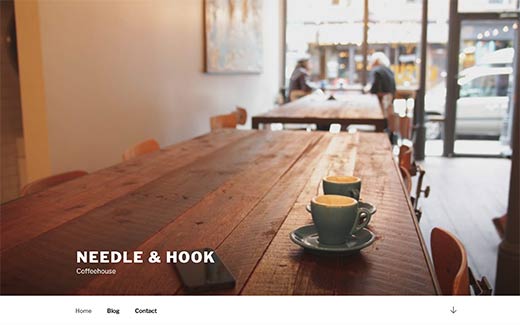
    Twenty Seventeen - The new default theme in WordPress 4.7

    WordPress 4.7 is the last release of the year. It is a WordPress tradition to release a new default theme each year named after the year.

    Meet Twenty Seventeen.

    This beautiful default theme comes with focus on business websites instead of blogs. It even comes with starter content to help new users start a WordPress website in minutes.

    Twenty Seventeen is flexible enough to be used as a blog theme as well. Perhaps the most noticeable thing about Twenty Seventeen is crisp typography, which looks great on all screens.

    Other noticeable features include large featured images, full screen header video and images, and graceful mobile-first design. All these elements make Twenty Seventeen a great starter theme for any kind of website.

    Video Header Support in WordPress 4.7

    Video headers support

    WordPress 4.7 brings video header support for themes. Many free and premium themes were already allowing users to add full screen videos. The video header feature will make it easier for theme developers to integrate it with in customizer with live preview.

    Users can upload their own videos in mp4 format, or add a YouTube video. We recommend adding a video using YouTube. See our article on why you should never upload videos to your WordPress site.

    Starter Content Support for Themes

    Starter content added by Twenty Seventeen theme in WordPress 4.7

    Some premium WordPress themes allowed their customers to import starter content when they purchased a theme. The purpose of this content is to immediately setup a site for users with dummy content, which they can later edit to meet their own needs.

    WordPress 4.7 brings similar functionality to the WordPress core and themes. Themes can now automatically add starter content on fresh sites.

    A user will need to just visit the theme customizer and the starter content will be displayed. However, this starter content will not be saved until a user clicks on the save button.

    PDF Previews in WordPress 4.7

    PDF thumbnail previews in WordPress 4.7

    WordPress 4.7 generates thumbnail previews for PDF files and displays them in media library. Previously, when you added a PDF document WordPress showed a generic document icon. Users had to use different PDF plugins for thumbnail previews.

    This feature creates an image for the first page of PDF document during upload. This image is then stored in different sizes and is displayed in media library, media upload popup, and attachment pages.

    Edit Shortcuts in Customizer Preview

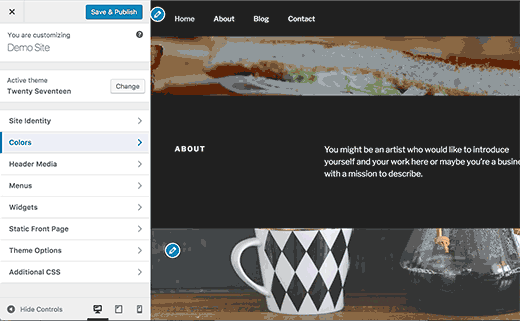
    Edit shortcuts in WordPress themes

    WordPress 4.7 also brings ‘Edit Shortcuts’ in customizer preview. These edit shortcuts are small blue icons placed on editable items in your theme’s live preview.

    This will be immensely helpful to new users who can now just point and click to edit an item.

    Don’t be surprised if you don’t see edit shortcuts for your theme. It is a new feature and it may not be available with your current theme.

    Add Custom CSS in Live Preview

    Custom CSS support in WordPress 4.7

    Sometimes you may need to quickly add some CSS to your WordPress site. Previously you had to add custom CSS to your theme or child theme‘s stylesheet. WordPress 4.7 allows you to directly add custom CSS using Customizer and view live preview of your changes.

    However, this custom CSS is specific to the WordPress theme you are currently editing. If you want to apply custom CSS regarless of which theme you are using, then see our guide on on how to add custom CSS in WordPress.

    Admin Language Control

    Users can switch admin area language from their profiles in WordPress 4.7

    WordPress 4.7 allows users to switch the admin area language from their user profile. You will still need to install the languages before users can switch them.

    Editor Improvements in WordPress 4.7

    Post editor changes in WordPress 4.7

    The post editor in WordPress is where users spend most of their time creating content. Each WordPress release strives to improve the editing experience by making it more easier and intuitive.

    WordPress 4.7 brings some important changes to the editor. Users can now see keyboard shortcuts in tooltips and drop down menus.

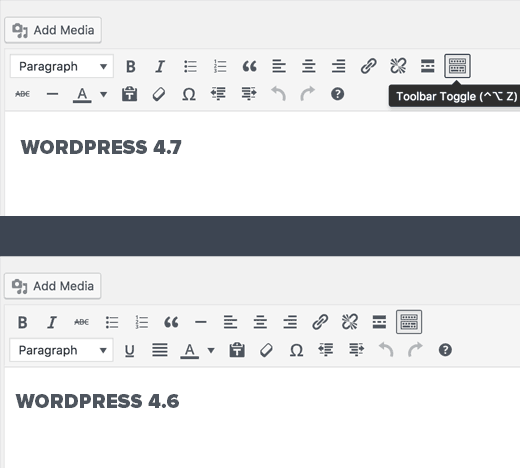
    The paragraph and heading selector menu will now appear in the top bar. The underline button has been removed, and the strikethrough and horizontal line buttons are moved to the kitchen sink bar.

    Under The Hood Changes

    WordPress 4.7 brings lots of exciting changes for developers as well. Here are some of those under the hood improvements.

    Post Type Templates in WordPress 4.7

    WordPress has custom page templates which allows users and theme developers to create different layouts for pages in WordPress. 4.7 brings this functionality to all post types including custom post types. (#18375)

    Rest API Content Endpoints

    Rest API Endpoints make their way into WordPress 4.7. (#38373)

    Locale Switching

    If the content of your website is displayed in a different locale than the one set in admin area, then WordPress will show the toolbar in the language of the content page. (#26511)

    Accessible Alt Text for Images

    WordPress automatically used file names as title and alternate text for images added in WordPress. Starting from 4.7, WordPress will now leave the alt text field blank if a user does not make any changes to the title or alt text fields when uploading an image. (#34635)

  • Whats New in WordPress 4.6

    Whats New in WordPress 4.6

    WordPress 4.6 was released just a few minutes ago. It is the second major release of the year 2016, and brings some exciting new improvements and fixes several bugs. In this article, we will show you what’s new in WordPress 4.6 and which features you should try after updating your websites.

    What's new in WordPress 4.6 (Features and Screenshots)
    4.6 is a major WordPress release, and unless you are on a managed WordPress hosting service, you will have to manually initiate the update.

    Important: Don’t forget to create a complete WordPress backup before starting the update.

    Native System Fonts in WordPress 4.6

    WordPress started using Open Sans from Google Fonts project, as the default font so that the admin interface looks the same on different platforms and devices. However, this meant a tiny compromise on speed and relying on a third party project.

    Since 4.6, WordPress will now use your native system font for the admin area. This will make WordPress load faster and feel like your native device and platform.

    Here is a screenshot of admin area in Safari web browser on macOS using system font San Francisco.

    Native system fonts in WordPress 4.6

    This change only affects user interface elements inside WordPress admin area. It will not affect content areas like post editor which uses your theme’s editor stylesheet for fonts.

    Shiny Updates for Plugins & Themes

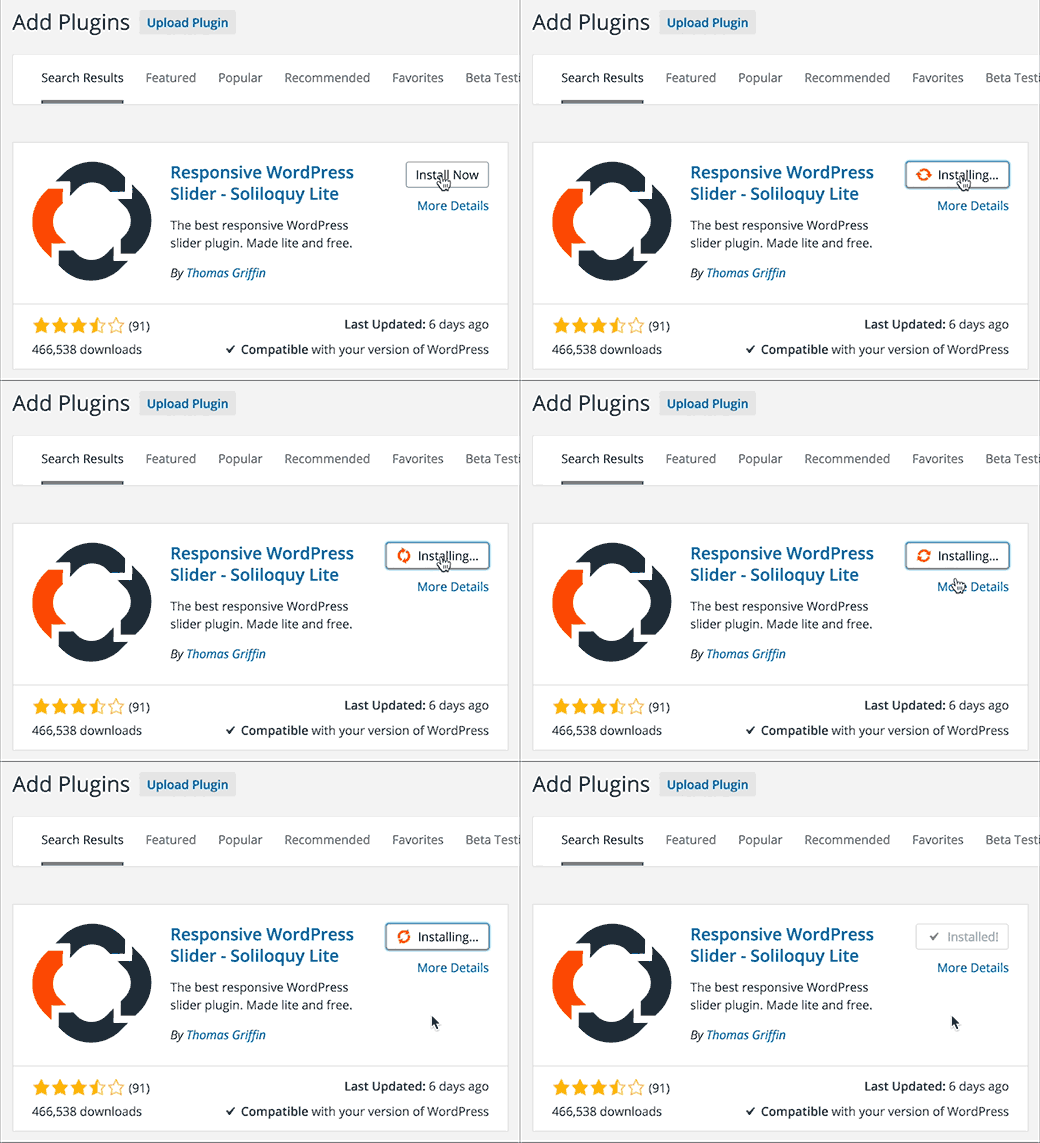
    Previously, when you installed a plugin or theme from WordPress.org, it showed you a progress screen. This added a page load and increased the time spent on installing plugins and themes.

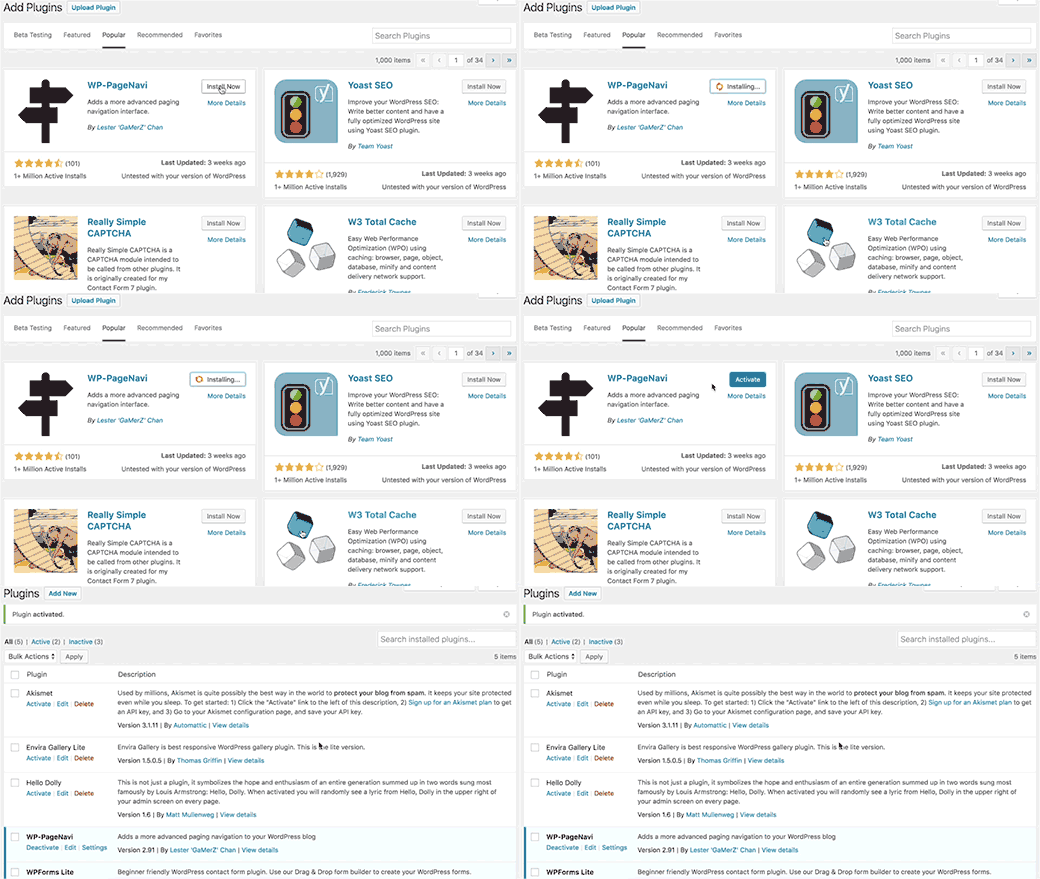
    WordPress 4.6 makes it faster to install and update your WordPress plugins and themes without leaving a page.

    Plugin installation in WordPress 4.6

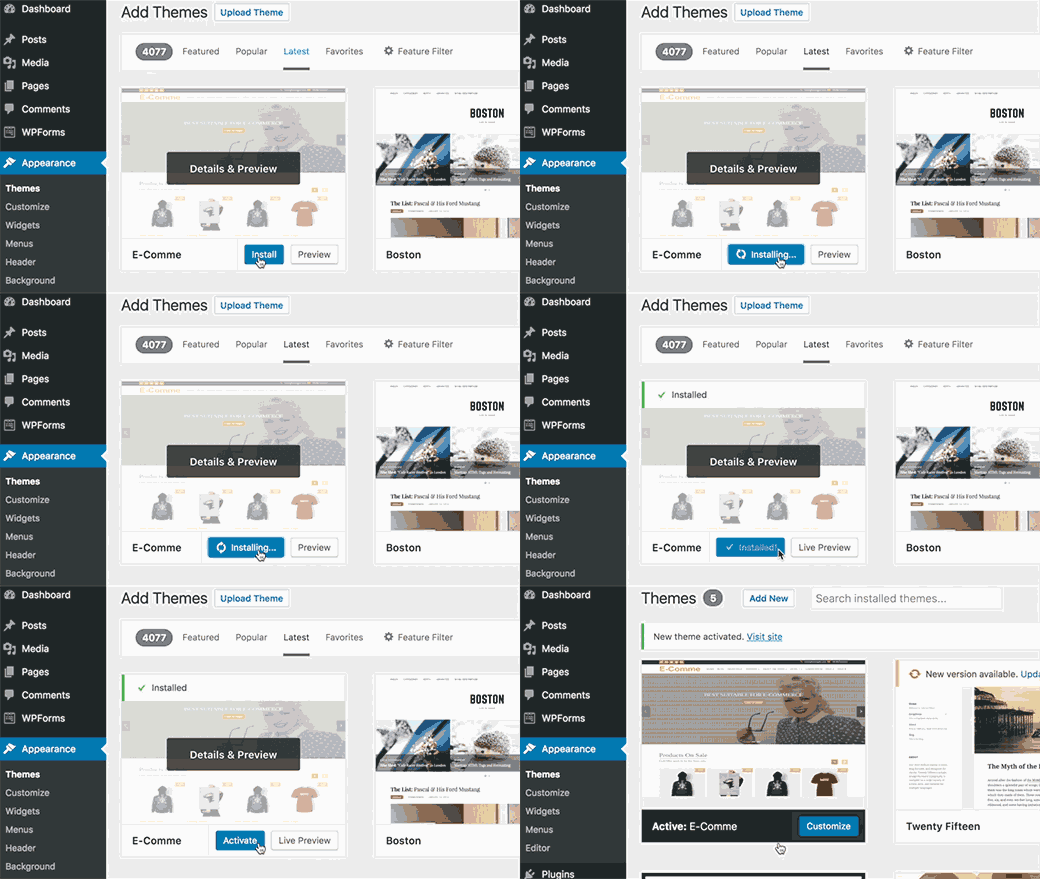
    This animation shows installation of a theme from WordPress.org themes directory.

    Installing theme from WordPress themes directory in WordPress 4.6

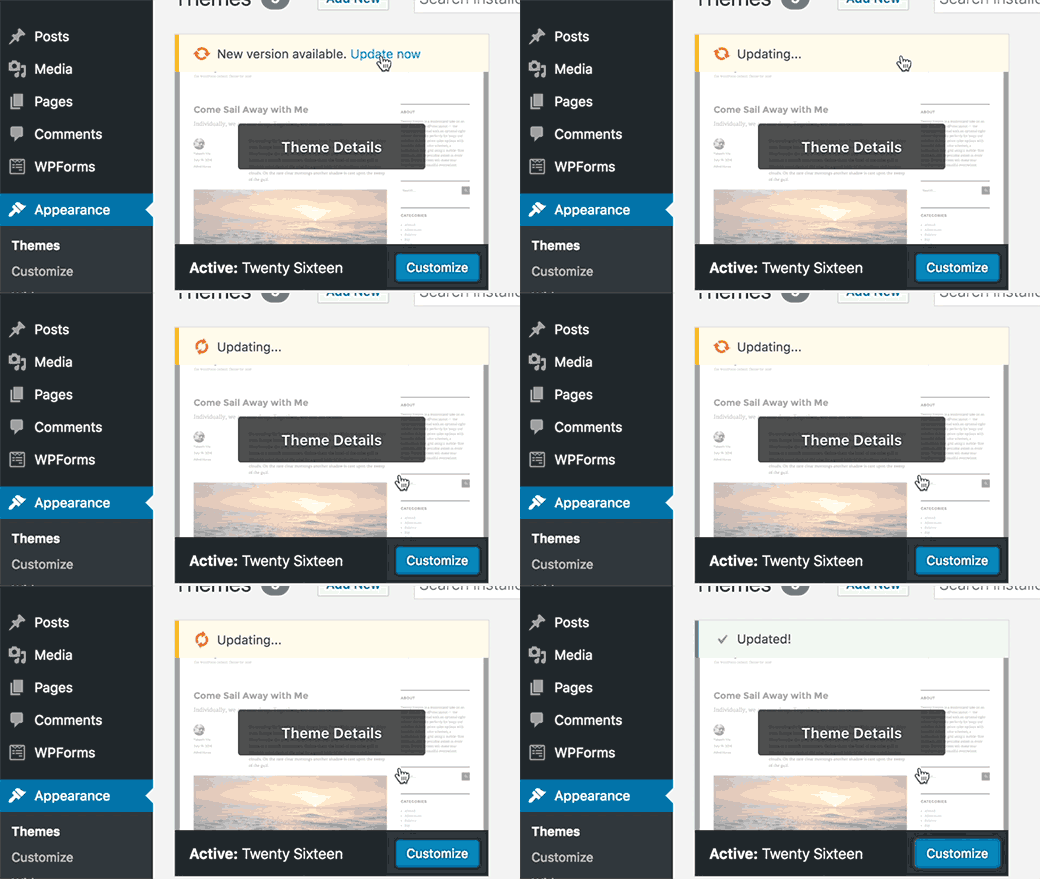
    Themes will also be using these faster updates. This animation shows how the new theme update process looks like in WordPress 4.6.

    Faster theme updates

    Editor Enhancements in WordPress 4.6

    Each new version of WordPress brings improvements and new features to the post editor. WordPress 4.6 introduces some cool new enhancements to the edit screen.

    Highlighting Broken Links in Visual Editor

    Sometimes users end up adding a broken link or improper URL in a post. If you publish the post, then that misspelled link goes live too.

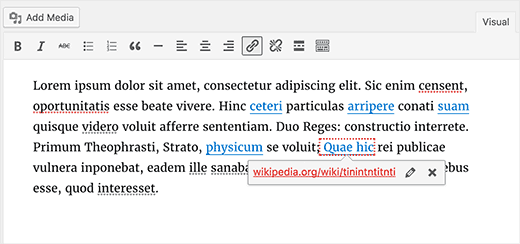
    Since 4.6, WordPress will now attempt to check for broken or poorly formatted links when you are using the Visual Editor. If a link is broken, then it will highlight the linked anchor text with red dots, showing the link URL in red.

    Broken link highlighter in WordPress 4.6

    Better Auto-Save and Recovery

    WordPress 4.6 comes with a better disaster recovery mode for the auto-save feature in the post editor. Previously, when users disabled revisions, it affected restoring drafts from browser cache and autosave feature.

    This issue is now fixed and users will be able to easily restore posts from browser backups and autosave.

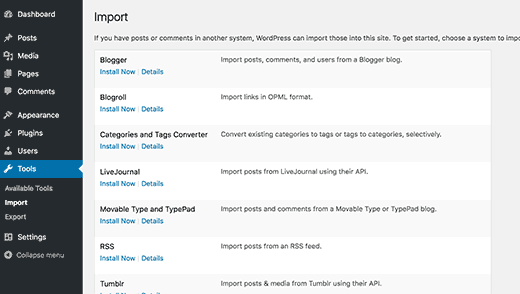
    A Better Looking Import Screen

    WordPress makes it super easy to import content from Blogger, Tumblr, and several other platforms using the Importer plugins located at Tools » Import page.

    WordPress 4.6 makes the import screen more readable and accessible.

    Import screen in WordPress 4.6

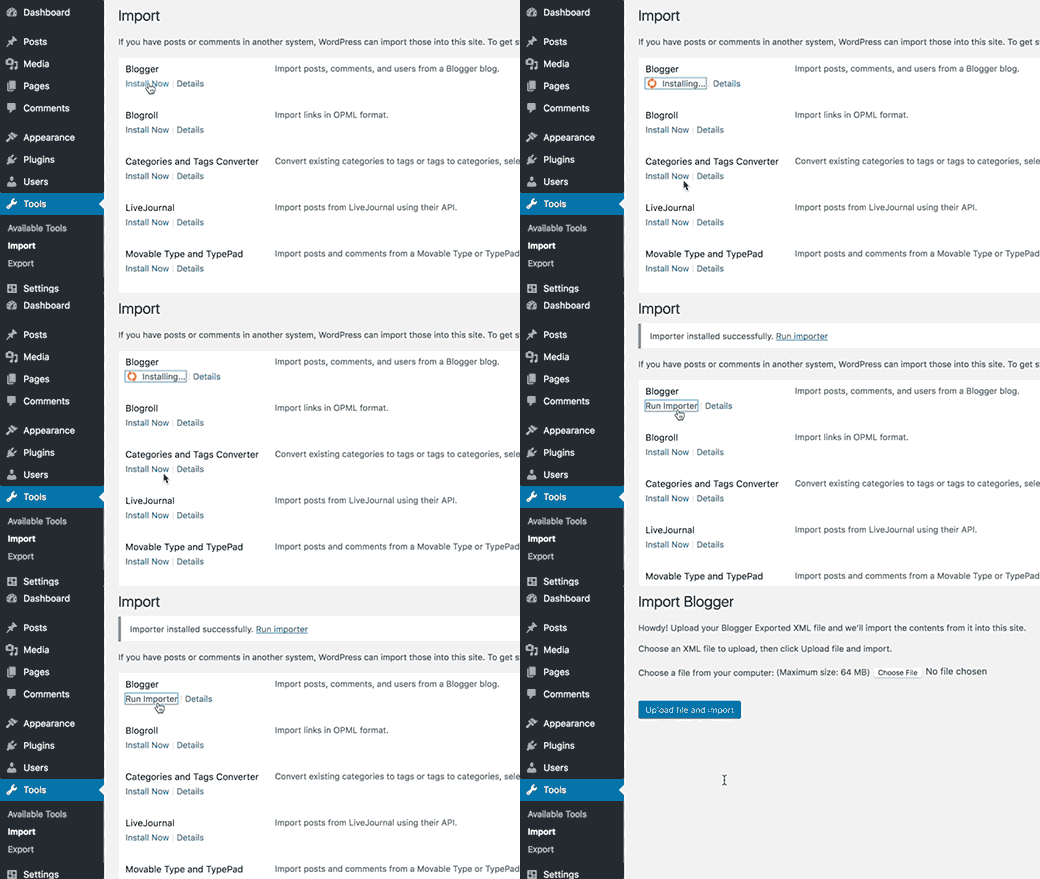
    It also uses shiny updates to install importer plugins in the background. This means no more popup to install importer plugin and no extra page load to show you the progress.

    Installing an importer plugin in WordPress 4.6

    Localization and Translation Improvements

    Translations from WordPress.org hosted community translations will now be given preference over the translations included with the plugin.

    The jQuery UI date picker is now displayed with proper locale.

    Declension of comment numbers, and months in different languages are now properly handled.

    Under The Hood Improvements

    WordPress 4.6 also brings lots of new improvements for developers. Here are some of those under the hood improvements.

    Resource Hints

    Resource hints is a new W3C specification, which allows browser to connect and prefetch resources to improve performance. (#34292)

    Improved Meta Registration

    WordPress 4.6 introduces register_meta() function for the registration of meta keys. It works like register_post_type() function and allows developers to use a standard way to work with metadata. (#35658)

    Persistent Comment Cache

    WordPress 4.6 allows comments to be cached as a persistent object type. This means comment cache is properly validated and updated when there are changes. (#37613)

    WP_Post_Type Class

    WordPress 4.6 introduces the new WP_Post_Type class. It changes $wp_post_types to an array of WP_Post_Type objects. This provides methods to handle post type supports, rewrite rules, meta boxes, hooks, and taxonomies. (#36217)

    WP_Term_Query Class

    The new WP_Term_Query class in WordPress 4.6 provides a better structure for generating term queries. (#35381)

  • Whats Coming in WordPress 4.6 (Features and Screenshots)

    Whats Coming in WordPress 4.6 (Features and Screenshots)

    The beta version of WordPress 4.6 has been released. We followed the development closely and excited to report that the final version is expected to be released around August 16, 2016. In this article, we will highlight what’s coming in WordPress 4.6 with features and screenshots.

    What's coming in WordPress 4.6

    Note: You can try out the beta version on your computer or on a staging environment by using the WordPress Beta Tester plugin.

    This is the beta release, which means no more new features will be added until the final release of WordPress 4.6. However, some of the features in beta may not make it into the final release.

    Shiny Updates in WordPress 4.6

    When users installed a new plugin or theme, or updated one, they usually saw a progress screen. This progress screen added one more page load and was a bit distracting.

    WordPress 4.6 will introduce shiny updates. Users will now be able to update and install plugins and themes without being redirected to the progress screen.

    Shiny updates in WordPress 4.6

    Native System Fonts in WordPress Admin Area

    WordPress started using Open Sans font in WordPress admin area to offer a consistent look across different devices and platforms. However, this meant that WordPress to rely on an external third party source. This also increased page load times of admin area, and affected speed.

    With WordPress 4.6, the admin area will revert back to using the system fonts. This means that your WordPress admin area may look slightly different on different platforms.

    Here is a screenshot of admin area in Safari web browser on macOS using system font San Francisco.

    Native System Fonts

    These are the system fonts that will be used in WordPress admin area on different platforms and environments.

    • apple-system for Safari and Firefox on macOS and iOS
    • Helvetica Neue on macOS prior to 10.11
    • BlinkMacSystemFont for Google Chrome on macOS
    • Segoe UI for Windows
    • Roboto for Android and Chrome OS
    • Oxygen-Sans for KDE
    • Ubuntu for Ubuntu
    • Cantarell for GNOME
    • sans-serif, the standard fallback

    Note: This change only affects the UI elements of WordPress admin area. It will not content areas like post editor which uses your theme’s editor stylesheet for fonts.

    Editor Improvements in 4.6

    Most WordPress users spend more time on post editor than any other admin screen on their site. Improving post editing experience always takes priority in new WordPress releases.

    Improved Auto Save Feature

    WordPress 4.6 brings improvements to autosave feature in WordPress. Previously, when users disabled revisions, it also affected restoring posts from autosave feature.

    WordPress 4.6 will fix this issue and users can restore WordPress posts from browser backups and autosave even when they have revisions disabled.

    Highlighting Broken Links

    If you are using the visual editor to write posts, then adding a broken URL will be highlighted.

    As soon as you add a link, WordPress will check if the link is valid. If you take the cursor to the linked text, then you will see the link in red color instead of the usual blue.

    Broken links will be highlighted in WordPress 4.6

    Under The Hood Improvements

    These updates improve significant parts of WordPress core but are mainly intended for developers.

    Standardized Metadata Registration

    WordPress 4.6 brings register_meta() function for the registration of meta keys. This function works like register_post_type() function. It allows plugins and theme developers to use a standardized way to work with meta data stored with posts, users, comment, or terms object types. (#35658)

    New WP_Post_Type Class

    WordPress 4.6 will introduce the new WP_Post_Type class. It changes $wp_post_types to an array of WP_Post_Type objects. This provides methods to handle post type supports, rewrite rules, meta boxes, hooks, and taxonomies. (#36217)

    New WP_Term_Query Class

    Similar to WP_Query, WP_User_Query, and WP_Comment_Query classes, WP_Term_Query in WordPress 4.6 will provide a better structure for generating term queries. (#35381)

    WP_Site_Query and WP_Network_Query Classes

    For WordPress multisite networks, the new WP_Site_Query and WP_Network_Query classes allow querying sites and networks with lazy loading. (#35791, #32504)

  • WP.org to WordPress

    WP.org to WordPress

    Over the last year and a half, if you typed in the domain wp.org, then you were redirected to WPBeginner. This was an unexpected and unpleasant surprise for many because you really wanted to visit WordPress.org, home of the popular content management system. Today, I’m pleased to announce that we have donated the domain to the WordPress Foundation.

    For majority of you, this doesn’t mean anything and life goes on as usual. For those who’re more involved in the WordPress community, this is a huge deal because now you can type wp.org in your Tweets, Slack messages, Facebook statuses, etc without cursing at me or WPBeginner.

    I know this redirect was frustrating because many of you tweeted at me or sent us angry emails. To all of you and even those who took the high road, I want to apologize for my actions.

    Now you’re probably wondering what changed?

    The short answer is A LOT.

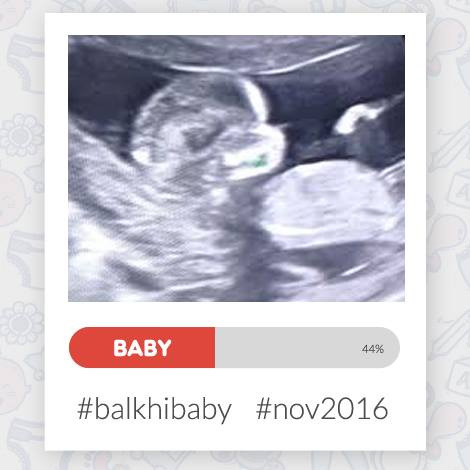
    My wife and I are pregnant with our first baby. This has given me a new perspective on life as whole.

    Balkhi Baby

    From ironing out a new will to working on expanding my life insurance coverage, there’s a lot happening. For the first time in my life, I’m thinking about unforseen circumstances. Some of you who’re older and much wiser will call this “growing up”.

    I wrote down all the things that are very important to me, and among the top after my family is WordPress. It is my extended family, and you can see that if you meet me at any of the WordCamps. I have been using WordPress for the last 10 years and WPBeginner has been around for almost 7 years.

    In other words, WordPress has been part of me for 40% of my life.

    As I think about all what WordPress has done for me, donating wp.org to the WordPress Foundation is the least that I could do.

    WordPress is far bigger than one person or one organization. That’s the reason why the WordPress Foundation exists. Now if something is to happen to me, at least I know this domain won’t be auctioned off to the highest bidder (rather it’ll be safe at home) with the Foundation.

    My only regret is that I didn’t do this sooner. But I’m glad that I did now.

    Life teaches us new lessons every day, and I’m sure I’ll be learning a lot with the new baby.

    I want to thank everyone who has supported me, and I look forward to continue serving the WordPress community.

    Yours Truly,

    Syed Balkhi
    Founder of WPBeginner

  • Whats New in WordPress 4.5

    Whats New in WordPress 4.5

    WordPress 4.5 named “Coleman” was released just a few minutes ago. It is the first major WordPress release of 2016, and comes with some exciting new features. In this article, we will show you what’s new in WordPress 4.5, and which features you should try after updating your websites.

    What's New in WordPress 4.5 (Features and Screenshots)

    This is a major WordPress release, and unless you are on a managed WordPress hosting service, you will have to manually initiate the update.

    Important: Don’t forget to create a complete WordPress backup before starting the update.

    Theme Logo Support

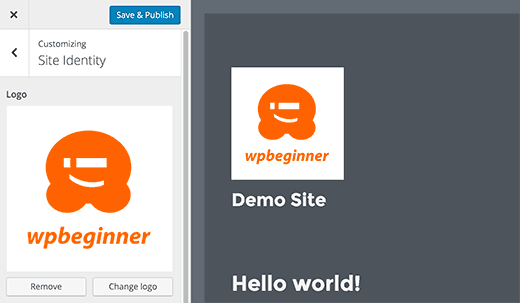
    Adding a logo to your site from customizer has been a long awaited feature. Many premium WordPress themes allowed users to set logos from theme options, but there was no standard way to do it.

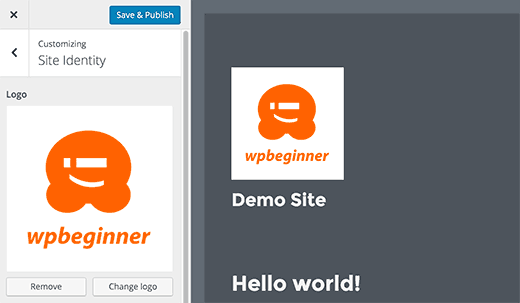
    With WordPress 4.5, theme developers are now able to enable theme support for logo. This will allow users to set a logo for their website using the customizer.

    Theme support for logo in WordPress 4.5

    Remember it is a theme feature, which means that it needs to be defined by your theme. If a theme does not support this feature, then you will not be able to see it in customizer.

    Better Previews for Site Icons

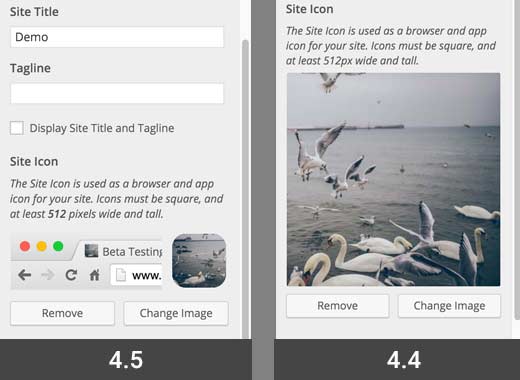
    Site Icons were introduced in WordPress 4.4. This feature allows users to set a favicon and application icon for their websites.

    WordPress 4.5 brings a slight improvement to the feature. Up till 4.4.2, you only saw the preview of site icon when setting the image. With 4.5, you also see a preview under site identity panel after you have set the site icon.

    Site icon preview

    Responsive Previews in Customizer

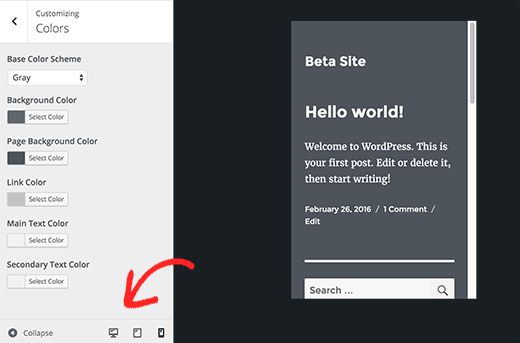
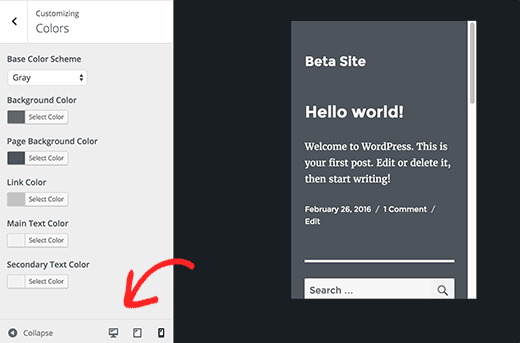
    Customizer in WordPress 4.5 comes with responsive live previews for desktop, tablet, and mobile devices.

    Simply click on the device icon to switch the view between devices. This will give you a generic idea of how your site would look on different screens.

    Responsive previews in WordPress 4.5

    Optimized Image Generation Performance

    Responsive images were one of the major improvements in WordPress 4.4, which allowed WordPress to show smaller image sizes to users on smaller screens.

    WordPress 4.5 takes it to a new level by improving the performance of how WordPress generates image sizes.

    Previously, WordPress used 90 for the image quality when compressing images. Now it will use 82, which produces nearly identical images with much smaller sizes.

    Improved Comment Moderation Screen

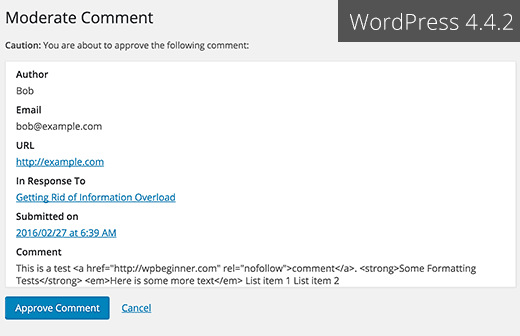
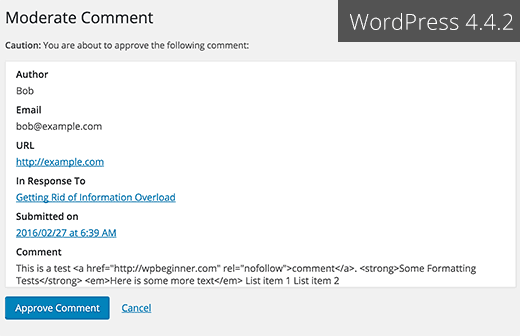
    WordPress 4.5 cleans up the comment moderation screen and makes it more usable. Until 4.4.2, when you clicked on the link in comment moderation notification email, you saw a page like this:

    Old comment moderation page in WordPress 4.4 and earlier

    This page didn’t allow you to edit a comment and if it also ignored plain HTML formatting used in a comment.

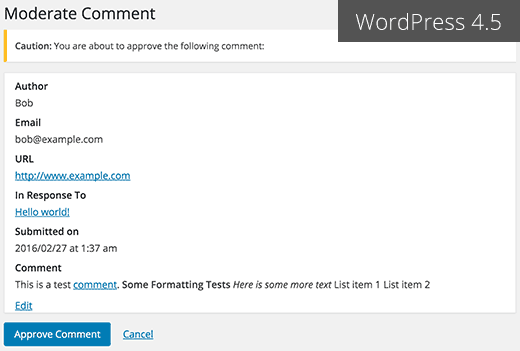
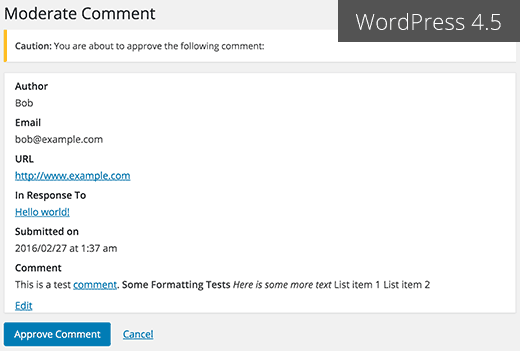
    This is how the comment moderation screen looks in WordPress 4.5.

    New comment moderation screen in WordPress 4.5

    Same Domain Links in Comments will not have Nofollow attribute

    Previously, all links added into comment content area had nofollow attribute added to them by default.

    WordPress 4.5 will not add nofollow attribute to links pointing to the same domain.

    If you or your users add link to a post or page on your site in the comment text, then WordPress will not add nofollow to it.

    However, if a user add your link in the URL field when submitting comment, then WordPress will add nofollow and external attributes to the link.

    See how you can disable website/url field in WordPress comment form.

    Visual Editor Enhancements

    Most WordPress users spend most of their time writing content. This makes visual editor one of the most important areas in the overall WordPress user experience.

    WordPress 4.5 builds on some existing improvements and adds a few new ones to make writing faster and more enjoyable.

    Inline Link Editor

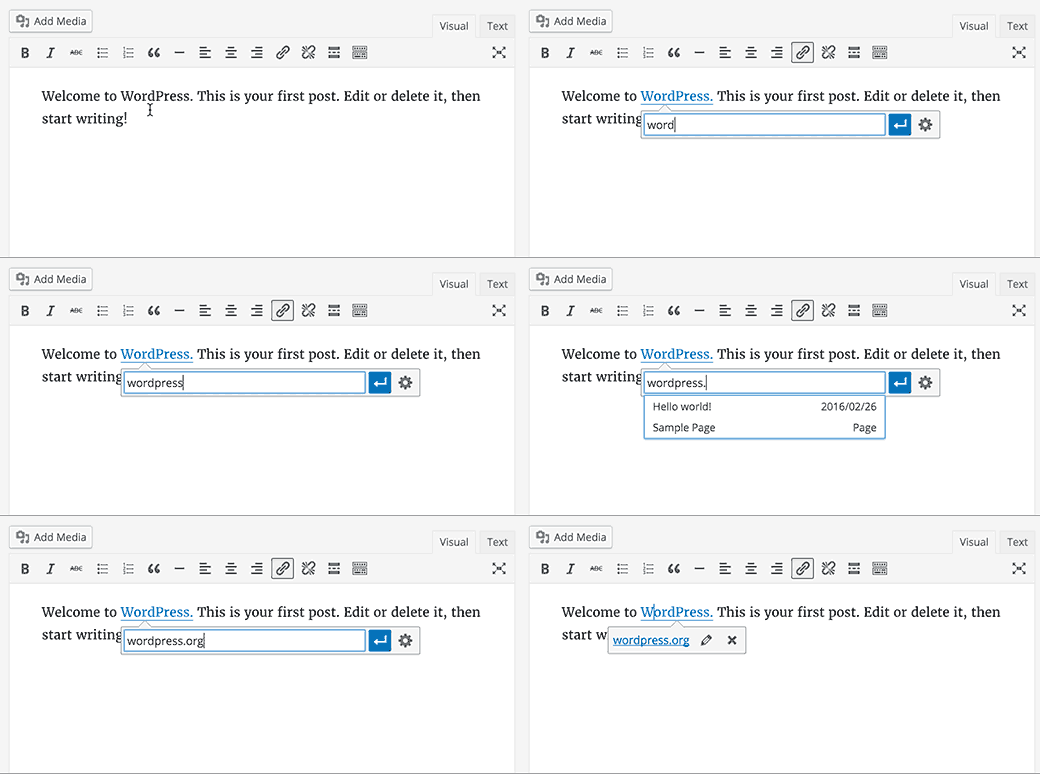
    One of the keyboard shortcuts in WordPress is CTRL+K (Command+K on Mac), which allows you to insert links in posts. Until 4.4.2, it opened the insert link popup which was a bit distracting.

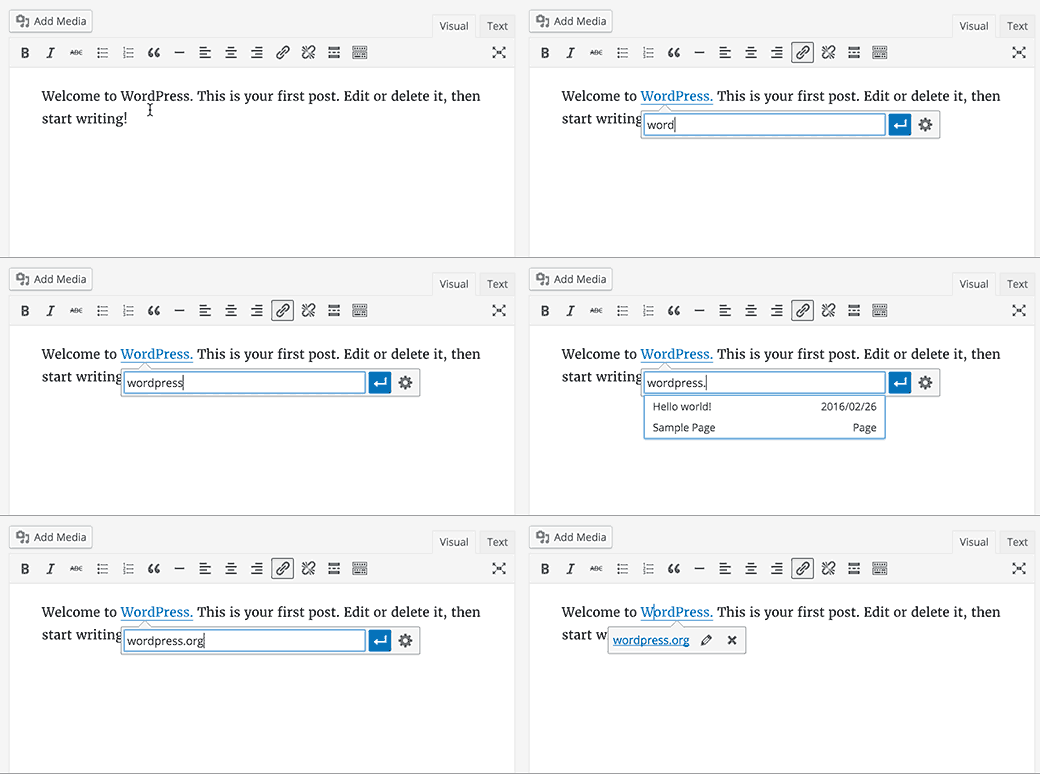
    In WordPress 4.5, pressing CTRL+K shows an inline insert link menu. Simply type the URL and continue writing your post without removing hands from keyboard.

    Inline link editing in WordPress 4.5

    New Inline Text Shortcuts

    Inline text shortcuts were introduced in WordPress 4.3. These shortcuts allow you to quickly add formatting markup while writing posts.

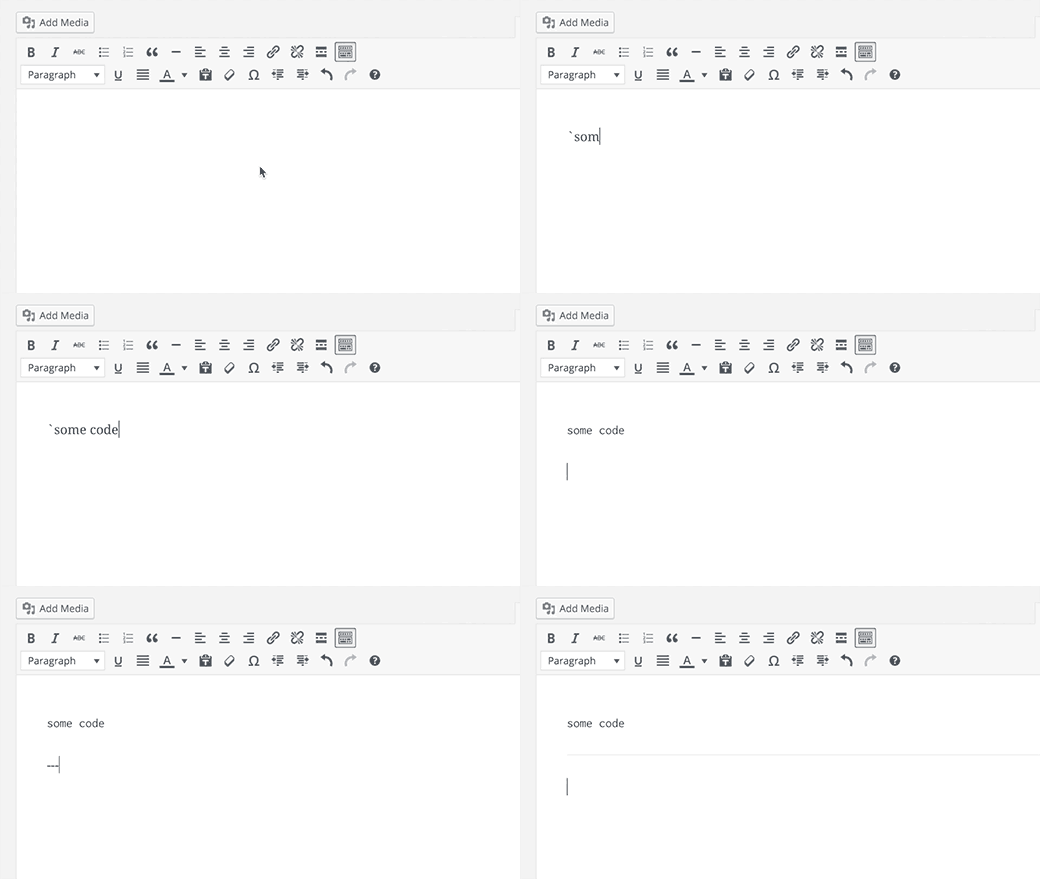
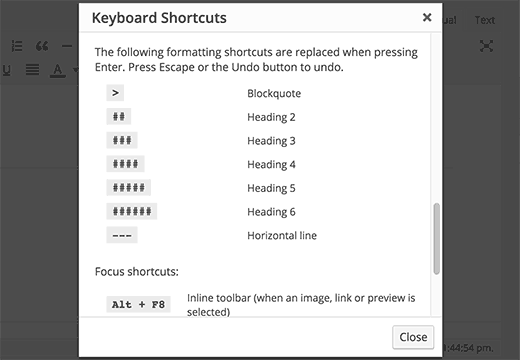
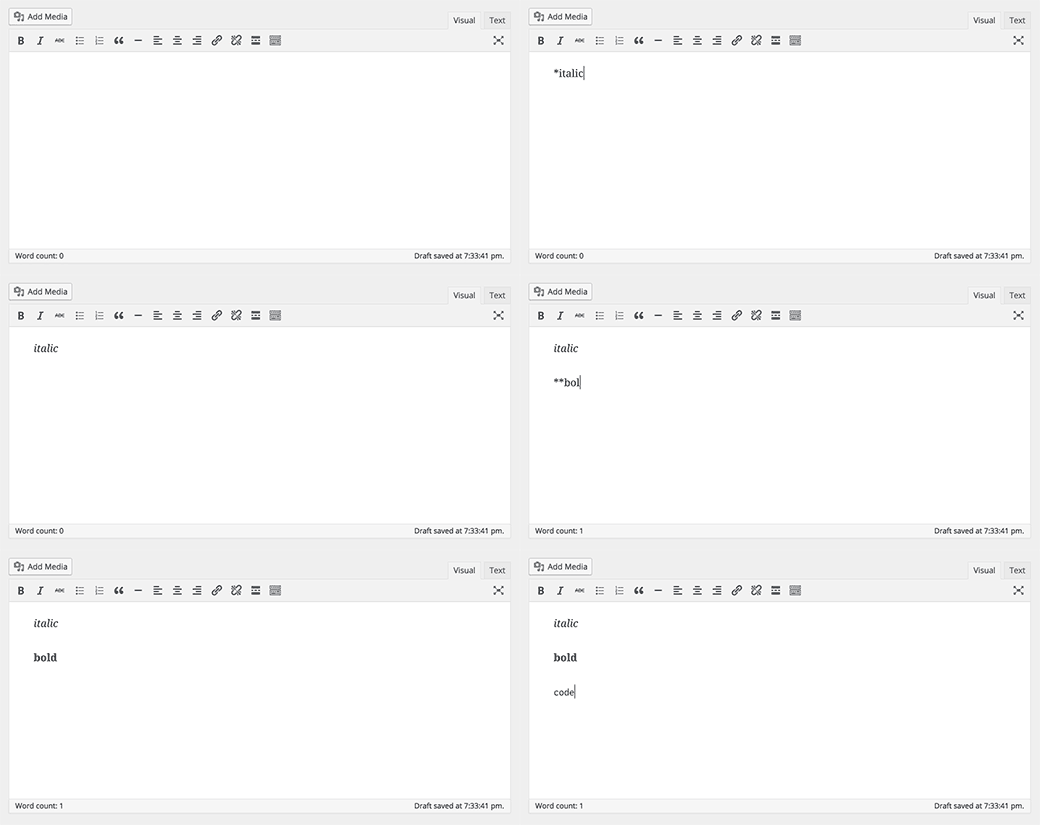
    WordPress 4.5 allows you to use three or more dashes — to add a horizontal line. You can also use backticks `code` to add code.

    We reported in what’s coming in WordPress 4.5, that there will be shortcuts for bold and italic too. Unfortunately, those shortcut patterns didn’t make it into 4.5.

    new inline shortcuts in WordPress 4.5

    You can see a full list of shortcuts available in WordPress by clicking on the help icon in the visual editor.

    Keyboard shortcuts modal

    For those of you who don’t want to use these shortcuts, you can disable inline text shortcuts in visual editor.

    Login With Email

    Many online services like Facebook, Twitter, etc. let you sign in not only by using your username but also with your email address.

    While you can easily forget your username, most people don’t forget their email address.

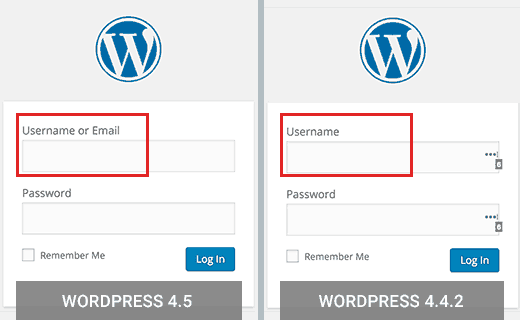
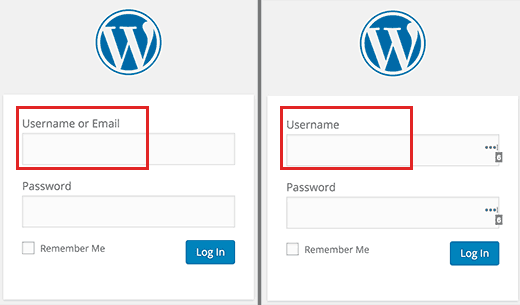
    WordPress 4.5 allows users to sign in using either their username or email address as username.

    Login with email support in WordPress 4.5

    If you were using a plugin to allow user log in with email in WordPress, then you can safely deactivate that plugin.

    Under The Hood Improvements

    WordPress 4.5 also brings some exciting new improvements for developers.

    Updated Libraries – WordPress 4.5 comes with new versions of bundled libraries for Underscores, Backbone, jQuery, and jQuery Migrate.

    Selective Refresh in Customizer – Previously, some changes in customizer required entire page reload. WordPress 4.5 comes with a framework to allow selective refresh in the customizer. It is fast and will allow developers to do great things with live previews. (#27355).

    Customizable Embed Templates – WordPress 4.4 introduced embeds which allowed users to embed posts from their own and other WordPress blogs. WordPress 4.5 makes embed templates customizable so that theme authors can adjust embed display to match their theme. (#34561)

    WP_Site Class – WordPress 4.5 comes with WP_Site class for multisite WordPress installs. (#32450)

    Script Loader – WordPress 4.5 introduces wp_add_inline_script() which makes it easier to add inline scripts. (#14853, #35873)

  • WPForms  Most Beginner Friendly WordPress Contact Form Plugin

    WPForms Most Beginner Friendly WordPress Contact Form Plugin

    Not a single day goes by where someone doesn’t ask us about what is the best WordPress contact form plugin? With so much demand and the recent WPBeginner survey responses, it became clear that we needed to build a WordPress forms plugin. So we did.

    Today, we are extremely proud to announce the launch of WPForms, a drag & drop WordPress form builder that is hands-down the most beginner friendly WordPress contact form plugin in the market.

    Now with just a few clicks, you can easily create a beautiful contact form, email subscription form, payment form, and other type of online forms without writing a single line of code.

    Since a lot of our audience is churches, non-profits, and startups who don’t necessarily have a budget to afford a premium plugin, WPForms Lite is 100% free and has all the basic features that you will need.

    For those who want all the features that WPForms has to offer such as multi-page forms, payment integrations, marketing integrations, conditional logic, and more, then you should check out our premium version.

    See the video overview of WPForms below:

    Subscribe to WPBeginner

    WPForms Features

    Unlike other contact form plugins, WPForms is not built from a feature-first mindset rather it’s built from a user-experience first mindset.

    What that means is that you can actually use all the features that WPForms comes with without having to hire a developer or learning how to code.

    We literally took the pain out of creating online forms and made it easy. Below are some of the features why smart business owners, bloggers, designers, and even developers love WPForms, and you will too.

    Drag & Drop Online Form Builder

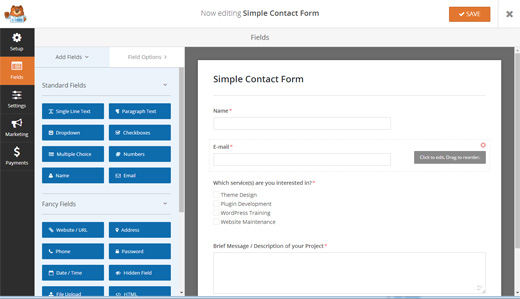
    WPForms Online Form Builder

    We built WPForms with WPBeginner users in mind, so our goal was to make everything extremely easy to use.

    Our drag & drop online form builder allows you to create WordPress forms in minutes. You can easily add custom form fields, rearrange them, and basically create a complete form in 5 minutes or less (no coding required).

    Pre-Built Form Templates

    Form Templates

    We believe in creating smart workflows that make complex tasks easy.

    Most other contact form plugins require you to build your form from scratch, but the truth is that it’s often not necessary unless you absolutely want to.

    WPForms comes with pre-built form templates to help you save time. You can add, remove, or re-arrange fields as necessary.

    Whether you’re looking to create a simple contact form, request a quote form, donation form, payment order form, or a subscription form, we have a form template for you.

    Mobile Ready, SEO Friendly, and Optimized for Speed

    WPForms is 100% responsive and mobile-friendly.

    Since speed is crucial for user experience and SEO, we optimized every query on the front-end and the back-end to ensure maximum speed.

    You can embed your forms on any page with optimized title and description giving you all the flexibility you want from a contact form plugin.

    All the Fields & Features that You Need

    WPForms Features

    WPForms has all the fields and features that you are looking for.

    From radio buttons to file uploads to multi-page forms, it can do everything you need it to do.

    You can easily integrate your forms with an email marketing service like MailChimp or AWeber. You can collect payments for bookings and orders with PayPal (Our Stripe integration is coming soon).

    The best part is that you can do all of this without hiring a developer.

    See the full list of WPForms features along with videos of each.

    Why did we build WPForms? (History)

    Our founder and CEO, Syed Balkhi, has a great behind the scenes of WPForms blog post that goes into details on why we built WPForms.

    To keep the story short, the most popular WordPress contact form plugin, Contact Form 7, has over 4 million active installs.

    This is their version of “simple and flexible”:

    Contact Form 7 UI

    So why is it so popular? Because a lot of users can’t afford to purchase a premium option, and Contact Form 7 is free.

    Now you have a much better alternative that’s actually easy to use and free: WPForms Lite.

    Our mission for WPForms is to build a WordPress forms plugin that’s EASY for beginners, marketers, and business owners who are not tech savvy.

    A quote from Syed Balkhi’s blog post explains it all:

    We made simple tasks EASY rather than letting the complex tasks define how hard simple will be.

    Limited Time Special

    If you’re interested in the premium version of WPForms, then you’d be crazy to miss out on this deal.

    Like any other premium plugin, WPForms licenses require annual renewal for updates and support.

    However for limited time only, we’re offering an ULTIMATE lifetime license for our early supporters.

    What that means is that you get grandfathered in, so you don’t ever have to pay for annual updates and support while still enjoying every new feature that we will ever release.

    Get WPForms NOW!

    Use this WPForms coupon code: WPB10 to get an additional 10% off your purchase.

    This is a limited time launch special, and it will expire so take advantage of it while it lasts.

  • Whats Coming in WordPress 4.5 (Features and Screenshots)

    Whats Coming in WordPress 4.5 (Features and Screenshots)

    The beta version of WordPress 4.5 was released last week. We followed the development closely, and we are excited to report that WordPress 4.5 is expected to be released during the second week of April, 2016. In this article, we will highlight what’s coming in WordPress 4.5 with features and screenshots.

    What to expect from upcoming WordPress 4.5

    Note: You can try out the beta version on your computer or on a staging environment by using the WordPress Beta Tester plugin.

    This is the beta release, which means no more new features will be added until the final release of WordPress 4.5. However, please know that some of these features may not make it into the final release.

    Theme Logo Support

    Adding theme logo from customizer is a long awaited feature. WordPress 4.5 will add theme logo support to WordPress core.

    Many premium WordPress themes already allow users to upload custom logo using their own options panel. With the core support for the feature, it would become possible for users to do that from the theme customizer.

    Theme Logo Support in upcoming WordPress 4.5

    Themes would be able to define support for logo with size values like this:

      add_image_size( 'twentysixteen-logo', 1200, 175 );  add_theme_support( 'site-logo', array( 'size' => 'twentysixteen-logo' ) );  

    If a theme does not support this feature, then it will not be visible in the customizer.

    Visual Editor Improvements

    Majority of WordPress users spend most of their time creating content. Anything that can make the writing experience better and faster is always a good thing.

    WordPress 4.5 will bring some new improvements to the visual editor, which will improve the writing experience for users.

    Inline Link Editing

    WordPress comes with some great time saving shortcuts, which all help you write faster. One of these shortcuts is CTRL+K (Command+K on Mac), which allows you to insert links in posts.

    This shortcut opens the insert link popup, which is a bit distracting.

    With WordPress 4.5, pressing CTRL+K will show an inline insert link menu. Simply type the URL and continue writing your post without removing hands from keyboard.

    Inline link editing in WordPress 4.5

    More Inline Text Shortcuts

    Inline text shortcuts were introduced in WordPress 4.3. They allowed users to quickly add formatting markup by using simple text shortcuts.

    WordPress 4.5 is introducing more shortcuts like `code` for code and **bold** for bold.

    New inline text shortcuts in WordPress 4.5

    For those users who don’t like these shortcuts, here is how to disable inline text shortcuts in visual editor.

    Improved Moderate Comment Screen

    Many bloggers spend a lot of time moderating comments in WordPress. Comment moderation is a necessary evil that we all have to tolerate in order to combat comment spam in WordPress.

    WordPress sends you an email notifications when there is a new comment submitted. Clicking on the approve, spam or trash link in the email will take you to a screen where you can see that comment with a button to perform the desired action.

    This screen does not allow you to edit a comment. It also does not show you any formatting in comment text, which isn’t pleasant.

    Moderate comment screen in WordPress 4.4.2

    With WordPress 4.5, you will get to see an improved screen. It will show you the formatting in comment text as it would appear in the browser. It will also have a link to edit the comment.

    Moderate comment screen in upcoming WordPress 4.5

    Responsive Preview in Customizer

    WordPress 4.5 will bring another cool addition to the customizer. You would now be able to see responsive previews of your site directly in the customizer.

    You can click on the device icon at the bottom to switch the view between devices. Currently it shows Desktop, tablet, and mobile device previews. This gives you a generic idea of how your site would look on these devices.

    Responsive previews in customizer

    Optimized Image Size Generation

    WordPress introduced responsive images in WordPress 4.4. This means that since 4.4, users on smaller screens get to see a smaller image appropriate for their screen.

    This feature is great as it not only improves performance of websites on smaller screens, it also saves them money on data plans.

    WordPress 4.5 will improve this further more. It will optimize images further to reduce their site upto 50% without any visible quality loss.

    We still recommend saving images optimized for web for best results.

    Allow Users to Login Using Email Address

    It is hard to keep track of all the usernames we use across all the different sites. This is why many popular sites like Facebook, Twitter, and others allow their users to use their email address as username.

    While you can easily forget your username, most people don’t forget their email address.

    In the past, WordPress didn’t allow users to login with email by default. This is expected to change in WordPress 4.5.

    Since each WordPress user on your site already has an email address associated with their account, they will now be able to use their email address to login.

    WordPress 4.5 will allow users to login with email address

    Developer Features

    WordPress 4.5 will bring many under the hood improvements for developers. Here are some of the exciting improvements for developers:

    Selective Refresh in Customizer – In customizer if a change has to be applied the entire page has to be reloaded. WordPress 4.5 will come with a robust framework allowing selective refresh in the customizer. This will make it incredibly fast, and it will allow developers to do great things with live previews. (#27355)

    Customizable Embed Templates – WordPress 4.4 also introduced embeds which allowed users to embed posts from their own and other WordPress blogs. WordPress 4.5 will make the embed templates customizable so that theme authors can have custom displays. (#34561)

    WP_Site Class – WordPress 4.5 will come with WP_Site class for multisite WordPress installs. (#32450)

    Script Loader – Adding inline scripts will become easier with the introduction of wp_add_inline_script() in WordPress 4.5. (#14853, #35873)

  • Whats Coming in WordPress 4.4 (Features and Screenshots)

    Whats Coming in WordPress 4.4 (Features and Screenshots)

    Development for WordPress 4.4 started with full momentum immediately after the release of WordPress 4.3. We followed the development closely, and we are excited to report that it is expected to be released during the second week of December 2015. In this article, we will show you what’s coming in WordPress 4.4 with features and screenshots.

    WordPress 4.4

    Note: You can try out the beta version on your computer or on a staging environment by using the WordPress Beta Tester plugin.

    Twenty Sixteen – The New Default WordPress Theme

    Since 2010, WordPress comes with a new default theme for each year. Keeping up with this tradition, WordPress 4.4 comes with a new default theme for 2016, called Twenty Sixteen.

    Twenty Sixteen - Default theme in WordPress 4.4

    Twenty Sixteen features the traditional blog layout with a sidebar and content area. The design focuses on readability and elegant display on all devices.

    It comes with five color schemes Default, Dark, Grey, Red, and Yellow. Users can also choose their own colors to create unlimited color schemes.

    It supports custom headers, and has two menu locations one for site navigation and other for social links.

    Twenty Sixteen customizer

    Responsive Images Out of The Box

    Users access the web using lots of different kind of devices with different screen sizes, resolutions, pixel density, etc. Low resolution images look unimpressive on devices with larger screens and better displays. This compels site owners to use better quality images which increases the page size and effects download speeds.

    Responsive images in WordPress 4.4

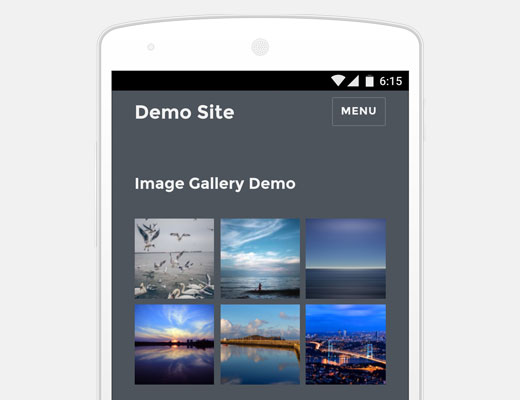
    WordPress will now provide a better solution to address this problem by showing responsive images out of the box. This is done by using srcset attribute. This attribute allows client’s browsers to display an image based on device capabilities.

    The srcset attribute is added on the fly and is not stored in the database. This means all images you previously added will benefit from this feature.

    All images added to a post, featured images, attachment pages, and image galleries will be responsive out of the box. This will greatly improve page speeds and user experience on WordPress sites.

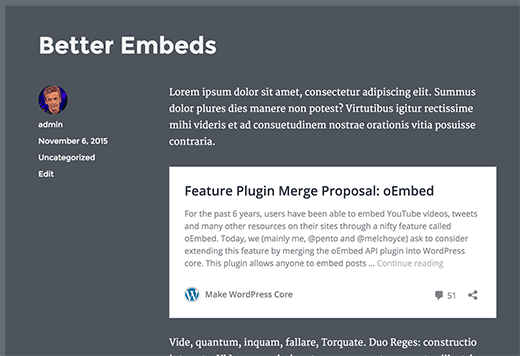
    Better Embeds

    WordPress users can automatically embed videos, Tweets, and Facebook status updates by simply entering their URL in a post. However, this feature was limited to only some sites that were whitelisted by the WordPress project.

    With WordPress 4.4, it would be possible for you to add embeds from any site that supports oEmbed. This also includes all WordPress sites.

    If you add a plain URL in your post from another WordPress site, then it will automatically embedded.

    Better embeds

    Note: Both sites should be using WordPress 4.4 or higher for embeds to work.

    If you were previously using a plugin to embed WordPress links as content cards, then you will not be needing those plugins anymore.

    Developer Features

    WordPress 4.4 will be coming with lots of under the hood improvements and changes. Developers will need to adjust code in some of their products.

    WordPress REST API (Phase 1)

    Finally, the underlying infrastructure for WordPress REST API plugin is added into core with WordPress 4.4. REST API allows WordPress developers to create new APIs or work on the existing WordPress APIs to in their own applications. With 4.4, plugin authors will be able to take advantage of REST API by adding custom end points.

    Taxonomy Term Meta Data

    Taxonomy term management has been going through some changes since last few releases. This enters into new stage with WordPress 4.4 which brings taxonomy term meta data capability into core. Terms in taxonomies (like categories and tags or any custom taxonomy) can now have meta data associated with them. (#14162)

    Comment Queries

    Comment queries will be split for better and faster performance. (#8071, #32619)

  • Whats Coming in WordPress 4.3 (Features and Screenshots)

    Whats Coming in WordPress 4.3 (Features and Screenshots)

    After the release of WordPress 4.2 in April, development of the next major release WordPress 4.3 started in full swing. We have been following the development closely and are excited to report that WordPress 4.3 is expected to be released next month. In this article, we will show you what’s coming in WordPress 4.3 with features and screenshots.

    Note: You can try out the beta version on your computer or on a staging environment by using the WordPress Beta Tester plugin.

    WordPress 4.3 Features

    Editing Menus in Customizer

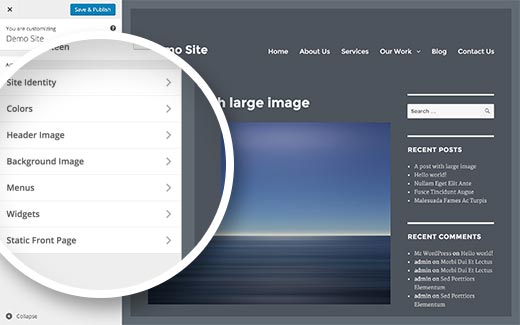
    With a heavy push for the theme customizer adoption, WordPress core team is slowly moving all theme options one by one to the customizer screen.

    Widgets management was added to the customizer in WordPress 3.9, and theme switching was added in WordPress 4.2.

    WordPress 4.3 will allow you to manage your navigation menus from the theme customizer.

    While you can still manage and edit your menus using the old interface, the goal of this new addition is to allow users to customize all their theme settings from one settings page with a live preview.

    WordPress 4.3 will have menus in customizer

    This change was met with heavy resistance by some very notable members of the community. It would be interesting to see how the customizer evolves in the next versions.

    Adding Site Icon or Favicon

    Favicon or site icon is the tiny icon that you see next to a site’s name in your web browser. In the past, WordPress users had to use a plugin to add a favicon or add it manually by editing their theme files.

    WordPress 4.3 will allow you to upload your site’s favicon or site icon from the WordPress admin area. Simply visit Settings » General and upload an image for your site icon.

    WordPress will allow you to crop the image and will also show you a live preview of how it will look in browsers and as a mobile icon.

    Site icon feature in WordPress 4.3

    Better Passwords

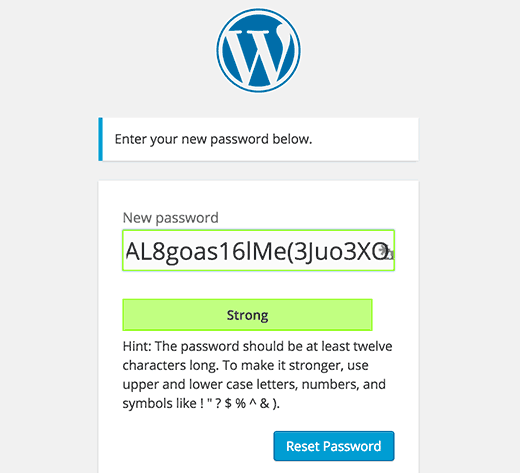
    WordPress 4.3 will introduce a new user interface for the password reset screen. It will automatically fill in the new password field with a strong password.

    New password reset screen in the upcoming WordPress 4.3

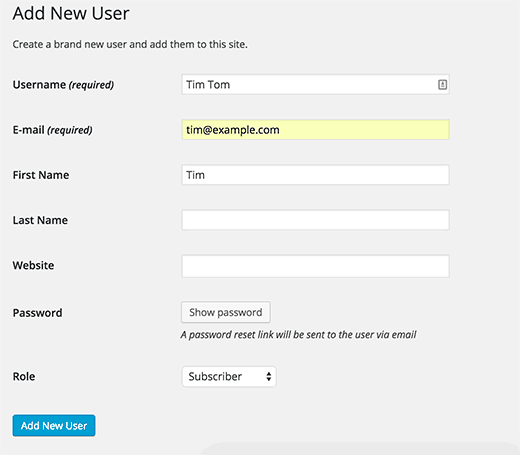
    When you add a new user, WordPress will now send them a password reset link instead of a pre-selected password in plain text. During the process you also have the option to click on the show password button and add a password for the new user. WordPress will show a strong password auto-filled when you click on the show password button. You can change that to your own password if you want.

    WordPress will send password reset link instead of plain text passwords in email to new users

    The goal here is to make sure that users understand the importance of using strong passwords. You may also want to take a look at our tutorial on what’s the best way to manage passwords for WordPress.

    Editor Improvements

    Many WordPress site owners spend most of their time writing posts. If you use the visual editor, then you will notice that moving your mouse to click on formatting buttons slows down your writing pace.

    With 4.3, WordPress is introducing inline text shortcuts. These shortcuts are similar to Markdown which allows you to format text and add element using simple markup in the text. However, unlike Markdown these text patterns will immediately transforms patterns into HTML.

    Using * or – will start an unordered list.
    Using 1. will start an ordered list.
    Using # will transform into h1. ## for h2, ### for h3 and so on.
    Using > will transform into blockquote.

    Using editor text patterns in WordPress 4.3

    This is surely going to speed up writing for power users.

    Visual/Text Editors in Press This

    In WordPress 4.3, the Press This tool will get a full featured visual and text post editor. This will make it easier to create posts quickly with proper formatting tools.

    Press This in WordPress 4.3 will have full featured post editors

    Under The Hood Developments

    In WordPress 4.3 shared terms on multiple taxonomies will now split up. This is part of the ongoing taxonomy improvement roadmap. (#30261)

    In WordPress template hierarchy, singular.php file will now act as the default fallback template for single.php and page.php. (#22314)

    WordPress 4.3 will allow developers to select a primary column when using list tables like on the Posts, Pages, or Media Library screens. (#25408)

  • WordPress 4.2.1  Security Release Fixes Zero Day XSS Vulnerability  Update Now
    WordPress 4.2.1 Security Release Fixes Zero Day XSS Vulnerability Update Now

    Just 3 days after the release of WordPress 4.2, a security researcher found a Zero day XSS Vulnerability that affects WordPress 4.2, 4.1.2, 4.1.1, 4.1.3, and 3.9.3. This allows an attacker to inject JavaScript into comments and hack your site. WordPress team responded fast and fixed the security issue in WordPress 4.2.1, and we strongly recommend that you update your sites immediately.

    WordPress XSS Security

    Jouko Pynnönen, a security researcher at Klikki Oy, who reported the issue described it as:

    If triggered by a logged-in administrator, under default settings the attacker can leverage the vulnerability to execute arbitrary code on the server via the plugin and theme editors.

    Alternatively the attacker could change the administrator’s password, create new administrator accounts, or do whatever else the currently logged-in administrator can do on the target system.

    This particular vulnerability is similar to the one reported by Cedric Van Bockhaven which was patched in the WordPress 4.1.2 security release.

    Unfortunately, they did not use proper security disclosure and instead posted the exploit publicly on their site. This means that those who do not upgrade their site will be in serious risks.

    Update: We have learned, that they tried contacting WordPress security team but failed to get a timely response.

    If you haven’t disabled automatic updates, then your site will automatically update.

    Once again, we strongly advise that you update your site to WordPress 4.2.1. Make sure to backup your site before you update.

  • Whats New in WordPress 4.2

    Whats New in WordPress 4.2

    WordPress 4.2 was released just a few minutes ago. This is the first major WordPress release of 2015. It fixes many issues and adds some great new features to WordPress. Sadly, some really cool features were dropped because they were not yet ready to be shipped. In this article, we will show you what’s new in WordPress 4.2 and which features you should try after updating your sites.

    WordPress 4.2 Features

    This is a major WordPress release, which means your site will not get automatically updated unless you are using managed WordPress hosting. You will have to initiate the update from your WordPress dashboard. As always, don’t forget to backup your WordPress site before updating.

    New and Improved Press This Tool

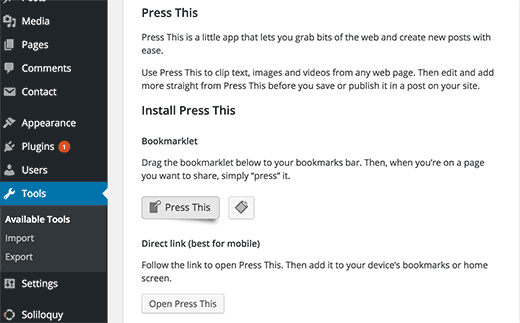
    WordPress 4.2 comes with the new and improved Press This tool.

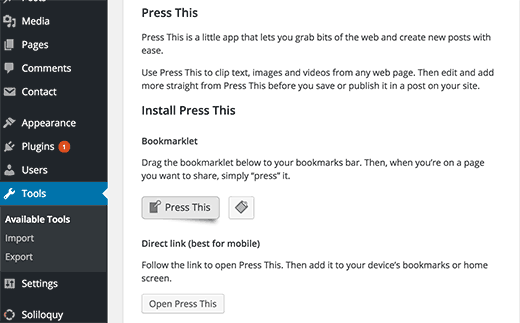
    Installing Press This tool for WordPress

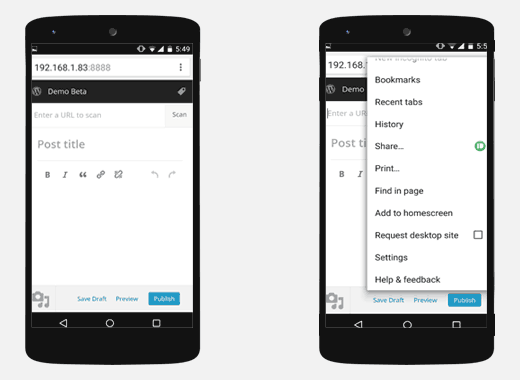
    It is a simple bookmarklet that you can drag and drop to your browser’s bookmarks bar or add to your mobile homescreen. This allows you to easily share any content from anywhere on the web to your WordPress site with a simple click or tap.

    Using Press This tool on your mobile phones

    Press This will now automatically find images, excerpt, and title for the content you are sharing and embed it to a post on the fly. This will make sharing content a lot faster and easier for many users.

    New Characters & Emoji Support in WordPress 4.2

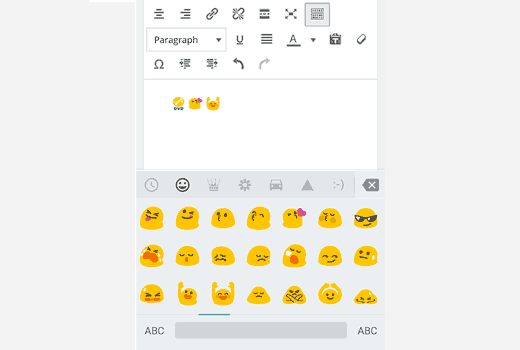
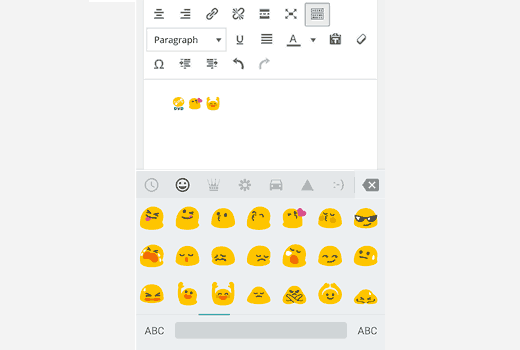
    Emoji are natively available on all modern devices including mobile phones. WordPress didn’t support emoji natively. WordPress 4.2 resolved this by adding the native support for emoji. You can now use emojis anywhere on your WordPress site.

    Using Emojis on a WordPress site from a mobile phone

    The support for Emoji was made possible by the underlying work done to add native support for Chinese, Japanese, Korean characters. WordPress 4.2 will automatically switch your utf-8 database to utf8mb4. This change will also allow musical and mathematical symbols and even hieroglyphs.

    While many users may not be as excited about Emoji support, the support for more language characters is a huge improvement for a very large global WordPress user base.

    Faster Plugin Updates

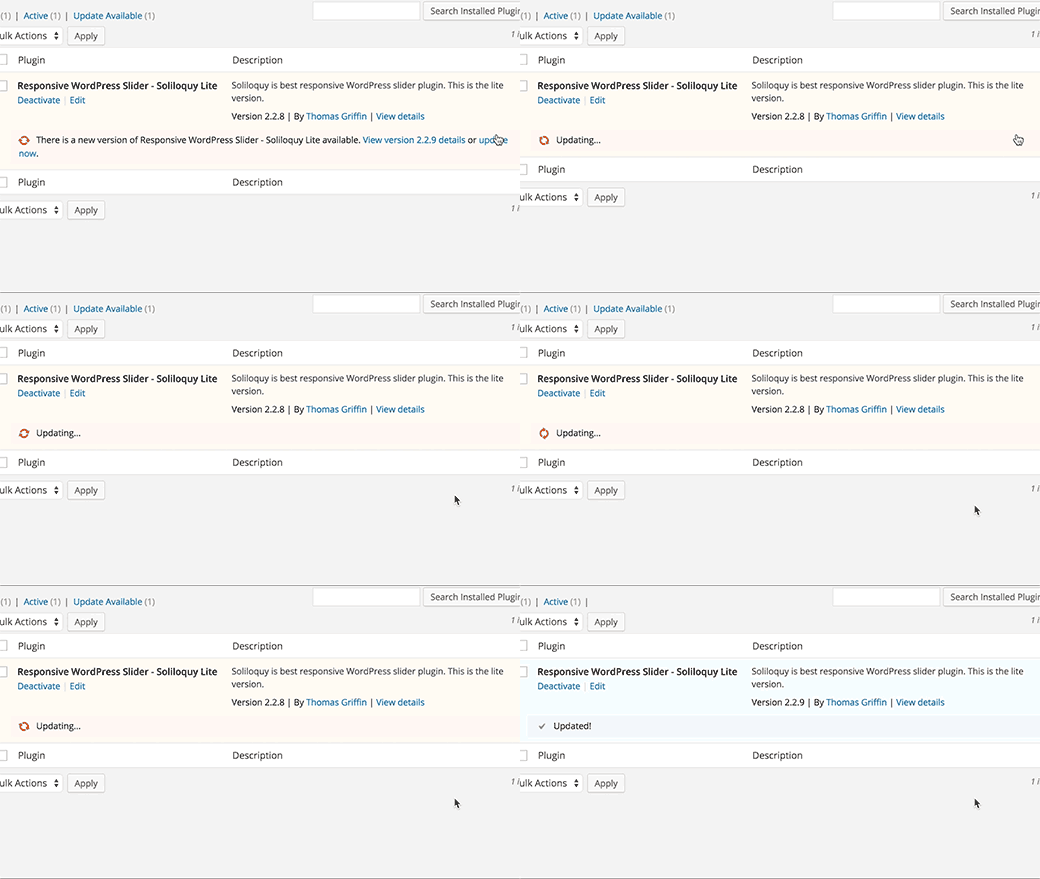
    Plugin updates required you to click on the update link and wait for a page to load which showed update progress. Then after the update you were able to move on to do whatever you were doing. This will change in WordPress 4.2 which now comes with a faster one-click plugin updates.

    Faster plugin updates in WordPress 4.2

    Earlier in our What’s coming in WordPress 4.2 article, we showed you faster plugin install feature. It was similar to the update feature but allowed users to install plugins without reloading page. This feature was dropped during the beta.

    More Auto Embeds

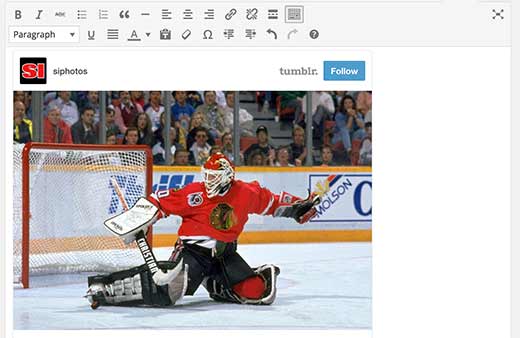
    Just like YouTube videos, Tweets, and many other services, Tumblr and Kickstarter are now included into oEmbed whitelist in WordPress. You can now paste a link from Tumblr or Kickstarter and see it automatically embedded into the post.

    Tumblr auto embed in WordPress

    Theme Switching in Customizer

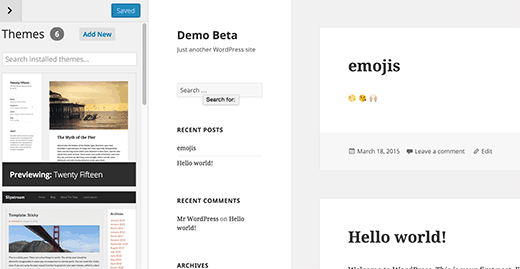
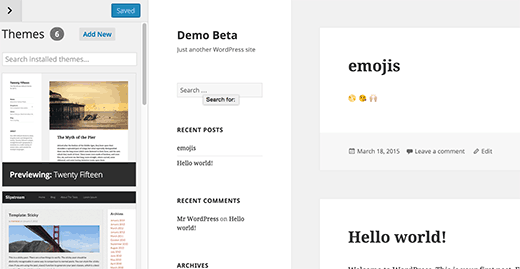
    WordPress 4.2 comes with some great improvements in the customizer. You can now switch themes directly from theme customizer and make changes. This will enable users to quickly preview themes and customize themes without even activating them.

    Theme Switching in WordPress 4.2

    Under The Hood Changes

    Messages generated by JavaScript calls to the server will now be readable by screen-readers. Plugin authors and developers can use wp.a11y.speak() to send audible notifications.

    Terms shared by multiple taxonomies will now be split when one of them is updated.

    Complex ordering support with meta query clauses is now supported by WP_Query, WP_Comment_Query, and WP_User_Query.

    There are some minor changes in the default WordPress color scheme.

    There are many bug fixes and other under the hood improvements. You can see a full list of changes here.

    We hope you liked this overview of what’s new in WordPress 4.2. We are particularly excited about faster plugin update feature. What are you excited about?

    If you liked this article, then please subscribe to our YouTube Channel for WordPress video tutorials. You can also find us on Twitter and Facebook.

  • Whats Coming in WordPress 4.2 (Features and Screenshots)

    Whats Coming in WordPress 4.2 (Features and Screenshots)

    After the release of WordPress 4.1, the development of the next major release started in full swing. WordPress 4.2 will be the first major release of 2015, and it is planned to be released by end of April. There are a lot of exciting things happening around it. In this article, we will show you what’s coming in WordPress 4.2 with features and screenshots.

    You can try out the beta version on your computer or on a staging environment by using the WordPress Beta Tester plugin.

    WordPress 4.2

    New and Improved Emoji Support

    Do you use Emoji’s in your text messages, facebook statuses, etc? Well, now you can use it in your WordPress blog posts as well.

    Emojis are cool and fun way to express your feelings in a text-based communication. WordPress had basic emoticons for a long time, and even though it was possible for users to add emoji support to WordPress, it was not supported by the core.

    With WordPress 4.2 your WordPress sites will have built-in emoji support. If you are using a mobile device, you can easily add emojis to your posts, comments, categories, and in most places where you can write text. This includes post slugs as well.

    Native support for emojis in WordPress 4.2

    Update: We realized that a lot of users weren’t as excited about Emojis and would have preferred other features. We wanted to highlight that Emoji support came out from the underlying work that had to be done to improve WordPress database and make it possible to use Han characters (Chinese, Japanese, Korean, etc) natively in WordPress.

    As you can imagine, this is a huge thing for a large population of the world.

    Switching Theme in Customizer

    WordPress 4.2 will bring improvements to the way you install, browse, and preview themes using the WordPress customizer. You will now be able to switch, preview, and activate themes from the theme customizer screen.

    Theme switcher in WordPress 4.2

    You can also click on the ‘Add New’ button to browse and install new themes.

    Faster Plugin Installation and Updates

    Plugin installation will be streamlined in WordPress 4.2. Now users will be able to install plugins directly from the ‘Add New Plugin’ or search results.

    Faster plugin installation in WordPress 4.2

    Plugins will not only be installed, but they will also be activated. This will reduce one step and two page loads from the plugin installation process.

    If you want to install a plugin and not activate it, then you will have to go back to Installed Plugins screen and deactivate the plugin.

    Same goes for the updates, users will be able to update plugins from the Installed Plugins screen without leaving the page.

    New and Improved Press This Button

    Press This is a little-known tool in WordPress that is gaining a rebirth in WordPress 4.2. There are two major improvements.

    Press This in WordPress 4.2

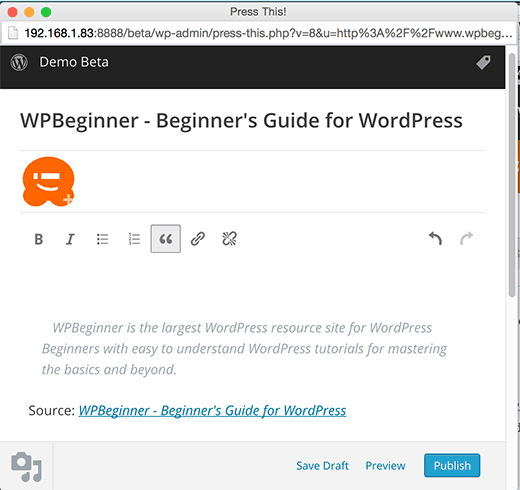
    The first one is the bookmarklet that you can drag and drop to your browser’s bookmarks bar. Simply click on the Press This bookmark when you want to post about a topic you are viewing on the web. It will open your WordPress post editor inside a popup, and it will automatically fetch the page title, image, and an excerpt from the page with a link back to the original source.

    Press This popup in the upcoming WordPress 4.2

    You can use it anywhere on the web. If you are on an oEmbed enabled site like YouTube, Twitter, Vimeo, Instagram, then it will automatically fetch the embed code as well.

    The second Press This tool is a simple link which you can open in your mobile browser and add it to your home screen / bookmark it.

    Adding Press This to your Home Screen in mobile devices

    Under The Hood Improvements

    There are some minor changes in the default color scheme for the WordPress admin area. (#31234)

    Shared terms across different taxonomies will now split when one of them is updated. This will resolve the issue of shared terms showing updates from different taxonomies. (#5809)

    New feature in wp.a11y.speak() function will allow screen readers to be able to read response generated by JavaScript. (#31368)

  • Whats New in WordPress 4.1

    Whats New in WordPress 4.1

    WordPress 4.1 was released today with many new features and improvements. This release will be the last WordPress release for the 2014, and it comes with a shiny new default theme for 2015. In this article, we will show you what’s new in WordPress 4.1 and which features you should try after updating your sites.

    Please note that WordPress 4.1 is a major release, so it will not get automatically updated. You will have to initiate the update. Don’t forget to backup your site before update.

    Video Tutorial

    Subscribe to WPBeginner

    If you don’t like the video or need more instructions, then continue reading.

    Twenty Fifteen – The New Default Theme

    WordPress 4.1 comes with a new beautiful default theme called Twenty Fifteen. It is an elegant, clean, but very customizable blogging theme. It was designed with a mobile first approach and it looks great on all devices. Twenty Fifteen also comes with improved support for internationalization by using Google’s Noto Font Family. The Noto font family project aims to support all unicode supported languages and scripts.

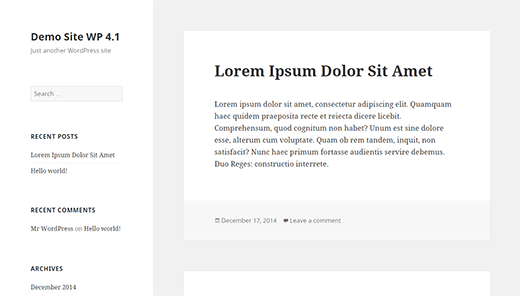
    Twenty Fifteen the new default theme in WordPress 4.1

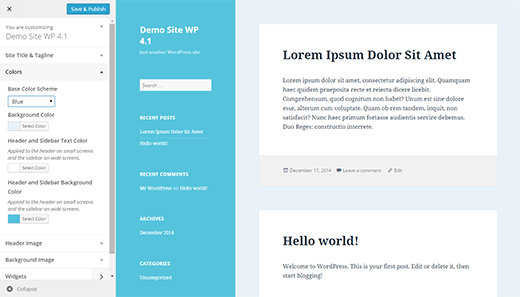
    Twenty Fifteen is designed to maximize the usage of tools available in the Customizer. Users would be able to fully customize the appearance of their theme from the Customizer. Twenty Fifteen also comes with 6 color schemes to choose from.

    Customizing Twenty Fifteen Theme

    Revamped and Rejuvenated Distraction Free Mode

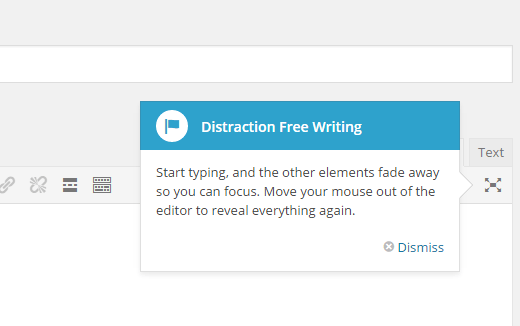
    WordPress 4.1 comes with a totally revamped distraction free writing mode. Simply click on the distraction free editor button to launch and just as soon as you start writing, all the distractions on the screen will fade away.

    Launching distraction free mode in WordPress

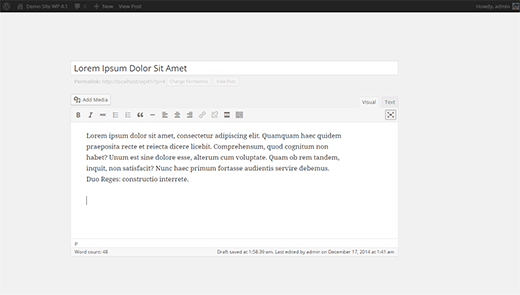
    The concept behind the new distraction free writing mode is that the distractions on the post editor screens are actually very useful tools that users need while writing posts. The previous version took those tools away and in order to access those tools user had to switch back and forth.

    The new distraction free editor simply fades away the meta boxes from the post edit screen, all the meta boxes fade back in as soon you move the mouse or move out of the post editor.

    New distraction free writing mode

    Inline Image Editing Toolbar

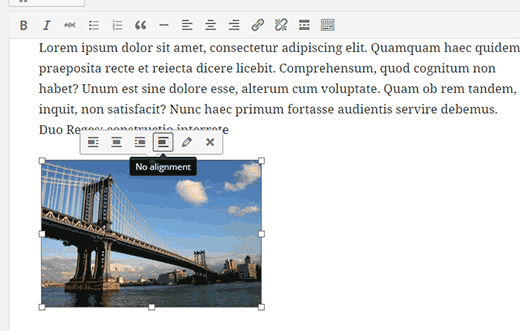
    Many WordPress beginners have trouble understanding how to align images inside the post editor. WordPress 4.1 comes with a new inline image editing tool bar that allows users to easily align images without opening them in media editor.

    Inline image toolbar

    Install Language Pack and Switch Language from Admin Area

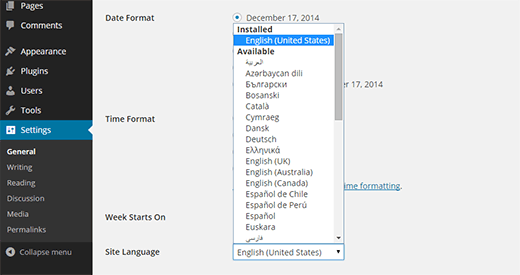
    If you didn’t choose the language during installation, WordPress 4.1 allows you to change the language from the Settings » General screen. Simply select your language from the drop down menu and WordPress will install the language pack for you.

    Switching WordPress to your language

    Plugin Recommendations

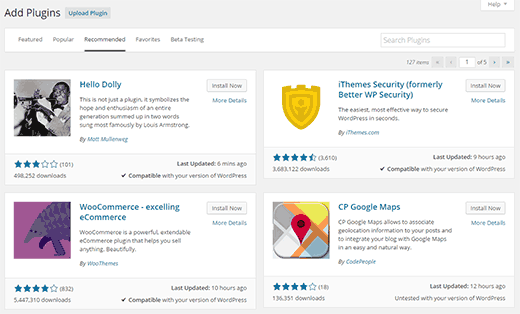
    Since 4.1, WordPress will try to recommend you plugins to try. Recommendations are based on what other plugins you have installed and what others are using. You can see the suggestions on Plugins » Add New screen by clicking on the Recommended tab.

    Plugin Recommendations

    Improvements for Developers

    WordPress 4.1 comes with some very exciting developments aiming the developers.

    Complex queries – Theme and plugin developers can now use advanced conditional logic, nested clues, and multiple operators in their meta, date, and term queries.

    Title Tag – WordPress will now allow theme developers to control document title and not clash with WordPress generated title tags.

    Customizer API – WordPress customizer API is aiming to build a complete JavaScript API for customizer. There are lots of improvements for contextual panels, controls and sections.

    There are many more under the hood bug fixes and improvements. You can take a look at the full list of changes here.